
Introdução
This manual provides detailed instructions for setting up, operating, and maintaining your AIKELA Smart Watch ID205U. This device is designed to monitor various health metrics and track fitness activities, compatible with Android OS 4.4 / iOS 8.0 or above and Bluetooth 4.2 or above smartphones. It is not intended for use with PCs, iPads, or tablets.

Image: The AIKELA Smart Watch ID205U, featuring a black square display and a black silicone strap.
Guia de configuração
Conteúdo da embalagem
- AIKELA Smart Watch (Model ID205U) x 1
- Cabo de carregamento magnético x 1
- Manual do usuário x 1
Carregando o dispositivo
Before initial use, fully charge your smartwatch. Connect the magnetic charging cable to the charging contacts on the back of the watch and plug the USB end into a power adapter (not included) or a computer's USB port. A full charge typically takes approximately 2.5 hours.
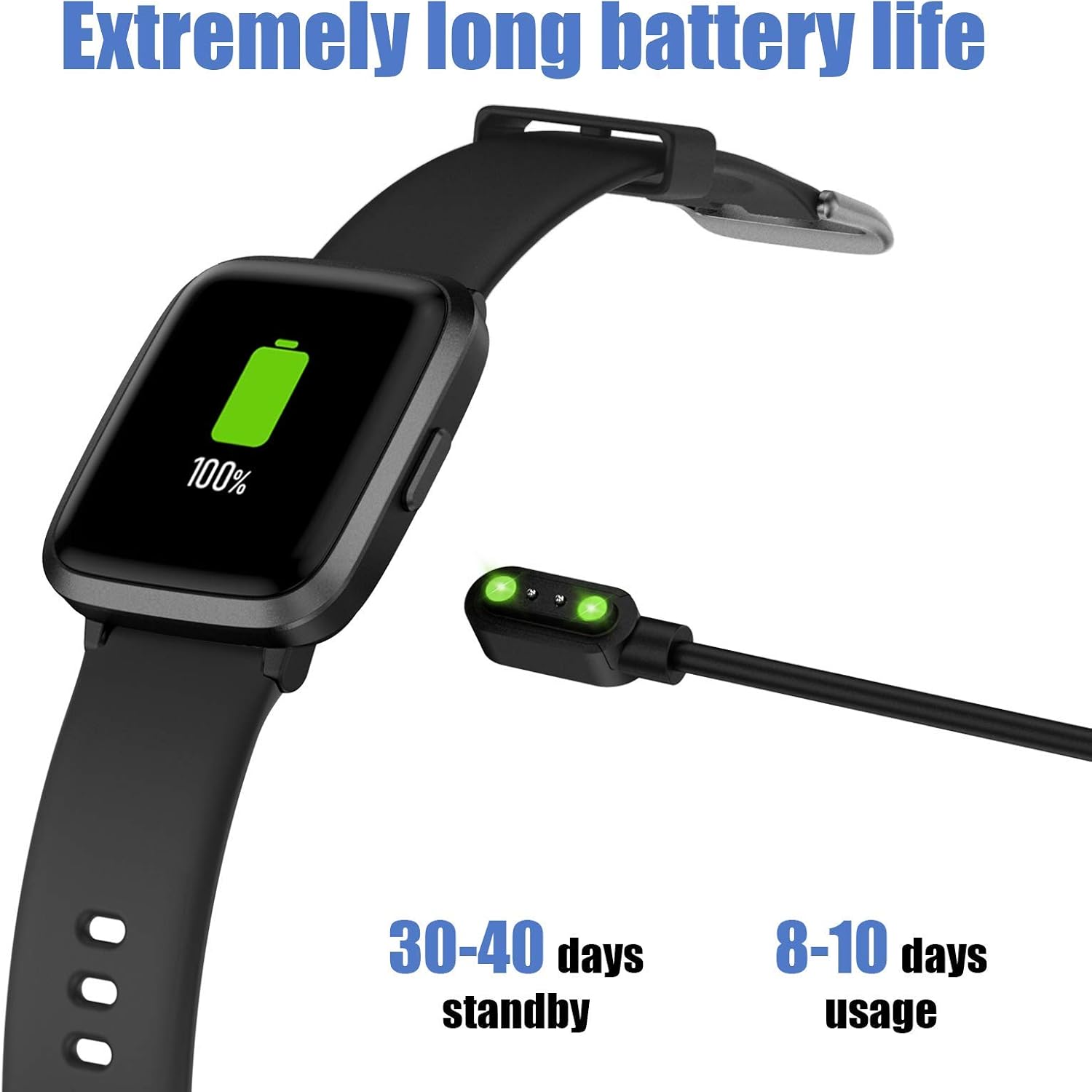
Image: The AIKELA Smart Watch connected to its magnetic charging cable, displaying a full battery icon.
Connecting to Your Smartphone (VeryFitPro App)
To utilize all features of your AIKELA Smart Watch, you must connect it to your smartphone using the "VeryFitPro" application. Ensure your smartphone meets the following requirements:
- Android OS 4.4 ou superior
- iOS 8.0 ou superior
- Bluetooth 4.2 ou superior
- Baixe o aplicativo: Scan the QR code provided in the physical user manual or search for "VeryFitPro" in the Google Play Store (for Android) or Apple App Store (for iOS).
- Enable Bluetooth and GPS: On your mobile phone, activate both Bluetooth and GPS services.
- Open VeryFitPro App: Launch the "VeryFitPro" application on your smartphone.
- Iniciar vinculação: On the home page of the app, look for a binding request or navigate to the "Device" section to add a new device.
- Select Device Model: Choose "ID205U" from the list of available devices.
- Confirmar vinculação: Follow the on-screen prompts and click "OK" to complete the binding process.
Após o emparelhamento bem-sucedido, o relógio sincronizará os dados com o aplicativo.
Instruções de operação
Navegação básica
- Tela sensível ao toque: The 1.3-inch TFT-LCD full touch screen allows for intuitive navigation. Swipe left/right, up/down, and tap to select options.
- Mostradores de relógio: Choose from 4 stylish clock faces directly on the watch or through the VeryFitPro app.
Recursos de monitoramento de saúde
The AIKELA Smart Watch ID205U provides monitoring for several key health indicators. Nota: Os dados coletados por este dispositivo são apenas para referência e não podem ser usados para diagnóstico ou tratamento médico.
- Monitor de frequência cardíaca: Monitora continuamente sua frequência cardíaca ao longo do dia. View Dados em tempo real no relógio ou tendências detalhadas no aplicativo.
- Monitor de pressão arterial: Measures your blood pressure. Ensure the watch is worn correctly for accurate readings.
- Monitor de oxigênio no sangue (SpO2): Monitora seus níveis de saturação de oxigênio no sangue.

Image: A man running, wearing the AIKELA Smart Watch which displays a blood oxygen level of 100% SpO2.

Image: Top shows a man checking his heart rate on the AIKELA Smart Watch. Bottom shows women doing push-ups, with the watch displaying a blood pressure measurement.
Monitoramento de condicionamento físico
The watch records your daily activities and supports multiple sports modes.
- Monitoramento de atividades durante todo o dia: Records steps taken, distance covered, calories burned, and active time.
- 9 Modos Esportivos: Select a mode before starting your workout for more accurate tracking. Available modes include:
- Andando
- Correndo
- Bicicleta
- Fiação
- Esteira
- Caminhada
- Ioga
- Escalando
- Fitness
- Monitor de sono: Automatically tracks your sleep patterns, including total sleep, deep sleep, and awake time. View detailed analysis in the VeryFitPro app.

Image: The AIKELA Smart Watch interface showing icons for 9 different sports modes, alongside images of individuals engaged in running, hiking, and yoga.

Image: A woman sleeping, with the AIKELA Smart Watch on her wrist displaying the time. A smartphone next to her shows the VeryFitPro app interface with detailed sleep tracking data.
Notificações e lembretes
Once connected to your smartphone, the watch can receive various notifications.
- Notificações de chamadas: Receive incoming call alerts directly on your watch. You can choose to decline calls from the watch.
- Notificações de mensagem: Read SMS messages and notifications from social media apps (e.g., Facebook, Instagram, Twitter, WhatsApp) on your watch screen.
- Outros lembretes: Set alarms, sedentary reminders, and other alerts through the VeryFitPro app.

Image: A woman holding a smartphone, with the AIKELA Smart Watch on her wrist displaying an incoming call notification. Icons for various social media and communication apps are shown in the background.
Manutenção
Resistência à água
The AIKELA Smart Watch ID205U has a 5ATM waterproof rating, meaning it can withstand pressures equivalent to a depth of 50 meters. This makes it suitable for activities like washing hands, showering, and swimming. However, it is not suitable for diving, hot water activities, or saunas, as steam and high temperatures can damage the device.
Limpeza e Cuidados
- Limpe regularmente o relógio e a pulseira com um pano macio e seco.amp pano.
- Evite usar produtos químicos agressivos ou materiais abrasivos.
- Certifique-se de que os contatos de carregamento estejam limpos e secos antes de carregar o dispositivo para evitar corrosão.
- Caso o relógio se molhe, seque-o completamente antes de carregá-lo ou utilizá-lo por um período prolongado.
Duração da bateria e carregamento
The device features a 210mAh Lithium Polymer battery. A full charge provides approximately 7-9 days of working time, with a standby time of 30-40 days. Actual battery life may vary based on usage patterns and settings.
Solução de problemas
Problemas e soluções comuns
- O relógio não está emparelhando com o telefone:
- Certifique-se de que o Bluetooth e o GPS estejam ativados no seu telefone.
- Verify the "VeryFitPro" app is installed and running.
- Verifique se a bateria do relógio está suficientemente carregada.
- Reinicie o telefone e o relógio.
- Tente desemparelhar e emparelhar novamente o dispositivo através do aplicativo.
- Dados de saúde imprecisos:
- Certifique-se de que o relógio esteja ajustado, mas confortável, no seu pulso, aproximadamente a largura de um dedo acima do osso do pulso.
- Evite movimentos excessivos durante as medições.
- Limpe o sensor na parte traseira do relógio.
- As notificações não estão aparecendo:
- Confirm the watch is connected to the app via Bluetooth.
- Check notification settings within the "VeryFitPro" app to ensure desired app notifications are enabled.
- Verify your phone's system notification settings allow the "VeryFitPro" app to display notifications.
- Vida curta da bateria:
- Frequent use of health monitoring features (e.g., continuous heart rate) or bright screen settings can reduce battery life.
- Reduce screen brightness or turn off unnecessary features.
- Certifique-se de que o relógio esteja totalmente carregado sempre que for utilizá-lo.
For further assistance, refer to the "Help" section within the VeryFitPro app or contact customer support.
Especificações
| Recurso | Detalhe |
|---|---|
| Modelo | ID205U |
| Método de sincronização | Bluetooth 4.2 |
| Tela | 1.3" TFT LCD, Full Touch |
| Resolução | 240 x 240 |
| Peso | 39g (1.37oz) |
| Tipo de Bateria | Polímero de lítio |
| Capacidade da bateria | 210mAh |
| Vol de Trabalhotage | 3.8V |
| Classificação à prova d'água | 5 ATMs |
| Tempo de trabalho | 7-9 dias |
| Tempo de carregamento | ≤ 2.5 horas |
| Compatibilidade do sistema operacional | Android OS 4.4 / iOS 8.0 or above |
| Características especiais | Heart Rate Monitor, Blood Pressure Monitor, Blood Oxygen Monitor, Sleep Monitor, 9 Sports Modes, Call & Message Notifications, Alarm Clock |
Garantia e Suporte
Informações de garantia
Specific warranty details are typically provided with your purchase documentation or on the product packaging. Please retain your proof of purchase for warranty claims.
Suporte ao cliente
For technical support, troubleshooting assistance, or any questions regarding your AIKELA Smart Watch ID205U, please refer to the "Help" section within the VeryFitPro application. You may also contact the retailer or manufacturer's customer service channels for further assistance.