
Introdução
The Seagate Expansion Portable Hard Drive provides an easy-to-use solution for instantly adding storage to your computer. This portable hard drive is designed for simple drag-and-drop file saving and offers automatic recognition with both Windows and Mac computers. It features a sleek, compact design, making it ideal for carrying your photos, movies, music, and other important files on the go. The device connects via USB 3.0, ensuring fast data transfer speeds and power directly from the USB port.
O que está incluído
Verifique se todos os itens estão presentes na embalagem:
- Seagate Expansion portable hard drive
- Cabo USB 18 de 45.72 polegadas (3.0 cm)
- Guia de início rápido
- Limited Warranty: APAC - 3 years
- Rescue Data Recovery Services information
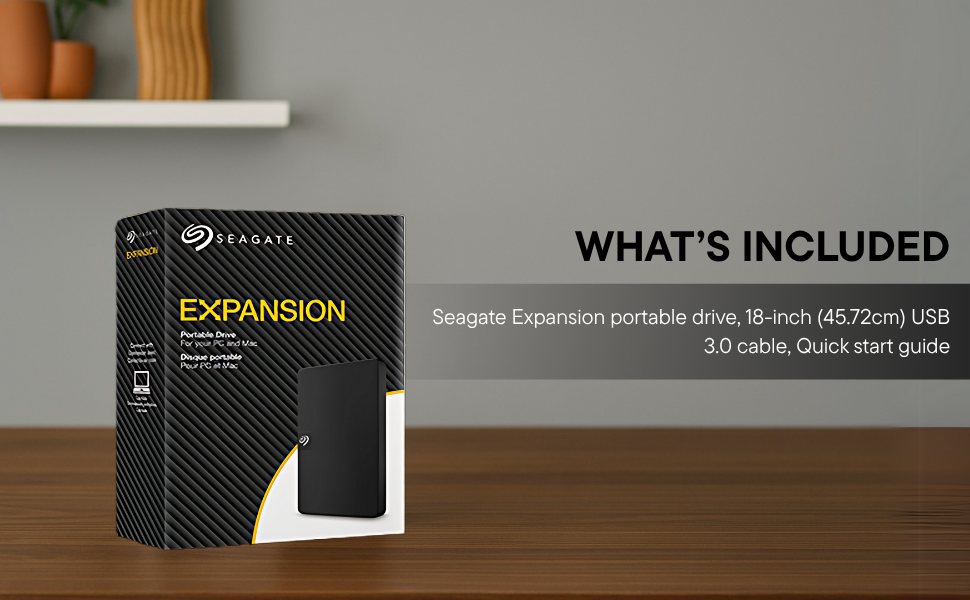
Image: Contents of the Seagate Expansion portable hard drive package, including the drive, USB cable, and documentation.
Configurar
- Conecte o Cabo USB: Plug the small end of the included USB 3.0 cable into the Seagate Expansion portable hard drive.
- Conectar ao computador: Plug the larger end of the USB 3.0 cable into an available USB port on your computer. The drive is USB 3.0 powered, so no external power adapter is needed.
- Reconhecimento Automático: The drive will be automatically recognized by your Windows or Mac operating system. No software installation is typically required for basic functionality.
- For Mac Users (Time Machine): If you intend to use the drive with Apple Time Machine for backups, reformatting the drive is required. Refer to your Mac's documentation for instructions on how to reformat and set up Time Machine.

Image: A Seagate Expansion portable hard drive connected to a laptop via a USB cable, demonstrating the plug-and-play setup.

Image: A hand holding the Seagate Expansion drive, with Windows and Mac compatibility logos displayed next to it.
Instruções de operação
Once connected, the Seagate Expansion drive functions like any other external storage device on your computer.
- Acessando a unidade: On Windows, the drive will appear under 'This PC' or 'My Computer'. On Mac, it will appear on the desktop or in Finder under 'Locations'.
- Salvando Files: Para salvar files, simply drag and drop them from your computer's internal storage to the Seagate Expansion drive's icon or open folder. You can also use the 'Copy' and 'Paste' functions.
- Organizando Files: Create folders on the drive to organize your data efficiently.
- Ejetando com segurança: Always safely eject the drive before disconnecting it to prevent data corruption. On Windows, right-click the drive icon in the system tray and select 'Eject'. On Mac, drag the drive icon to the Trash or click the Eject button next to the drive in Finder.

Image: A hand demonstrating the drag-and-drop method to transfer files from a laptop to the Seagate Expansion portable hard drive.
Manutenção
Proper maintenance ensures the longevity and optimal performance of your Seagate Expansion drive.
- Cuidados Físicos: Handle the drive with care. Avoid dropping it or exposing it to extreme temperatures, moisture, or strong magnetic fields.
- Limpeza: Use um pano macio, seco e sem fiapos para limpar a parte externa da unidade. Não use produtos de limpeza líquidos ou solventes.
- Backup de dados: While the drive is designed for storage, it is always recommended to maintain backups of critical data on multiple devices or cloud services.
- Atualizações de firmware: Verifique periodicamente o suporte da Seagate. webAcesse o site para verificar se há atualizações de firmware disponíveis para o seu modelo, garantindo assim o melhor desempenho e compatibilidade.
Solução de problemas
If you encounter issues with your Seagate Expansion drive, consider the following steps:
- Unidade não detectada:
- Certifique-se de que o cabo USB esteja firmemente conectado tanto à unidade quanto ao computador.
- Tente conectar a unidade a uma porta USB diferente do seu computador.
- Teste a unidade com um cabo USB diferente, se disponível.
- Reinicie o seu computador.
- Desempenho lento:
- Ensure you are using a USB 3.0 port for optimal speeds. USB 2.0 ports will result in slower transfers.
- Feche todos os aplicativos desnecessários que estiverem sendo executados em segundo plano.
- Check your computer's disk management or disk utility to ensure the drive is healthy.
- Acessando Files: Se você não puder acessar files, ensure the drive is properly mounted and not in use by another application.
Para obter informações mais detalhadas sobre resolução de problemas, consulte o manual oficial. Seagate Troubleshooting Guide (PDF).
Especificações
| Número do modelo | STKM1000400 |
| Capacidade de armazenamento digital | 1 TB |
| Interface de disco rígido | USB 2.0/3.0 |
| Tecnologia de Conectividade | USB |
| Marca | Seagate |
| Recurso especial | Data Recovery Service, Portable |
| Fator de forma do disco rígido | 2.5 polegadas |
| Descrição do disco rígido | Disco Rígido Mecânico |
| Dispositivos compatíveis | Computador de mesa, laptop |
| Tipo de instalação | Disco Rígido Externo |
| Cor | Preto |
| Velocidade de rotação do disco rígido | 5400 RPM |
| Velocidade de leitura | 120 megabytes por segundo |
| Item Dimensions L x W x Thickness | 11.7L x 8W x 1.5Th Centimeters |
| Peso do item | 0.4 libras |
| Material do gabinete | Plástico |
Garantia e Suporte
Your Seagate Expansion portable hard drive comes with comprehensive support and warranty coverage.
- Garantia limitada: The product includes a 3-year limited warranty. This covers device replacement or repair for manufacturing defects.
- Rescue Data Recovery Services: For added peace of mind, your purchase includes 3 years of Rescue Data Recovery Services. This service covers data loss due to accidents, mechanical errors, or natural disasters, providing a chance to recover your valuable data.

Image: The 'Rescue Services' logo, indicating the inclusion of 3 years of data recovery services.
Informações de contato
For warranty claims, technical support, or inquiries regarding Rescue Data Recovery Services, please contact Seagate Customer Care:
- Seagate Technology (Thailand) Limited. India Customer Care No: 18003092525
Please have your product model number (STKM1000400) and proof of purchase ready when contacting support.