
1. Introdução
This manual provides essential information for the safe and efficient operation, maintenance, and troubleshooting of your GBC AutoFeed+ 230X Paper Shredder. Please read these instructions thoroughly before using the shredder and retain them for future reference.
2. Informações de segurança
Observe the following safety precautions to prevent injury or damage to the shredder:
- Mantenha as mãos, o cabelo e roupas soltas longe da abertura para entrada de papel.
- Mantenha crianças e animais de estimação longe do triturador.
- Não pulverize aerossóis ou lubrificantes dentro do triturador.
- Desligue o triturador da tomada antes de mover, limpar ou esvaziar o recipiente de lixo.
- Do not shred metal objects, large paper clips, or non-approved materials.
- Certifique-se de que o triturador esteja colocado em uma superfície estável e nivelada.
3. Produto acabadoview
The GBC AutoFeed+ 230X is designed for efficient and secure document destruction in small office environments. It features both automatic and manual feed options.

Imagem: Frente view of the GBC AutoFeed+ 230X Paper Shredder, showing the auto-feed tray and control panel.
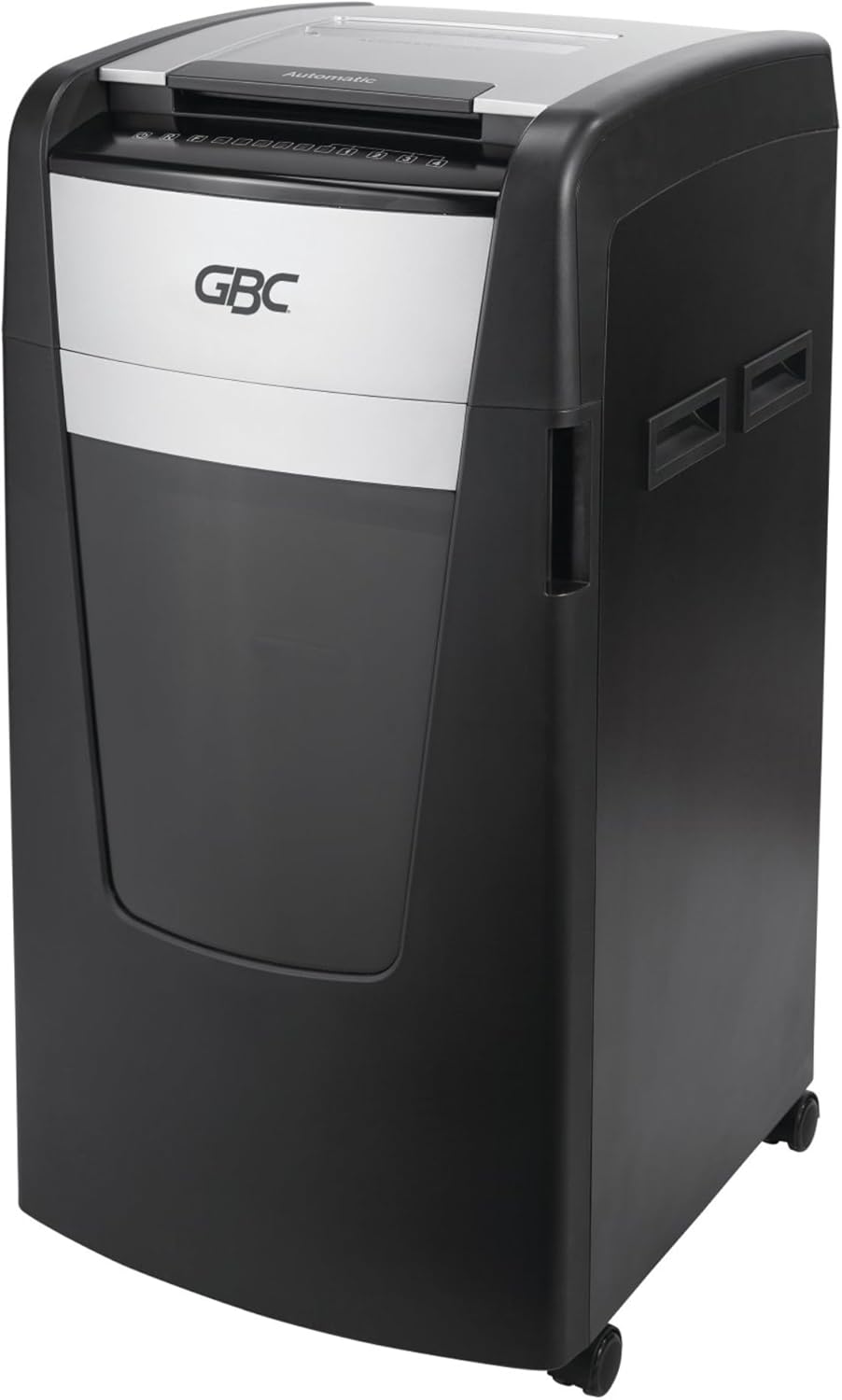
Imagem: Lado view of the GBC AutoFeed+ 230X Paper Shredder, highlighting its compact design and casters for mobility.
4. Configuração
- Desembalagem: Carefully remove the shredder from its packaging. Retain packaging materials for potential future transport or service.
- Colocação: Position the shredder on a flat, stable surface. Ensure adequate space around the unit for ventilation and access to the waste bin. The shredder dimensions are approximately 19 x 17 x 29 inches.
- Lixeira: Ensure the 16-gallon waste bin is correctly inserted into the shredder cabinet. The shredder will not operate if the bin is not properly seated.
- Conexão de energia: Conecte o cabo de alimentação a uma tomada elétrica padrão.
- Ligar: Locate the main power switch, typically on the back or side of the unit, and turn it to the 'ON' position.
5. Operação
5.1 Auto-Feed Operation
The AutoFeed+ feature allows for hands-free shredding of multiple sheets.
- Abra a tampa da bandeja de alimentação automática.
- Stack up to 230 sheets of paper neatly into the auto-feed chamber. Ensure papers are flat and free of folds.
- Feche a tampa da bandeja de alimentação automática. O triturador começará a processar os documentos automaticamente.

Image: A person loading a stack of documents into the auto-feed tray of the GBC shredder, demonstrating the hands-free operation.

Image: A visual guide showing the three steps of auto-feed shredding: 'Stack' papers, 'Shut' the lid, and the machine 'Shreds' automatically.
5.2 Manual Feed Operation
For smaller quantities or specific items, use the manual feed slot.
- Insert up to 10 sheets of paper at a time into the manual feed slot.
- Credit cards must be manually inserted one at a time into the designated slot.

Image: A graphic comparing the AutoFeed method (up to 600 sheets, though this model is 230) and the Manual Feed method (up to 15 sheets, though this model is 10), highlighting the versatility of the shredder.
5.3 Shredding Capabilities
The GBC AutoFeed+ 230X can shred:
- Paper (up to 230 sheets auto-feed, 10 sheets manual feed)
- Clipes de papel
- Grampos
- Credit cards (manual feed only)
5.4 Nível de Segurança
This shredder provides P-4 Level Security with a Super Cross-Cut style, creating small particles for enhanced data protection.
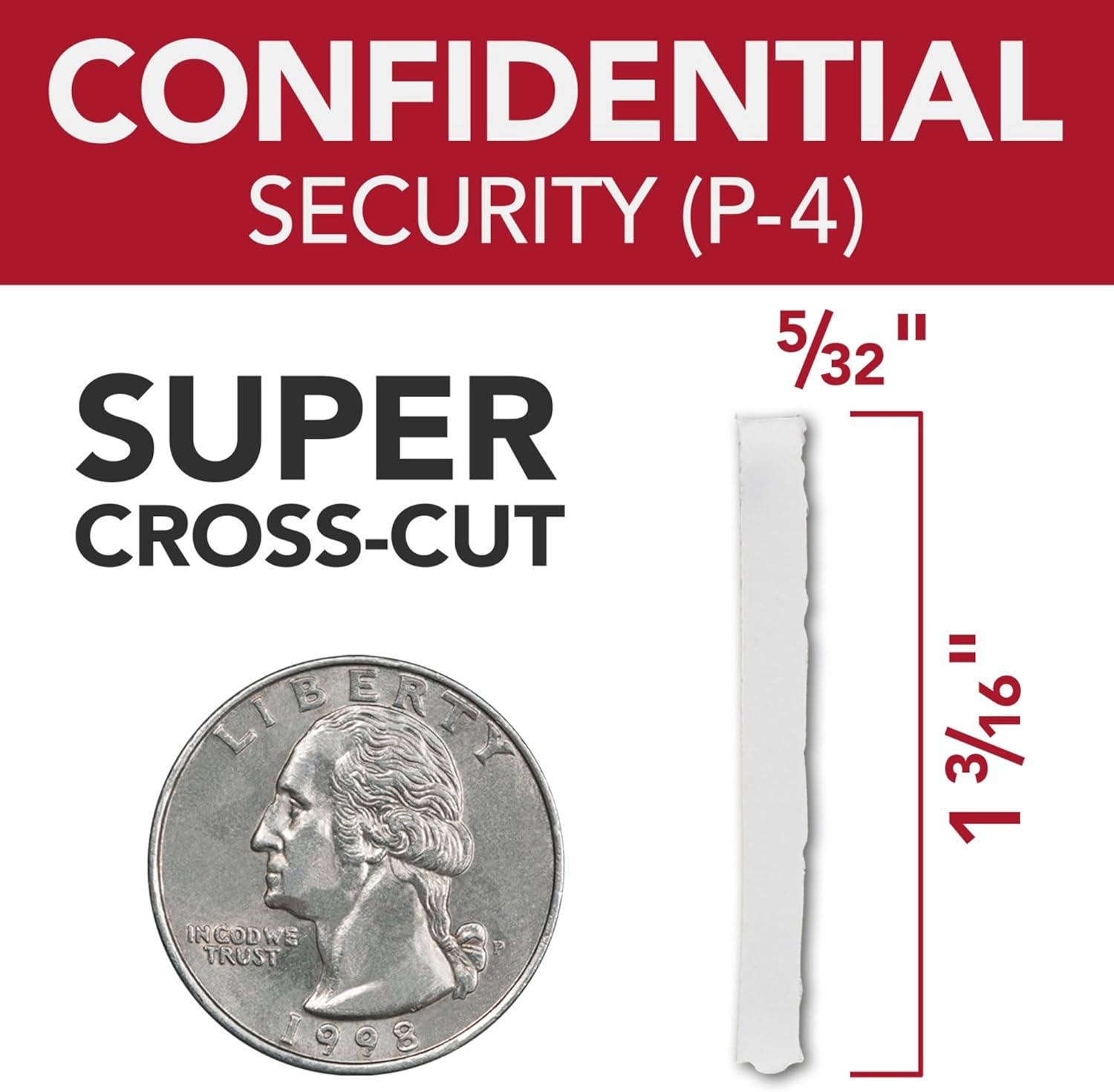
Image: A graphic illustrating the P-4 Super Cross-Cut shred size (5/32" x 1 3/16") next to a US quarter for scale, demonstrating the high level of security.
5.5 Continuous Run Time
The shredder features a 30-minute continuous run time, allowing for extended shredding sessions before requiring a cool-down period.

Image: An icon displaying '30 min Run Time', indicating the shredder's continuous operation capability.
5.6 Operação silenciosa
Designed with an ultra-quiet motor, this shredder minimizes noise disruption in office environments.

Image: An icon depicting a speaker with sound waves, labeled 'Quiet Shredding', highlighting the low noise level during operation.
6. Manutenção
A manutenção regular garante o desempenho ideal e prolonga a vida útil do seu triturador.
- Lubrificação: Apply shredder oil regularly to the cutting blades. Follow the instructions provided with your shredder oil for frequency and application method. This helps maintain cutting efficiency and prevents jams.
- Esvaziar o caixote do lixo: Empty the 16-gallon waste bin when the 'Bin Full' indicator illuminates. Overfilling can lead to jams and reduced performance.
- Limpeza: Periodically clean the exterior of the shredder with a soft, dry cloth. Do not use abrasive cleaners or solvents.
- Prevenção de congestionamentos: The shredder features auto forward and reverse functions to help prevent and clear minor jams. Avoid exceeding the sheet capacity.
7. Solução De Problemas
Consulte a tabela a seguir para obter informações sobre problemas comuns e suas soluções.
| Problema | Possível causa | Solução |
|---|---|---|
| O triturador não liga. | No power, waste bin not seated, main switch off. | Check power cord, ensure bin is fully inserted, turn main switch ON. |
| Atolamento de papel. | Overfed paper, foreign object. | Use reverse function. If persistent, unplug, carefully remove paper. Do not force. |
| O triturador para durante o funcionamento. | Overheat protection, waste bin full. | Allow to cool down (approx. 30 minutes). Empty waste bin. |
| Reduced shredding performance. | Blades require oiling. | Apply shredder oil as per maintenance instructions. |
8. Especificações
| Recurso | Detalhe |
|---|---|
| Número do modelo | WSM1757606 |
| Marca | GBC |
| Tipo de Fragmentação | Super Corte Transversal |
| Nível de segurança | P-4 |
| Capacidade de alimentação automática | Até 230 folhas |
| Capacidade de alimentação manual | Até 10 folhas |
| Capacidade da lixeira | 16 galões |
| Tempo de execução contínuo | 30 minutos |
| Peso do item | 55.6 libras |
| Dimensões do produto | 19 x 17 x 29 polegadas |
| Recurso especial | Operação silenciosa |
9. Garantia e Suporte
For warranty information, product support, or service inquiries, please refer to the official GBC webou entre em contato diretamente com o serviço de atendimento ao cliente da GBC. Guarde o comprovante de compra como prova de aquisição.