
1. Introdução
Welcome to the ISUDAR SU6901 Car Subwoofer instruction manual. This document provides essential information for the proper installation, operation, and maintenance of your new active car subwoofer. Please read this manual thoroughly before use to ensure optimal performance and safety.
2. Produto acabadoview
The ISUDAR SU6901 is an active car subwoofer designed to enhance your vehicle's audio system with powerful bass. It features an integrated amplifier and a compact design for flexible installation.
Componentes principais

Figura 2.1: geral view of the ISUDAR SU6901 active car subwoofer.

Figure 2.2: The control panel on the side of the subwoofer provides access to power connections, input options, and audio adjustments.
3. Principais características
- Energia Integrada Ampmais vital: Delivers 150 watts of bass output.
- Construção de alumínio durável: Full die-cast aluminum molds ensure rapid heat dissipation and minimize noise-causing vibrations.
- Entrada de alto nível: Allows connection to both aftermarket and original equipment stereo systems, making it a perfect addition to your car's factory audio.
- Ultra-Slim, Space-Saving Design: Compact dimensions enable installation under most car seats, preserving passenger legroom.
- Filtro passa-baixo variável: Provides control over level, frequency, and phase settings for customized bass response.
- Controle remoto de graves: Included remote allows easy adjustment of bass levels from the driver's seat.
4. Conteúdo da embalagem
Por favor, verifique se todos os itens estão presentes na embalagem:

Figure 4.1: Components included with your ISUDAR SU6901 subwoofer.
- Subwoofer ativo para carro ISUDAR SU6901
- Power Wire (480cm)
- Audio Cable (500cm)
- Fusível
- Fio terra
- Control Wire (500cm)
- Controle remoto de graves
- Various Connectors and Mounting Hardware
5. Especificações técnicas
| Recurso | Especificação |
|---|---|
| Marca | ISUDAR |
| Potência máxima de saída do alto-falante | 150 Watts |
| Resposta de frequência | 10 GHz |
| Tecnologia de Conectividade | Com fio |
| Modo de saída de áudio | Estéreo |
| Vol de entradatage | 12 Volts (CC) |
| Tipo de montagem | Suporte de montagem |
| Material | Alumínio |
| Nome do modelo | ISUDAR SU6901 |
| Tipo de alto-falante | Coaxial |
| Método de controle | Controle remoto |
| Tamanho do alto-falante | 293 Millimeters (6 Inches) |
| Impedância | 4 Ohms |
| Tipo de veículo compatível | Carro |
| Fonte de energia | Energia CC |
| Número de canais de áudio | 2.1 |
| Nível de resistência à água | Não é à prova d'água |
| Tipo de garantia | Garantia limitada |
6. Guia de instalação
Precauções de segurança
- Desconecte o terminal negativo da bateria do veículo antes de iniciar a instalação.
- Certifique-se de que toda a fiação esteja devidamente isolada para evitar curtos-circuitos.
- Mount the subwoofer securely to prevent movement during driving.
- Consulte um profissional se tiver dúvidas sobre qualquer etapa da instalação.
Canal recomendado
The compact design of the ISUDAR SU6901 allows for flexible placement. The most common and recommended location is under a car seat to save space and provide optimal bass distribution. Ensure there is adequate ventilation around the unit.
Instruções de fiação
The subwoofer requires power, ground, and a remote turn-on signal, in addition to audio input.
Conexão de energia

Figure 6.1: Power and ground wiring connections.
- Connect the red power wire (typically 480cm) to the positive (+) terminal of your car battery. Install the included fuse holder as close to the battery as possible.
- Connect the black ground wire to a clean, unpainted metal surface on the vehicle's chassis. Ensure a good electrical connection.
- Connect the blue remote turn-on wire to the remote output of your car's head unit. This wire tells the subwoofer to turn on and off with your stereo.
Conexão de entrada de áudio
The ISUDAR SU6901 supports both low-level (RCA) and high-level (speaker wire) inputs.
Entrada de baixo nível (RCA)
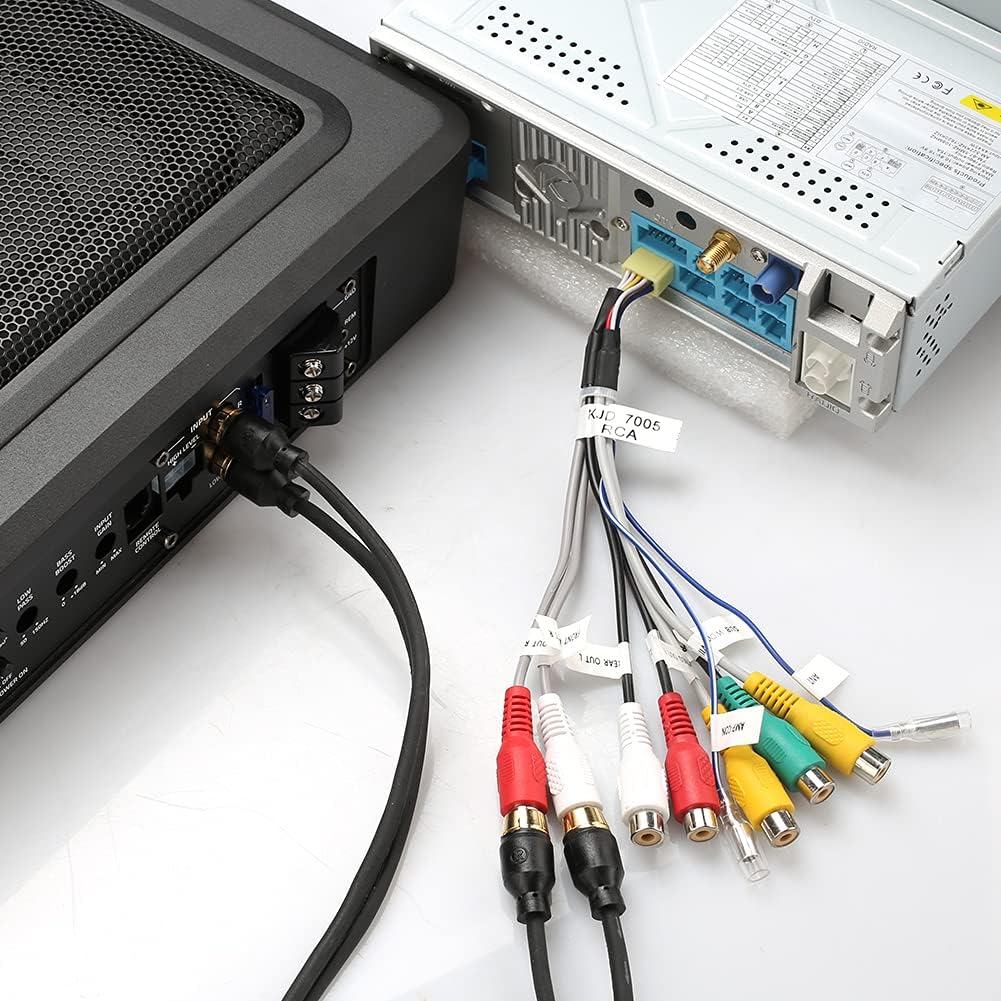
Figure 6.2: RCA audio input connection.
If your head unit has RCA pre-outs, connect the supplied audio cable (500cm) from the head unit's RCA outputs to the "INPUT" RCA jacks on the subwoofer. This provides the best signal quality.
Entrada de alto nível (fio do alto-falante)

Figure 6.3: High-level speaker wire input connection.
If your head unit does not have RCA outputs, use the high-level input. Connect the speaker wires from your head unit's speaker outputs to the high-level input terminal on the subwoofer. Refer to your head unit's manual for speaker wire polarity.
Chave de nível de entrada
On the control panel (refer to Figure 2.2), locate the "INPUT LEVEL" switch. Set it to "RCA" if using low-level inputs or "SPK" if using high-level inputs.
7. Operação
Configuração e ajustes iniciais
After installation, turn on your car's audio system. The subwoofer should power on automatically if the remote wire is connected correctly.
Figure 7.1: Subwoofer control panel for adjustments.
Gain Control (MIN/MAX)
- Adjust the "GAIN" knob to match the output level of your head unit. Start at minimum and slowly increase until the bass blends well with your main speakers without distortion.
Low Pass Filter (LOW PASS 50-150Hz)
- This filter controls the upper frequency limit of the subwoofer. Adjust it to blend smoothly with your main speakers. A common starting point is 80-100Hz.
Bass Boost (0-12dB)
- Use the "BASS BOOST" knob to increase the bass output at a specific frequency. Use sparingly to avoid distortion.
Phase Control (0°/180°)
- The "PHASE" switch helps to align the subwoofer's output with your main speakers. Listen to music with strong bass and switch between 0° and 180° to find the setting that provides the most impactful and cohesive bass.
Controle remoto de graves
- The included remote bass control allows you to adjust the subwoofer's output level conveniently from the driver's seat without accessing the main unit.
8. Manutenção
- Mantenha o subwoofer limpo e livre de poeira e detritos. Use um pano macio e seco para a limpeza.
- Certifique-se de que todas as conexões permaneçam seguras. Verifique periodicamente a fiação em busca de sinais de desgaste ou danos.
- Evite expor o subwoofer a temperaturas extremas ou umidade.
- Do not block the speaker grille or any ventilation openings.
9. Solução De Problemas
| Problema | Possível causa | Solução |
|---|---|---|
| Sem som | No power to the subwoofer. | Check power, ground, and remote wire connections. Ensure the fuse is intact. |
| Sem som | Incorrect input level setting. | Verify the "INPUT LEVEL" switch is set correctly (RCA or SPK). |
| Sem som | Audio input cables are loose or faulty. | Check RCA or speaker wire connections. |
| Som distorcido | O ganho está muito alto. | Reduce the "GAIN" setting. |
| Som distorcido | Bass Boost set too high. | Reduce the "BASS BOOST" setting. |
| Graves fracos | Configuração de fase incorreta. | Toggle the "PHASE" switch between 0° and 180°. |
| Graves fracos | Filtro passa-baixa configurado com um nível muito baixo. | Adjust the "LOW PASS" frequency higher. |
| Subwoofer turns off randomly | Overheating or protection mode activated. | Ensure adequate ventilation. Check for short circuits in wiring. Reduce volume/gain. |
| Fusível queima repetidamente | Short circuit in power wiring or internal fault. | Inspect power and ground wires for damage or short circuits. If the issue persists, seek professional assistance. |
If you continue to experience issues, please contact ISUDAR customer support.
10. Informações de garantia
The ISUDAR SU6901 Car Subwoofer comes with a limited warranty. Please refer to the warranty card included in your package for specific terms and conditions. Keep your proof of purchase for warranty claims.
11. Suporte ao cliente
For further assistance, technical support, or warranty inquiries, please visit the official ISUDAR store or contact their customer service.