
Introdução
This manual provides detailed instructions for the setup, operation, and maintenance of your Singing Machine Carpool Karaoke The Mic 2.0. Please read this manual thoroughly before using the product to ensure proper function and to maximize your experience.
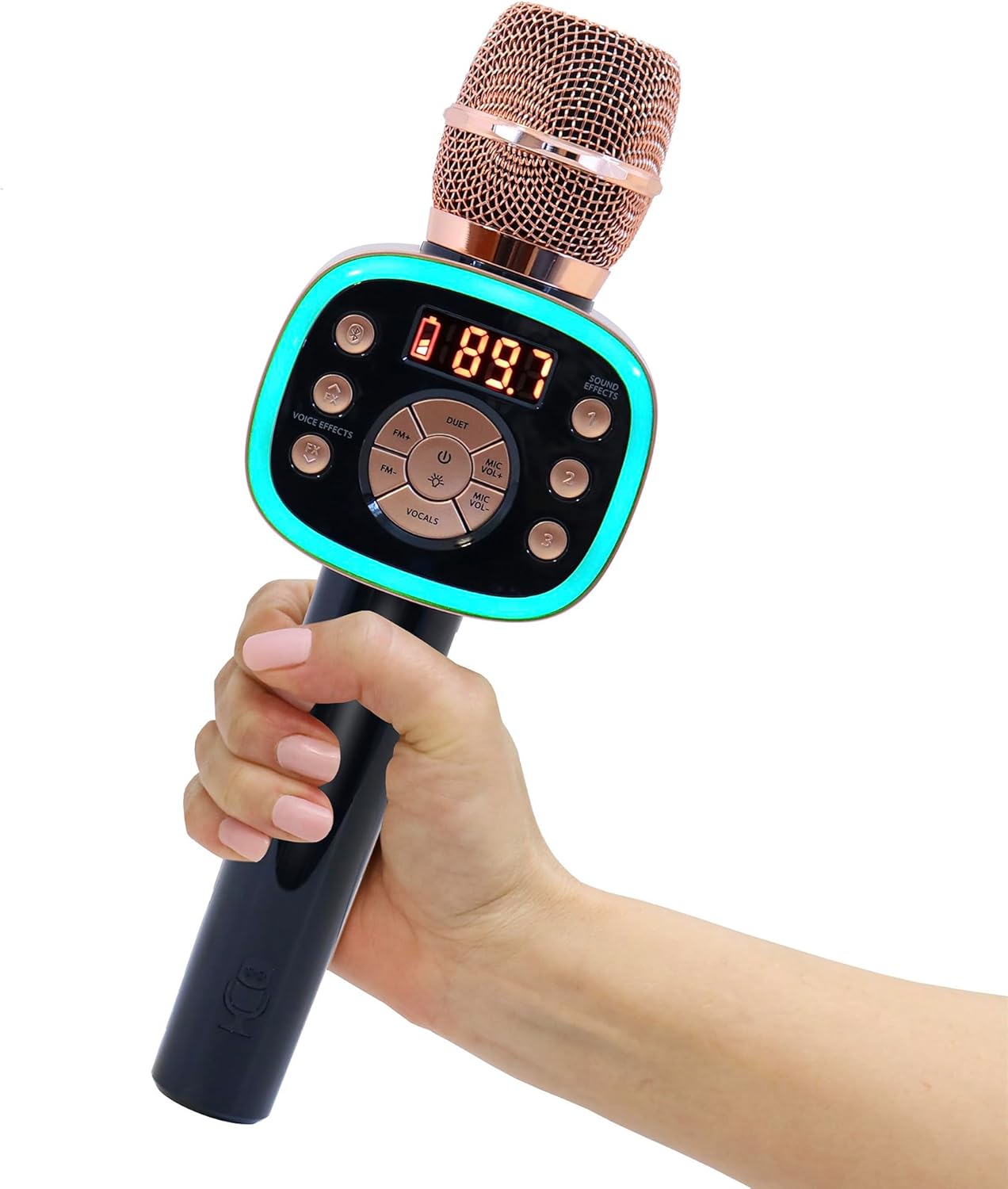
Image: The Carpool Karaoke The Mic 2.0 in Rose Gold, held by a hand, showcasing its design and illuminated controls.
Conteúdo da embalagem
Verifique se todos os itens estão presentes no seu pacote:
- Carpool Karaoke The Mic 2.0 Microphone (Model CPK565)
- Reusable Carrying Case
- Cabo de carregamento micro USB
- Extra-long AUX Cord
- 5 Karaoke Song Downloads (via Singing Machine app)
Características e controles do produto
The Carpool Karaoke The Mic 2.0 is designed for ease of use and portability. It features:
- Conectividade sem fio: Bluetooth for streaming music from devices.
- Sintonizador FM: Connects to your car's FM radio for audio output.
- Efeitos de mudança de voz: Multiple built-in effects for vocal modification.
- Efeitos sonoros: Integrated sound effects for added fun.
- Volume and Echo Controls: Adjustable settings for microphone and music.
- Music Synchronized Lights: LED lights that react to the music.
- Duets Option: Connect a second microphone for duet performances.
- Lead Vocal Cancellation: Reduces original song vocals for a better karaoke experience.
- Bateria recarregável: Proporciona até 6 horas de diversão.

Image: A diagram highlighting the key features and controls of the microphone, such as Bluetooth connectivity, FM tuner, voice effects, sound effects, lead vocal cancellation, and the duets option.
Configurar
1. Carregando o microfone
Before first use, fully charge the microphone using the provided Micro USB charging cable. Connect the small end of the USB cable to the microphone's charging port and the larger end to a USB power source (e.g., computer, USB wall adapter). The battery indicator will show charging status.
2. Ligar / desligar
Press and hold the Power button (usually marked with a circle and a vertical line) to turn the microphone on or off.
3. Conectando via Bluetooth
- Turn on the microphone. It will automatically enter Bluetooth pairing mode.
- No seu dispositivo móvel, ative o Bluetooth e pesquise os dispositivos disponíveis.
- Select "Carpool Karaoke Mic 2.0" from the list to pair.
- Once paired, you can stream music from your device through the microphone's speaker.
4. Connecting via FM Tuner (for car audio)
- Ligue o microfone.
- Tune your car's FM radio to an unused, clear frequency (one with static or no broadcast).
- On the microphone, press the FM button to activate FM transmission.
- Use the FM +/- buttons on the microphone to match the frequency of your car radio.
- Once matched, your voice and music from the microphone will play through your car's speakers.
5. Connecting via AUX Cord
For devices without Bluetooth or FM capabilities, use the provided AUX cord. Connect one end to the microphone's AUX input and the other end to your audio source's output.
Video: A demonstration on how to connect the Carpool Karaoke microphone to various devices, including Bluetooth and FM radio.
Instruções de operação
1. Ajustando o Volume e o Eco
Use the dedicated sliders or buttons on the microphone to adjust your microphone volume, music volume, and echo effect level. Experiment to find your preferred sound.
2. Using Voice Changing Effects
Press the 'Voice Effects' button to cycle through various built-in voice changing effects (e.g., Echo, Female, Male, Chipmunk, Robot, Radio). Select the effect you desire.
3. Using Sound Effects
The microphone includes 3 super fun sound effects. Press the 'Sound Effects' button to activate them.
4. Duets Function
To enable duet mode, ensure both microphones are powered on and follow the pairing instructions for connecting a second microphone. This allows two users to sing simultaneously.
Video: Instructions on how to connect a second Carpool Karaoke microphone for Duets mode, enhancing the interactive singing experience.
5. Vocal Removal Technology
Activate the 'Vocals' button to utilize the vocal removal technology, which reduces lead vocals from songs, allowing you to sing along more prominently.
6. Using with Karaoke Apps
The microphone is compatible with various music and karaoke apps. Connect your device via Bluetooth and use your preferred app to access a wide variety of karaoke music. The Singing Machine app offers additional features and song downloads.

Image: A user interacting with the Singing Machine app on a smartphone while holding the Carpool Karaoke microphone, demonstrating how to access music and features.
Manutenção
- Limpeza: Use a soft, dry cloth to clean the microphone. Do not use liquid cleaners or abrasive materials.
- Armazenar: Guarde o microfone em seu estojo reutilizável quando não estiver em uso para protegê-lo contra poeira e danos.
- Cuidados com a bateria: Para prolongar a vida útil da bateria, evite descarregá-la completamente com frequência. Recarregue-a regularmente, mesmo que não esteja em uso constante.
Solução de problemas
| Problema | Solução possível |
|---|---|
| O microfone não liga. | Ensure the battery is charged. Connect to power using the USB cable. |
| Nenhum som sai dos alto-falantes do carro. | Verify FM frequency match between microphone and car radio. Ensure car radio volume is up. |
| O dispositivo Bluetooth não está emparelhando. | Ensure microphone is in pairing mode. Turn off and on Bluetooth on your device. Move closer to the microphone. |
| Voice effects not working. | Check microphone volume and ensure a voice effect is selected. |
Especificações
| Recurso | Detalhe |
|---|---|
| Dimensões do produto | 3.6 x 2.1 x 10.6 polegadas |
| Peso do item | 1.01 libras |
| Número do modelo do item | CPK565RD |
| Baterias | 1 bateria de íon de lítio (incluída) |
| Características especiais | AM/FM Radio, Bluetooth, Rechargeable |
| Cor | Rose Gold & Black |
| Fabricante | Máquina de cantar |
Garantia e Suporte
For warranty information or technical support, please visit the official Singing Machine webou entre em contato com o serviço de atendimento ao cliente. Guarde o comprovante de compra como prova de aquisição.
Você também pode visitar o Loja Singing Machine na Amazon Para obter mais informações e produtos.