Introdução
Thank you for choosing the PHEANOO D6 Sound Bar System. This 2.1 channel soundbar with a dedicated wired subwoofer is designed to enhance your audio experience, providing clear dialogue, powerful bass, and immersive sound for your home entertainment. This manual provides detailed instructions for setup, operation, maintenance, and troubleshooting to ensure optimal performance and longevity of your device.
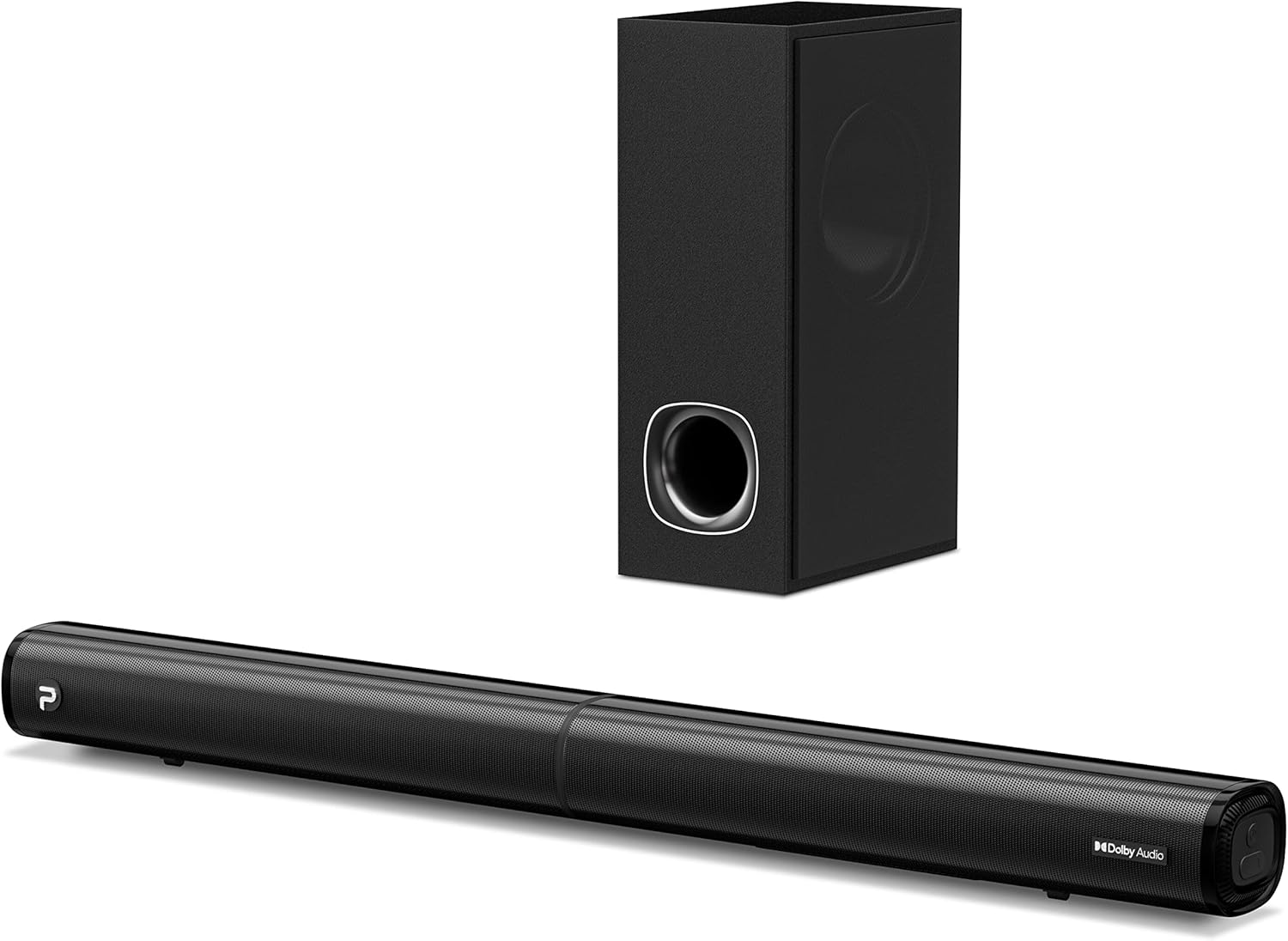
Image: The PHEANOO D6 Sound Bar and its accompanying wired subwoofer, showcasinseu design elegante em preto.
O que está na caixa
Verifique cuidadosamente o conteúdo da embalagem. Se algum item estiver faltando ou danificado, entre em contato com o suporte ao cliente.
- Soundbar and Wired Subwoofer
- Cabo HDMI
- Cabo de áudio RCA
- Wall Mount Kit (screws and anchors)
- Controle remoto (pilhas não incluídas)
- Adaptador de energia

Image: All components included in the PHEANOO D6 Sound Bar package, laid out for clear identification, including the soundbar, subwoofer, cables, remote, and wall mount kit.
Configurar
1. Assembling the Soundbar (Detachable Design)
The PHEANOO D6 soundbar features a unique detachable design for flexible placement. Follow these steps to assemble it:
- Align the audio connector from one half of the soundbar with the corresponding port on the other half.
- Gently push the two halves together until they click into place.
- Twist the two halves to secure the connection, ensuring the soundbar is firmly assembled.

Image: A three-step visual guide demonstrating how to connect the two halves of the detachable soundbar, ensuring proper alignment and secure locking.
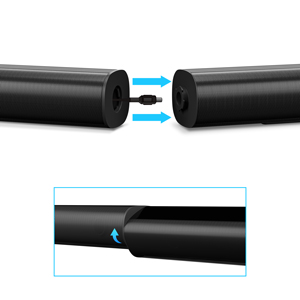
Imagem: Um close-up view of the soundbar's detachable connection point, showing the male and female connectors.
2. Conectando o Subwoofer
Connect the wired subwoofer to the soundbar using the dedicated subwoofer cable. Ensure the connection is secure.
3. Opções de posicionamento
You can place the soundbar on a tabletop or mount it on a wall.
- Colocação na mesa: Place the soundbar directly in front of your TV, ensuring it does not obstruct the TV's remote sensor.
- Montagem na parede: Use the included wall mount kit. It is recommended to measure and mark the drilling points accurately, rather than relying solely on the paper stencil, to ensure a level installation.
4. Conexões de áudio
The PHEANOO D6 offers multiple connectivity options. Choose the best one for your device:
- HDMI (ARCO): For the best audio quality and control, connect an HDMI cable from the soundbar's HDMI (ARC) port to your TV's HDMI (ARC) port. This allows your TV remote to control the soundbar's volume.
- Óptico: Connect an optical cable from the soundbar's Optical port to your TV's Optical Digital Audio Out port.
- AUXILIAR: Use the 3.5mm AUX cable to connect to devices with a 3.5mm audio output.
- Bluetooth 5.0: For wireless connection, pair your device via Bluetooth.

Image: The rear panel of the PHEANOO D6 Sound Bar, highlighting the HDMI (ARC), Bluetooth, Optical, and AUX input ports with corresponding icons.

Imagem: Uma imagem detalhada view of the soundbar's input panel, showing the AUX, Optical, and HDMI (ARC) ports clearly labeled.
5. Conexão de energia
Connect the power adapter to the soundbar and then plug it into a wall outlet.
Instruções de operação
Controle remoto
The included remote control allows you to manage all functions of the soundbar. Insert two AAA batteries (not included) into the remote before use.

Image: The remote control for the PHEANOO D6 Sound Bar, showing its buttons and an indicator light.
Ligar/Desligar
Press the power button on the remote or the soundbar to turn the unit on or off.
Seleção de entrada
Press the "Input" button on the remote to cycle through available input sources: HDMI (ARC), Optical, AUX, and Bluetooth.
Emparelhamento Bluetooth
Para emparelhar um dispositivo Bluetooth:
- Select Bluetooth input on the soundbar. The indicator light will flash.
- Enable Bluetooth on your device (smartphone, tablet, etc.) and search for "PHEANOO D6".
- Select the soundbar from the list to pair. Once connected, the indicator light will be solid.

Image: A smartphone displaying a music app, wirelessly connected to the PHEANOO D6 Sound Bar via Bluetooth, indicated by a Wi-Fi like symbol.
Modos de som
The soundbar offers various sound modes to optimize your listening experience:
- Modo de diálogo: Enhances vocal clarity, making speech easier to understand.
- Modo de música: Optimized for music playback, providing balanced audio.
- Modo Filme: Delivers an immersive cinematic experience with enhanced effects.
- Modo 3D: Creates a wider, more enveloping soundstage.

Image: Icons representing different sound modes: Dialogue, Music, Movie, and 3D, indicating the soundbar's versatility.
Ajuste de graves
Use the dedicated bass control buttons on the remote to increase or decrease the subwoofer's output level to your preference.

Image: A close-up of the subwoofer, with a visual effect suggesting powerful bass emanating from it.
Dolby Digital Support
The PHEANOO D6 Sound Bar supports Dolby Digital decoding, providing a rich and dynamic audio experience for compatible content.

Image: A living room setup with the soundbar and TV, overlaid with a grid pattern indicating premium 3D surround sound powered by Dolby Audio.

Image: The Dolby Audio logo accompanied by visual representations of sound waves, emphasizing the enhanced audio quality.
Pronto para TV Roku
This soundbar is certified to work seamlessly with your Roku TV. Enjoy smooth setup, easy access to sound settings, and compatibility with any Roku TV remote.

Image: A television screen displaying the "Roku TV Ready" setup interface, with the PHEANOO Soundbar and subwoofer positioned below it, illustrating seamless integration.
Manutenção
- Limpeza: Use um pano macio e seco para limpar as superfícies da barra de som e do subwoofer. Não use produtos de limpeza líquidos ou aerossóis.
- Ventilação: Assegure uma ventilação adequada ao redor da barra de som e do subwoofer para evitar o superaquecimento. Não bloqueie nenhuma abertura de ventilação.
- Armazenar: Se for armazenar o aparelho por um período prolongado, desconecte-o da energia e guarde-o em local fresco e seco.
Solução de problemas
| Problema | Possível causa | Solução |
|---|---|---|
| Sem energia | Cabo de alimentação desconectado; tomada elétrica não funcionando. | Verifique se o cabo de alimentação está firmemente conectado. Tente usar outra tomada. |
| Sem som | Entrada incorreta selecionada; Volume muito baixo; Cabos não conectados corretamente. | Select the correct input source. Increase volume. Check all audio cable connections. |
| Falha no pareamento Bluetooth | A barra de som não está em modo de emparelhamento; o dispositivo está muito longe; há interferência. | Ensure soundbar is in Bluetooth input and indicator is flashing. Move device closer. Turn off other Bluetooth devices. |
| Má qualidade de som | Incorrect sound mode; Source audio quality is low. | Try different sound modes (Music, Movie, Dialogue). Ensure the audio source is high quality. |
| Controle remoto não funciona | Batteries dead or incorrectly inserted; Obstruction between remote and soundbar. | Substitua as pilhas, certificando-se da polaridade correta. Remova quaisquer obstruções. |
For more detailed troubleshooting, refer to the official Troubleshooting Guide PDF available on the product page or contact PHEANOO customer support.
Especificações
| Recurso | Detalhe |
|---|---|
| Modelo | D6 |
| Marca | FEANOO |
| Tipo de alto-falante | Barra de som com subwoofer com fio |
| Configuração de Canal | 2.1 CH |
| Tecnologia de Conectividade | HDMI (ARC), Bluetooth 5.0, Optical, AUX |
| Alcance Bluetooth | Até 100 metros (aproximadamente 328 pés) |
| Potência máxima de saída do alto-falante | 240 Watts |
| Dimensões do produto (barra de som) | 29.5"L x 2.4"A x 2.8"P |
| Peso do item | 11.57 libras |
| Tipo de controlador | Controle remoto |
| Características especiais | Dolby Digital Decoding, Dialogue Enhancement, Bass Adjustable, Detachable Design, Roku TV Ready |
Garantia e Suporte
The PHEANOO D6 Sound Bar System comes with a Garantia limitadaConsulte o cartão de garantia incluído na embalagem para obter os termos e condições específicos.
For technical support, warranty claims, or further assistance, please visit the official PHEANOO website or contact their customer service department. You can also find additional resources like the Guia do usuário (PDF) e Guia de solução de problemas (PDF) on-line.