
1. Introdução
The Elitech MTC-5060 is a digital temperature controller designed for precise temperature management in cold storage environments such as cold rooms and refrigerators. It features dual screens for simultaneous display of current and set temperatures, along with indicator lights for operational status. The controller supports both cooling and defrosting functions, offering comprehensive temperature control capabilities.
This manual provides detailed instructions for the installation, operation, and maintenance of your MTC-5060 temperature controller. Please read this manual thoroughly before installation and use to ensure proper function and safety.
2. Informações de segurança
- Ensure the power supply matches the controller's specifications (110VAC±10%, 50Hz/60Hz).
- All wiring should be performed by a qualified electrician to prevent electric shock or damage to the unit.
- Do not operate the controller in environments with excessive humidity or corrosive gases.
- Desligue a energia antes de realizar qualquer manutenção ou instalação elétrica.
- O controlador foi projetado apenas para uso interno.
3. Recursos do Produto
- Exibição dupla: Shows current room temperature and set temperature simultaneously.
- Cooling and Defrosting Control: Manages both refrigeration and defrosting cycles.
- Alta precisão: Utilizes a high-precision sensor and chip for stable performance and minimal drift.
- Interface amigável: Multi-functional button panel for easy parameter setting and operation.
- Funções de alarme: Includes high/low temperature alarm and sensor error alarm.
- EMC Standard Compliance: Passed industrial four-level tests for stable and reliable operation in harsh environments.

Figura 3.1: Frente view of the Elitech MTC-5060 controller, illustrating the dual temperature display and control buttons.
4. Conteúdo da embalagem
Por favor, verifique o conteúdo da embalagem ao recebê-la. Se algum item estiver faltando ou danificado, entre em contato com seu fornecedor imediatamente.
- Elitech MTC-5060 Digital Temperature Controller (1 unit)
- NTC Sensor Probe (1 unit)
- Manual do usuário (1 cópia)
5. Instalação e fiação
5.1 Montagem
The MTC-5060 controller is designed for panel mounting. Ensure adequate space for ventilation and access to wiring terminals.
- Tamanho do painel frontal: 10.2 cm (C) x 5.1 cm (L)
- Tamanho do produto: 10.2 cm (C) x 5.1 cm (L) x 8.3 cm (P)
- Installing Hole Size: 9.2 cm (C) x 4.4 cm (L)

Figure 5.1: Physical dimensions of the MTC-5060 controller.

Figure 5.2: Required mounting hole dimensions for installation.
5.2 Diagrama de fiação
Refer to the wiring diagram below for correct electrical connections. Ensure all connections are secure and comply with local electrical codes. The controller operates on 110VAC.

Figure 5.3: Wiring diagram for the MTC-5060 controller. Terminals 1-2 for power, 3-5 for sensors, 6-9 for output loads (cooling and defrosting).
- Fonte de energia: Connect 110VAC to terminals 1 and 2.
- Conexões de sensores: Connect the NTC sensor(s) to the designated terminals (e.g., 3, 4, 5). The MTC-5060 supports two sensors for storage temperature and defrosting temperature.
- Cargas de saída: Connect cooling and defrosting loads to the respective relay output terminals (e.g., 7-8 for cooling, 8-9 for defrosting). The relay output contact capacity is 3A/110VAC.
6. Instruções de operação
The MTC-5060 features a user-friendly interface with dedicated buttons for common functions and parameter settings.
6.1 Visor e indicadores
The controller has two digital displays:
- Visor superior: Mostra a temperatura ambiente atual.
- Tela Inferior: Mostra a temperatura definida.
Indicator lights provide visual feedback on the operating mode (e.g., cooling, defrosting).
6.2 Configuração de temperatura
- Pressione o Definir botão para view a temperatura atual definida.
- While the set temperature is displayed, use the Up e Abaixo arrow buttons to adjust the desired temperature value.
- Pressione o Definir Pressione o botão novamente para confirmar e salvar a nova configuração.
6.3 Defrosting Control
The MTC-5060 supports automatic and manual defrosting.
- Descongelamento Automático: Configured through parameters (defrost cycle, defrost time). Refer to the detailed parameter settings section (if available in full manual) for adjustment.
- Descongelação manual: Pressione o Forced Def. button to initiate a manual defrost cycle.
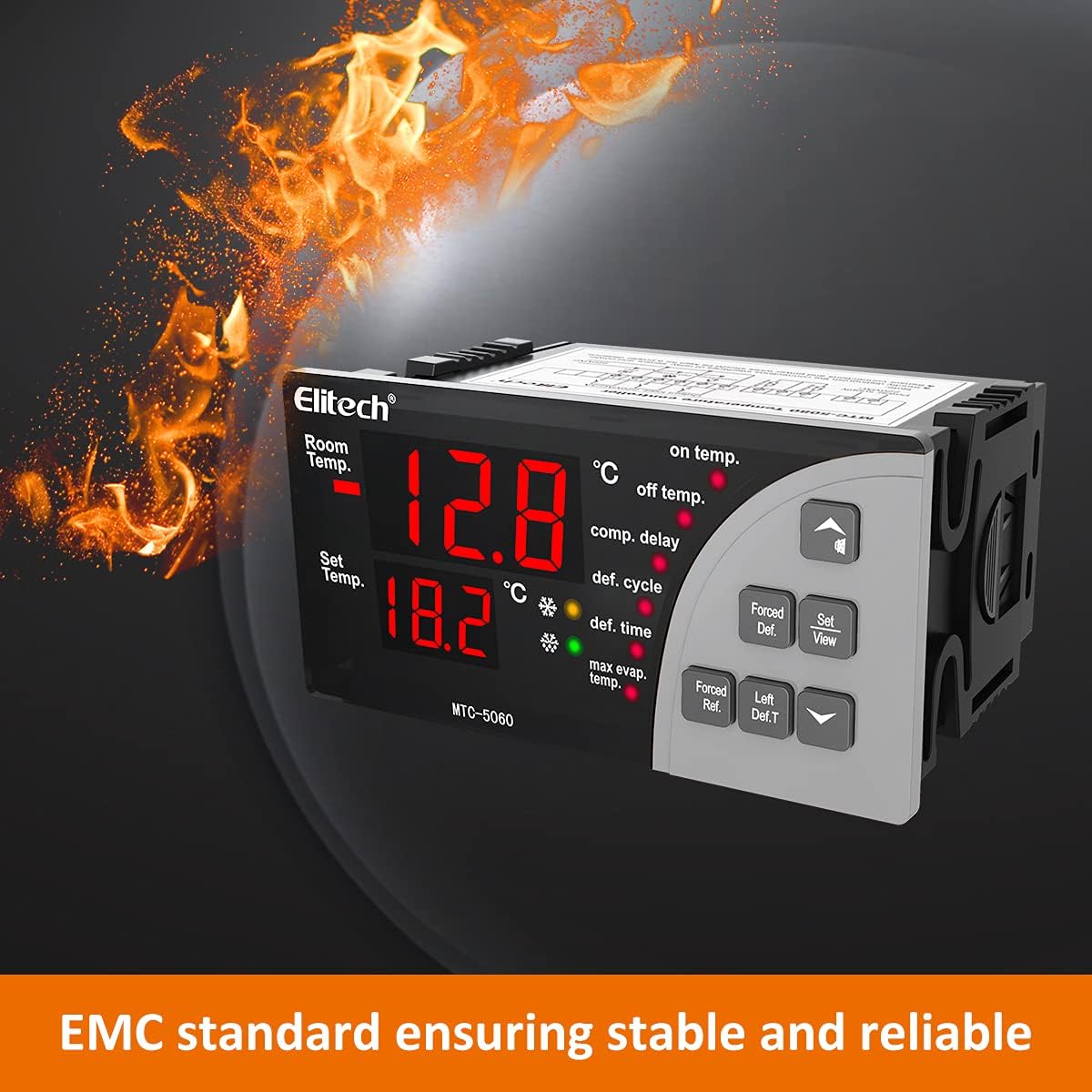
Figure 6.1: Illustrates the "Forced Def." button for manual defrost initiation.
6.4 configurações de parâmetros
Advanced parameters such as compressor delay, defrost cycle, defrost time, and temperature calibration can be accessed and adjusted. Consult the full product manual for a complete list of parameters and their functions.
Note: Incorrect parameter settings can affect the performance and safety of your refrigeration system. Proceed with caution when adjusting advanced settings.
7. Especificações
| Parâmetro | Valor |
|---|---|
| Fonte de energia | 110VAC±10%, 50Hz/60Hz |
| Faixa de medição de temperatura | -50°C a 50°C |
| Temperature Controlling Range | -50°C a 50°C |
| Precisão | ±1°C |
| Resolução | 0.1°C |
| Relay Output Contact Capacity | 3A/110VAC |
| Temperatura de operação | 0°C a 60°C |
| Humidade relativa | 20% -85% (sem condensação) |
| Tipo de sensor | NTC (10KΩ/25°C, B value = 3435K) |
| Sensor Probe Length | 2 metros (7.87 polegadas) |
| Tamanho do painel frontal | 10.2 cm (C) x 5.1 cm (L) |
| Dimensões do produto | 10.2 cm (C) x 5.1 cm (L) x 8.3 cm (P) |
| Installing Hole Size | 9.2 cm (C) x 4.4 cm (L) |
| Número do modelo | MTC-5060 |
| Fabricante | Elitech |
8. Manutenção
To ensure the longevity and optimal performance of your Elitech MTC-5060 controller, follow these maintenance guidelines:
- Limpeza: Regularly wipe the front panel with a soft, dry cloth. Do not use abrasive cleaners or solvents.
- Inspeção: Verifique periodicamente se todas as conexões da fiação estão bem apertadas e se apresentam sinais de desgaste ou danos.
- Verificação do sensor: Ensure the temperature sensor is clean and properly positioned for accurate readings.
- Ambiente: Maintain the operating environment within the specified temperature and humidity ranges to prevent condensation and ensure reliable operation.
9. Solução De Problemas
This section provides solutions to common issues you might encounter with your MTC-5060 controller.
| Problema | Possível causa | Solução |
|---|---|---|
| O controle não liga. | Sem fonte de alimentação ou fiação incorreta. | Check power connections (terminals 1 & 2) and ensure 110VAC supply. Verify wiring against diagram. |
| Temperature display is inaccurate or shows "EE". | Sensor error or faulty sensor. | Check sensor connections. Ensure the sensor is not damaged. Replace sensor if necessary. Perform temperature calibration if readings are consistently off. |
| Cooling/Defrosting not activating. | Incorrect set temperature, parameter settings, or faulty output relay. | Verify set temperature and differential. Check relevant parameters (e.g., compressor delay, defrost cycle). Inspect wiring to the cooling/defrosting load. |
| High/Low temperature alarm triggers frequently. | Alarm limits set too close to operating temperature or actual temperature fluctuation. | Adjust high/low temperature alarm limits. Investigate the cause of temperature fluctuations in the controlled environment. |
Se o problema persistir após tentar essas soluções, entre em contato com o suporte ao cliente da Elitech para obter mais assistência.
10. Garantia e Suporte
Elitech Technology, Inc. warrants this product to be free from defects in materials and workmanship for a period specified by your regional distributor from the date of purchase. This warranty does not cover damage caused by improper installation, misuse, unauthorized modification, or natural disasters.
For technical support, warranty claims, or service inquiries, please contact your local Elitech distributor or visit the official Elitech website para informações de contato.
Fabricante: Elitech
Modelo: MTC-5060