
Introdução
This manual provides essential instructions for setting up, operating, maintaining, and troubleshooting your Nyko 86158 Core Wireless Controller for Xbox One. Please read this manual thoroughly before use to ensure optimal performance and longevity of your device.
Conteúdo da embalagem
Verifique se todos os itens listados abaixo estão incluídos em seu pacote:
- Nyko 86158 Core Wireless Controller
- USB Wireless Receiver Dongle
- Cabo de carregamento USB
- Manual do usuário (este documento)
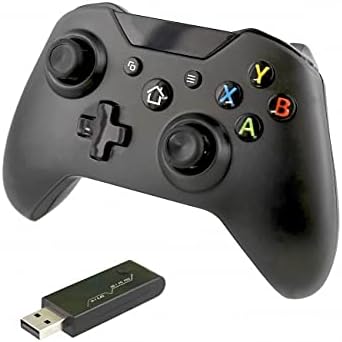
Image: Nyko 86158 Core Wireless Controller shown alongside its USB wireless receiver dongle. This illustrates the main components included in the package.

Imagem: Close-up view of the USB wireless receiver dongle. This dongle is essential for establishing a wireless connection between the controller and the Xbox One console or PC.

Image: The USB charging cable provided with the controller. This cable is used to recharge the controller's internal battery.
Layout do controlador
Familiarize yourself with the buttons and features of your Nyko Core Wireless Controller.
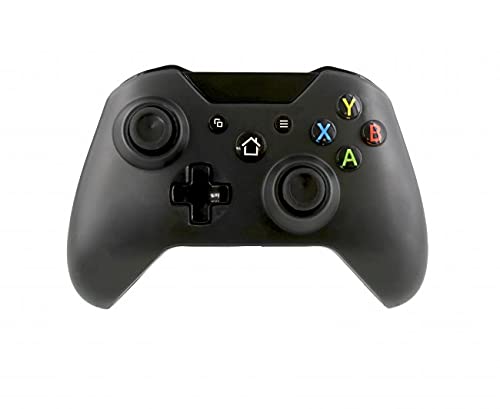
Imagem: Frente view of the Nyko 86158 Core Wireless Controller, showing the two analog sticks, D-pad, A/B/X/Y buttons, View button, Menu button, Xbox button, and Share button.
- Alavanca analógica esquerda: Para controle de movimento e câmera.
- Alavanca analógica direita: Para controle e enquadramento da câmera.
- D-pad: Entrada direcional para navegação nos menus e ações específicas do jogo.
- Botões A/B/X/Y: Botões de ação principais.
- View Botão: Accesses additional in-game information or menus.
- Botão de menu: Opens game menus or system options.
- Botão Xbox: Powers on the controller, accesses the Xbox Guide, or returns to the home screen.
- Botão Compartilhar: Captures screenshots or video clips (functionality may vary by console/game).

Imagem: Topo view of the Nyko 86158 Core Wireless Controller, highlighting the Left and Right Bumpers (LB, RB), Left and Right Triggers (LT, RT), and the micro-USB charging port located at the front.
- Left Bumper (LB) / Right Bumper (RB): Botões de ombro para diversas ações no jogo.
- Left Trigger (LT) / Right Trigger (RT): Analog triggers for precise input, often used for acceleration or aiming.
- Porta Micro USB: Used for charging the controller.

Imagem: Costas view of the Nyko 86158 Core Wireless Controller, showing the battery compartment cover. This is where the batteries are inserted or the rechargeable battery pack is housed.
Instruções de configuração
1. Alimentação do controlador
The Nyko 86158 Core Wireless Controller requires batteries to operate wirelessly. It is compatible with standard AA batteries or a rechargeable battery pack (sold separately).
- Localize o compartimento da bateria na parte traseira do controle.
- Press down on the tab and slide the battery cover off.
- Insert two (2) AA batteries, ensuring correct polarity (+/-). If using a rechargeable pack, insert it as directed by the pack's instructions.
- Recoloque a tampa da bateria.
2. Connecting to Xbox One
To connect your wireless controller to an Xbox One console:
- Insert the USB Wireless Receiver Dongle into an available USB port on your Xbox One console.
- Ligue seu console Xbox One.
- Pressione e segure o Botão Xbox on the controller until it powers on. The Xbox button will flash.
- The controller will automatically attempt to pair with the USB receiver. Once connected, the Xbox button on the controller will glow solid.
- If the controller does not connect automatically, press the small pairing button on the USB receiver dongle, then press and hold the Botão Xbox on the controller until it pairs.
3. Connecting to PC (Optional)
The controller can also be used with a PC. Ensure your PC has an available USB port for the wireless receiver.
- Insert the USB Wireless Receiver Dongle into an available USB port on your PC.
- The PC should automatically install the necessary drivers. This may take a few moments.
- Pressione e segure o Botão Xbox on the controller until it powers on.
- The controller will connect to the receiver. The Xbox button will glow solid once connected.
Instruções de operação
Ligar/Desligar
- Para Ativar: Pressione e segure o Botão Xbox until the controller vibrates and the light turns on.
- Desligar: Pressione e segure o Botão Xbox for 5-10 seconds until the controller powers down. The controller will also automatically turn off after a period of inactivity to conserve battery life.
Carregando o controlador
If using a rechargeable battery pack (not included) or if the controller has a built-in rechargeable battery:
- Connect the small end of the USB Charging Cable to the micro-USB port on the front of the controller.
- Connect the larger end of the USB Charging Cable to an available USB port on your Xbox One console or a USB wall adapter (5V, 1A recommended).
- The indicator light on the controller (usually the Xbox button) will show charging status (e.g., flashing while charging, solid when fully charged).
- Desconecte o cabo quando o carregamento estiver concluído.
Manutenção
- Limpeza: Use um pano macio e seco para limpar o controlador. Não utilize produtos químicos agressivos ou materiais abrasivos.
- Armazenar: Guarde o controlador em local fresco e seco, longe da luz solar direta e de temperaturas extremas.
- Cuidados com a bateria: If not using the controller for an extended period, remove the AA batteries to prevent leakage.
- Evite quedas: Proteja o controlador contra quedas e impactos, que podem danificar os componentes internos.
Solução de problemas
Controller Not Turning On
- Certifique-se de que as pilhas estejam inseridas corretamente, respeitando a polaridade.
- Replace old batteries with new ones, or fully charge the rechargeable battery pack.
Controller Not Connecting to Xbox One/PC
- Ensure the USB Wireless Receiver Dongle is securely plugged into an active USB port.
- Experimente uma porta USB diferente.
- Certifique-se de que o controlador esteja ligado.
- Re-attempt the pairing process: press the pairing button on the dongle, then press and hold the Xbox button on the controller.
- Reinicie seu console Xbox One ou PC.
Atraso de entrada ou desconexões
- Ensure the controller is within range of the USB receiver (typically up to 30 feet/9 meters).
- Minimize a interferência de outros dispositivos sem fio (por exemplo, roteadores Wi-Fi, telefones sem fio).
- Certifique-se de que o controle remoto tenha carga de bateria suficiente.
Especificações
| Marca | Nyko |
| Número do modelo | 86158 |
| Dispositivos compatíveis | Xbox One, PC |
| Tipo de controlador | Controlador de jogos sem fio |
| Tecnologia de Conectividade | Wireless (2.4GHz via USB dongle) |
| Fonte de energia | Batteries (AA or rechargeable pack) |
| Dimensões (C x L x A) | 8.3 x 18.4 x 15.2 cm (aproximadamente 3.27 x 7.24 x 5.98 polegadas) |
| UPC | 743840861584 |
| ASIN | B09BD8813T |
Garantia e Suporte
For warranty information or technical support, please refer to the documentation included with your purchase or visit the official Nyko website. Guarde o comprovante de compra para solicitações de garantia.