
1. Introdução
The Beca BHT-8000GCLW is an advanced WiFi-enabled smart thermostat designed for controlling gas boiler heating systems. This thermostat allows you to manage your home's temperature efficiently through its intuitive 4.8-inch color LCD touchscreen, a dedicated mobile application, or voice commands via smart home assistants. Its sleek, modern design and slim profile integrate seamlessly into any living space.
Principais características:
- Controle WiFi: Remote management via the SmartLife app on Android and iOS devices.
- Programabilidade: Supports 5+2 period programming for optimized comfort and energy savings.
- Alta precisão: Maintains temperature within ±0.5 °C or ±1 °F of the set point.
- Large Color LCD: Intuitive 4.8-inch display for clear information visibility.
- Integração de casa inteligente: Certified for Amazon Alexa, Google Home, and IFTTT.
- Weather Synchronization: Supports local weather synchronization for enhanced control.

Image 1.1: Beca BHT-8000GCLW Thermostat and its mobile application interface.
2. Informações de segurança
Please read this manual carefully before installation and operation. Failure to follow instructions could result in product damage or hazardous conditions. All wiring must be performed by a qualified electrician and comply with local electrical codes.
- Desligue sempre a energia no disjuntor antes de instalar ou realizar manutenção no termostato.
- Do not install the thermostat in areas with excessive vibration, direct sunlight, or drafts.
- Certifique-se de que a fonte de alimentação voltage matches the thermostat's requirements (95 ~ 240 V AC).
- This device is designed for gas boiler control systems. Do not use it for other applications unless specified.
3. Conteúdo da embalagem
Verifique se todos os itens estão presentes na embalagem:
- Beca BHT-8000GCLW Smart Thermostat
- Hardware de montagem (parafusos)
- Wiring (if included by manufacturer, otherwise user-supplied)
- Manual do usuário (este documento)
4. Produto acabadoview
The BHT-8000GCLW features a large, clear display and intuitive touch controls for easy operation. Its design emphasizes both functionality and aesthetics.

Image 4.1: Display features of the Beca BHT-8000GCLW Thermostat.
4.1. Display Elements and Buttons
Familiarize yourself with the various indicators and capacitive touch buttons on the thermostat's screen:

Image 4.2: Labeled display elements of the Beca BHT-8000GCLW Thermostat.
- WiFi (AP mode): Access Point mode indicator for Wi-Fi setup.
- WiFi (EZ mode): Easy mode indicator for Wi-Fi setup.
- Aquecimento ligado: Indica quando o sistema de aquecimento está ativo.
- Velocidade do vento: (May indicate fan speed or external weather data).
- Clima: Current weather condition icon.
- Períodos: Indicates the current programming period.
- De segunda a Domingo: Day of the week indicator.
- Sensor Externo: Indicates if an external temperature sensor is connected/active.
- Ultraviolet Intensity: Exibição do índice UV.
- The Humidity Outdoor: Outdoor humidity display.
- Botão para baixo: Decreases temperature or navigates menu options.
- Botão para cima: Increases temperature or navigates menu options.
- Relógio: Exibe a hora atual.
- Opções avançadas: Accesses advanced settings menu.
- Modo: Switches between manual, programmable, or auto modes.
- Poder: Botão liga/desliga.
- Tempo: Exibição da hora atual.
- Definir temperatura: Configuração de temperatura desejada.
- Menu: Acessa o menu principal.
- Temperatura ambiente.: Temperatura ambiente atual.
- Trancar: Child lock or keypad lock indicator.
5. Instalação
Professional installation is highly recommended to ensure correct wiring and safe operation.
5.1. Montagem
The thermostat is designed for installation in standard electrical wall boxes. It is compatible with 86 x 86 mm square boxes or 60 mm European round boxes.
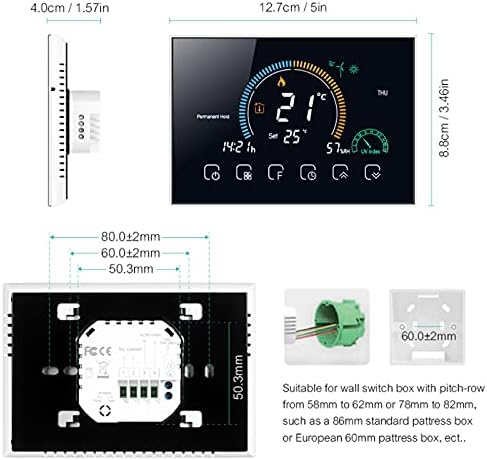
Image 5.1: Thermostat dimensions and compatible installation box types.
5.2. Fiação
WARNING: Disconnect power at the circuit breaker before wiring.
- Carefully remove the front panel of the thermostat to access the wiring terminals.
- Connect the power supply wires (Live and Neutral) to the designated terminals. The thermostat requires 95 ~ 240 V AC, 50 ~ 60 Hz.
- Connect the gas boiler control wires (dry contact) to the appropriate terminals. Refer to your boiler's manual for specific wiring requirements.
- Ensure all wire connections are secure. The terminals are suitable for 2 x 1.5 mm² wires or 1 x 2.5 mm² wire.
- Mount the thermostat backplate to the wall box using the provided screws.
- Reattach the front panel to the backplate.
6. Configuração
6.1. Inicialização da alimentação
After installation and wiring are complete, restore power at the circuit breaker. The thermostat display should light up, indicating it is powered on.
6.2. Wi-Fi Connection (SmartLife App)
To enable remote control and smart features, connect your thermostat to your home Wi-Fi network using the SmartLife app.
- Baixe o SmartLife Aplicativo disponível na App Store (iOS) ou na Google Play Store (Android).
- Cadastre-se ou faça login na sua conta SmartLife.
- On the thermostat, press and hold the Wi-Fi button (refer to Image 4.2, item 1 or 2) until the Wi-Fi icon starts blinking rapidly (EZ mode) or slowly (AP mode).
- In the SmartLife app, tap '+' to add a device, then select 'Small Home Appliances' > 'Thermostat'.
- Follow the on-screen instructions in the app to connect the thermostat to your 2.4GHz Wi-Fi network.
- Assim que estiver conectado, o ícone do Wi-Fi no termostato ficará aceso continuamente.
6.3. Smart Home Integration (Alexa, Google Home)
After connecting to the SmartLife app, you can integrate your thermostat with Amazon Alexa or Google Home for voice control.
- Abra o aplicativo Amazon Alexa ou o aplicativo Google Home.
- Acesse "Habilidades e jogos" (Alexa) ou "Compatível com o Google" (Google Home).
- Procurar and enable the 'SmartLife' skill/service.
- Link your SmartLife account when prompted.
- Discover devices. Your Beca thermostat should now appear and be controllable via voice commands.
7. Instruções de operação
The BHT-8000GCLW offers multiple ways to control your heating system.
7.1. Manual Temperature Control
In manual mode, you can set a desired temperature that the thermostat will maintain until changed.
- Press the 'Mode' button (Image 4.2, item 15) to switch to manual mode (usually indicated by a hand icon or 'M').
- Use the 'Up' (Image 4.2, item 12) and 'Down' (Image 4.2, item 11) buttons to adjust the target temperature.
- The thermostat will activate the boiler to reach and maintain this temperature.
7.2. Programmable Mode (5+2 Periods)
The 5+2 programmable mode allows you to set different temperature schedules for weekdays (5 days) and weekends (2 days), with multiple periods per day.
- Press the 'Mode' button to select programmable mode (often indicated by a clock or calendar icon).
- Access the programming menu (usually via the 'Menu' or 'Advanced Options' button).
- Set desired temperatures and times for each period (e.g., morning, day, evening, night) for weekdays and weekends.
- Save your settings. The thermostat will now automatically follow this schedule.
7.3. Controle de aplicativos
The SmartLife app provides comprehensive control over your thermostat from anywhere.
- Open the SmartLife app on your smartphone.
- Select your Beca thermostat from the device list.
- Você pode view current temperature, adjust set points, change modes, modify schedules, and access advanced settings.
7.4. Controle de voz
Use voice commands with Amazon Alexa or Google Home for hands-free temperature adjustments.
- Alexa: "Alexa, set the thermostat to 22 degrees." or "Alexa, what is the temperature in the living room?"
- Assistente do Google: "Hey Google, turn up the heat." or "Hey Google, set the living room thermostat to 21 degrees."
7.5. Bloqueio para crianças
To prevent unauthorized changes, activate the child lock feature. This is usually done by pressing and holding a specific button combination (refer to the thermostat's on-screen prompts or advanced settings menu). The lock icon (Image 4.2, item 21) will appear when active.
8. Manutenção
The Beca BHT-8000GCLW thermostat requires minimal maintenance.
- Limpeza: Limpe a tela e casing with a soft, dry cloth. Do not use abrasive cleaners, solvents, or spray directly onto the thermostat.
- Evite Obstruções: Ensure no furniture or curtains block the thermostat, as this can affect temperature readings.
9. Solução De Problemas
If you encounter issues with your thermostat, try the following steps:
- Sem energia/Tela em branco: Check the circuit breaker. Ensure wiring connections are secure.
- Aquecimento não responde: Verify the thermostat is in the correct mode (manual or programmable) and the set temperature is above the current room temperature. Check boiler operation.
- Wi-Fi Disconnected: Check your home Wi-Fi router. Restart the thermostat and attempt to reconnect via the SmartLife app. Ensure your Wi-Fi is 2.4GHz.
- Leitura de temperatura imprecisa: Certifique-se de que o termostato não esteja exposto à luz solar direta, correntes de ar ou fontes de calor.
- Problemas de controle de aplicativos: Ensure your phone has an internet connection and the SmartLife app is up to date.
For persistent issues, contact Beca customer support or consult a qualified technician.
10. Especificações
| Recurso | Especificação |
|---|---|
| Fonte de energia | 95 ~ 240 V AC, 50 ~ 60 Hz |
| Precisão | ±0.5 °C ou ±1 °F |
| Faixa de ajuste de temperatura | 5-35 °C |
| Faixa de temperatura de exibição | 5 ~ 99 °C |
| Temperatura de armazenamento | -5 ~ 45 °C |
| Material da concha | PC + ABS (retardador de chama) |
| Caixa de instalação | 86 x 86 mm square box or 60 mm European round box |
| Terminais de fio | 2 x 1.5 mm² wire or 1 x 2.5 mm² wire |
| Classe de proteção | IP20 |
| Botões | Botões de toque capacitivos |
| Conectividade | Wi-fi |
| Compatible Smart Assistants | Amazon Alexa, Google Home, IFTTT |
| Cor | Transparent (as per product details, though product image shows white frame) |
11. Garantia e Suporte
For warranty information and technical support, please refer to the documentation provided with your purchase or visit the official Beca website. Guarde o comprovante de compra para solicitações de garantia.