
HTC HTC TWS3
Manual do Usuário dos Fones de Ouvido Sem Fio HTC 2
Model: HTC TWS3
Introdução
The HTC True Wireless Earbuds 2 offer a seamless audio experience with advanced features designed for comfort and convenience. These earbuds utilize the latest Bluetooth 5.1 technology for instant pairing and stable connections across various devices. Enjoy extended listening times, intuitive touch controls, and a comfortable, ergonomic fit for all-day use.

Image: HTC True Wireless Earbuds 2 in their pink charging case, showcasino design compacto.

Image: A display of HTC True Wireless Earbuds 2 in three available colors: white, black, and pink.
Vídeo: Um oficial sobreview of the HTC True Wireless Bluetooth Earbuds, highlighting key features and design.
O que está na caixa
Your HTC True Wireless Earbuds 2 package includes the following items:
- HTC True Wireless Earbuds 2 (Left and Right)
- Cabo de carregamento USB-C
- Rubber Eartips (Two pairs: Large and Small sizes, in addition to the pre-installed medium size)
- Estojo de carregamento
Video: An unboxing video for the HTC True Wireless Earbuds 2, showing the contents of the package.
Configurar
1. Carregando os fones de ouvido e o estojo
Before first use, ensure both the earbuds and the charging case are fully charged. Connect the provided USB-C cable to the charging port on the case and plug the other end into a compatible USB power source. The indicator light on the case will show charging status. A full charge provides up to 8 hours of listening time for the earbuds and up to 32 hours total with the charging case.

Image: Pink HTC True Wireless Earbuds 2 and their charging case, illustrating the 30-hour combined battery life.
2. Emparelhamento com seu dispositivo
- Abra o estojo de carregamento. Os fones de ouvido entrarão automaticamente no modo de emparelhamento.
- No seu dispositivo (smartphone, tablet, laptop), acesse as configurações de Bluetooth.
- Select "HTC True Wireless Earbuds 2" from the list of available devices.
- Após a conexão, você ouvirá um aviso sonoro e a luz indicadora nos fones de ouvido mudará.
The earbuds utilize Bluetooth 5.1 for quick and stable connections. They are compatible with iOS, Android, and Windows devices.

Image: A diagram illustrating the quick pairing process and wide compatibility of the HTC True Wireless Earbuds 2 with various devices.
3. Achieving Optimal Comfort
The earbuds are ergonomically crafted for a secure and comfortable in-ear fit. Experiment with the included rubber eartips (small, medium, large) to find the size that provides the best seal and comfort for your ears. A proper fit enhances sound quality and noise isolation.

Image: A woman wearing pink HTC True Wireless Earbuds 2 while working on a laptop, emphasizing the ultra-lightweight comfort and ergonomic design.
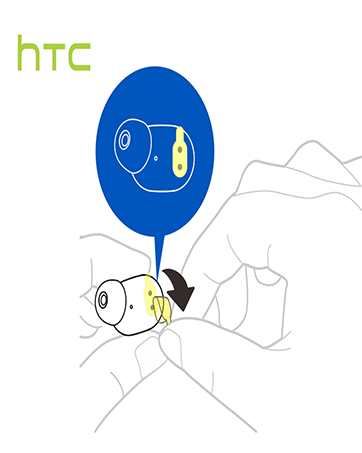
Image: A diagram illustrating the correct method for inserting an earbud to ensure a secure and comfortable fit.
Instruções de operação
Controles de toque
The HTC True Wireless Earbuds 2 feature intuitive touch controls on each earbud for easy management of your audio and calls:
- Reproduzir/Pausar: Tap left/right earbud once.
- Atender chamada: Tap left earbud once.
- Desligue a chamada: Tap right earbud once.
- Rejeitar chamada: Tap and hold left/right earbud for 2 seconds.
- Faixa anterior: Tap and hold left earbud for 2 seconds.
- Próxima faixa: Tap and hold right earbud for 2 seconds.
- Aumentar o volume: Tap left earbud twice.
- Volume baixo: Tap right earbud twice.
- Ative o Voice Assistant: Tap left/right earbud three times.

Image: A visual guide detailing the simple touch controls for the pink HTC True Wireless Earbuds 2.

Image: A visual guide detailing the simple touch controls for the black HTC True Wireless Earbuds 2.
Uso de fone de ouvido único
You can use either earbud independently for mono audio or calls. Simply take one earbud out of the case, and it will automatically connect to your device. This feature allows for versatility depending on your listening needs.

Image: Two smartphones connected to individual pink HTC True Wireless Earbuds 2, showcasing the versatility of using one or both earbuds.

Image: A diagram illustrating the versatility of using one or both black HTC True Wireless Earbuds 2 with different devices.
Manutenção
Limpeza e Cuidados
- Limpe regularmente os fones de ouvido e o estojo de carregamento com um pano macio e seco.
- Remova as pontas auriculares e limpe-as com água e sabão neutro, se necessário, certificando-se de que estejam completamente secas antes de recolocá-las.
- Evite usar materiais abrasivos ou produtos químicos agressivos.
Resistência à água
The HTC True Wireless Earbuds 2 are IPX5 waterproof, meaning they are protected against low-pressure water jets from any direction. This makes them suitable for workouts and light rain. However, they are not designed for submersion in water.
Solução de problemas
If you encounter any issues with your HTC True Wireless Earbuds 2, please refer to the following common solutions:
| Problema | Solução |
|---|---|
| Fones de ouvido não emparelham | Ensure earbuds are charged. Place them back in the case, close, then reopen to re-enter pairing mode. Check your device's Bluetooth settings and forget/remove previous connections if necessary. |
| Sem som de um fone de ouvido | Certifique-se de que ambos os fones de ouvido estejam carregados. Tente colocá-los de volta no estojo e retirá-los novamente. Emparelhe-os novamente com seu dispositivo. |
| Os controles de toque não respondem | Ensure earbuds are clean and dry. Restart your device and re-pair the earbuds. |
| Má qualidade de som | Adjust the eartips for a better seal. Ensure your device is within the 10m Bluetooth range. Check for interference from other wireless devices. |
Especificações
| Recurso | Detalhe |
|---|---|
| Nome do modelo | Fones de ouvido sem fio verdadeiros HTC 2 |
| Número do modelo do item | HTC TWS3 |
| Tecnologia de Conectividade | Sem fio (Bluetooth 5.1) |
| Duração da bateria (fones de ouvido) | Até 8 horas com uma única carga |
| Duração da bateria (com estojo de carregamento) | Até 32 horas |
| Capacidade da bateria do estojo de carregamento | 500 mAh |
| Nível de resistência à água | IPX5 (resistente à água) |
| Tipo de controle | Touch Control (Volume, Play/Pause, Call Management, Voice Assistant) |
| Colocação da orelha | No ouvido |
| Faixa de frequência | 20-20,000 Hz |
| Peso do item | 2.82 onças |
| Dimensões do produto | 1.71 x 1.71 x 1.36 polegadas |
Garantia e Suporte
HTC provides a 12-month warranty for the True Wireless Earbuds 2. For any support inquiries or warranty claims, please contact HTC customer service through their official website ou o varejista onde o produto foi comprado.
Para mais informações, visite o site oficial Loja HTC na Amazon.
Ask a question about this manual
Ask about setup, troubleshooting, compatibility, parts, safety, or missing instructions. Manuals+ will review the question and use this page’s manual context to help answer it.