
1. Introdução
The SteelSeries Arctis Nova 1X Gaming Headset delivers an immersive audio experience across multiple platforms. Designed for comfort and clarity, it features the Signature Arctis Sound and a ClearCast Gen 2 Microphone, making it ideal for Xbox Series X|S, PC, PlayStation, Switch, and mobile gaming.
This manual provides detailed instructions for setting up, operating, and maintaining your Arctis Nova 1X headset to ensure optimal performance and longevity.
2. O que está na caixa
Upon unboxing your SteelSeries Arctis Nova 1X Gaming Headset, you should find the following components:
- Fone de ouvido Arctis Nova 1X
- Main Headset Cable (3.5mm)
- Headband (pre-installed or separate, as per packaging)
- Guia de informações do produto

Imagem: Frente view of the SteelSeries Arctis Nova 1X Gaming Headset, showcasing its sleek design and microphone.
3. Configuração
3.1 Conectando o fone de ouvido
The Arctis Nova 1X is a wired headset designed for universal compatibility. To connect your headset:
- Locate the 3.5mm main headset cable.
- Plug one end of the 3.5mm cable into the audio jack on the left earcup of your Arctis Nova 1X headset.
- Plug the other end of the 3.5mm cable into the corresponding audio port on your gaming device (Xbox Series X|S controller, PC, PlayStation controller, Nintendo Switch, or mobile device).
Note: Ensure the cable is securely connected to both the headset and your device for optimal audio and microphone performance.

Image: Diagram illustrating the multi-platform compatibility of the Arctis Nova 1X headset, showing connections to various gaming devices.
4. Operando o fone de ouvido
4.1 Controle de volume
Adjust the audio volume directly from the headset:
- Locate the volume wheel on the left earcup.
- Roll the wheel up to increase the volume or down to decrease it.
4.2 Silenciar o microfone
To mute or unmute your microphone:
- Find the microphone mute button on the left earcup, adjacent to the volume wheel.
- Press the button to toggle the microphone on or off. A red indicator will typically show when the microphone is muted.
4.3 Retractable ClearCast Gen 2 Microphone
The ClearCast Gen 2 microphone is retractable for convenience:
- To use the microphone, gently pull it out from the left earcup until it reaches your desired position.
- To store the microphone, push it back into the earcup until it is fully retracted.
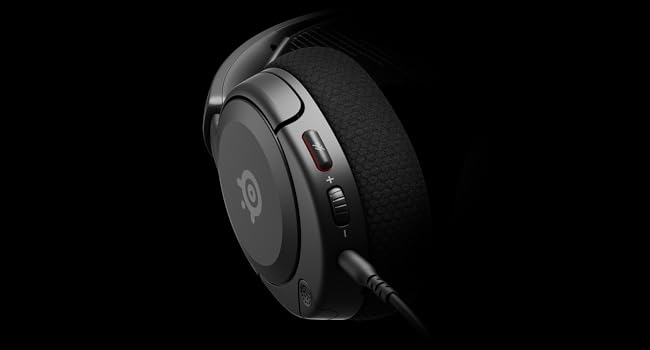
Imagem: Close-up view of the left earcup of the Arctis Nova 1X, highlighting the volume wheel and microphone mute button for easy access during gameplay.
Video: Official SteelSeries video demonstrating the features of the Arctis Nova 1 headset, including its audio capabilities and microphone design.
5. Conforto e Ajuste
The Arctis Nova 1X is designed for extended gaming sessions with its ComfortMAX System:
- Design ultraleve: Weighing only 236g, the headset minimizes pressure during long use.
- Height-Adjustable Earcups: The earcups can be adjusted vertically to fit various head sizes comfortably.
- Flexible Suspension Headband: The elastic headband conforms to your head for a secure yet gentle fit.

Image: The Arctis Nova 1X headset highlighting its ultra-lightweight and slim profile, designed for comfort.

Image: The Arctis Nova 1X headset demonstrating its height-adjustable earcups for a personalized and comfortable fit.
6. Recursos de áudio
Experience superior sound with the Arctis Nova 1X:
- Almighty Audio: The Nova Acoustic System with High Fidelity Drivers delivers crystal-clear highs, precise mids, and deep bass.
- Áudio espacial de 360°: Immerse yourself in the game with surround sound that allows you to pinpoint enemy positions and environmental cues.
- Pro-grade Parametric EQ: Personalize seu profissional de somfile with the SteelSeries Sonar Audio Software Suite for a competitive edge.

Image: The Arctis Nova 1X headset highlighting its "Almighty Audio" capabilities for a rich sound experience.
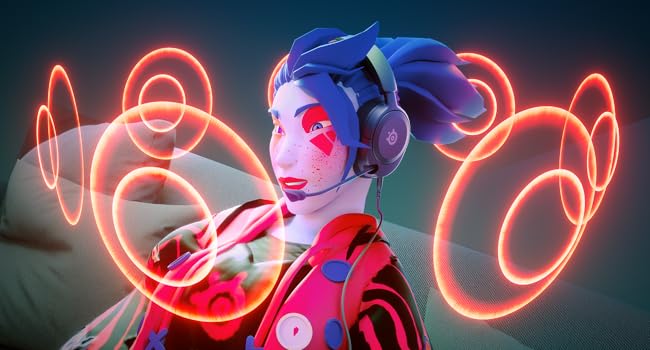
Image: Visual representation of 360° Spatial Audio, showing sound waves surrounding a gamer wearing the Arctis Nova 1X headset.

Image: Graphic illustrating the Pro-grade Parametric EQ, suggesting advanced audio customization options available with the headset.
7. Microphone Features
The ClearCast Gen 2 Mic ensures clear communication:
- AI Noise Cancelling: Advanced AI algorithms filter out background noise, ensuring your voice is heard clearly by teammates.
- Design retrátil: The microphone can be fully retracted into the earcup when not in use, maintaining a sleek profile.

Image: The Nova 1 AI Microphone, emphasizing its noise-cancelling capabilities for clear voice communication.
8. Manutenção
To ensure the longevity and optimal performance of your Arctis Nova 1X headset, follow these maintenance guidelines:
- Limpeza: Use um pano macio e seco para limpar os fones de ouvido e a faixa de cabeça. Para uma limpeza mais profunda, use um pano levemente umedecido.amp cloth with mild soap can be used, ensuring no moisture enters the speaker grilles or ports.
- Cuidados com os cabos: Avoid sharp bends or excessive pulling on the headset cable to prevent internal damage. Store the cable neatly when not in use.
- Armazenar: Guarde o fone de ouvido em local fresco e seco, longe da luz solar direta e de temperaturas extremas.
- Dicas para fones de ouvido: If applicable, ensure earbud tips (if using with mobile) fit snugly. Replace worn-out earbud tips to maintain sound quality and comfort.
9. Solução De Problemas
If you encounter issues with your Arctis Nova 1X headset, try the following solutions:
- Sem áudio/Volume baixo:
- Ensure the 3.5mm cable is fully inserted into both the headset and your device.
- Verifique o botão de volume no fone de ouvido e o volume do sistema do seu dispositivo.
- Teste o fone de ouvido com outro dispositivo para descartar problemas específicos do aparelho.
- Microfone não funciona:
- Ensure the microphone mute button is not activated (red indicator off).
- Verifique se o microfone está totalmente estendido e posicionado corretamente.
- Verifique as configurações de áudio do seu dispositivo para garantir que a entrada de microfone correta esteja selecionada e que o volume não esteja silenciado.
- Má qualidade de som:
- Ensure the 3.5mm cable is not damaged and is securely connected.
- Adjust your device's audio settings or equalizer settings.
10. Especificações
| Recurso | Detalhe |
|---|---|
| Marca | Série Steel |
| Nome do modelo | Arctis Nova 1X |
| Número do modelo | 61616 |
| Tecnologia de Conectividade | Com fio (conector de 3.5 mm) |
| Colocação da orelha | Sobre a orelha |
| Controle de Ruído | Cancelamento ativo de ruído (microfone) |
| Tipo de driver de áudio | Driver Dinâmico |
| Faixa de frequência | 20 Hz - 20,000 Hz |
| Microfone | ClearCast Gen 2 (Retractable, AI Noise Cancelling) |
| Dispositivos compatíveis | Xbox Series X|S, PC, PlayStation, Switch, Mobile |
| Peso do item | 1.1 libras (aprox. 500g) |
| Cor | Preto |
| UPC | 850014119737 |
Vídeo: Uma visão de 360 graus view of the SteelSeries Arctis Nova 1X headset in black, showcasinanalisando seu design de todos os ângulos.
11. Garantia e suporte
11.1 Informações de garantia
The SteelSeries Arctis Nova 1X Gaming Headset comes with a Garantia limitada de 1 anos A partir da data da compra. Esta garantia cobre defeitos de fabricação e assegura que o seu produto funcione conforme o esperado em condições normais de uso. Guarde o comprovante de compra para eventuais solicitações de garantia.
For detailed warranty terms and conditions, please refer to the official SteelSeries website ou o cartão de garantia incluído na embalagem do produto.
11.2 Suporte ao cliente
For further assistance, technical support, or warranty claims, please contact SteelSeries customer support through their official website:
You may also find additional resources, FAQs, and software downloads on their support page.