1. Introdução
This manual provides comprehensive instructions for the Generic AN-MR20GA Replacement Voice Remote Control. It covers setup, operation, maintenance, and troubleshooting to ensure optimal use with your compatible LG 4K Smart UHD TV models 75UN9070AUD and 86UN9070AUD.
2. Produto acabadoview
The AN-MR20GA is a replacement voice-enabled remote control designed to function with specific LG 4K Smart UHD TV models. It features standard navigation, numeric keys, and dedicated buttons for streaming services, along with voice command capabilities.
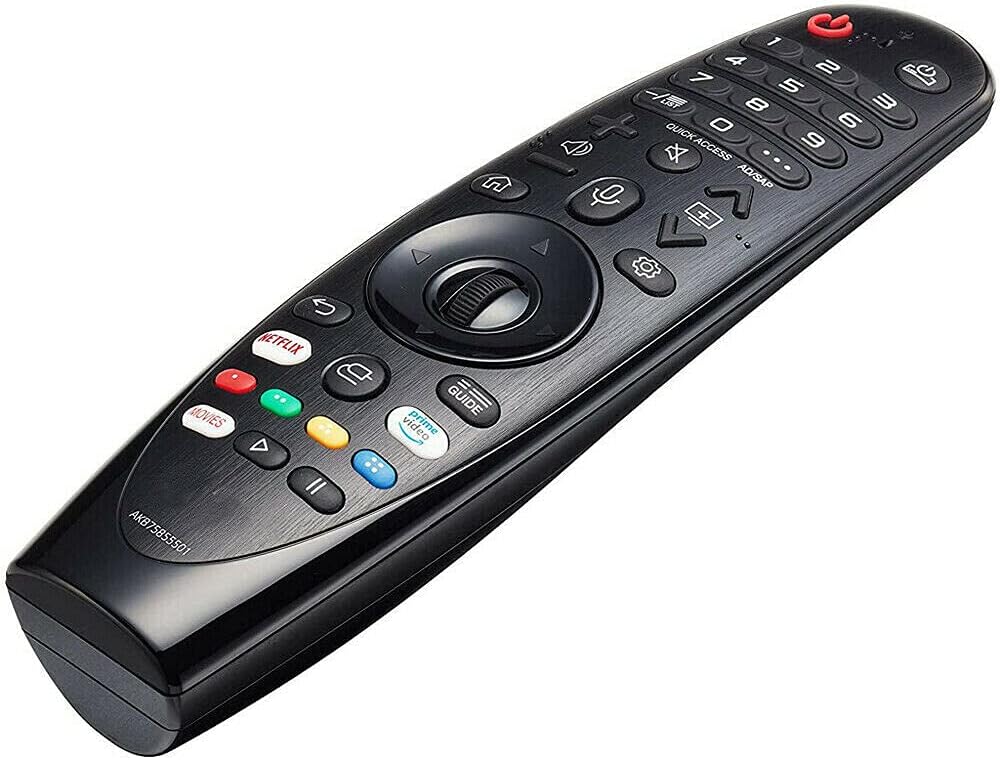
Figura 2.1: Frente view of the AN-MR20GA remote control, showing various buttons including power, numeric keypad, navigation wheel, volume, channel, and dedicated streaming service buttons.
2.1 Compatibilidade
This remote control is compatible with the following LG 4K Smart UHD TV models:
- LG 75UN9070AUD 75-inch 4K Smart UHD TV
- LG 86UN9070AUD 86-inch 4K Smart UHD TV
It may also be compatible with other LG models listed in the product description, such as various SK, UK, and OLED series TVs. Please refer to your TV's manual or the product listing for a complete list of compatible models.
3. Configuração
3.1 Instalação da bateria
The remote control requires two (2) 1.5V AAA Alkaline batteries (not included).
- Localize a tampa do compartimento da bateria na parte traseira do controle remoto.
- Deslize a tampa para baixo ou pressione a trava para abri-la.
- Insira duas pilhas AAA, certificando-se de que os terminais positivo (+) e negativo (-) estejam alinhados corretamente com as marcações dentro do compartimento.
- Recoloque a tampa do compartimento da bateria, deslizando-a de volta para o lugar até ouvir um clique.

Figura 3.1: Voltar view of the remote control with the battery compartment open, illustrating correct battery placement.
3.2 Pairing the Remote Control (Magic Remote Function)
To use the voice and pointer functions of this remote, it must be paired with your LG TV. This process is often referred to as 'registering' the Magic Remote.
- Ensure your TV is powered on and the batteries are correctly installed in the remote.
- Point the remote control directly at your TV screen.
- Pressione o Roda (OK) button located in the center of the navigation pad.
- The TV should display a message indicating that the remote is registered or paired.
Observação: If the TV fails to register the remote, turn the TV off and then back on, and repeat the pairing steps.
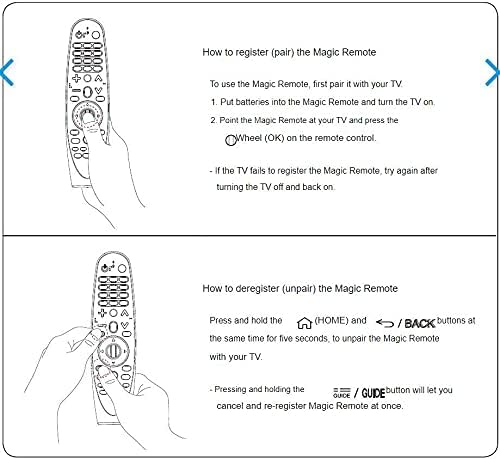
Figura 3.2: Visual guide for pairing the Magic Remote by pressing the Wheel (OK) button, and unpairing by holding HOME and BACK buttons simultaneously.
3.3 Unpairing the Remote Control
If you need to unpair (deregister) the remote control from your TV, follow these steps:
- Pressione e segure o LAR botão (
 ) e o VOLTAR botão (
 ) simultaneously for approximately five seconds.
 - The TV should display a message confirming the remote has been unpaired.
Dica: Pressionando e segurando o GUIA button will allow you to cancel and re-register the Magic Remote at once.
4. Instruções de operação
4.1 Funções Básicas
- Botão de energia: Liga ou desliga a TV.
- Teclado Numérico (0-9): Insira os números dos canais diretamente.
- Aumentar/diminuir volume: Adjusts the TV's volume.
- Canal para cima/para baixo: Muda de canal na TV.
- Navigation Pad (Up/Down/Left/Right): Moves the cursor or selection on the screen.
- Botão de roda (OK): Confirms selections or activates the pointer function.
- Botão Voltar: Volta para a tela ou menu anterior.
- Botão Home: Accesses the TV's main menu or Smart TV interface.
4.2 Controle de voz
To use the voice control feature:
- Pressione e segure o Microfone botão no controle remoto.
- Speak clearly into the microphone located on the remote.
- Solte o botão quando terminar de falar.
Examples de comandos de voz: "Change to Channel 5", "Open Netflix", "Procurar action movies", "What's the weather?"
4.3 Botões Especiais
- Botão Netflix: Directly launches the Netflix application.
- Botão de vídeo principal: Directly launches the Amazon Prime Video application.
- Botão Guia: Exibe o guia eletrônico de programação (EPG).
- Quick Access / AD/SAP Button: Provides quick access to frequently used apps or functions, or activates Audio Description/Secondary Audio Program.
5. Manutenção
5.1 Limpeza
To clean your remote control:
- Ensure the batteries are removed before cleaning.
- Limpe a superfície com um pano macio, seco e sem fiapos.
- Para sujeira persistente, levementeampLimpe o pano com água ou um detergente suave e não abrasivo. Não borrife o detergente diretamente no controle remoto.
- Avoid using harsh chemicals, solvents, or abrasive materials, as these can damage the remote's finish or internal components.
5.2 Armazenamento
When not in use for extended periods, remove the batteries to prevent leakage and corrosion. Store the remote in a cool, dry place away from direct sunlight and extreme temperatures.
6. Solução De Problemas
6.1 Controle remoto não responde
- Verifique as baterias: Ensure batteries are inserted correctly and are not depleted. Replace with fresh AAA alkaline batteries if necessary.
- Linha de visão: Certifique-se de que não haja obstruções entre o controle remoto e o receptor infravermelho da TV.
- Reemparelhar o controle remoto: If the remote uses Bluetooth (Magic Remote function), try re-pairing it with the TV as described in Section 3.2.
- TV Power Cycle: Turn off the TV, unplug it from the power outlet for a few minutes, then plug it back in and turn it on. Try the remote again.
6.2 O controle de voz não funciona
- Emparelhamento: Ensure the remote is properly paired with the TV (Section 3.2), as voice functionality relies on this connection.
- Botão do microfone: Make sure you are pressing and holding the Microphone button while speaking.
- Fale com clareza: Fale de forma clara e em um volume normal.
- Conexão com a Internet: Some voice commands may require the TV to be connected to the internet.
7. Especificações
| Recurso | Detalhe |
|---|---|
| Número do modelo | AN-MR20GA |
| Marca | Genérico |
| Dispositivos compatíveis | LG 75UN9070AUD, 86UN9070AUD 4K Smart UHD TVs, and other compatible LG models |
| Tecnologia de Conectividade | Infrared, Bluetooth (for Magic Remote functions) |
| Fonte de energia | 2 x 1.5V AAA Alkaline Batteries (not included) |
| Recurso especial | Voice Control, Ergonomic Design |
| Cor | Preto |
8. Garantia e Suporte
Specific warranty information for this Generic replacement remote control is not provided in the product details. Please refer to the seller's return policy or contact the seller directly for details regarding warranty coverage and customer support.


