
PowerDrive PWD2000P
Manual do Usuário do Inversor de Potência PowerDrive de 2000 Watts
Model: PWD2000P
Introdução
This manual provides detailed instructions for the safe and efficient operation, installation, and maintenance of your PowerDrive 2000 Watt Power Inverter, Model PWD2000P. This device converts 12V DC power from your vehicle battery into 110V AC power, allowing you to operate various AC devices and charge electronic devices on the go. Please read this manual thoroughly before using the inverter.
Informações importantes de segurança
Always observe the following safety precautions to prevent injury or damage to the inverter or connected devices:
- Não abra o inversor casing. Não existem peças internas que possam ser reparadas pelo usuário.
- Assegure-se de que haja ventilação adequada ao redor do inversor. Não bloqueie as aberturas de ventilação.
- Mantenha o inversor longe de água, umidade e materiais inflamáveis.
- Conecte o inversor apenas a uma fonte de alimentação de 12V CC.
- Do not exceed the inverter's rated power output (2000 Watts continuous, 4000 Watts surge).
- Sempre conecte o inversor à bateria antes de ligar os aparelhos de corrente alternada.
- Desconecte o inversor da bateria quando não estiver em uso.
- Este produto contém produtos químicos conhecidos no Estado da Califórnia por causar câncer e defeitos congênitos ou outros danos reprodutivos. Lavar as mãos após o manuseio.
Componentes do produto
The PowerDrive 2000 Watt Power Inverter comes with the following components:
- PowerDrive 2000 Watt Power Inverter unit
- 39-inch heavy-duty installation cables (red for positive, black for negative)
- Tela LCD removível
- Suportes de montagem

Figura 1: Frente view of the PowerDrive 2000 Watt Power Inverter, showing the digital display, power button, Bluetooth indicator, four AC 120V outlets, one USB-C port, and one USB-A port. The unit features a durable yellow and black casing with ventilation grilles.

Figura 2: Sobreview of the PowerDrive 2000 Watt Power Inverter with key dimensions (14.54" length, 9.8" width, 4.25" height) and included accessories. The image displays the inverter unit, red and black 39-inch battery cables, and a 12-foot remote LCD cable.
Configuração e instalação
Proper installation is crucial for the inverter's performance and safety. Follow these steps carefully:
- Escolha um local: Select a dry, well-ventilated area for mounting the inverter. Ensure it is away from direct sunlight, heat sources, and any flammable materials. The mounting brackets can be used to secure the unit.
- Prepare a bateria: Ensure your vehicle's battery is a 12V DC system. Turn off the vehicle and any accessories.
- Cabos de conexão:
- Conecte o vermelho (positive) cable to the positivo (+) terminal do inversor.
- Conecte o preto (negative) cable to the negativo (-) terminal do inversor.
- Conecte a outra extremidade do vermelho cabo para o positivo (+) terminal of the vehicle battery.
- Conecte a outra extremidade do preto cabo para o negativo (-) terminal of the vehicle battery.
Importante: Always connect the inverter terminals first, then the battery terminals. Ensure connections are tight and secure.
- Connect Remote LCD (Optional): If desired, connect the removable LCD screen to the inverter using the provided cable. This allows for remote monitoring and control.
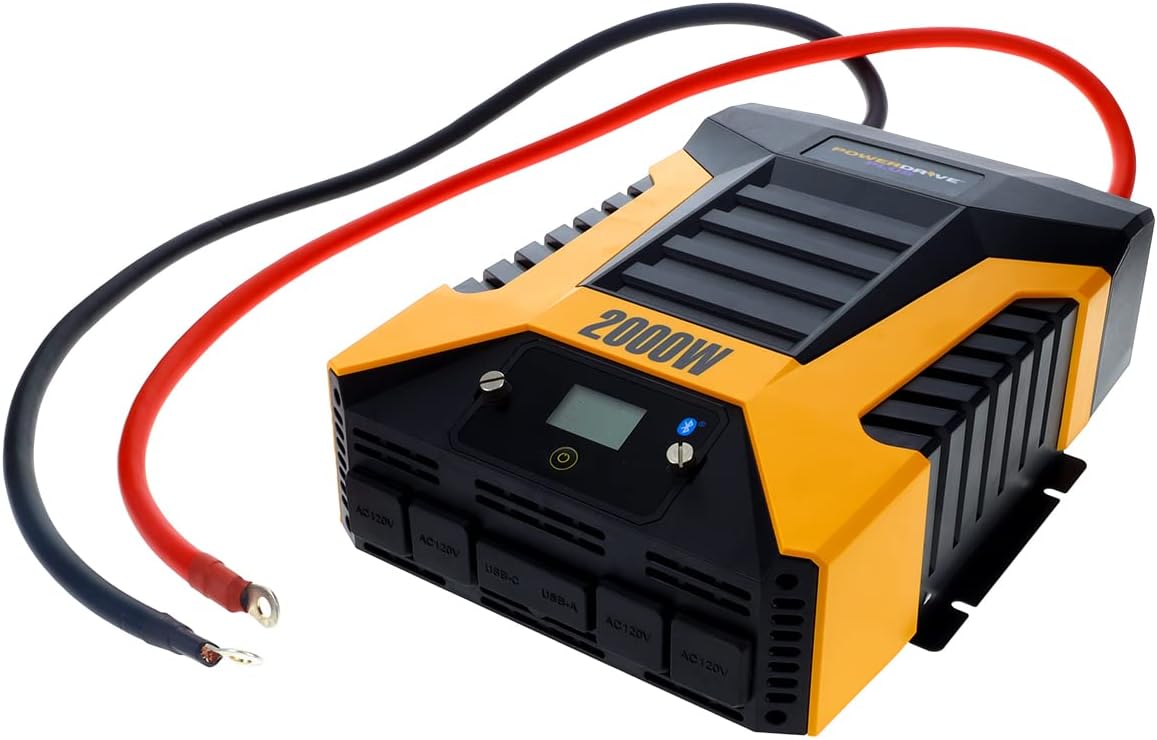
Figura 3: The PowerDrive 2000 Watt Power Inverter with the red positive and black negative battery cables securely connected to its terminals, ready for connection to a vehicle battery. This illustrates the correct cable attachment for power input.
Instruções de operação
Once installed, the inverter is ready for operation:
- Ligando: Press the power button on the inverter's front panel or on the remote LCD screen. The digital display will illuminate, showing battery voltage e saída wattage.
- Dispositivos de conexão: Plug your AC devices into the four 3-prong AC outlets. For charging smartphones and tablets, use the standard USB 2.4 Amp port or the fast-charging USB-C 3.0 Amp porta.
- Monitoramento: The digital display provides real-time information on battery voltage, output power (watts), and any error codes.
- Tecnologia sem fio Bluetooth:
- Baixe o grátis PowerDrive Plus app from your smartphone's app store (compatible with Android and iOS).
- Enable Bluetooth on your smartphone and pair it with the inverter.
- The app allows you to remotely monitor battery voltage, output power, and product temperature. You can also set up protections like undervoltage and overload, and power the inverter on/off from a distance.
- Desligando: Press and hold the power button until the display turns off, or use the PowerDrive Plus app. Disconnect devices before turning off the inverter.

Figura 4: Close-up frontal view of the PowerDrive 2000 Watt Power Inverter, highlighting its four AC 120V outlets, one USB-C port, and one USB-A port. These ports provide versatile power options for various electronic devices and appliances.

Figura 5: A smartphone screen showing the PowerDrive Plus application interface. The app displays real-time data such as output power (842 watts), battery power percentage (88%), battery voltage (12.6 VDC), and output voltage (120 VAC), along with temperature readings and control options.
Manutenção
To ensure the longevity and optimal performance of your PowerDrive inverter, follow these maintenance guidelines:
- Mantenha limpo: Limpe regularmente a parte externa do inversor com um pano seco e macio. Não use produtos de limpeza líquidos ou solventes.
- Ventilação: Ensure the cooling fan vents are clear of dust and debris. The high-speed cooling fan automatically activates when needed and is designed for quiet operation.
- Conexões de cabo: Periodically check that all cable connections to the battery and inverter terminals are secure and free from corrosion.
- Armazenar: When not in use for extended periods, store the inverter in a cool, dry place, disconnected from the battery.

Figura 6: Traseira view of the PowerDrive 2000 Watt Power Inverter, showcasing its two high-speed cooling fans and the robust battery input terminals. Proper airflow through these fans is essential for maintaining optimal operating temperature.
Solução de problemas
Se você encontrar problemas com seu inversor, consulte os problemas comuns e suas soluções a seguir:
| Problema | Possível causa | Solução |
|---|---|---|
| Sem saída de energia / Inversor não liga |
|
|
| O inversor desliga com frequência. |
|
|
| Digital display shows error code | Specific error condition (e.g., over-voltage, sub-voltage, overload, short circuit) | Refer to the PowerDrive Plus app or contact customer support for specific error code interpretations and solutions. Address the underlying issue (e.g., reduce load, check battery). |
Especificações do produto
| Recurso | Detalhe |
|---|---|
| Marca | Acionamento elétrico |
| Número do modelo | PWD2000P |
| Potência Contínua | 2000 Watts |
| Potência de surto | 4000 Watts |
| Vol de entradatage | 12 V CC |
| Volume de saídatage | 110 V CA |
| Tomadas AC | Four 3-prong outlets |
| Portas USB | 2.4 um USB Amp, One USB-C 3.0 Amp |
| Conectividade | Bluetooth Wireless Technology (PowerDrive Plus App compatible) |
| Mostrar | Digital display (removable LCD screen) |
| Resfriamento | Ventilador de refrigeração de alta velocidade |
| Peso do item | 9 libras |
| Dimensões do produto | 5.7 x 17 x 12 polegadas |
Garantia e Suporte
For warranty information, technical support, or service inquiries, please contact PowerDrive customer service. Keep your purchase receipt as proof of purchase.
For additional resources and frequently asked questions, visit the official PowerDrive website or refer to the PowerDrive Plus app.
Ask a question about this manual
Ask about setup, troubleshooting, compatibility, parts, safety, or missing instructions. Manuals+ will review the question and use this page’s manual context to help answer it.