
Introdução
This manual provides detailed instructions for the safe and efficient operation of the Deviser EP310 PON Power Meter. Please read this manual thoroughly before using the device to ensure proper functionality and to prevent damage.
Produto acimaview
The Deviser EP310 is a specialized power meter designed for Passive Optical Network (PON) systems. It simultaneously measures the power levels of all PON wavelengths (1310nm, 1490nm, and 1550nm), providing essential data for network installation and maintenance. Its features include:
- Power measurement ranges: 1310nm: -45 to +10dBm (BW) / -30 to +8dBm (CW), 1490nm: -45 to +12dBm, 1550nm: -40 to +25dBm.
- Medição simultânea dos comprimentos de onda de 1310 nm, 1490 nm e 1550 nm.
- Pass/Fail analysis with Green/Red light LED indicators for quick result interpretation.
- Supports SC/APC or FC connectors.
- Powered by 2 x AA rechargeable batteries with 5VDC USB charging.
Informações de segurança
Observe sempre as seguintes precauções de segurança para evitar ferimentos ou danos ao dispositivo:
- Não exponha o dispositivo a temperaturas extremas, umidade ou luz solar direta.
- Evite deixar cair ou submeter o dispositivo a impactos fortes.
- Não tente abrir ou reparar o dispositivo por conta própria. Consulte um técnico qualificado.
- Utilize apenas o tipo de bateria e o método de carregamento especificados.
- Keep the optical connector clean to ensure accurate measurements.
Conteúdo da embalagem
Verifique se todos os itens estão presentes na embalagem:
- Deviser EP310 PON Power Meter
- 2 pilhas recarregáveis AA
- 5VDC USB Charger
- Manual do usuário (este documento)
- Soft Carrying Case (may vary by region)
Componentes do dispositivo
Painel de controle
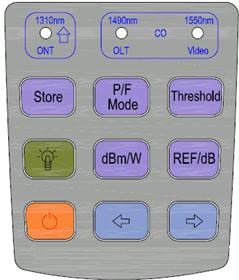
Figura 1: Deviser EP310 PON Power Meter Control Panel. This image displays the button layout and their primary functions, including wavelength selection (1310nm, 1490nm, 1550nm), Store, P/F Mode, Threshold, backlight, dBm/W, REF/dB, Power On/Off, and navigation buttons.
- 1310nm (ONT) / Up Arrow: Selects 1310nm wavelength mode or navigates up/increases value.
- 1490nm (OLT) / CO: Selects 1490nm wavelength mode or CO (Central Office) setting.
- 1550nm (Video): Selects 1550nm wavelength mode or Video setting.
- Loja: Saves current measurement data.
- P/F Mode: Toggles Pass/Fail analysis mode.
- Limite: Sets or adjusts Pass/Fail threshold values.
- Backlight (Lightbulb icon): Activates or deactivates display backlight.
- dBm/W: Switches between dBm and Watt units for power measurement.
- REF/dB: Sets reference power or displays relative dB value.
- Power On/Off (Orange button): Liga ou desliga o dispositivo.
- Seta esquerda: Navigates left or decreases value.
- Seta direita: Navigates right or increases value.
Interface de exibição

Figura 2: Deviser EP310 PON Power Meter Display Interface. This image illustrates the various indicators and data points on the device's screen, including Self Adjustment, Store, Auto Off, Wavelength, Burst indicator, Storage Setting, Reference Power, Threshold Mode, USB Battery indicator, Unit, Measured data, and Threshold Status (Pass/Fail).
- Self Adjustment (Cal): Indicates automatic calibration status.
- Loja: Icon indicating data storage function.
- Desligamento automático: Icon indicating automatic power-off feature is active.
- Wavelength (1310nm, 1550nm, 1490nm): Displays the currently selected or measured wavelengths.
- Burst indicator: Indicates detection of burst signals (for 1310nm ONT).
- Storage Setting (JOB NO): Displays the current job number for stored data.
- Reference Power (REF): Indicates reference power mode.
- Modo Limiar: Indicates that threshold settings are active.
- USB Battery: Battery level indicator and USB charging status.
- Unit (dBm, W): Displays the current measurement unit.
- Threshold Status (Checkmark/X): Green checkmark for Pass, Red X for Fail, based on set thresholds.
Configurar
Instalação e carregamento da bateria
- Abra a tampa do compartimento da bateria na parte traseira do dispositivo.
- Insira as duas pilhas recarregáveis AA, certificando-se da polaridade correta (+/-).
- Feche bem a tampa do compartimento da bateria.
- Connect the 5VDC USB charger to the device's USB port and to a power source to charge the batteries before first use. The battery icon on the display will indicate charging status.
Ligar/desligar
- To power on, press and hold the orange Power On/Off button (Figure 1) until the display illuminates.
- To power off, press and hold the orange Power On/Off button until the display turns off.
Instruções de operação
Connecting to a PON Network
- Ensure the optical connector on the EP310 is clean. Use a suitable fiber optic cleaner if necessary.
- Connect the fiber optic cable from the PON network to the optical input port of the EP310. Ensure a secure connection. The device supports SC/APC or FC connectors.
Tirando medidas
- Ligue o dispositivo.
- The device will automatically begin measuring and displaying power levels for 1310nm, 1490nm, and 1550nm simultaneously (Figure 2).
- To switch between dBm and Watt units, press the dBm/W botão (Figura 1).
- The 1310nm measurement will show a burst indicator if a burst signal from the ONT is detected.
Using Pass/Fail Analysis
- Pressione o P/F Mode button (Figure 1) to activate Pass/Fail analysis.
- To set or adjust thresholds, press the Limite button (Figure 1). Use the arrow keys to navigate and adjust values. Press Limite novamente para confirmar.
- Once thresholds are set, the display will show a green checkmark for "Pass" or a red "X" for "Fail" next to each wavelength measurement (Figure 2).
- The Green/Red light LED on the device will also indicate the overall Pass/Fail status.
Storing Measurement Data
- To store the current measurement data, press the Loja botão (Figura 1).
- The "Store" icon and "JOB NO" on the display (Figure 2) will indicate successful storage and the assigned job number.
- Refer to the device's internal menu (if available, not detailed in provided data) for recalling stored data.
Manutenção
Cleaning the Optical Connector
Regularly clean the optical input port to ensure accurate measurements. Use a specialized fiber optic cleaning tool or lint-free wipes with isopropyl alcohol. Never use abrasive materials.
Cuidados com a bateria
- Recharge batteries when the low battery indicator appears.
- Se o dispositivo não for utilizado por um longo período, remova as pilhas para evitar vazamentos.
- Descarte as baterias usadas de acordo com os regulamentos locais.
Armazenar
Store the device in a cool, dry place, away from direct sunlight and extreme temperatures. Use the provided carrying case to protect it from dust and physical damage.
Solução de problemas
| Problema | Possível causa | Solução |
|---|---|---|
| O dispositivo não liga. | Baterias fracas ou descarregadas; Instalação incorreta da bateria. | Charge or replace batteries; Check battery polarity. |
| Medições imprecisas. | Dirty optical connector; Damaged fiber cable; Incorrect measurement mode. | Clean the optical connector; Inspect and replace fiber cable if damaged; Ensure correct wavelength mode is selected. |
| Pass/Fail LED always red (Fail). | Power levels are outside set thresholds; Incorrect threshold settings. | Verify network power levels; Adjust threshold settings using the Threshold button. |
| A tela está escura ou piscando. | Bateria fraca. | Recarregue as baterias. |
Especificações
| Recurso | Detalhe |
|---|---|
| Marca | Deviser |
| Modelo | EP310 |
| Tipo de medição | Medidor de potência PON |
| Wavelengths Measured | 1310nm, 1490nm, 1550nm (simultaneously) |
| Power Range (1310nm) | -45 to +10dBm (BW), -30 to +8dBm (CW) |
| Power Range (1490nm) | -45 a + 12dBm |
| Power Range (1550nm) | -40 a + 25dBm |
| Tipo de conector | SC/APC or FC |
| Fonte de energia | 2 x AA rechargeable batteries |
| Carregando | 5VDC USB charger |
| Cor | Azul |
| Estilo | Industrial |
Garantia e Suporte
Informações de garantia
This product comes with a standard manufacturer's warranty against defects in materials and workmanship. Please refer to the warranty card included with your purchase or contact your retailer for specific warranty terms and conditions. The warranty does not cover damage caused by misuse, accidents, unauthorized modifications, or improper maintenance.
Suporte ao cliente
For technical assistance, troubleshooting, or service inquiries, please contact your authorized Deviser distributor or retailer. Provide your product model number (EP310) and a detailed description of the issue when seeking support.