
Introdução
Obrigado pela compra.asing the Kisonli G1 Classic Wooden Retro Wireless Bluetooth Speaker. This manual provides essential information for setting up, operating, and maintaining your speaker. Please read it carefully before use and retain it for future reference.
Conteúdo da embalagem
Verifique se todos os itens estão presentes na embalagem:
- Kisonli G1 Bluetooth Speaker (1 unit)
- Cabo de carregamento (USB)
- Cabo de áudio (AUX)
- Manual do usuário
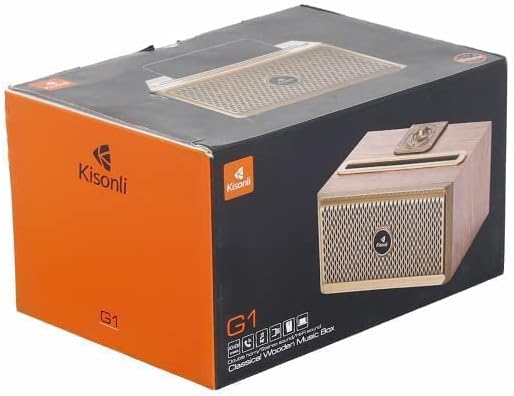
Image: The Kisonli G1 speaker packaging box, showing the speaker and brand logo.
Produto acimaview
Familiarize-se com os componentes e controles da caixa de som.
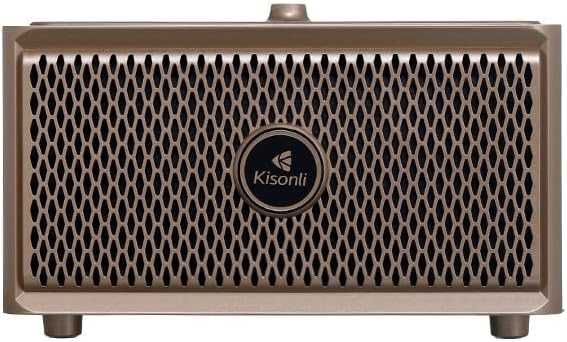
Imagem: Frente view of the Kisonli G1 speaker, showing the speaker grille and Kisonli logo.
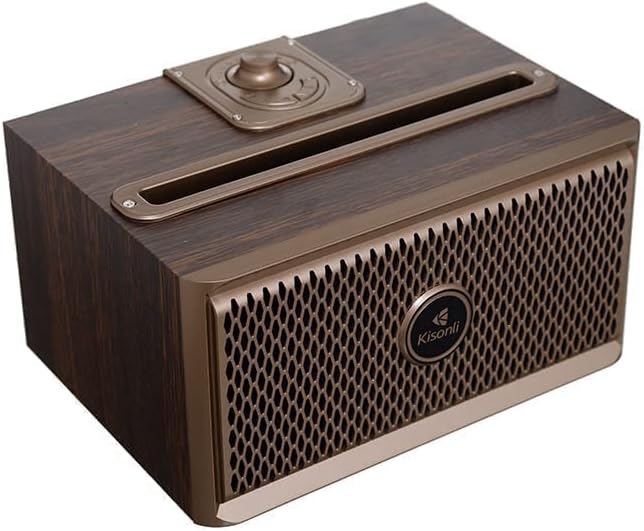
Imagem: Angulada view of the Kisonli G1 speaker, highlighting the top-mounted control knob and slot.

Imagem: Lado view of the Kisonli G1 speaker, displaying the USB, TF card, AUX, and charging ports, along with a control knob.
Controles e portas:
- Botão de potência/volume: Rotate to adjust volume, press and hold to power on/off.
- Botão de modo: Switch between Bluetooth, AUX, USB, and TF card modes.
- Botão Reproduzir/Pausar: Reproduzir ou pausar o áudio. Atender/encerrar chamadas.
- Botões de faixa anterior/próxima: Navegue pelas trilhas.
- Porta USB: Para reprodução a partir de unidade USB.
- Slot para cartão TF: Para reprodução em cartão TF (MicroSD).
- Entrada AUX: Para conexão de áudio com fio.
- Porta de carregamento: Porta micro USB para carregamento.
Configurar
1. Carregando o alto-falante
- Conecte o cabo de carregamento USB fornecido à porta de carregamento da caixa de som.
- Conecte a outra extremidade do cabo USB a um adaptador de alimentação USB (não incluído) ou à porta USB de um computador.
- A luz indicadora de carregamento acenderá durante o carregamento e apagará quando a carga estiver completa.
- A full charge takes approximately 3-4 hours. The battery capacity is 1500 mAh.
2. Ligar / desligar
- Para ligar: Press and hold the Power/Volume knob for a few seconds until you hear an audible prompt.
- Para desligar: Press and hold the Power/Volume knob for a few seconds until you hear an audible prompt.
3. Emparelhamento Bluetooth
- Ensure the speaker is powered on and in Bluetooth mode. If not, press the Mode button to switch to Bluetooth. The Bluetooth indicator light will flash, indicating it is ready for pairing.
- No seu dispositivo móvel (smartphone, tablet, etc.), ative o Bluetooth.
- Procurar available Bluetooth devices. You should see "Kisonli G1" or a similar name in the list.
- Select "Kisonli G1" to connect. Once paired, the speaker will emit a confirmation sound, and the Bluetooth indicator light will stop flashing and remain solid.
- O alto-falante tentará se reconectar automaticamente ao último dispositivo emparelhado ao ser ligado.
4. Conexão AUX/USB/Cartão TF
- Modo AUX: Connect one end of the 3.5mm audio cable to the speaker's AUX input and the other end to your audio device's headphone jack. Press the Mode button to select AUX mode.
- Modo USB: Insert a USB flash drive (with audio files) into the USB port. The speaker will automatically switch to USB mode and begin playback.
- Modo de cartão TF: Insert a TF (MicroSD) card (with audio files) into the TF card slot. The speaker will automatically switch to TF card mode and begin playback.
Instruções de operação
Reprodução de música
- Controle de volume: Rotate the Power/Volume knob clockwise to increase volume, counter-clockwise to decrease.
- Reproduzir/Pausar: Pressione o botão Reproduzir/Pausar para reproduzir ou pausar a faixa atual.
- Próxima faixa: Press the "Next Track" button to skip to the next song.
- Faixa anterior: Press the "Previous Track" button to go back to the beginning of the current song or to the previous song.
Chamada viva-voz
- Quando uma chamada for recebida enquanto a conexão for feita via Bluetooth, a música será pausada.
- Atender chamada: Press the Play/Pause button once to answer the incoming call.
- Encerrar chamada: Pressione o botão Reproduzir/Pausar uma vez durante a chamada para encerrá-la.
- Rejeitar chamada: Pressione e mantenha pressionado o botão Reproduzir/Pausar por 2 segundos para rejeitar uma chamada recebida.
Radio Function (if applicable)
The product specifications mention "Radio and Speaker" as included components. If your unit includes an FM radio function:
- Pressione o botão Mode para alternar para o modo de rádio FM.
- Press the Play/Pause button to auto-scan and save available radio stations.
- Use the Previous/Next Track buttons to navigate between saved stations.
Manutenção
- Limpeza: Limpe o alto-falante com um pano macio e seco. Não use produtos de limpeza abrasivos ou solventes.
- Armazenar: Guarde a caixa de som em local fresco e seco, longe da luz solar direta e de temperaturas extremas.
- Resistência à água: The speaker is water-resistant. However, avoid submerging it in water or exposing it to heavy rain for extended periods. Ensure all ports are dry before charging.
- Cuidados com a bateria: Para prolongar a vida útil da bateria, carregue totalmente a caixa de som antes da primeira utilização e recarregue-a pelo menos uma vez a cada três meses, caso não a utilize regularmente.
Solução de problemas
| Problema | Solução |
|---|---|
| A caixa de som não liga. | Certifique-se de que a caixa de som esteja carregada. Conecte-a a uma fonte de energia usando o cabo USB. |
| Não foi possível emparelhar via Bluetooth. |
|
| Nenhum som. |
|
| Má qualidade de som. |
|
Especificações
| Número do modelo | QUN-047 |
| Marca | Kisonli |
| Material | Plastic (with wooden aesthetic) |
| Tecnologia de Conectividade | Bluetooth, USB, Auxiliar |
| Comunicação sem fio | Bluetooth |
| Fonte de energia | Alimentado por bateria |
| Capacidade da bateria | 1500 mAh |
| Dispositivos compatíveis | Tablet, Smartphone |
| Cor | Marrom |
| Peso do item | 1 quilogramas |
| Resistente à água | Sim |
| Resposta de frequência | Até 20 kHz |
| Modo de saída de áudio | Surround (Simulated) |
| Tipo de montagem | Mesa |
| Características especiais | Wireless, Hands-free Calling, USB/TF Card Playback, Radio Function |
| Dimensões (Pacote) | 22.8 x 15.7 x 13 cm |
Garantia e Suporte
This Kisonli G1 speaker comes with a Full Warranty. For warranty claims or technical support, please contact your retailer or the Kisonli customer service department. Keep your purchase receipt as proof of purchase.
For further assistance, please refer to the contact information provided on the product packaging or the official Kisonli website.