
WANGCL IND26864
WANGCL Multimeter LCD Digital USB Tester User Manual
Modelo: IND26864 | Marca: WANGCL
1. Introdução
The WANGCL Multimeter LCD Digital USB Tester is a versatile diagnostic tool designed for monitoring and testing various electrical parameters of electronic devices. It is capable of measuring voltage, current, power, resistance, and capacity, making it ideal for assessing the performance of mobile phone chargers, data cables, and mobile power supplies. This device provides real-time data to help identify and troubleshoot charging issues.

Figura 1.1: Frente view of the WANGCL Multimeter LCD Digital USB Tester, displaying its color screen and various input/output ports.
2. Informações de segurança
Please read all safety instructions carefully before using the device. Failure to follow these instructions may result in electric shock, fire, or damage to the device or connected equipment.
- Fonte de energia: Always use a compliant and stable power supply. Ensure the input voltage and current do not exceed the device's specified limits.
- Temperatura: Avoid exposing the device to extreme heat or direct sunlight. Operate within the specified temperature range (0~80°C).
- Ventilação: Assegure-se de que haja ventilação adequada ao redor do dispositivo durante o funcionamento para evitar superaquecimento.
- Umidade: Mantenha o dispositivo seco. Não o exponha à água ou outros líquidos.
- Manuseio: Manuseie o dispositivo com cuidado. Evite deixá-lo cair ou submetê-lo a impactos fortes.
- Desmontagem: Não tente desmontar, reparar ou modificar o dispositivo. Encaminhe todos os serviços de manutenção a pessoal qualificado.
- Conexão: Ensure all connections are secure and correct before applying power. Incorrect connections can cause damage.
Note: This safety information is derived from standard product safety guidelines and typical product packaging warnings.
3. Recursos do Produto
The WANGCL Multimeter LCD Digital USB Tester offers a comprehensive set of features for detailed electrical analysis:
- Ampla aplicação: Suitable for testing mobile phone chargers, data cables, and mobile power supplies.
- Monitoramento em tempo real: Continuously monitors charging parameters of electronic devices.
- Múltiplas interfaces: Equipped with 8 types of interfaces for broad compatibility:
- Type-C male input
- Type-C female input
- Type-C female chassis output
- 5525/5521 female input
- 5525/5521 male output
- USB3.0 male input
- USB3.0 female header output
- Micro USB
- Conectividade Bluetooth: Supports Bluetooth remote control for setting and measuring via a mobile phone application.
- Multifunctional Protections: Includes overload protection, power-off memory, timer charging, and battery full power-off functions.
- Tela colorida: Features a 1.8-inch 128*160 color screen for clear display of data.
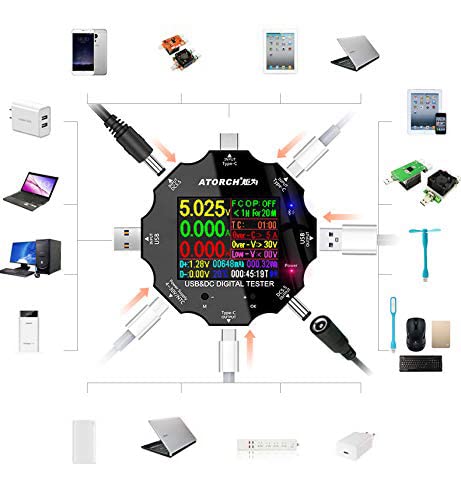
Figure 3.1: Diagram illustrating the various input and output interfaces of the USB tester and its broad compatibility with different devices.
4. Especificações
| Parâmetro | Valor |
|---|---|
| Volumetage Faixa de Medição | 3.60 V~32.00 V |
| Faixa de Medição Atual | 0.00~5.10A |
| USB Load Limit | 5V 1A/2A/3A (Max 15W) |
| Capacity/Power Accumulation Range | 0~99999mAh / 0~999.99Wh |
| Faixa de medição de potência | 000.00~163.00W |
| Faixa de medição de impedância | 1~999.9Ω |
| Faixa de medição de temperatura | 0~80°C |
| Intervalo de tempo | 999 horas 59 minutos 59 segundos |
| Interfaces de entrada | Type-C / Micro USB / USB / DC5.5 |
| USB D+ D- Voltage Alcance | 0 V~2.99 V |
| Tipo de tela | 1.8 inches 128*160 color screen |
| Self-consumption Current | <0.025A |
| Temperatura de operação | -10~+60°C |
| Dimensões | 6.2 x 6.2 x 1.4 cm |
| Peso do item | 65 g |
5. Configuração
Follow these steps to set up your WANGCL USB Tester for first use:
- Desembalagem: Carefully remove the USB tester from its packaging. Inspect the device for any signs of damage.
- Inicialização do sistema: Connect the tester to a USB power source (e.g., a wall charger, power bank, or computer USB port) using one of its input interfaces (Type-C, Micro USB, or USB). The screen should light up, displaying the current measurements.
- Familiarize-se com os controles: Locate the physical buttons on the device. These are typically used for navigating menus and changing display modes.
6. Instruções de operação
The USB tester is designed for straightforward operation. Here are the basic steps for common measurements:
- Conecte a fonte de alimentação: Plug the tester's input port (e.g., USB-A male, Type-C male) into your power source (e.g., wall charger, power bank, computer USB port).
- Conectar o dispositivo em teste: Plug the device you wish to test (e.g., smartphone, tablet, USB fan) into one of the tester's output ports (e.g., USB-A female, Type-C female).
- Leia as medidas: The color screen will immediately display real-time measurements such as voltage (V), current (A), power (W), accumulated capacity (mAh), and accumulated energy (Wh).
- Navigate Display Modes: Use the physical buttons (usually labeled 'M' for Mode and 'OK' or '+' for selection/next) to cycle through different display screens or measurement parameters. This may include detailed views of D+/D- voltage, temperature, timing, and impedance.
- Redefinir dados: To clear accumulated capacity and energy data, typically press and hold a specific button (refer to on-screen prompts or specific model instructions if available) while on the main display.
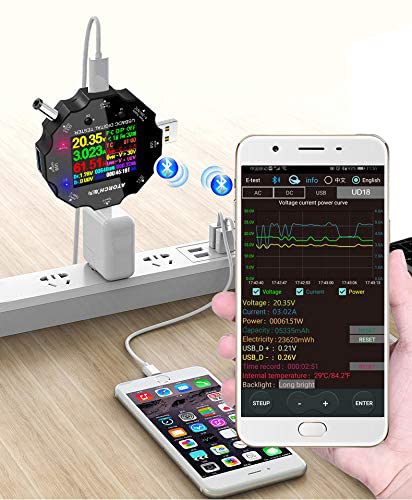
Figure 6.1: The USB tester actively measuring power flow between a wall charger and a mobile phone, with Bluetooth enabled.
7. Bluetooth Connectivity and Mobile App
The WANGCL USB Tester supports Bluetooth connectivity, allowing you to monitor and control the device remotely via a dedicated mobile application. This feature provides a more detailed view of data and additional control options.
- Baixe o aplicativo: Procurar the "E_Test" application in your mobile device's app store (e.g., Apple App Store for iOS, Google Play Store for Android). Download and install the application.
- Ativar Bluetooth: Certifique-se de que o Bluetooth esteja ativado em seu dispositivo móvel.
- Power On Tester: Connect the USB tester to a power source to turn it on.
- Emparelhamento: Open the "E_Test" app. The app should automatically detect nearby WANGCL USB testers. Select your device from the list to initiate pairing. Follow any on-screen prompts within the app to complete the connection.
- Dados do monitor: Uma vez conectado, você pode view real-time data, historical graphs, and adjust settings directly from your mobile phone.
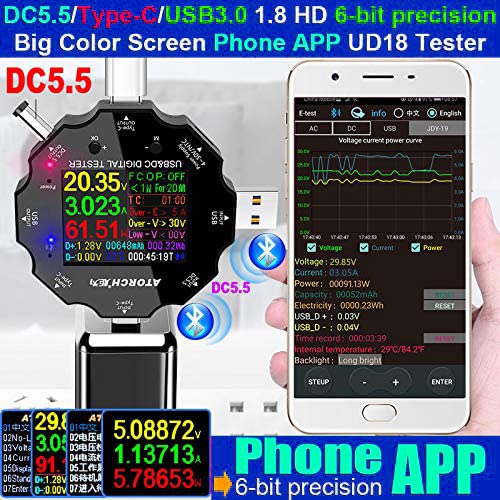
Figure 7.1: The USB tester displaying data on its screen while simultaneously transmitting data to a connected smartphone app for detailed analysis.
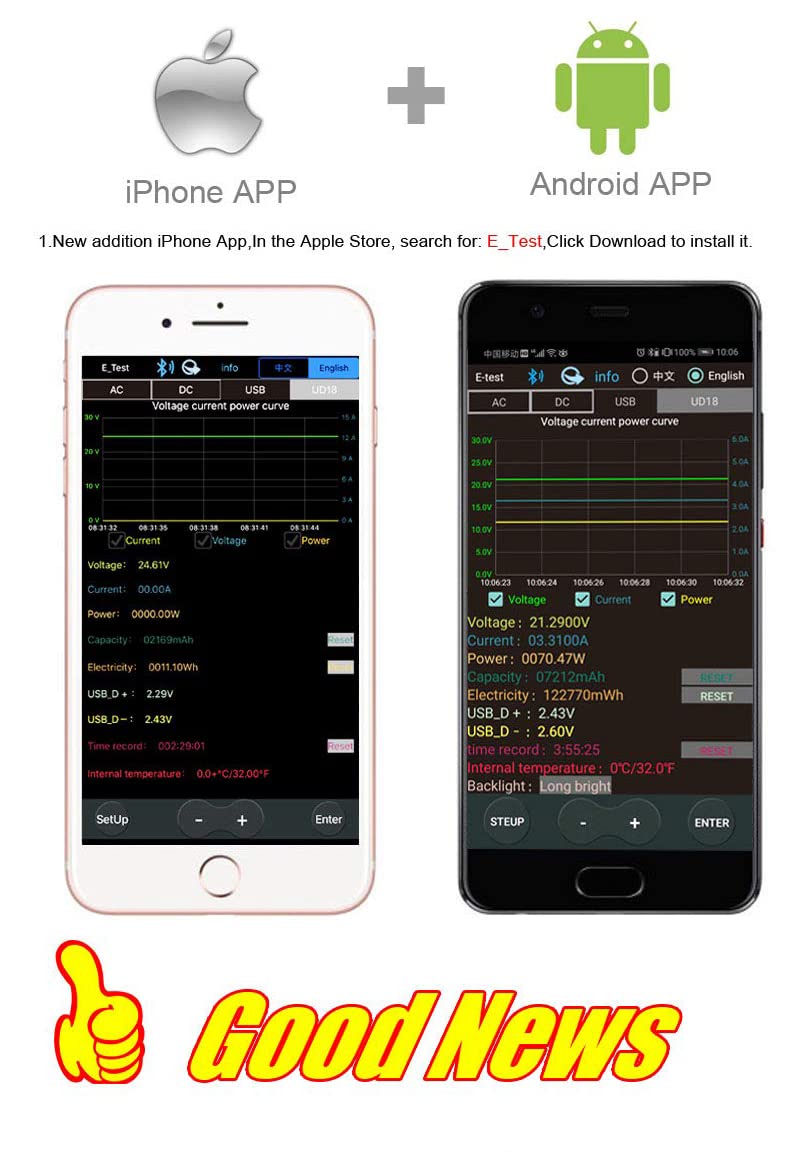
Figure 7.2: Screenshots of the "E_Test" application interface on both iPhone and Android devices, showing similar data display capabilities.
8. Manutenção
Proper maintenance ensures the longevity and accuracy of your WANGCL USB Tester:
- Limpeza: Use a soft, dry cloth to clean the device. Do not use abrasive cleaners, solvents, or harsh chemicals.
- Armazenar: Guarde o dispositivo em local fresco e seco, longe da luz solar direta, temperaturas extremas e alta umidade.
- Manuseio: Evite deixar o dispositivo cair ou submetê-lo a vibrações fortes.
- Cuidados portuários: Keep the USB and other ports free from dust and debris.
9. Solução De Problemas
If you encounter issues with your WANGCL USB Tester, refer to the following common problems and solutions:
| Problema | Possível causa/solução |
|---|---|
| O dispositivo não liga. |
|
| No readings displayed. |
|
| A conexão Bluetooth falha. |
|
| Leituras imprecisas. |
|
10. Garantia e Suporte
WANGCL is committed to providing quality products. For specific warranty details and support, please refer to your purchase documentation or contact the seller directly.
- Política de devolução: This product typically comes with a 30-day return policy from the date of purchase. Please check the specific terms and conditions of your retailer.
- Suporte técnico: For technical assistance, troubleshooting beyond this manual, or warranty claims, please contact the seller, WANGCL EU, through the Amazon messaging system or the platform where the product was purchased.
Documentos relacionados - IND26864
 |
Manual do usuário do multímetro ANENG M127 / M128 Manual do usuário completo para os multímetros portáteis inteligentes ANENG M127 e M128, detalhando recursos, funções e instruções de operação. |
 |
Manual de Instruções do Multímetro Digital ANENG AN8205C Manual de instruções completo para o multímetro digital ANENG AN8205C, abrangendo informações de segurança, especificações, instruções de operação para diversas medições e manutenção. |
 |
VICTOR 615B Digital Clamp Manual do usuário do multímetro Comprehensive user manual for the VICTOR 615B Digital Clamp Multimeter and High-Voltage Test Socket, detailing specifications, operation, safety precautions, and technical characteristics for accurate electrical measurements. |
 |
Manual do usuário do multímetro digital inteligente ANENG 621A Manual do usuário do multímetro digital inteligente ANENG 621A, detalhando suas características, especificações técnicas, instruções de operação e manutenção. |
 |
Guia de início rápido do multímetro digital MASTECH MY74 | Medições precisas Comece rapidamente com o Multímetro Digital MASTECH MY74. Este guia aborda configuração, segurança e especificações para medições precisas de volume.tage, medições de corrente, resistência, capacitância, frequência e temperatura. |
 |
Guia de Início Rápido do Multímetro Digital Tipo Caneta MASTECH MS8211D Um guia de início rápido para o multímetro digital tipo caneta MASTECH MS8211D, fornecendo informações essenciais de segurança, especificações técnicas e instruções básicas de operação para medição de volumes.tage, testes de corrente, resistência e lógica. |
Ask a question about this manual
Ask about setup, troubleshooting, compatibility, parts, safety, or missing instructions. Manuals+ will review the question and use this page’s manual context to help answer it.