
Introdução
The Docooler Bone Conduction Speaker is a compact, portable audio device designed to transform various surfaces into sound-producing diaphragms. Utilizing bone conduction technology, it offers a unique audio experience with enhanced bass and volume depending on the surface it is placed upon. This manual provides essential information for the safe and effective use of your speaker.
Informações de segurança
Leia e siga estas diretrizes de segurança para evitar danos ao dispositivo ou ferimentos pessoais:
- Não exponha o alto-falante a temperaturas extremas ou à luz solar direta.
- Evite deixar cair ou submeter o dispositivo a impactos fortes.
- Keep the speaker away from water and liquids, as it is not waterproof.
- Não tente desmontar, reparar ou modificar o dispositivo. Isso anulará a garantia.
- Utilize apenas o cabo de carregamento fornecido e um adaptador de energia compatível.
- Evite ouvir em volumes altos por períodos prolongados para prevenir danos à audição.
Conteúdo da embalagem
Verifique se todos os itens estão presentes no seu pacote:
- Docooler Bone Conduction Speaker (1 unit)
- Cabo de carregamento USB tipo C (1 unidade)
- Manual do usuário (este documento)
- Adhesive Pads / Suction Cup (for mounting)
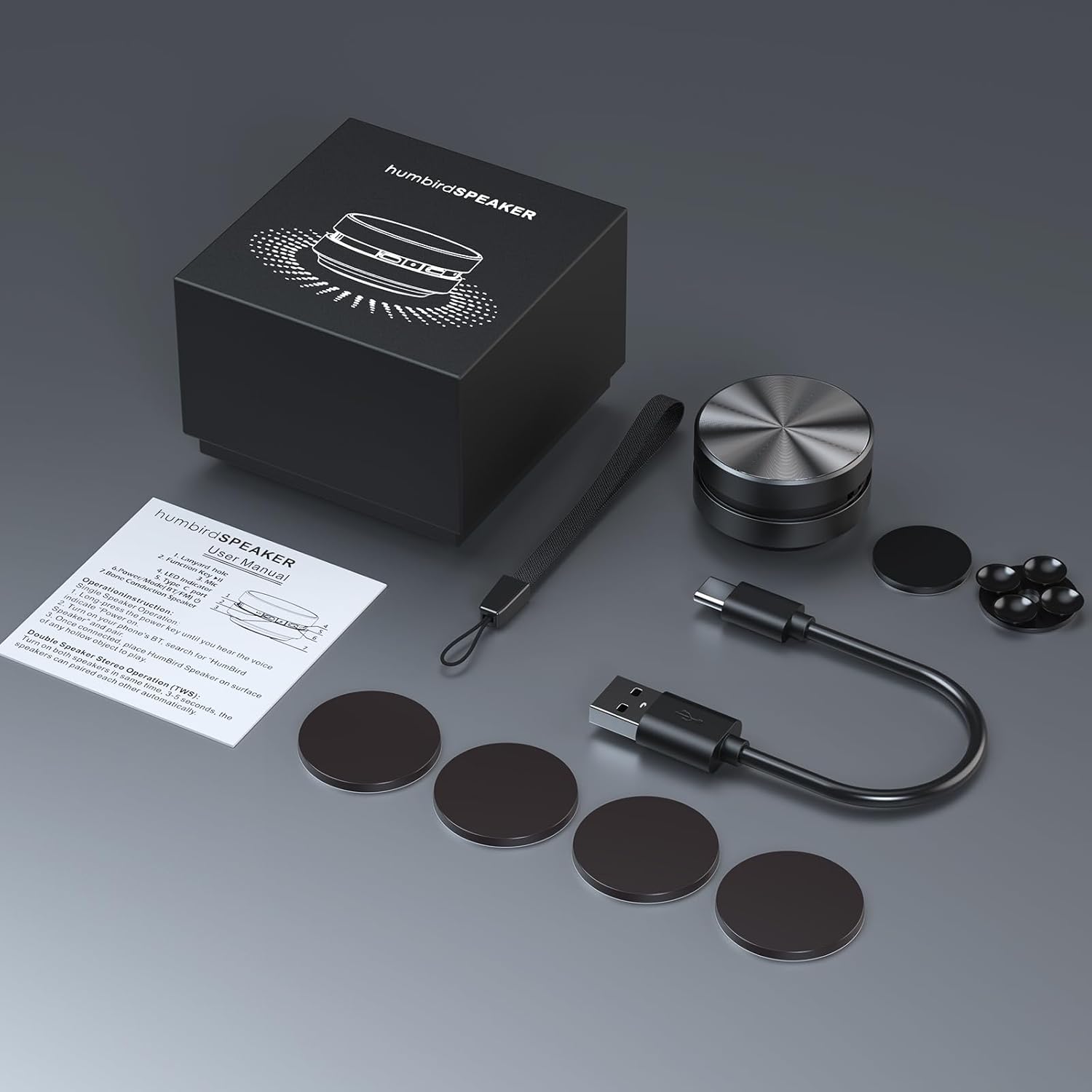
Image: Contents of the Docooler Bone Conduction Speaker package, showing the speaker, charging cable, and various adhesive pads for mounting.
Produto acimaview
The Docooler Bone Conduction Speaker is a compact device with a minimalist design. It features a durable aluminum alloy casing and a Type-C charging port. The speaker utilizes Bluetooth 5.0 for wireless connectivity and supports True Wireless Stereo (TWS) pairing for an enhanced audio experience.

Imagem: Frente view of the Docooler Bone Conduction Speaker, highlighting its key features such as Bone Conduction technology, Bluetooth 5.0, TWS, Type-C Charging Port, Fast Charge, and Aviation Aluminum Alloy construction.
Configurar
1. Carregando o alto-falante
- Conecte o cabo USB Type-C fornecido à porta de carregamento da caixa de som.
- Plug the other end of the cable into a compatible USB power source (e.g., wall adapter, computer USB port).
- A luz indicadora mostrará o status do carregamento (consulte a seção do indicador LED para obter detalhes).
- Uma carga completa normalmente leva de 1 a 2 horas.
2. Bluetooth Pairing (Single Speaker)
- Press and hold the power button on the speaker until the indicator light flashes, indicating pairing mode.
- No seu smartphone ou outro dispositivo com Bluetooth, ative o Bluetooth e procure por dispositivos disponíveis.
- Select "Humbird Speaker" (or similar name) from the list of devices.
- Once connected, the indicator light will remain solid, and you will hear a confirmation tone.
3. True Wireless Stereo (TWS) Pairing (Two Speakers)
For a stereo sound experience, you can pair two Docooler Bone Conduction Speakers together:
- Certifique-se de que ambas as caixas de som estejam totalmente carregadas e desligadas.
- Power on both speakers simultaneously. They will automatically attempt to pair with each other within 3-5 seconds.
- Once successfully paired, one speaker will act as the master (left channel) and the other as the slave (right channel). The indicator lights will reflect their connected status.
- Now, connect your smartphone or Bluetooth device to the master speaker as described in the "Bluetooth Pairing (Single Speaker)" section.

Image: Two Docooler Bone Conduction Speakers positioned for True Wireless Stereo (TWS) pairing, demonstrating their ability to create a wider soundstage.
Instruções de operação
1. Ligar/desligar
- Ligar: Pressione e segure o botão liga/desliga por aproximadamente 3 segundos.
- Desligar: Pressione e segure o botão liga/desliga por aproximadamente 3 segundos.
2. Controle de reprodução
- Reproduzir/Pausar: Pressione rapidamente o botão liga / desliga uma vez.
- Próxima faixa: Pressione duas vezes o botão liga/desliga.
- Faixa anterior: Triple-press the power button.
3. Ajuste de volume
Volume is primarily controlled via your connected Bluetooth device (smartphone, tablet, etc.). The speaker itself does not have dedicated volume buttons.
4. Using with Different Surfaces
The unique feature of this bone conduction speaker is its ability to use various surfaces as sound amplifiers. Experiment with different materials to discover unique sound profiles:
- Hollow Objects: Cardboard boxes, plastic containers, or hollow wooden surfaces often produce a fuller sound with enhanced bass.
- Superfícies de vidro: Windows or glass tables can create a clear, crisp sound.
- Superfícies de madeira: Desks, guitars, or wooden panels can offer a warm, resonant tone.
- Car Dashboards: Can provide an immersive in-car audio experience.
Use the included adhesive pads or suction cup to securely attach the speaker to your chosen surface. The sound quality will vary significantly based on the material, size, and hollowness of the surface.

Image: The bone conduction speaker demonstrated on different surfaces, including a guitar, a kitchen countertop, a mirror, and a car dashboard, illustrating its versatility in sound production.
Manutenção
To ensure the longevity and optimal performance of your Docooler Bone Conduction Speaker, follow these maintenance tips:
- Limpeza: Wipe the speaker with a soft, dry cloth. Do not use abrasive cleaners, alcohol, or solvents.
- Armazenar: Guarde a caixa de som em local fresco e seco, longe da luz solar direta e de temperaturas extremas quando não estiver em uso.
- Cuidados com a bateria: For best battery life, avoid fully discharging the speaker frequently. Charge it regularly, even if not used for extended periods.
Solução de problemas
| Problema | Solução possível |
|---|---|
| A caixa de som não liga. | Certifique-se de que a caixa de som esteja totalmente carregada. Conecte-a a uma fonte de energia e tente novamente. |
| Não foi possível emparelhar via Bluetooth. | Make sure the speaker is in pairing mode (flashing indicator light). Turn off and on Bluetooth on your device. Ensure the speaker is within range (up to 10 meters). |
| Sem som ou volume muito baixo. | Increase the volume on your connected device. Ensure the speaker is placed on a suitable surface. Try a different surface. Check if the speaker is properly connected. |
| O emparelhamento TWS falhou. | Ensure both speakers are powered off before attempting TWS pairing. Power them on simultaneously and wait for automatic pairing. Disconnect any existing Bluetooth connections before TWS pairing. |
| A qualidade do som é ruim. | Experiment with different surfaces. Hollow and resonant surfaces generally yield better results. Ensure the speaker is securely attached to the surface. |
Especificações
| Recurso | Detalhe |
|---|---|
| Nome do modelo | Alto-falante de condução óssea |
| Número do modelo | RM |
| Marca | Docooler |
| Material | Alumínio |
| Dimensões do produto | 2.76"P x 2.76"L x 1.97"A |
| Peso do item | 4.6 onças (0.13 quilogramas) |
| Tecnologia de Conectividade | Bluetooth |
| Alcance Bluetooth | 10 metros |
| Modo de saída de áudio | Estéreo (com emparelhamento TWS) |
| Potência máxima de saída do alto-falante | 3 Watts |
| Resposta de frequência | 20 kHz |
| Sinal-Ruído | 70 dB |
| Fonte de energia | Alimentado por bateria |
| Capacidade da bateria | 400 Miliamp Horas |
| Método de controle | App (implied by product data, but primary control is physical buttons) |
| É à prova d'água | FALSO |
Garantia e Suporte
The Docooler Bone Conduction Speaker comes with a limited warranty. For specific warranty details, please refer to the documentation included with your purchase or contact Docooler customer service.
If you encounter any issues or have questions not covered in this manual, please contact Docooler customer support through their official channels. Contact information can typically be found on the product packaging or the official Docooler website.