
1. Introdução
This manual provides essential information and instructions for the safe and efficient use of your Blackview BV7200 Rugged Smartphone. The BV7200 is designed for durability and performance in challenging environments, featuring advanced water and dust resistance, a powerful processor, and a high-capacity battery.
Os principais recursos incluem:
- IP68 & IP69K Certification: Advanced water and dust resistance for outdoor and demanding conditions.
- Processador MediaTek Helio G85: Ensures smooth performance for gaming, multitasking, and general use.
- 50MP Dual Camera: Capture high-quality photos, even in low-light conditions.
- Bateria de 5180mAh: Long-lasting power with 18W fast charging support.
- 6.1-inch HD+ Display: Durable screen with Corning Gorilla Glass 3, optimized for comfortable viewindo.
- Modo Luva: Allows screen operation even when wearing gloves.

Imagem: Acimaview do Negroview BV7200 Rugged Smartphone, highlighting its MediaTek Helio G85 processor, 50MP camera, IP68/IP69K ratings, 5180mAh battery, 6.1-inch display, and Glove Mode.
2. Configuração
2.1. Instalação do cartão SIM e do cartão microSD
Para instalar seu(s) cartão(ões) SIM e/ou cartão MicroSD:
- Localize a bandeja do SIM na lateral do aparelho.
- Utilize a ferramenta de ejeção do SIM fornecida para abrir a bandeja.
- Carefully place your Nano-SIM card(s) and/or MicroSD card into the designated slots, ensuring correct orientation.
- Empurre suavemente a bandeja de volta para dentro do dispositivo até que ela se encaixe no lugar.
2.2. Carregamento inicial e inicialização
Antes da primeira utilização, recomenda-se carregar totalmente o dispositivo.
- Connect the USB Type-C cable to the charging port at the bottom of the phone. Ensure the port cap is securely opened before inserting the cable and closed after charging to maintain water resistance.
- Conecte a outra extremidade do cabo a um adaptador de energia compatível e ligue-o a uma tomada de parede.
- Once sufficiently charged, press and hold the Power button (usually on the right side) for a few seconds until the Blackview O logotipo aparece.
- Siga as instruções na tela para concluir a configuração inicial, incluindo a seleção do idioma, a conexão Wi-Fi e a configuração da conta do Google.
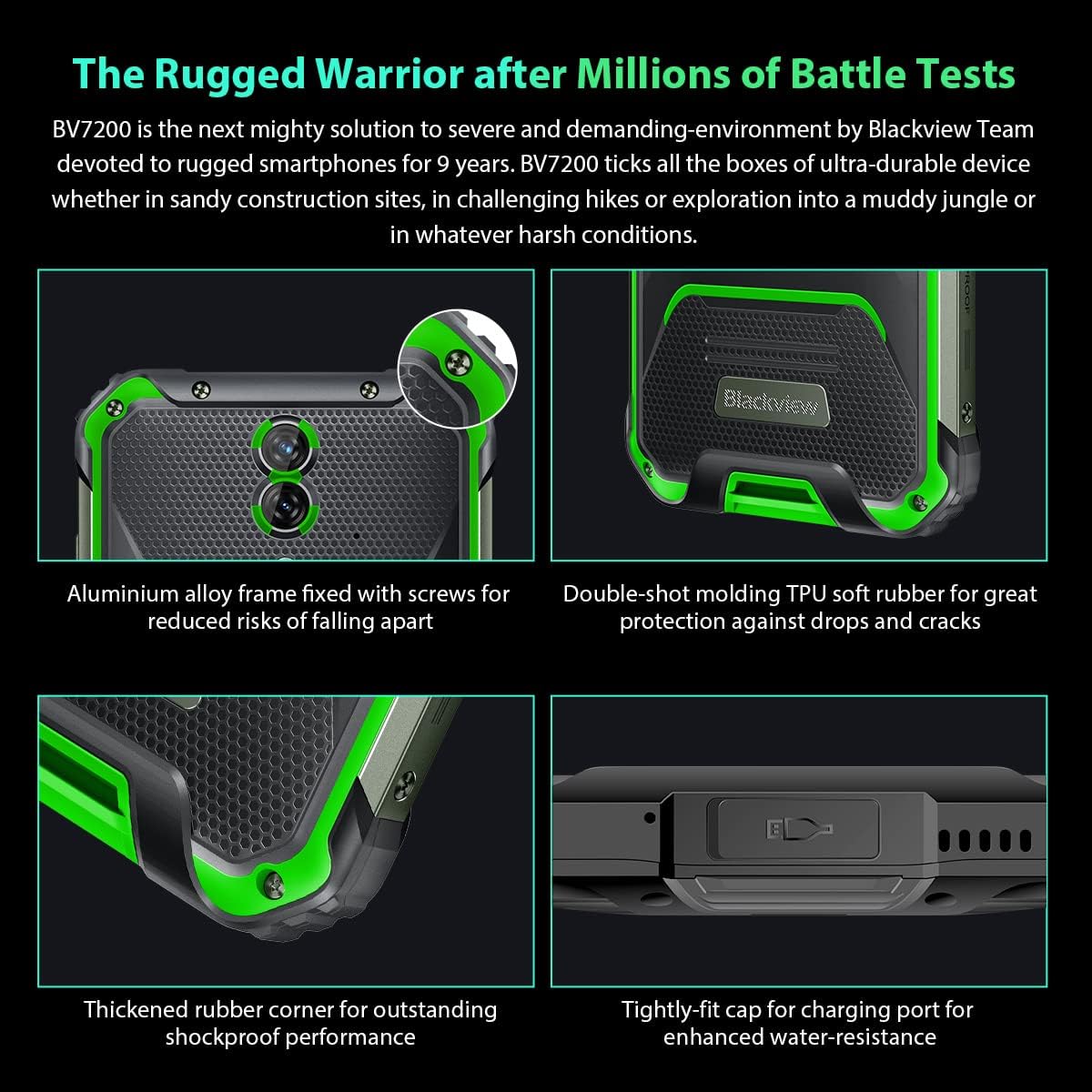
Imagem: Close-up views of the Blackview BV7200's rugged construction, including aluminum alloy frame, double-shot molding TPU rubber, thickened rubber corners, and the tightly-fit cap for the charging port, emphasizing its durability and water resistance.
3. Instruções de operação
3.1. Navegação Básica
O Pretoview BV7200 operates on Doke OS 3.0, based on Android 12. Use touch gestures for navigation:
- Tocar: Selecione um item ou abra um aplicativo.
- Deslize: Percorra as telas ou listas.
- Pitada: Aumente ou diminua o zoom nas imagens e web páginas.
- Pressão longa: Aceda aos menus contextuais ou mova os ícones da aplicação.
3.2. Uso da câmera
The BV7200 features a 50MP main rear camera and an 8MP ultra-wide/macro rear camera.
- Abra o aplicativo Câmera na sua tela inicial ou na gaveta de aplicativos.
- Select your desired mode (Photo, Video, Portrait, Pro, etc.).
- Toque na tela para focar em uma área específica.
- Pressione o botão do obturador para tirar uma foto ou iniciar/parar a gravação de vídeo.

Image: Diagram illustrating the Blackview BV7200's 50MP Samsung ISOCELL JN1 main rear camera, 8MP ultra-wide and ultra-macro rear camera, and rear flash, highlighting its photographic capabilities.
3.3. Modo Luva
The BV7200 supports Glove Mode, allowing you to operate the touchscreen while wearing gloves.
- To activate/deactivate Glove Mode, navigate to Settings > Smart Assistant > Glove Mode.
- Ensure this mode is enabled when using gloves for optimal touch responsiveness.

Image: Collage demonstrating the Blackview BV7200's Glove Mode in various scenarios, showing users operating the phone while wearing different types of gloves, emphasizing its utility in cold or industrial environments.
3.4. Water and Dust Resistance (IP68 & IP69K)
The BV7200 is certified IP68 and IP69K, making it resistant to water immersion and high-pressure water jets. This allows for use in aquatic sports or dusty environments.
- Always ensure all port caps (charging port, SIM tray) are securely closed before exposing the device to water or dust.
- Rinse the phone with clean water after exposure to saltwater or chemicals.
- Do not charge the phone if the charging port is wet. Allow it to dry completely.
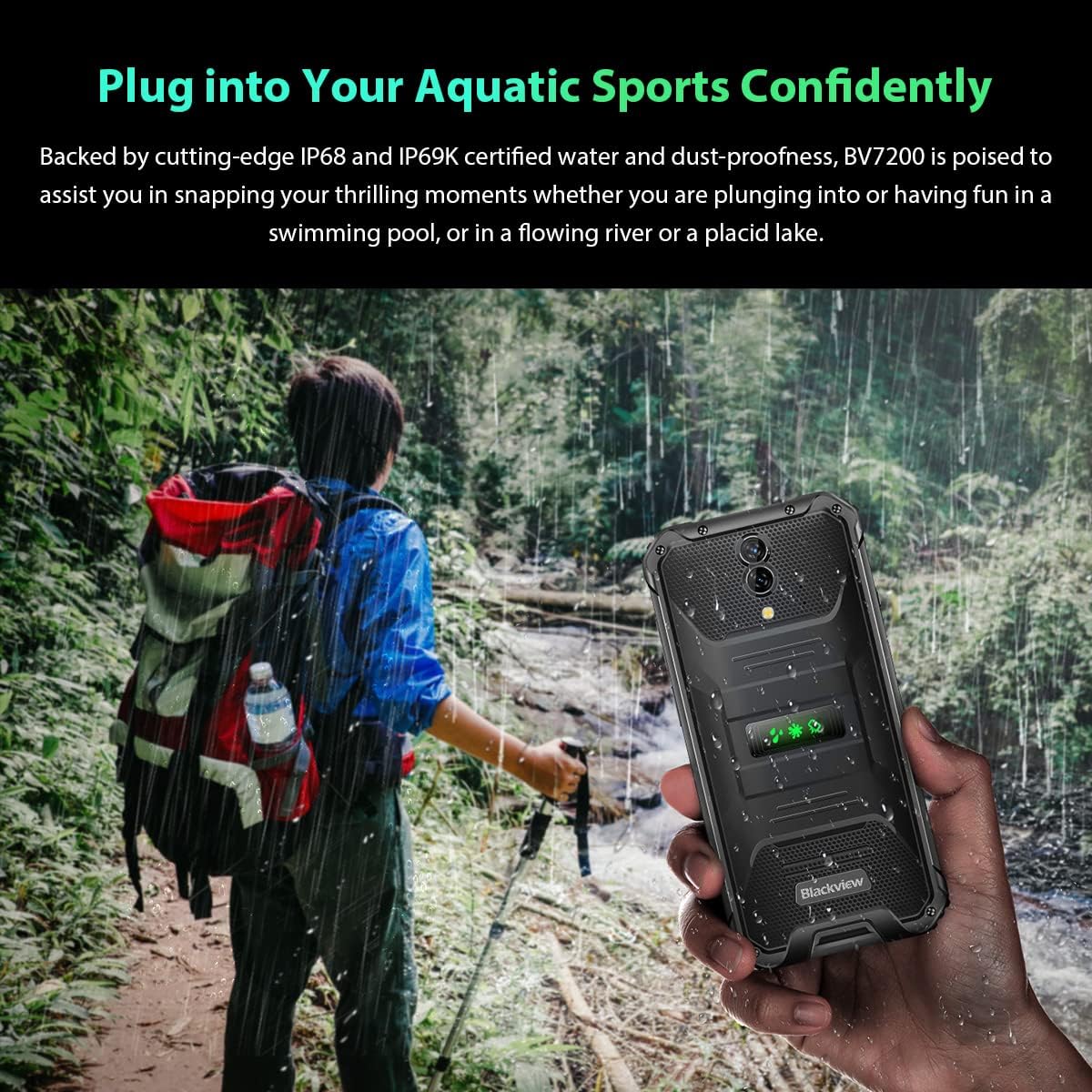
Image: A person holding the Blackview BV7200 near a stream or waterfall, illustrating its water resistance and suitability for outdoor and aquatic activities.
3.5. Gerenciamento de bateria
The 5180mAh battery provides extended usage. The device supports 18W fast charging.
- Use the original charger and cable for optimal charging speed and safety.
- The battery is designed to withstand temperatures down to -10°C.
- To prolong battery life, avoid extreme temperatures and fully discharging the battery regularly.
3.6. Expansão de memória
The BV7200 features 6GB of RAM with an additional 4GB virtual memory expansion, totaling 10GB, for enhanced multitasking and performance.

Image: Graphic illustrating the memory expansion feature of the Blackview BV7200, showing 6GB of physical RAM and an additional 4GB of virtual RAM, combining for a total of 10GB for improved performance.
4. Manutenção
4.1. Limpando seu dispositivo
To clean your Blackview BV7200:
- Limpe a tela e a carcaça com um pano macio e sem fiapos.
- Para sujeira teimosa, use um pano levemente damp Passe um pano com sabão neutro e, em seguida, seque-o.
- Não utilize produtos químicos agressivos, solventes ou produtos de limpeza abrasivos.
- Ensure all port caps are closed before cleaning with liquids.
4.2. Atualizações de software
Verifique e instale regularmente as atualizações de software para garantir o melhor desempenho, segurança e acesso a novos recursos.
- Vá para Configurações > Sistema > Atualização do sistema para verificar as atualizações disponíveis.
- Antes de iniciar uma atualização, certifique-se de que seu dispositivo tenha bateria suficiente e uma conexão Wi-Fi estável.
5. Solução De Problemas
5.1. Problemas e soluções comuns
- Dispositivo não liga: Certifique-se de que a bateria esteja carregada. Conecte-a a um carregador por pelo menos 15 minutos e, em seguida, tente ligá-la novamente.
- Tela não responde: Restart the device by holding the Power button for about 10-15 seconds. If the issue persists, try a factory reset (data will be lost).
- Connectivity issues (Wi-Fi/Bluetooth/Mobile Data):
- Desative e ative o Wi-Fi/Bluetooth/Dados móveis.
- Reinicie o dispositivo.
- Check router/network settings.
- For mobile data, ensure SIM card is correctly inserted and activated.
- Aplicativos travando: Limpe o cache e os dados do aplicativo (Configurações > Aplicativos > [Nome do aplicativo] > Armazenamento > Limpar cache/Limpar dados). If the problem continues, uninstall and reinstall the app.
5.2. Redefinição de fábrica
A restauração de fábrica apagará todos os dados do seu telefone e o restaurará às configurações originais de fábrica. Faça backup dos seus dados importantes antes de prosseguir.
- Vá para Configurações > Sistema > Opções de redefinição > Apagar todos os dados (redefinição de fábrica).
- Confirm your decision. The device will restart and perform the reset.
6. Especificações
Below are the technical specifications for the Blackview BV7200:
| Recurso | Especificação |
|---|---|
| Marca | Pretoview |
| Tamanho da RAM | 6 GB (expandable to 10GB with virtual RAM) |
| Modelo de CPU | MediaTek Helio G85 |
| Capacidade de armazenamento | 128 GB (expandable up to 1TB with TF card) |
| Tamanho da tela | 6.1 polegadas |
| Resolução | 720 x 1560 HD+ |
| Tecnologia Celular | 4G |
| Tecnologia de rede sem fio | GSM, LTE, Wi-Fi |
| Capacidade da bateria | 5180 mAh |
| Sistema operacional | Android 12 (Doke OS 3.0) |
| Resistência à água/poeira | IP68, IP69K |

Imagem: Detalhada view of the MediaTek Helio G85 processor, highlighting its specifications including RAM, ROM, GPU, and expandable storage, emphasizing its strong performance capabilities.

Image: Graphic detailing the Blackview BV7200's 6.1-inch HD+ display specifications, including resolution (720x1560), screen-to-body ratio (83%), brightness (380cd/cm2), and PPI (283), emphasizing its visual quality and durability with Corning Gorilla Glass 3.
7. Garantia e Suporte
For warranty information and technical support, please refer to the warranty card included with your product or visit the official Blackview website. Guarde o comprovante de compra para solicitações de garantia.
For further assistance, you may contact Blackview customer service through their official channels.