
TENVIS IP602W
Manual do Usuário da Câmera IP Externa TENVIS IP602W
Model: IP602W
Marca: TENVIS
Introdução
The TENVIS IP602W is a robust outdoor IP camera designed for reliable surveillance. It offers broad compatibility, supporting not only Windows OS but also Mac OS and other platforms accessible via an internet browser. Its design facilitates easy installation, allowing for wall mounting and wireless connectivity.
Equipped with a 1/4 CMOS image sensor and a 6mm lens, the IP602W delivers video at a maximum frame rate of 30 frames per second, with a resolution of up to 640 x 480 pixels. For low-light and nighttime environments, the camera features 30 infrared LEDs, providing high levels of invisible light for clear visibility. Mobile viewing is supported across multiple platforms via 3G networks, including iPhone, Android, Windows Mobile, and Java phones, enabling remote monitoring from any location with internet access.
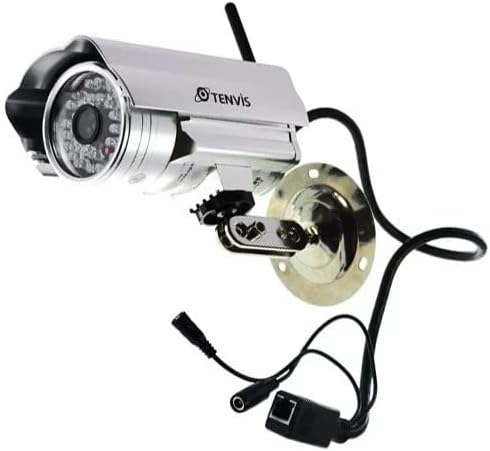
Image: The TENVIS IP602W Outdoor IP Camera, showcasing its durable build, integrated mounting bracket, and connectivity cables.
O que está na caixa
Ao abrir a embalagem, verifique se todos os seguintes componentes estão incluídos:
- 1 x IP602W WiFi IP Camera
- 1 x Power Adaptor (AU Plug)
- 1 x Antena WiFi
- 1 x Suporte de montagem
- 1 x CD (containing software/drivers)
- 1 x Screw Set for mounting
- 1 x Manual do Usuário

Image: All components included in the TENVIS IP602W package, laid out for verification.
Características do produto
The TENVIS IP602W camera is equipped with several key features to enhance its performance and usability:
- Night Version: Integrated infrared LEDs provide clear visibility in low-light and complete darkness.
- Suporte sem fio: Connects to your network via Wi-Fi for flexible placement.
- Metal and Waterproof Shell: Designed for outdoor use with a durable, weather-resistant casing.
- Movimento detectado: Configurable motion detection alerts for security monitoring.
- Compatibilidade entre plataformas: Suporta viewing and control from various operating systems and browsers, including Windows, Mac OS, Firefox, Chrome, and Safari.
- Móvel View: Access live feeds and controls from mobile devices via 3G network, supporting iPhone, Android, Windows Mobile, and Java phones.

Image: Visual representation of the TENVIS IP602W camera, emphasizing its key features such as night vision and wireless capabilities.
Configuração e instalação
Identificação de componentes
Familiarize yourself with the camera's ports and components before installation:
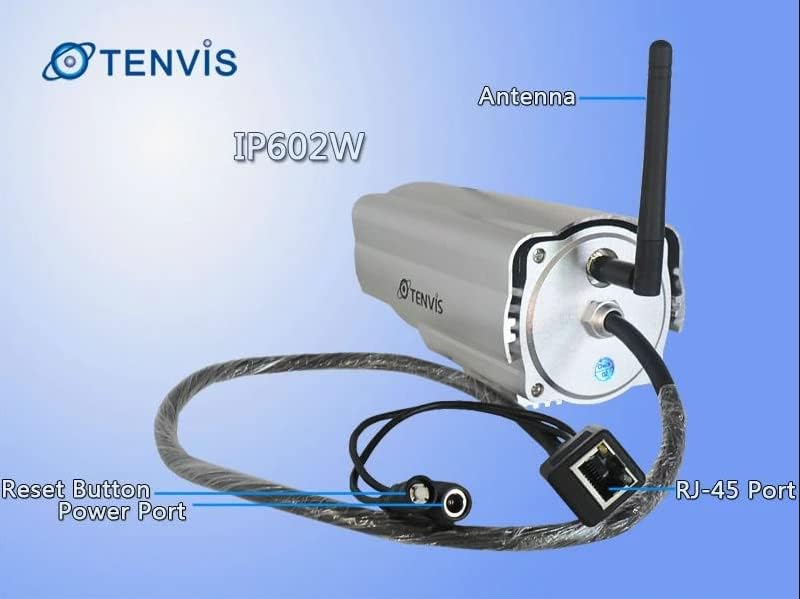
Imagem: Detalhada view of the TENVIS IP602W camera's rear, showing the antenna, RJ-45 Ethernet port, power input, and reset button.
- Antena: Para conectividade de rede sem fio.
- Porta RJ-45: For wired Ethernet connection to your router.
- Porta de alimentação: Conecte o adaptador de alimentação incluído aqui.
- Botão de reinicialização: Utilizado para restaurar as configurações padrão de fábrica.
Conexão de rede
The IP602W can connect to your network wirelessly or via an Ethernet cable. For initial setup, a wired connection is often recommended for stability.

Image: Network diagram showing how the IP602W camera connects to a router, allowing access from a LAN PC, Internet PC, and 3G phone.
- Connect the camera to your router using an Ethernet cable (if using wired setup).
- Connect the power adapter to the camera and plug it into an electrical outlet.
- Allow the camera a few minutes to power on and initialize.
- Refer to the included CD or the TENVIS website for software installation and detailed network configuration instructions, especially for wireless setup.
Montagem
The camera comes with a mounting bracket for easy installation on a wall or other suitable surface. Ensure the mounting location provides a clear view and is within range of your Wi-Fi signal or Ethernet cable.
- Choose a suitable outdoor location for mounting.
- Use the mounting bracket as a template to mark drill holes.
- Faça os furos necessários e insira buchas de parede, se necessário.
- Fixe o suporte de montagem à superfície utilizando os parafusos fornecidos.
- Attach the camera to the mounting bracket and adjust its angle for optimal viewindo.
Operação
Once the camera is set up and connected to your network, you can begin monitoring. The IP602W supports various viewing methods:
- PC/Mac Access: Use the provided software or a compatible web browser (Firefox, Chrome, Safari) to access the camera's live feed and settings from your computer.
- Mobile Device Access: Download the TENVIS mobile application (if available) or use a compatible mobile browser on your iPhone, Android, Windows Mobile, or Java phone to view the camera remotely via a 3G network connection.
- Qualidade do vídeo: The camera streams video at up to 640x480 resolution with a frame rate of 30fps, providing clear and smooth surveillance footage.
- Detecção de movimento: Configure motion detection settings through the camera's interface to receive alerts when movement is detected in the monitored area.
Manutenção
Regular maintenance helps ensure the longevity and optimal performance of your TENVIS IP602W camera:
- Limpeza: Limpe periodicamente a lente e o corpo da câmera com um pano macio e seco.amp pano. Evite produtos de limpeza abrasivos ou solventes.
- Inspeção de cabos: Check all cables (power, Ethernet) for any signs of wear, damage, or loose connections.
- Atualizações de firmware: Check the TENVIS official website periodically for any available firmware updates. Keeping the firmware updated can improve performance and security.
- Verificações ambientais: Ensure the camera's mounting remains secure and that no obstructions are blocking its field of view.
Solução de problemas
If you encounter issues with your IP602W camera, try the following steps:
- Sem energia: Certifique-se de que o adaptador de energia esteja conectado firmemente tanto à câmera quanto a uma tomada elétrica em funcionamento.
- Sem conexão de rede:
- Para conexão com fio, verifique o cabo Ethernet e o status do roteador.
- For wireless connection, ensure the Wi-Fi antenna is properly attached and the camera is within range of your router. Verify Wi-Fi settings in the camera's configuration.
- Não é possível acessar a câmera: Verify the camera's IP address. Ensure your computer or mobile device is on the same network or has proper internet access for remote viewing. Check firewall settings on your computer.
- Má qualidade de vídeo: Ensure the lens is clean. Check network bandwidth and signal strength.
- Redefinindo a câmera: If issues persist, use the reset button (refer to Component Identification) to restore factory default settings. You will need to reconfigure the camera after a reset.
Especificações
| Recurso | Detalhe |
|---|---|
| Nome do modelo | IP602W |
| Marca | TÊNIS |
| Uso interno/externo | Ar livre |
| Tecnologia de Conectividade | Sem fio (Wi-Fi) |
| Tipo de controlador | Android (and other platforms) |
| Tipo de montagem | Montagem na parede |
| Resolução de captura de vídeo | 480p (640x480) |
| Taxa de quadros | 30 qps |
| Tecnologia de sensor fotográfico | CMOS (1/4 inch) |
| Lente | 6 mm |
| Tecnologia de pouca luz | Night Color (Infrared LEDs) |
| Tipo de alerta | Apenas movimento |
| Dimensões do produto | 10 x 9.5 x 4 polegadas |
| GTIN | 06928446299816 |
Garantia e Suporte
For warranty information, technical support, or further inquiries regarding your TENVIS IP602W camera, please refer to the official TENVIS website or contact their customer service directly. The included CD may also contain support contact details.
You can visit the official TENVIS store for more information: TENVIS Store on Amazon
Ask a question about this manual
Ask about setup, troubleshooting, compatibility, parts, safety, or missing instructions. Manuals+ will review the question and use this page’s manual context to help answer it.