
Introdução
The Cloud b LoveLight Buddies Billy Bunny Sound Machine is designed to provide a comforting environment for children, aiding in relaxation and sleep. This device combines soothing sounds, gentle light, and a unique parent voice recording feature within a soft plush toy. Please read this manual carefully to ensure proper use and maintenance of your product.

Image: The Billy Bunny sound machine with its packaging, highlighting its features.
Características do produto
- Gravador de voz: Allows parents to record a custom message or lullaby for their child.
- 8 Soothing Sounds & Melodies: Includes heartbeat, rain, waves, whale song, and 4 calming lullabies.
- Luz suave: Emits a warm, pulsing glow to provide reassurance.
- Shake & Play Motion Sensor: Restarts light, lullabies, and recorded messages with a simple shake.
- Temporizador de desligamento automático de 30 minutos: Conserves battery power and creates a quiet environment for deep sleep.
- Recarregável: Sound machine/nightlight unit recharges via USB-C (cable included).
Configurar
- Desembale o produto: Carefully remove the Billy Bunny plush and the sound unit from the packaging.
- Charge the Sound Unit: The sound unit contains a rechargeable Lithium Polymer battery. Connect the included USB-C cable to the unit and a suitable USB power source (e.g., computer, wall adapter). The indicator light will show charging status. Ensure the unit is fully charged before first use.
- Insert Sound Unit into Plush: Locate the opening on the back of the Billy Bunny plush. Gently insert the sound unit into the designated pouch inside the plush. Ensure the controls on the unit are accessible through the opening or can be easily manipulated from outside the plush.

Image: A hand demonstrating how to insert the sound unit into the Billy Bunny plush toy.
Instruções de operação
Ligar/Desligar
To power on the sound machine, locate the power button on the sound unit and press it. To power off, press the power button again. The unit will automatically turn off after 30 minutes of continuous play.
Seleção de Som
The sound unit offers 8 different options: 4 white noises and 4 soothing melodies. Use the dedicated sound selection buttons on the unit to cycle through the available sounds:
- Ruídos Brancos: Heartbeat, Rain, Soft Shush, Brook
- Melodias: Fairy Dance, Dolphin Dreams, Classical Lullaby, Bach Lullaby
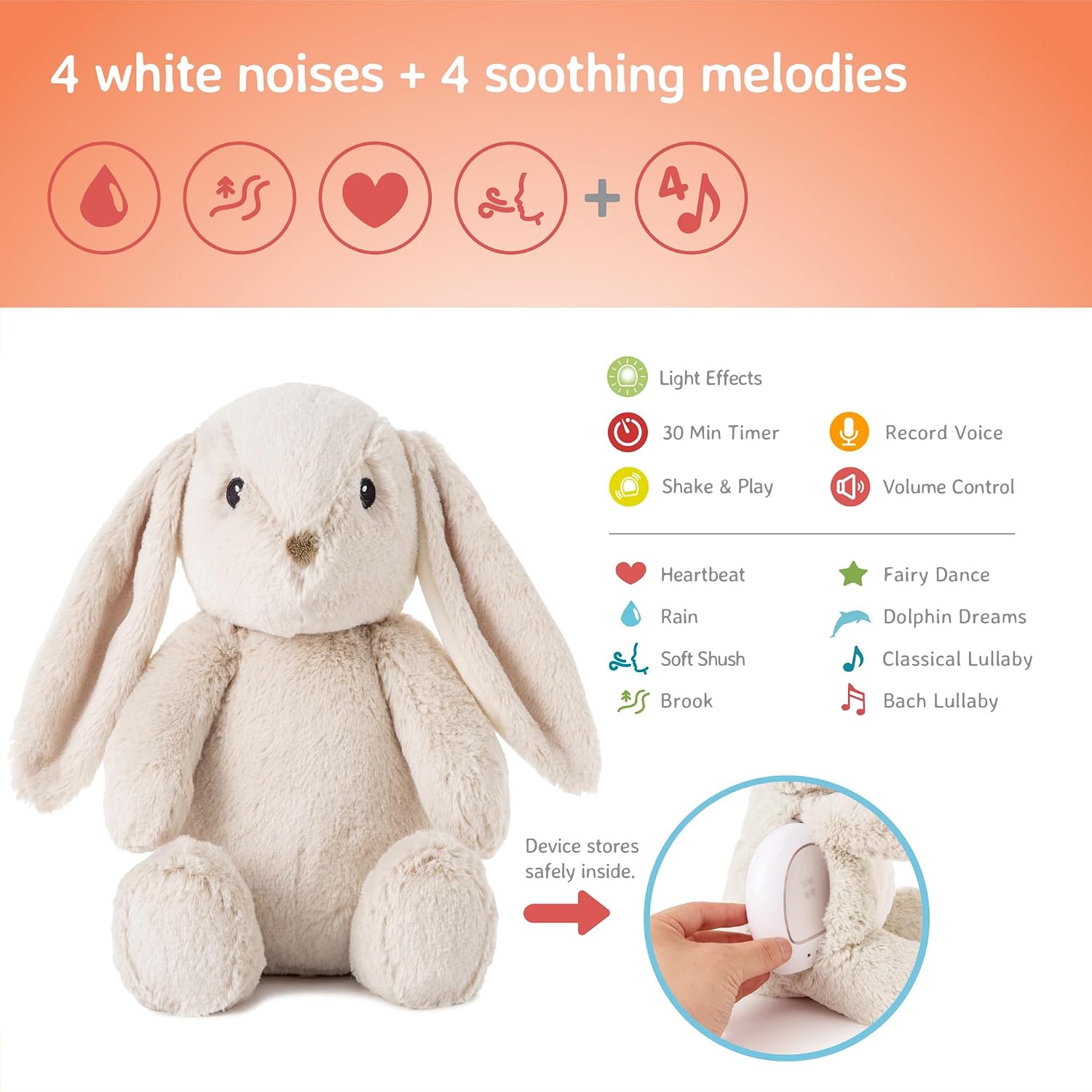
Image: A visual representation of the sound unit, detailing its controls and the various sound options available.
Ajuste de volume
Adjust the volume using the volume control buttons on the sound unit. There are typically 'up' and 'down' buttons to increase or decrease the sound level.
Função de Gravação de Voz
The sound unit includes a voice recorder. To record a message:
- Press and hold the record button (often indicated by a microphone icon).
- Speak clearly into the microphone on the unit.
- Solte o botão para interromper a gravação.
- Press the play button (often indicated by a play icon) to listen to your recorded message.

Image: A parent recording a personalized message into the sound unit, which is then placed inside the Billy Bunny plush for a baby in a crib.
Configurações de luz
The sound unit features a gentle light that can pulse. Use the light control button to activate or change the light settings. The light is designed to be reassuring and not overly stimulating.
Video: Demonstration of the sound unit's light and sound features.
Shake & Play Motion Sensor
The LoveLight Buddies feature a Shake & Play motion sensor. A gentle shake of the plush toy will reactivate the light, lullabies, or the last played recorded message, providing immediate comfort without needing to press buttons.

Image: The Billy Bunny plush toy with a glowing light in its belly, accompanied by icons representing its key features: eight calming sounds, shake & play, five gentle colors, and a voice recorder.
Video: Demonstration of the voice recording feature and long-term use.
Manutenção
Cleaning the Plush Toy
The sound unit is removable, allowing the Billy Bunny plush to be cleaned separately. Hand wash the plush toy with mild soap and water, then air dry. Do not machine wash or tumble dry, as this may damage the fabric or internal components.
Cuidados com a bateria
The sound unit's internal Lithium Polymer battery is rechargeable via USB-C. To prolong battery life, avoid fully discharging the unit frequently. Recharge as needed. If the unit will not be used for an extended period, ensure it is fully charged before storage and recharge periodically.
Solução de problemas
- No Sound/Light: Ensure the sound unit is charged. Press the power button firmly.
- Má qualidade de som: Check the volume settings. Ensure the unit is properly seated within the plush.
- Problemas de gravação: Ensure you are pressing and holding the record button while speaking. Speak clearly and close to the microphone.
- Shake & Play Not Responding: Ensure the unit is powered on. A firm but gentle shake is usually sufficient to activate the sensor.
- Problemas de carregamento: Verify the USB-C cable is securely connected to both the unit and the power source. Try a different USB-C cable or power source.
Especificações
| Recurso | Detalhe |
|---|---|
| Número do modelo | CB7703-BB |
| Dimensões do produto | 3.94 x 1.97 x 0.5 polegadas |
| Peso do item | 1.23 libras |
| Tipo de material | Poliéster |
| Fonte de energia | Alimentado por bateria (polímero de lítio recarregável) |
| Gênero alvo | Unissex |
Garantia e Suporte
For warranty information and customer support, please refer to the documentation included with your product or visit the official Cloud b webGuarde o comprovante de compra como prova para eventuais solicitações de garantia.