
Introdução
The LEICEX Portable Mini Bluetooth Speaker (Model B11-TF) is a compact, waterproof audio device designed for versatile use. Featuring Bluetooth 5.0 connectivity, TF card support, and a durable design, it provides portable sound for various environments. This manual provides essential information for setting up, operating, maintaining, and troubleshooting your speaker.
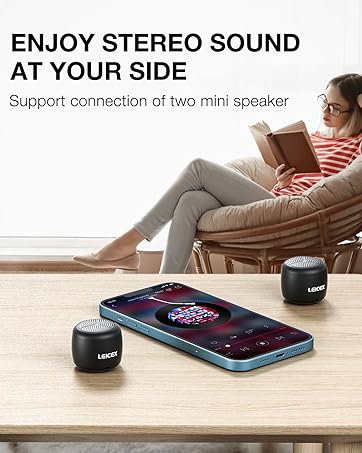
Image: The LEICEX Mini Bluetooth Speaker, shown held in a hand with a water splash, highlighting its compact size and waterproof feature.
Conteúdo da embalagem
Por favor, verifique se todos os itens estão presentes na embalagem:
- LEICEX Portable Mini Bluetooth Speaker
- Cabo de carregamento USB-C
- Cordão
- Manual de instruções

Image: A visual representation of the speaker, USB-C cable, lanyard, and instruction manual included in the product package.
Configurar
Carregando o alto-falante
Before first use, fully charge the speaker. Connect the provided USB-C cable to the charging port on the speaker and the other end to a standard USB power adapter (not included) or a computer's USB port. The charging indicator light will illuminate during charging and turn off when fully charged.
Ligar/Desligar
To power on the speaker, press and hold the power button (marked with a power symbol) for approximately 3 seconds until you hear an audible prompt. To power off, press and hold the power button again for 3 seconds.

Image: A detailed diagram illustrating the location and function of the speaker's buttons, microphone, TF memory card slot, and USB-C port.
Instruções de operação
Emparelhamento Bluetooth
- Verifique se o alto-falante está ligado.
- No seu dispositivo (smartphone, tablet, laptop), ative o Bluetooth e procure por dispositivos disponíveis.
- Select "LEICEX B11-TF" from the list of devices.
- Once paired, the speaker will indicate a successful connection with an audible prompt. The maximum connection distance is approximately 30 feet (9 meters).

Image: The LEICEX Mini Bluetooth Speaker resting on a smartphone, demonstrating its compact size and readiness for Bluetooth connection.
Stereo Pairing (TWS Function)
For an enhanced audio experience, you can pair two LEICEX B11-TF speakers together for true wireless stereo (TWS) sound.
- Certifique-se de que ambas as caixas de som estejam desligadas.
- Ligue as duas caixas de som simultaneamente. Elas tentarão se emparelhar automaticamente.
- Once successfully paired with each other, one speaker will act as the master.
- Connect your device via Bluetooth to the master speaker as described in the "Bluetooth Pairing" section.
Observação: Stereo pairing is only supported for Bluetooth audio playback. When using a TF card, only the speaker with the TF card inserted will play audio.

Image: Two LEICEX Mini Bluetooth Speakers positioned on either side of a smartphone, illustrating the stereo pairing feature for immersive sound.
Reprodução de cartão TF
Insert a TF (Micro SD) card (up to 32GB, not included) pre-loaded with audio files into the TF card slot on the speaker. The speaker will automatically switch to TF card playback mode. Use the control buttons to manage playback.
Funções de controle
Refer to the "Speaker Button Description" image in the Setup section for button locations.
- Botão de energia: Long press to Power ON/OFF. Single click to Play/Pause music.
- Diminuir volume / faixa anterior: Long press for Volume Down. Single click for Previous Music track.
- Aumentar volume / próxima faixa: Long press for Volume Up. Single click for Next Music track.
Chamada viva-voz
When connected to a smartphone via Bluetooth, the speaker can be used for hands-free calls. A single click on the power button will answer or end a call.
Manutenção
Classificação de impermeabilidade (IPX7)
The speaker features an IPX7 waterproof rating, meaning it can be submerged in water up to 1 meter for 30 minutes. This makes it suitable for use in showers, by the pool, or during light rain. Ensure the charging port cover is securely closed before exposing the speaker to water.

Image: The LEICEX Mini Bluetooth Speaker hanging by its lanyard in a shower, demonstrating its suitability for wet environments.
Limpeza
Limpe o alto-falante com um suave, damp pano. Não utilize produtos de limpeza abrasivos ou solventes, pois estes podem danificar a superfície ou os componentes internos.
Cuidados com a bateria
Para prolongar a vida útil da bateria, evite descarregar completamente a caixa de som com frequência. Carregue-a regularmente, mesmo que não a utilize por longos períodos. Guarde-a em local fresco e seco.
Solução de problemas
- A caixa de som não liga: Ensure the speaker is fully charged. Connect it to a power source using the USB-C cable and allow it to charge for at least 30 minutes before attempting to power on again.
- Sem som: Check the volume level on both the speaker and your connected device. Ensure the speaker is properly paired via Bluetooth or that the TF card is correctly inserted and contains playable audio files.
- Não foi possível emparelhar via Bluetooth: Ensure the speaker is in pairing mode (usually indicated by a flashing LED). Turn off Bluetooth on your device and then turn it back on. If issues persist, try restarting both the speaker and your device.
- Stereo pairing not working: Ensure both speakers are powered off before attempting to pair them together. After they pair with each other, connect your device to the master speaker. Remember that TF card playback does not support stereo sound across two speakers.
- Problemas com danos causados pela água: While the speaker is IPX7 waterproof, always ensure the charging port cover is sealed tightly before exposure to water. If the speaker has been submerged, allow it to dry completely before attempting to charge or power on.
Especificações
| Nome do modelo | B11-TF |
| Marca | LEICEX |
| Tecnologia de Conectividade | Bluetooth 5.0 |
| Distância wireless | Até 30 pés (9 metros) |
| Nível de resistência à água | IPX7 (à prova d'água) |
| Potência máxima de saída do alto-falante | 2 Watts |
| Modo de saída de áudio | Estéreo (com emparelhamento TWS) |
| Hora de brincar | Aproximadamente 4 horas |
| Porta de carregamento | USB-C |
| Suporte para cartão TF | Sim, até 32 GB |
| Dimensões do produto | 1.45"P x 1.45"L x 1.25"A |
| Peso do item | 2.89 onças |
| Material | Plástico ou borracha duráveis |

Image: A diagram illustrating the compact dimensions of the LEICEX Mini Bluetooth Speaker: 1.45 inches in diameter and 1.25 inches in height.
Garantia e Suporte
Informações de garantia
The LEICEX Portable Mini Bluetooth Speaker comes with a one-year warranty for host parts from the date of purchase. This warranty covers manufacturing defects under normal use. It does not cover damage caused by misuse, accidents, unauthorized modifications, or natural disasters.
Suporte ao cliente
If you encounter any issues or have questions regarding your LEICEX speaker, please refer to the contact information provided with your purchase documentation or visit the official LEICEX support website para obter assistência.


