
ANLAN SD-8811
Manual de Instruções do Dispositivo Facial e de Pescoço ANLAN RF EMS SD-8811
Modelo: SD-8811
Introdução
This manual provides detailed instructions for the safe and effective use of your ANLAN RF EMS Facial and Neck Device, model SD-8811. This device is designed to support skin care routines through Radio Frequency (RF), Electrical Muscle Stimulation (EMS), and multi-frequency vibration technologies, aiming to improve skin elasticity and reduce the appearance of wrinkles.
Informações importantes de segurança
- Metallic Implants: If you have metallic implants in your mouth (e.g., metal braces), it is not recommended to use the EMS mode of this product. The EMS microcurrent may form a circuit with the metallic object, potentially causing discomfort to the gums and affecting the device's effectiveness.
- Invisible Aligners: If you wear invisible aligners that do not contain metal, the microcurrent beauty device can generally be used normally.
- Modo RF: The RF mode can be used normally regardless of metallic implants.
- Frequência de uso: It is recommended to use the RF mode 2 to 3 times per week. The EMS mode can be used daily. Each session should last approximately 10 minutes.
- Consult a healthcare professional if you have any pre-existing medical conditions or concerns before using this device.
Produto acimaview
The ANLAN RF EMS Facial and Neck Device is a handheld beauty instrument designed for comprehensive skin care. It integrates Radio Frequency (RF), Electrical Muscle Stimulation (EMS), multi-frequency vibration, and light therapy (Red and White Light) to target various skin concerns.

Image: The ANLAN RF EMS Facial and Neck Device shown with its retail packaging.
Componentes do dispositivo
Image: Detailed diagram illustrating the device's components, including the massage area, light therapy area, level/vibration button, power/mode button, level indicators, and charging port.
- Massage Area / Light Therapy: The head of the device, which comes into contact with the skin, delivering RF, EMS, vibration, and light therapy.
- Level/Vibration Button: Used to adjust intensity levels and activate vibration.
- Botão Liga / Desliga / Modo: Used to turn the device on/off and switch between operating modes.
- Level Indicators: Lights indicating the selected intensity level.
- Porta de carregamento: USB-C port for charging the device.
Principais recursos e funções
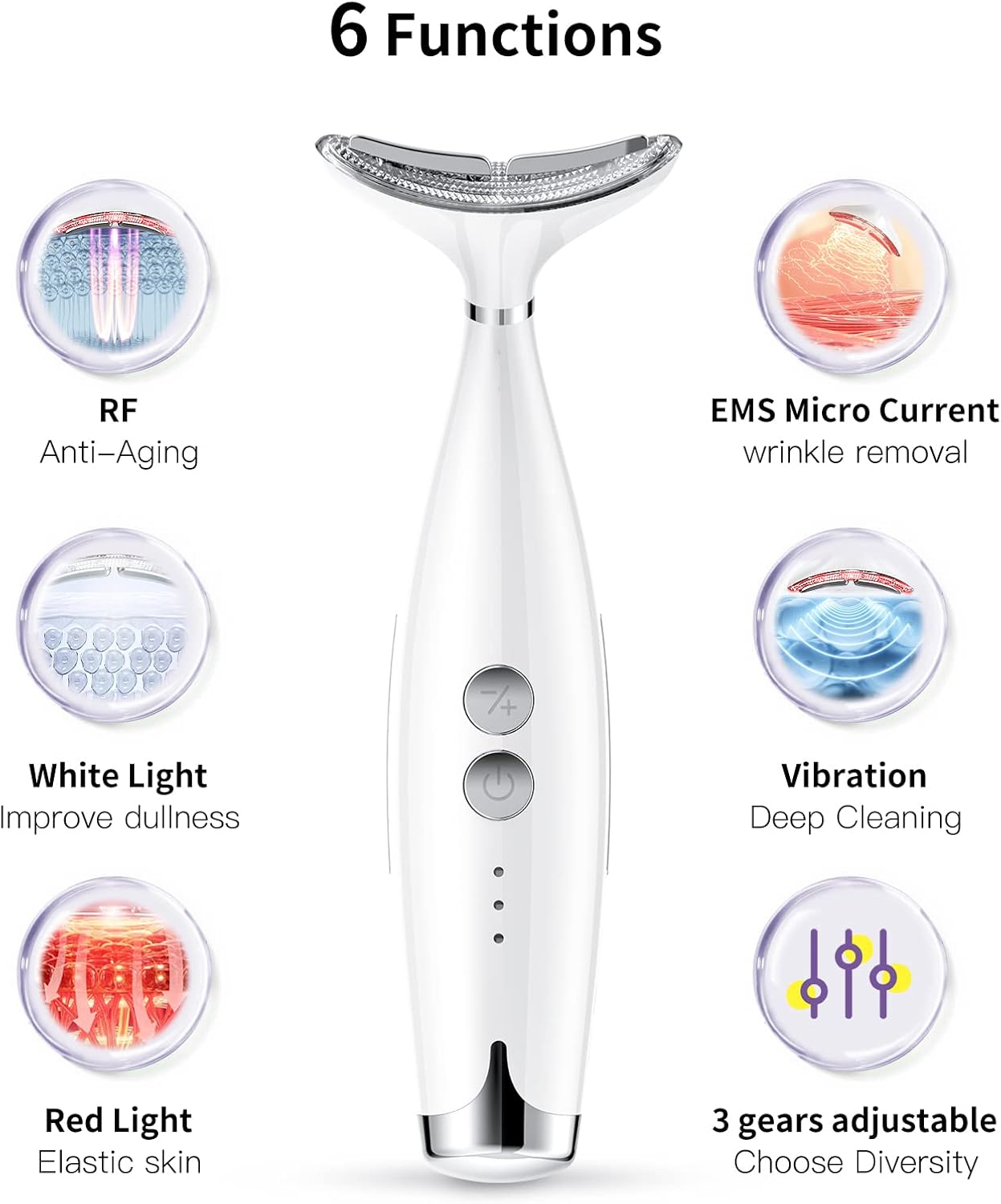
Imagem: Acimaview of the device's six primary functions, including RF, EMS Micro Current, White Light, Vibration, Red Light, and 3 adjustable intensity levels.
1. Radio Frequency (RF)
RF energy penetrates the dermal layer of the skin, stimulating collagen regeneration and promoting cellular rejuvenation. This process helps to reduce the appearance of wrinkles and tighten facial contours.

Image: Visual representation of RF energy acting on collagen in the dermis, promoting collagen synthesis and skin tightening.
2. Electrical Muscle Stimulation (EMS) Microcurrent
EMS microcurrent stimulates and massages skin cells, increasing cellular activity. This promotes better absorption of skincare products and cellular proliferation, contributing to plumper, firmer skin and restored elasticity.

Image: Diagram showing EMS stimulating and massaging skin cells, increasing cell activity and promoting absorption.
3. Multi-Frequency Vibration
The device features adjustable vibration speeds suitable for various skin types and ages. Vibration helps to relax facial muscles and enhance the absorption of skincare products.

Image: Visual representation of high-frequency vibration relaxing muscles and promoting absorption within the skin.
4. Red Light Therapy (640nm)
Red light at 640nm wavelength helps to rejuvenate collagen and improve skin elasticity.
5. White Light Therapy (490nm)
White light at 490nm wavelength assists in lightening pigmentation and breaking down dark spots, contributing to a more even skin tone.

Image: Illustrates the effects of Red Light (640nm) for collagen rejuvenation and White Light (490nm) for lightening pigment and breaking down dark spots.
Configurar
1. Carregando o dispositivo
Before first use, fully charge the device. Connect the provided power adapter to the charging port on the device and plug it into a power outlet. The level indicators will show charging status and turn solid when fully charged.
2. Preparação da pele
Cleanse your face and neck thoroughly. Apply a suitable skincare product such as a serum, gel, or moisturizer to the treatment area. This ensures smooth gliding of the device and optimal conductivity for RF and EMS functions.
Instruções de operação
1. Ligar/desligar
- Para ligar, pressione e segure o Botão de energia/modo for a few seconds until the device activates.
- Para desligar, pressione e segure o Botão de energia/modo Novamente, por alguns segundos.
2. Seleção de modo
Pressione brevemente o Botão de energia/modo Para alternar entre os modos disponíveis:

Image: Illustrates the two main operating modes: Mode 1 (RF + Red Light) and Mode 2 (EMS + White Light), along with instructions for button usage.
- Mode 1: RF + Red Light (621 nm) - Focuses on deep skin penetration, accelerating active tissue metabolism, and improving fine lines and skin laxity.
- Mode 2: EMS + White Light (473 nm) - Targets lightening dark spots, improving dullness, and promoting skin firmness.
3. Level and Vibration Adjustment
- Pressione brevemente o Botão de nível/vibração to change the intensity level (3 levels available). Start with the lowest level and gradually increase as your skin adapts.
- Pressione e segure o Botão de nível/vibração to activate or deactivate the vibration function.
4. Aplicação
- Gently glide the device over the desired areas of your face and neck. Ensure continuous movement and avoid holding the device stationary on one spot for too long.
- For optimal results, follow the recommended usage frequency: RF mode 2-3 times per week, EMS mode daily. Each session should be approximately 10 minutes.
Manutenção
1. Limpeza
- After each use, turn off the device and wipe the massage head with a soft, damp pano.
- Não utilize produtos de limpeza abrasivos, álcool ou produtos químicos agressivos, pois estes podem danificar o aparelho.
- Certifique-se de que o dispositivo esteja completamente seco antes de guardá-lo.
2. Armazenamento
Guarde o dispositivo em local fresco e seco, longe da luz solar direta e fora do alcance de crianças.
Solução de problemas
| Problema | Possível causa | Solução |
|---|---|---|
| O dispositivo não liga. | Bateria fraca ou descarregada. | Charge the device fully before use. Ensure the charging cable is properly connected. |
| No sensation during EMS/RF mode. | Insufficient contact with skin or low intensity level. | Ensure the device head is in full contact with moisturized skin. Increase the intensity level using the Level/Vibration Button. |
| O dispositivo para de funcionar durante o uso. | Battery depleted or automatic shutdown. | Recharge the device. The device may have an automatic shutdown feature after a certain period of inactivity or continuous use. |
| Skin feels uncomfortable or irritated. | Intensity level too high or insufficient skincare product. | Reduce the intensity level. Apply more serum or gel to ensure smooth gliding and proper conductivity. Discontinue use if irritation persists. |
Especificações
| Marca | ANLAN |
| Número do modelo | SD-8811 |
| Dimensões | 18 x 6 x 3.1 cm |
| Peso | 190 gramas |
| Material | Plástico |
| Cor | Branco |
| Fonte de energia | Mains operated (via adapter) |
| Volumetage | 5 Volts |
| Componentes incluídos | Power adapter, possibly facial tips |
Garantia e Suporte
For warranty information and customer support, please refer to the documentation included with your purchase or contact ANLAN customer service directly. Keep your proof of purchase for warranty claims.