Produto acimaview
The PTZOptics Move 4K 30x Auto-Tracking PTZ Camera is designed for high-quality video production, offering advanced features such as auto-tracking, auto-framing, and 4K resolution at 60 frames per second. It is suitable for various applications including education, conferences, and live broadcasts. This manual provides essential information for setting up, operating, and maintaining your camera.
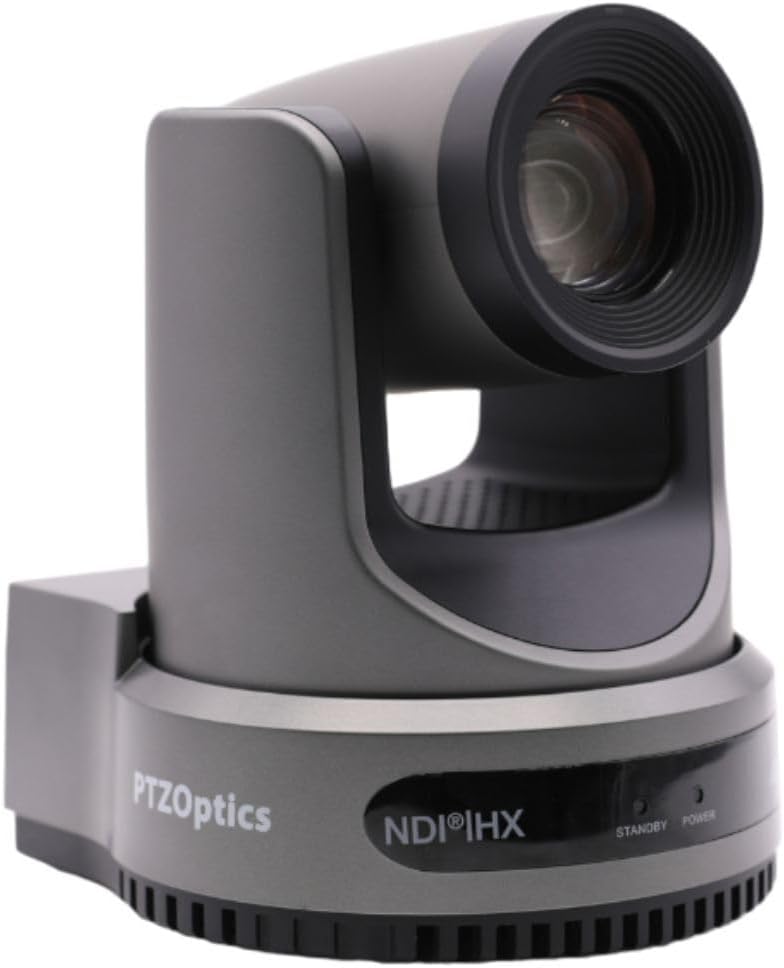
Figura 1: Frente view of the PTZOptics Move 4K Camera.
Desembalagem e conteúdo do pacote
Upon unboxing your PTZOptics Move 4K camera, ensure all components are present. The package typically includes the following items:
- PTZOptics Move 4K Camera (30X model)
- Fonte de alimentação de 12 Vca
- Cabo AA USB
- Cabo RS232
- Guia de início rápido
- remoto IR
- (2) Baterias AA
Video 1: PTZOptics Move 4K Unboxing. This video demonstrates the unboxing process and highlights the included accessories.

Figura 2: Lateral view of the PTZOptics Move 4K Camera, showcasinseu design elegante.
Configurar
Follow these steps to set up your PTZOptics Move 4K camera:
- Conexão de energia: Connect the provided 12V AC Power Supply to the DC 12V port on the back of the camera. Alternatively, if your network supports Power over Ethernet (PoE), you can connect an Ethernet cable to the LAN port for both power and data.
- Resolution and Frame Rate Selection: Before powering on, select your desired video resolution and frame rate using the yellow dial labeled "SYSTEM SELECT" on the back of the camera. Refer to the Quick Start Guide or the table on the bottom of the camera for available options.
- Inicialização: Once powered, the camera will perform an initial pan and tilt movement. The "POWER" light on the front will illuminate.
- Conectividade: Connect the camera to your live streaming, recording, or conferencing device using the appropriate output ports (USB 2.0, 3G-SDI, or HDMI).

Figura 3: Traseira view of the camera, highlighting the various input/output ports including DC 12V, LAN (PoE), USB 2.0, 3G-SDI, HDMI, RS232, RS485, and audio line in/out.
Instruções de operação
The PTZOptics Move 4K camera offers multiple control options and features for seamless operation:
- Auto-Tracking and Auto-Framing: Utilize the camera's built-in auto-tracking and auto-framing capabilities to automatically follow a subject or keep multiple subjects framed within the shot.
- Luz de registro: A built-in tally light located above the lens indicates whether the camera is live (red) or in preview mode, helping talent stay in sync with the production.
- Opções de controle: The camera can be controlled via the included IR remote, network connection, RS-232, RS-485, Web UI, PTZ Control App, or a Camera Management Platform.
- Saídas Simultâneas: The camera provides simultaneous video outputs via NDI, USB, and IP, along with either SDI or HDMI, allowing for flexible integration into various production workflows.

Figure 4: This diagram illustrates how the PTZOptics camera can be used for live streaming directly to platforms like YouTube and Facebook Live, with audio input via 3.5mm.
Manutenção
To ensure the longevity and optimal performance of your PTZOptics Move 4K camera, follow these general maintenance guidelines:
- Limpeza: Use um pano macio e seco para limpar o corpo da câmera. Para a lente, use um pano e solução de limpeza específicos para lentes, a fim de evitar arranhões. Não use produtos químicos agressivos ou materiais abrasivos.
- Proteção contra poeira: Keep the camera in a clean, dust-free environment when not in use. Consider using a dust cover.
- Temperatura e Umidade: Operate and store the camera within recommended temperature and humidity ranges to prevent damage to internal components.
- Atualizações de firmware: Periodically check the PTZOptics official website for any available firmware updates. Keeping the firmware updated can improve performance, add new features, and resolve potential issues.
Solução de problemas
If you encounter issues with your PTZOptics Move 4K camera, consider the following troubleshooting steps:
- Sem energia: Ensure the power supply is securely connected and the power outlet is functional. If using PoE, verify your network switch provides sufficient power.
- Sem saída de vídeo: Check all video cable connections (HDMI, SDI, USB, Ethernet). Verify the selected resolution and frame rate on the camera's system select dial are compatible with your receiving device.
- Problemas de controle: Ensure the IR remote batteries are fresh and there are no obstructions between the remote and the camera. For network control, verify the camera's IP address and network settings.
- Problemas de qualidade de imagem: Check lighting conditions. Ensure the lens is clean and free from smudges or dust. Adjust white balance and exposure settings as needed.
- A câmera não responde: Try pressing the "RESTORE" button on the back of the camera to reset it to factory defaults. This may resolve software-related glitches.
Especificações
| Recurso | Detalhe |
|---|---|
| Dimensões do produto | 5.6 x 6.6 x 6.5 polegadas |
| Peso do item | 8.33 libras |
| ASIN | B0BSMM3VM3 |
| Número do modelo do item | PT30X-4K-GY-G3_EDI_1 |
| Baterias | 2 pilha AA necessária. (incluída) |
| Data da primeira disponibilidade | 18 de janeiro de 2023 |
| Fabricante | PTZoptics |
| Marca | PTZOptics |
| Tecnologia de sensor fotográfico | CMOS |
| Resolução de captura de vídeo | 4K |
| Distância focal máxima | 20 milímetros |
| Tipo de Memória Flash | SD |
| Formato de captura de vídeo | MP4 |
| Formato de áudio suportado | MP3, WAV, AAC |
| Tamanho da tela | 1.8 polegadas |
| Tecnologia de Conectividade | HDMI, USB |
| Cor | Cinza |
Garantia e Suporte
For detailed warranty information, technical support, and additional resources, please visit the official PTZOptics website or refer to the documentation included with your product. You may also find helpful information and protection plans available on the PTZOptics Store on Amazon.