
Introdução
This manual provides comprehensive instructions for the safe and efficient operation of your QWORK WD10229 Foldable Digital Floor Scale. Please read this manual thoroughly before use and retain it for future reference.
Informações de segurança
- Ensure the scale is placed on a stable, level surface.
- Não exceda a capacidade máxima de peso de 660 kg (300 lbs).
- Avoid dropping or subjecting the scale to severe shocks.
- Mantenha a balança longe da água e de temperaturas extremas.
- Utilize somente o adaptador de energia fornecido.
- Não tente desmontar ou reparar a balança por conta própria. Contate pessoal qualificado para assistência técnica.
Conteúdo da embalagem
Verifique se todos os itens estão presentes na embalagem:
- QWORK WD10229 Digital Floor Scale Platform
- Digital Display Unit with Keypad
- Connecting Pole/Stand
- Adaptador de energia
- Manual do usuário (este documento)
Instruções de configuração
Desembalagem: Remova cuidadosamente todos os componentes da embalagem.
Colocação da plataforma: Place the scale platform on a firm, level surface. Ensure all four adjustable non-slip feet are in contact with the ground and the platform is stable.

Imagem: Frente view of the QWORK WD10229 Digital Floor Scale, showing the platform and display unit.
Assemble Display Stand: Attach the connecting pole to the scale platform and secure it. Then, mount the digital display unit onto the top of the pole. Ensure all connections are firm.

Image: The scale platform separated from its frame, illustrating the internal structure and connection points for assembly.

Imagem: Close-up views of the scale's internal wiring connector, load cell, adjustment knob for the display stand, and power switch.
Conexão de energia: Connect the power adapter to the display unit and plug it into a suitable power outlet. The scale can also operate on its internal rechargeable battery.

Image: The QWORK WD10229 Digital Floor Scale with its display unit, platform, and the included power adapter.
Inicialização: Turn on the scale using the power switch, usually located on the display unit or near the power input. The display will perform a self-test and then show "0.00".
Instruções de operação
Pesagem Básica
Ligar: Certifique-se de que a balança esteja ligada e exiba "0.00".
Coloque o item: Carefully place the item to be weighed onto the center of the scale platform.

Image: The digital floor scale in use, showing packages and a crate of produce being weighed on the platform.
Peso de leitura: The weight will be displayed on the digital screen. Wait for the reading to stabilize.
Remover item: Remove the item from the platform. The display should return to "0.00" or a negative value if tare was used.
Unit Conversion (KG/LB)
The scale supports weighing in both kilograms (KG) and pounds (LB).
Locate Unit Button: On the display unit, press the "UNIT" or "KG/LB" button to switch between units.

Image: Close-up of the scale's digital display, illustrating the unit conversion function between kilograms (KG) and pounds (LB).
Verify Unit: A unidade ativa (KG ou LB) será indicada no visor.
Função Tare
The tare function allows you to subtract the weight of a container, so only the contents are weighed.
Place Empty Container: Place the empty container onto the scale platform.
Press TARE: Wait for the weight to stabilize, then press the "TARE" button on the display unit. The display will reset to "0.00".
Add Contents: Place the items to be weighed into the container. The display will show only the net weight of the contents.
Remover o recipiente: After weighing, remove both the container and its contents. The display will show a negative value equal to the container's weight. Press "TARE" again to clear the tare and return to "0.00".
Função Zero
If the display does not show "0.00" when the platform is empty, use the Zero function.
Empty Platform: Ensure nothing is on the scale platform.
Pressione ZERO: Press the "ZERO" button on the display unit. The display should reset to "0.00".
Manutenção
- Limpeza: Limpe a plataforma da balança e o visor com um pano macio e seco.amp pano. Não utilize produtos de limpeza abrasivos nem mergulhe a unidade em água.
- Armazenar: When not in use, store the scale in a dry, clean environment. The scale is foldable for convenient storage.
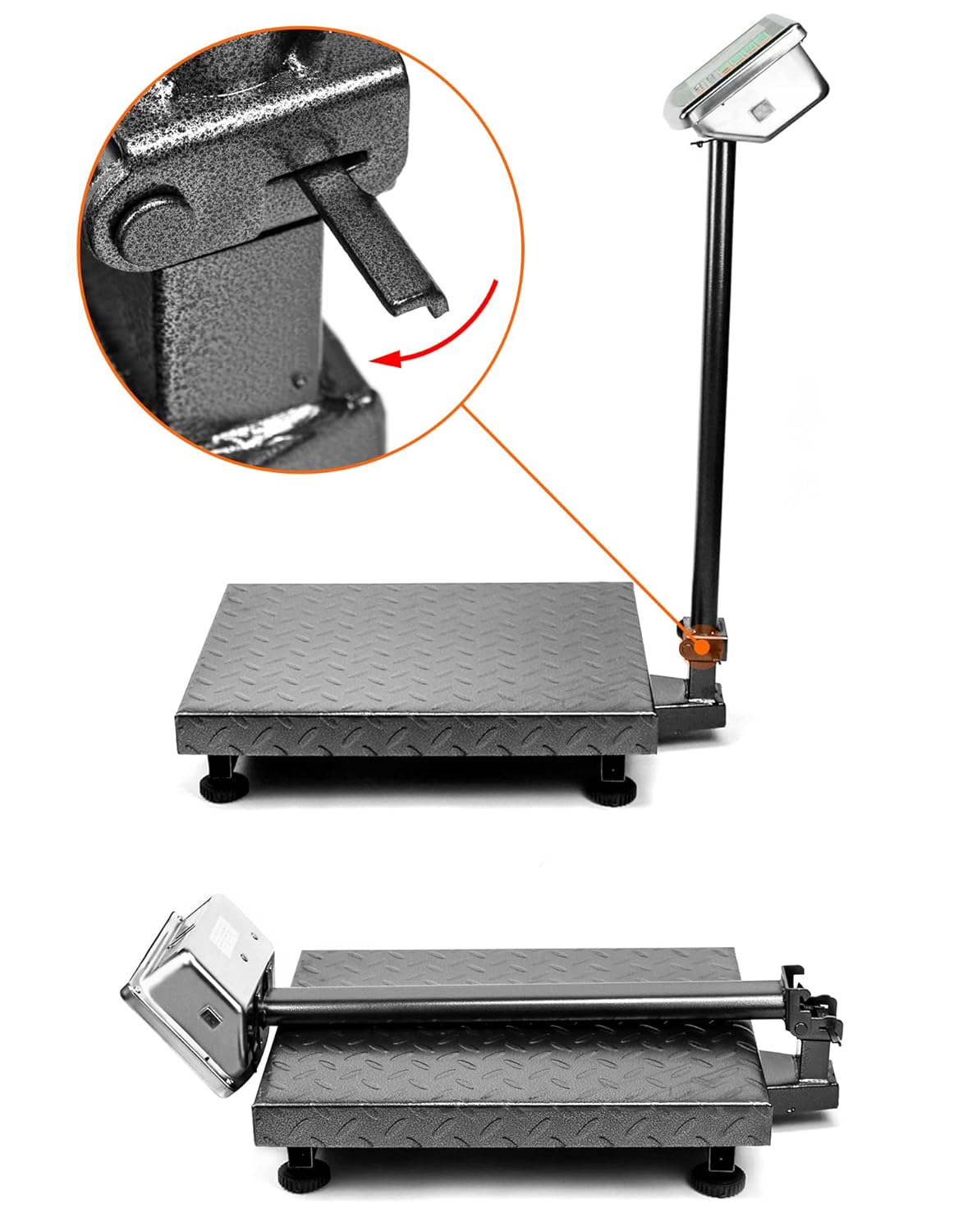
Image: The folding mechanism of the QWORK WD10229 Digital Floor Scale, showing how the display stand can be lowered for compact storage.
- Carregamento da bateria: If the scale is battery-powered, ensure it is charged regularly to maintain optimal performance.
Solução de problemas
Display shows "Lo" or "Battery Low": The internal battery is low. Connect the scale to the power adapter for charging.
Display shows "O_Ld" or "Err": The scale is overloaded. Remove the item immediately to prevent damage. Ensure the weight does not exceed 660 lbs (300 kg).
Leituras imprecisas:
- Certifique-se de que a balança esteja em uma superfície estável e nivelada.
- Check that nothing is touching the platform or interfering with its movement.
- Perform a Zero operation before weighing.
- Avoid strong vibrations or air currents during weighing.
Nenhuma exibição:
- Check if the power adapter is securely connected and the power outlet is functional.
- Certifique-se de que o interruptor de energia esteja na posição "LIGADO".
- Se estiver usando bateria, certifique-se de que ela esteja carregada.
Especificações
| Recurso | Detalhe |
|---|---|
| Marca | QWORK |
| Número do modelo | WD10229 |
| Capacidade de peso | Minimum: 0.050 lb, Maximum: 660 lb (300 kg) |
| Dimensões da plataforma | 19.8" x 15.75" (500 mm x 400 mm) Image: Diagram illustrating the dimensions of the QWORK WD10229 Digital Floor Scale platform and overall height. |
| Tipo de exibição | LCD/LED with Backlit Display |
| Material | Liga de aço |
| Fator de forma | Dobrável |
| Peso do item | 9.44 quilos |
| Usos recomendados | Packages, Envelopes, Warehouse, Shipping, Postal |
Garantia e Suporte
For warranty information or technical support, please refer to the contact details provided with your purchase or visit the official QWORK webGuarde o comprovante de compra como prova de aquisição.