
Introdução
This manual provides essential information for the safe and efficient use of your ONN 42-Inch Full HD LED Smart TV, Model 100018254. Please read these instructions thoroughly before operating your television and retain them for future reference.
O que está na caixa
Verifique se todos os componentes estão presentes antes de prosseguir com a instalação.
- ONN 42-Inch Full HD LED Smart TV
- Controle remoto
- Suporte para TV (2 peças)
- Parafusos para suporte de TV
- Cabo de alimentação
- Guia de Início Rápido (não incluído neste manual)

Imagem: Frente view of the ONN 42-inch Smart TV displaying the Roku TV home screen with various streaming app icons like Netflix, Disney+, Apple TV, Hulu, Peacock, and Roku Channel. The TV is black with slim bezels and two stand feet.
Configurar
1. Fixando o suporte de TV
- Coloque a TV com cuidado, com a tela voltada para baixo, sobre uma superfície macia e limpa para evitar danos.
- Alinhe cada peça do suporte com os orifícios correspondentes para os parafusos na parte inferior da TV.
- Fixe cada peça do suporte com os parafusos fornecidos. Certifique-se de que estejam bem apertados.

Image: A diagram illustrating the dimensions of the ONN 42-inch TV, showing its width as 43 inches and height as 37 inches when placed on its stand.
2. Montagem na parede (opcional)
This TV is compatible with VESA standard wall mounts. Refer to your wall mount's instructions for proper installation. Ensure the wall mount can support the weight of the television.

Imagem: Traseira view of the ONN 42-inch TV, highlighting the VESA mounting screw holes in a square pattern and various input ports on the side and bottom right.
3. Dispositivos de conexão
Conecte seus dispositivos externos, como decodificadores de TV a cabo, consoles de jogos ou reprodutores de Blu-ray, às portas de entrada da TV.
- HDMI: For high-definition audio and video. Use an HDMI cable to connect devices like set-top boxes, game consoles, or streaming sticks.
- USB: Para conectar dispositivos de armazenamento USB para reproduzir mídia. files.
- Wi-fi: For internet connectivity to access smart TV features and streaming services.
4. Assistente de Inicialização e Configuração Inicial
- Ligue o cabo de alimentação à TV e, em seguida, a uma tomada de parede.
- Pressione o botão liga/desliga no controle remoto ou na própria TV.
- Follow the on-screen instructions to complete the initial setup, including language selection, network connection (Wi-Fi), channel scanning, and linking to your Roku account (if applicable).
Operando a TV
1. Controle remotoview
The remote control allows you to navigate the TV's interface and control various functions.
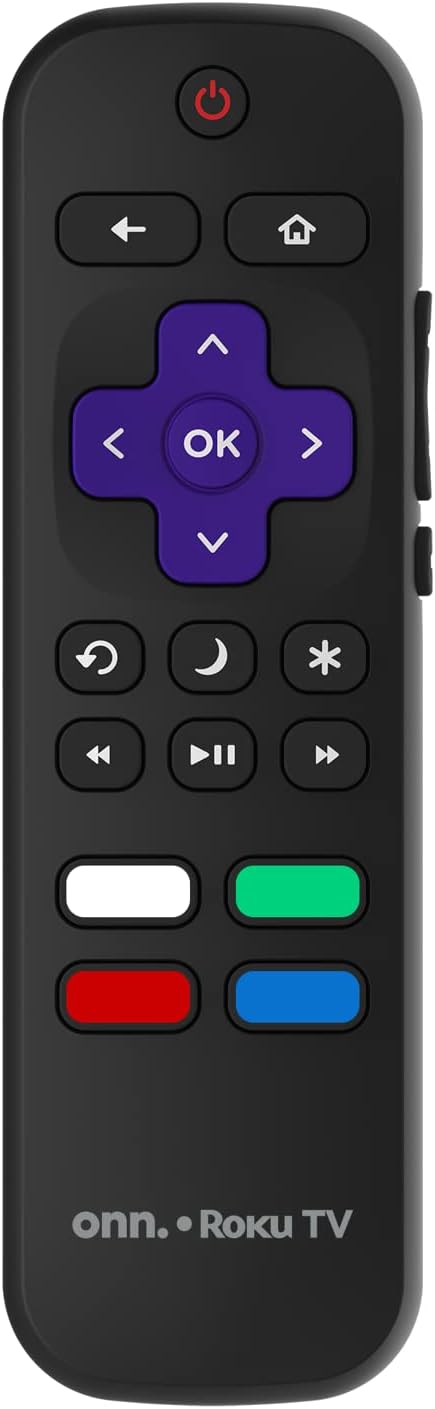
Image: The ONN Roku TV remote control, featuring a power button, directional pad, OK button, home button, back button, volume controls, and dedicated buttons for popular streaming services.
- Botão de energia: Liga ou desliga a TV.
- Directional Pad (D-Pad) & OK: Navega pelos menus e confirma as seleções.
- Botão Home: Retorna à tela inicial da Roku TV.
- Botão Voltar: Volta para a tela ou menu anterior.
- Aumentar/diminuir volume: Ajusta o volume do áudio.
- Botão Mudo: Ativa ou desativa o som do áudio.
- Canal para cima/para baixo: Changes channels (for antenna/cable inputs).
- Botões de aplicativos dedicados: Quick access to popular streaming services like Netflix, Hulu, etc.
2. Recursos da Smart TV
Your ONN Smart TV provides access to a wide range of streaming content and smart functionalities.
- Serviços de streaming: Access pre-installed apps like Netflix, YouTube, and many more through the Roku Channel Store.
- Controle de voz: Compatible with Alexa and Google Assistant for hands-free control (requires a separate compatible voice assistant device).
- Atualizações automáticas de software: The TV will automatically update its software when connected to the internet, ensuring you have the latest features and security.
3. Seleção de entrada
To switch between connected devices (e.g., cable box, game console), use the Entrada button on your remote or select the desired input from the Roku TV home screen.
4. Configurações de imagem e som
Acesse o menu de configurações da TV para personalizar as preferências de imagem e som. Navegue até Settings > TV picture settings or Configurações> Áudio to adjust options like brightness, contrast, color, sound mode, and equalizer settings.
Manutenção
1. Limpeza da tela
- Always turn off the TV and unplug it before cleaning.
- Use um pano macio e sem fiapos, levemente umedecido.ampLimpe com água ou um produto de limpeza específico para telas.
- Não borrife o produto de limpeza diretamente na tela. Aplique-o primeiro no pano.
- Avoid using abrasive cleaners, alcohol, benzene, or thinners, as these can damage the screen.
2. Atualizações de software
Ensure your TV is connected to the internet to receive automatic software updates. These updates improve performance, add features, and enhance security. You can manually check for updates in the Configurações > Sistema > Atualização do sistema menu.
Solução de problemas
Se você tiver problemas com sua TV, consulte as seguintes soluções comuns:
Sem energia
- Verifique se o cabo de alimentação está firmemente conectado tanto à TV quanto à tomada.
- Verifique se a tomada está funcionando conectando outro aparelho.
- Tente pressionar o botão liga/desliga na própria TV, e não apenas no controle remoto.
Sem imagem / Imagem distorcida
- Certifique-se de que a fonte de entrada correta esteja selecionada (por exemplo, HDMI 1, HDMI 2).
- Verifique todas as conexões de cabos entre a TV e os dispositivos externos.
- Try a different HDMI cable if possible.
- Ajuste as configurações de imagem (brilho, contraste) no menu da TV.
Sem som / Som baixo
- Check if the TV is muted or if the volume is turned down.
- Ensure external audio devices (soundbars, receivers) are properly connected and powered on.
- Verifique as configurações de áudio no menu da TV.
Problemas de conexão de rede
- Verify your Wi-Fi router is powered on and functioning.
- Reinicie o roteador e o modem.
- Vá para Configurações > Rede > Verificar conexão on your TV to diagnose the issue.
- Certifique-se de digitar a senha correta do Wi-Fi.
Especificações
| Recurso | Detalhe |
|---|---|
| Número do modelo | 100018254 |
| Tamanho da tela | 42 polegadas |
| Tecnologia de exibição | LIDERADO |
| Resolução | 1080p (Full HD) |
| Taxa de atualização | 60 Hz |
| Conectividade | USB, Wi-Fi |
| Serviços de Internet suportados | Netflix, YouTube (and others via Roku platform) |
| Método de controle | Voice (via Alexa & Google Assistant compatible devices), Remote Control |
| Tipo de montagem | Suporte de parede (compatível com VESA) |
| Cor | Preto |
| UPC | 671227025567 |

Image: Energy Guide label for Television Model 100018254, indicating an estimated yearly energy cost of $11 based on 12 cents per kWh and 5 hours use per day.
Garantia e Suporte
For warranty information and technical support, please refer to the documentation included with your purchase or visit the official ONN support website. Guarde o recibo de compra para reclamações de garantia.