
Roidmi XCQ06RM
Manual do usuário do aspirador e esfregão sem fio 2 em 1 Roidmi X20S XCQ06RM
Model: XCQ06RM
1. Introdução
Thank you for choosing the Roidmi X20S XCQ06RM Cordless 2-in-1 Vacuum and Mop. This appliance is designed to provide efficient and convenient cleaning for various floor types in your home. This manual contains important information regarding the safe use, operation, and maintenance of your device. Please read it thoroughly before first use and keep it for future reference.
2. Instruções de segurança
Para reduzir o risco de incêndio, choque elétrico ou ferimentos, observe as seguintes precauções de segurança:
- Leia todas as instruções antes de usar o aparelho.
- Não utilize ao ar livre ou em superfícies molhadas.
- Não permita que seja usado como brinquedo. É necessária muita atenção quando usado por ou perto de crianças.
- Utilize apenas conforme descrito neste manual. Utilize somente os acessórios recomendados pelo fabricante.
- Não use com cabo ou plugue danificado. Se o aparelho não estiver funcionando como deveria, tiver sido derrubado, danificado, deixado ao ar livre ou caído na água, devolva-o a um centro de serviços.
- Não puxe ou carregue pelo fio, use o fio como alça, feche uma porta no fio ou puxe o fio em torno de bordas ou cantos afiados. Não passe o aparelho sobre o fio. Mantenha o fio longe de superfícies aquecidas.
- Não desconecte puxando o cabo. Para desconectar, segure o plugue, não o cabo.
- Não manuseie o plugue ou o aparelho com as mãos molhadas.
- Não coloque nenhum objeto nas aberturas. Não use com nenhuma abertura bloqueada; mantenha livre de poeira, fiapos, cabelos e qualquer coisa que possa reduzir o fluxo de ar.
- Mantenha cabelos, roupas largas, dedos e todas as partes do corpo longe de aberturas e peças móveis.
- Desligue todos os controles antes de desconectar.
- Tenha cuidado extra ao limpar escadas.
- Não utilize para coletar líquidos inflamáveis ou combustíveis, como gasolina, nem em áreas onde eles possam estar presentes.
- Não pegue nada que esteja queimando ou soltando fumaça, como cigarros, fósforos ou cinzas quentes.
- Não use sem o coletor de pó e/ou filtros instalados.
- Evite partidas involuntárias. Certifique-se de que o interruptor está na posição desligada antes de conectar a bateria, pegar ou transportar o aparelho.
- Recarregue somente com o carregador especificado pelo fabricante.
3. Conteúdo da embalagem
Please check the package contents upon unpacking to ensure all items are present:
- Unidade principal do aspirador de pó
- Escova multifuncional
- Mite removal brush
- Washing brush (mop attachment)
- Escova de colchão elétrica
- Carregador sem fio
- Filtro
- Ferramenta para fendas
- Estação de limpeza
- Tubo de vácuo
- Mop heads x2
4. Produto acabadoview
The Roidmi X20S XCQ06RM is a powerful and versatile cleaning solution, combining vacuuming and mopping capabilities. Its lightweight design and advanced features make home cleaning efficient.

Figura 1: The Roidmi X20S XCQ06RM cordless vacuum cleaner in its upright configuration.
Principais características:
- Aspirador e esfregão 2 em 1: Easily switch between vacuuming and mopping functions by attaching the appropriate head. The mop brush rotates at approximately 200 RPM for deep cleaning.
- Sucção potente: Features a new generation Engine-x brushless digital motor (up to 120,000 rpm) delivering 138 watts of suction power and 25,000 Pa air intake pressure. Air-x technology ensures consistent suction by separating dust from air.
- 6-Level Filtration System: A multi-level system effectively separates dust, filtering impurities as small as 0.3 µm with a 99% purification rate. The device includes a safety mechanism that prevents operation if filters are not correctly installed.
- Mobile Application Connectivity: Connects via Bluetooth to your smartphone. The app allows monitoring of remaining operating time, cleaning time, and provides notifications for dustbin full or filter replacement.
- Vida útil da bateria estendida: Optimized by the BMS-X system, the 8 LG/Samsung lithium batteries provide approximately 65 minutes of runtime. The app displays battery status and alerts.
- Carregamento magnético sem fio: Convenient and cable-free charging.
- Design amigável: Operates at a reduced noise level of approximately 72 dB (A). The electric brush includes an LED light for improved visibility in dark areas. Weighing 1.5 kg, it is lightweight for easy handling.

Figura 2: The Roidmi X20S main unit shown with both the vacuum brush head and the mop attachment.

Figura 3: A user operating the Roidmi X20S to vacuum a rug in a living room setting.

Figura 4: The mop attachment of the Roidmi X20S cleaning a wet spill on a tiled kitchen floor.
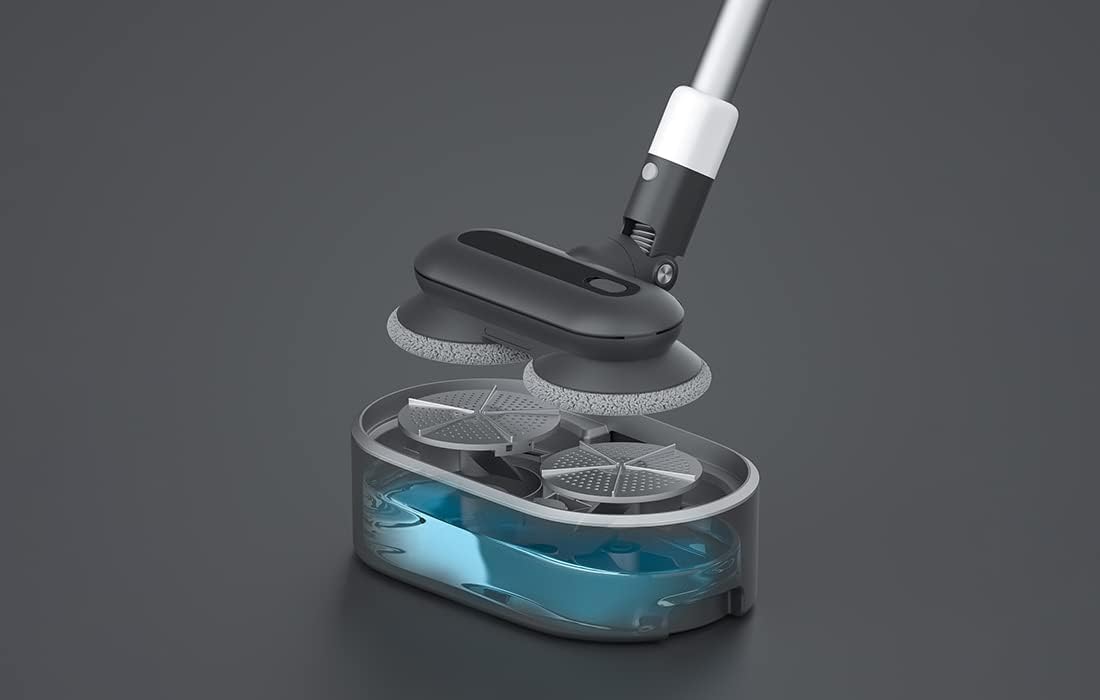
Figura 5: um explodiu view showing the internal components of the Roidmi X20S mop attachment, including the water tank.
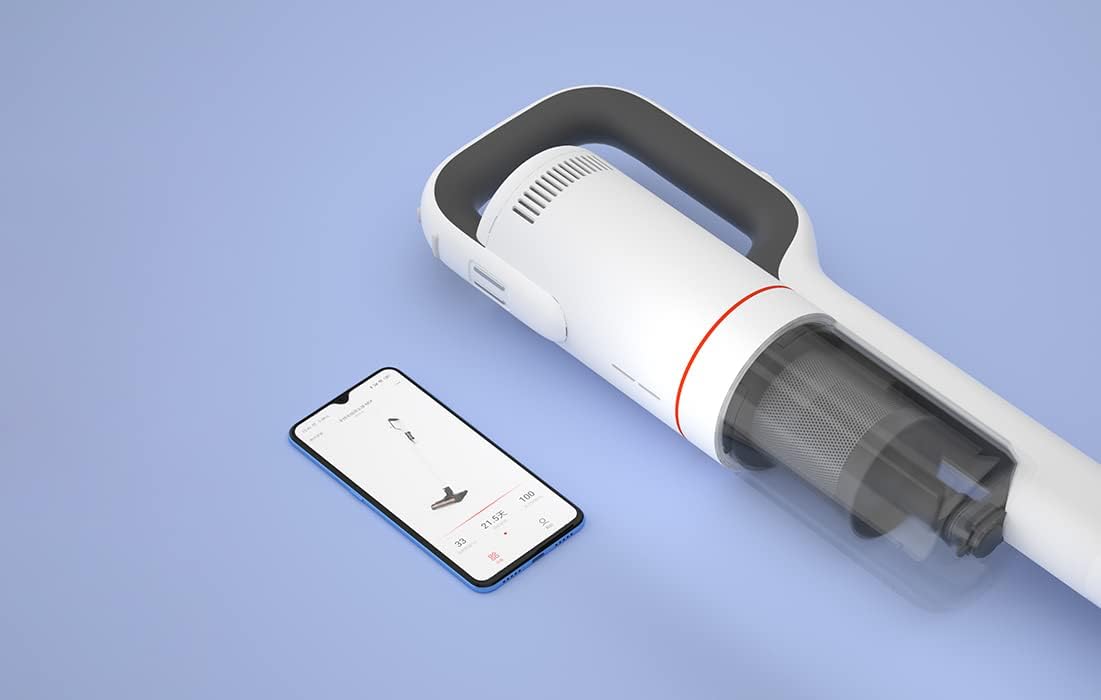
Figura 6: The Roidmi X20S main unit positioned next to a smartphone, illustrating its connectivity with the Roidmi mobile application.

Figura 7: A user demonstrating the Roidmi X20S in handheld mode, cleaning a sofa with an attachment.
5. Configuração
5.1 Montagem
- Connect the Vacuum Tube: Insert the vacuum tube into the main unit until it clicks into place.
- Fixar a cabeça de limpeza: Select the desired cleaning head (multi-function brush for vacuuming, or washing brush for mopping) and attach it to the end of the vacuum tube until it clicks.
- Install Mop Pads (for mopping): If using the washing brush, attach the mop pads to the bottom of the mop attachment.
5.2 Carregamento
Before first use, fully charge the appliance. The Roidmi X20S uses magnetic wireless charging.
- Mount the cleaning station to a wall in a convenient location, ensuring it is near a power outlet.
- Connect the wireless charger to the cleaning station and plug it into a power outlet (220 Volts).
- Place the Roidmi X20S onto the cleaning station. The magnetic connection will secure it, and charging will begin automatically.
- Monitor the battery status via the indicator lights on the device or through the Roidmi mobile application.
6. Instruções de operação
6.1 Aspiração
- Ensure the multi-function brush or appropriate vacuum attachment is securely installed.
- Pressione o botão liga / desliga para ligar o aspirador.
- Select the desired suction mode (if applicable) using the mode selection button.
- Begin vacuuming the desired surface. The LED light on the brush head will illuminate dark areas.
- After use, press the power button to turn off the vacuum.
6.2 Esfregar
- Detach the vacuum brush head and attach the washing brush (mop attachment) with mop pads installed.
- Fill the water tank on the mop attachment with clean water. Do not use corrosive liquids or hot water.
- Press the power button to turn on the device. The mop pads will begin to rotate.
- Gently guide the mop attachment over the floor surface to clean.
- After use, press the power button to turn off the device. Empty any remaining water from the tank and clean the mop pads.
6.3 Mobile Application Usage
- Download the Roidmi app from your smartphone's app store (compatible with Android and iOS).
- Enable Bluetooth on your smartphone and open the Roidmi app.
- Follow the in-app instructions to pair your Roidmi X20S with your smartphone.
- Uma vez conectado, você pode view battery status, remaining operating time, cleaning history, and receive notifications for dustbin full or filter replacement.
7. Manutenção
Regular maintenance ensures optimal performance and extends the lifespan of your Roidmi X20S.
7.1 Esvaziando a Lixeira
- When the dustbin full notification appears on the app or when visibly full, detach the dustbin from the main unit.
- Abra a lixeira e despeje o conteúdo em uma lixeira comum.
- Close the dustbin and reattach it to the main unit.
7.2 Limpeza/Substituição de Filtros
- The Roidmi X20S features a washable filter. When the app notifies you to clean or replace the filter, remove the filter from the dustbin.
- Rinse the filter under running water until clean. Ensure it is completely dry before reinserting.
- Substitua o filtro se estiver danificado ou excessivamente gasto.
7.3 Cleaning Brushes and Mop Pads
- Regularly remove hair and debris from the multi-function brush and electric mattress brush. Use the crevice tool or scissors if necessary.
- After mopping, detach the mop pads from the washing brush and rinse them thoroughly. Allow them to air dry completely before storing or reusing.
8. Solução De Problemas
If you encounter issues with your Roidmi X20S, refer to the following common problems and solutions:
| Problema | Possível causa | Solução |
|---|---|---|
| Sem energia/Não liga | Bateria esgotada Device not properly assembled | Carregue a bateria totalmente Ensure all parts are clicked into place |
| Baixo poder de sucção | O caixote do lixo está cheio O filtro está entupido A cabeça da escova está bloqueada | Esvazie o caixote do lixo Limpe ou substitua o filtro Remova quaisquer obstruções da cabeça da escova. |
| Mop function not effective | Tanque de água está vazio Mop pads are dirty or worn | Reabasteça o tanque de água Clean or replace mop pads |
| O dispositivo para inesperadamente | A bateria está fraca Filtration system parts not installed correctly | Recarregue a bateria Check all filter components are securely in place |
| Problemas de conectividade de aplicativos | Bluetooth está desligado Dispositivo não emparelhado | Ensure Bluetooth is enabled on your phone Follow app instructions to re-pair the device |
If the problem persists after attempting these solutions, please contact Roidmi customer support.
9. Especificações
| Recurso | Especificação |
|---|---|
| Marca | ROIDMI |
| Número do modelo | XCQ06RM |
| Cor | Branco |
| Poder | 34.2 Watts |
| Volumetage | 220 Volts |
| Nível de ruído | 72 decibéis (A) |
| Duração da bateria | Aproximadamente 65 minutos |
| Peso do item | 3.95 quilos |
| Tipo de filtro | Cartridge (Washable, HEPA) |
| Fonte de energia | Alimentado por bateria (1 bateria de íon-lítio incluída) |
| Compatibilidade | Android, iOS (via Roidmi App) |
| Características especiais | Compact, Lightweight, Portable, Bagless, Wet/Dry (mop function) |
| Fabricante | Wuxi Roidmi Information Technology Co., Ltd. |
10. Garantia e Suporte
For warranty information, please refer to the warranty card included with your product or contact Roidmi customer service directly. Information regarding the availability of spare parts is not provided in the product details.
For technical support or service inquiries, please visit the official Roidmi webou entre em contato com os canais de suporte ao cliente.
Ask a question about this manual
Ask about setup, troubleshooting, compatibility, parts, safety, or missing instructions. Manuals+ will review the question and use this page’s manual context to help answer it.