
1. Instruções importantes de segurança
- Leia estas instruções cuidadosamente antes de usar o produto.
- Guarde este manual para referência futura.
- Não exponha o produto a temperaturas extremas, umidade ou ambientes corrosivos.
- Evite ouvir em níveis de volume altos por longos períodos para evitar danos auditivos.
- Do not disassemble, repair, or modify the product. Contact authorized service personnel for assistance.
- Mantenha o produto longe de crianças e animais de estimação.
- Descarte o produto e sua bateria de forma responsável, de acordo com as normas locais.
2. Conteúdo da embalagem
Verifique se todos os itens estão presentes na embalagem:
- Edifier TO-U6+ True Wireless Earbuds (Left and Right)
- Estojo de carregamento
- Cabo de carregamento USB
- Pontas auriculares (vários tamanhos)
- Manual do usuário (este documento)
3. Produto acabadoview
The Edifier TO-U6+ earbuds are designed for comfortable in-ear fit and provide high-quality audio with touch controls.
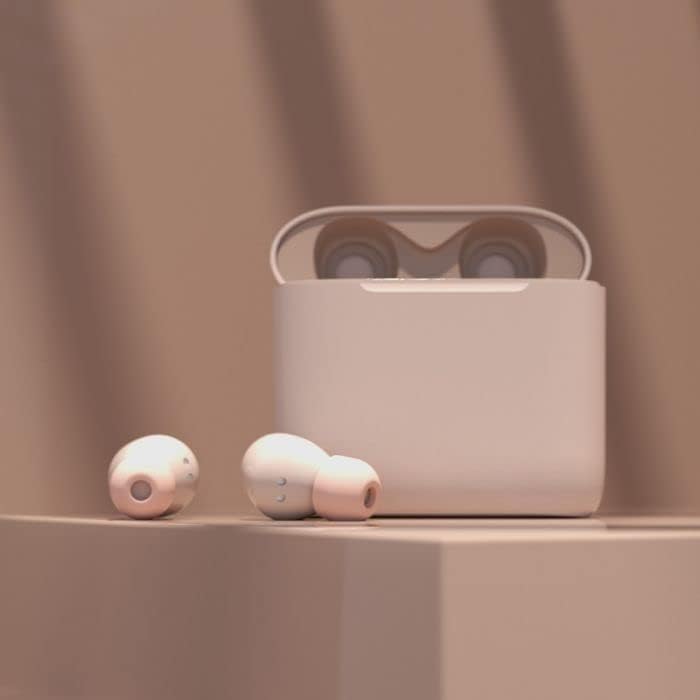
Image: Edifier TO-U6+ Earbuds removed from their open charging case, showcasinseu design.

Image: A person wearing Edifier TO-U6+ earbuds, demonstrating their ergonomic fit during use.
The charging case protects the earbuds and provides additional battery life for extended listening.
4. Configuração
4.1 Carregando os fones de ouvido e o estojo
Antes da primeira utilização, carregue totalmente os fones de ouvido e o estojo de carregamento.
- Coloque os fones de ouvido no estojo de carregamento. Certifique-se de que estejam encaixados corretamente.
- Connect the USB charging cable to the charging port on the case and to a USB power source.
- The indicator light on the charging case will show charging status. A full charge provides up to 8 hours of playback for the earbuds and an additional 24 hours from the case, totaling 32 hours. A 15-minute charge can provide 1 hour of music playback.
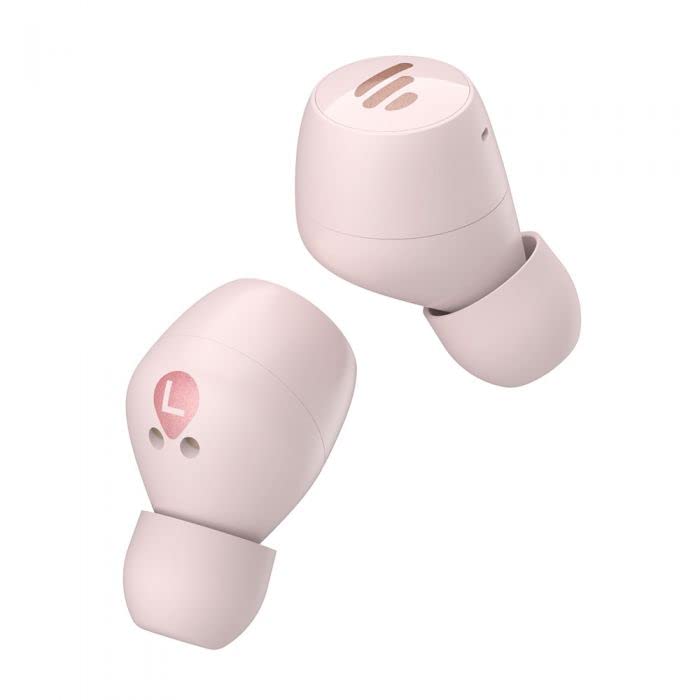
Image: The Edifier TO-U6+ charging case, illustrating its compact design.
4.2 Emparelhamento Bluetooth
- Abra o estojo de carregamento. Os fones de ouvido entrarão automaticamente no modo de emparelhamento, indicado por uma luz piscando nos fones.
- No seu dispositivo (smartphone, tablet, etc.), ative o Bluetooth.
- Procurar available Bluetooth devices and select "Edifier TO-U6+" from the list.
- Once connected, the earbud indicator lights will turn off or show a steady light, depending on the model.
- If pairing fails, place the earbuds back into the case, close the lid, and then reopen to re-enter pairing mode.
5. Instruções de operação
5.1 Controles de toque
The Edifier TO-U6+ earbuds feature intuitive touch controls on each earbud. The touch-sensitive area is located on the outer surface of each earbud.

Imagem: Topo view of the Edifier TO-U6+ earbuds, highlighting the touch control area.
| Ação | Função |
|---|---|
| Toque único (esquerda/direita) | Reproduzir/Pausar música, atender/encerrar chamada |
| Toque duplo (fone de ouvido direito) | Próxima faixa |
| Toque duplo (fone de ouvido esquerdo) | Ativar Assistente de Voz |
| Triple Tap (fone de ouvido direito) | Faixa anterior |
| Pressione e segure (esquerda/direita) | Rejeitar chamada |
5.2 Voice Calls
The earbuds feature CVC 8.0 voice call noise cancellation, which reduces ambient noise for clearer conversations. Use the single tap action to answer or end calls, and long press to reject incoming calls.
6. Manutenção
6.1 Limpeza
- Regularly clean the ear tips with a soft, dry cloth.
- Wipe the charging contacts on the earbuds and inside the case with a dry cotton swab to ensure proper charging.
- Não use produtos químicos agressivos ou materiais abrasivos para limpeza.
6.2 Armazenamento
- Guarde sempre os fones de ouvido no estojo de carregamento quando não estiverem em uso para protegê-los e mantê-los carregados.
- Armazene o produto em local fresco e seco, longe da luz solar direta e de temperaturas extremas.
6.3 Resistência à água e poeira
The Edifier TO-U6+ earbuds are IP55-rated for dust and water resistance. This means they are protected against limited dust ingress and low-pressure water jets from any direction. They are suitable for workouts and light rain, but não for swimming or submersion in water.
7. Solução De Problemas
If you encounter issues with your Edifier TO-U6+ earbuds, refer to the following common solutions:
- Sem som: Certifique-se de que os fones de ouvido estejam carregados, emparelhados corretamente e que o volume esteja ajustado tanto nos fones quanto no seu dispositivo.
- Problemas de emparelhamento: Turn off Bluetooth on your device, place earbuds back in the case, close and reopen the lid, then try pairing again. Clear previous Bluetooth connections on your device if necessary.
- Um fone de ouvido não funciona: Place both earbuds back in the case, close the lid, wait a few seconds, then take them out again. This often re-syncs them.
- Problemas de carregamento: Check the charging cable and power source. Ensure charging contacts on earbuds and case are clean and free of debris.
- Má qualidade de chamada: Ensure earbuds are properly seated in your ears. Check for strong Bluetooth signal.
If problems persist, consult the Edifier support website ou entre em contato com o atendimento ao cliente.
8. Especificações
| Recurso | Detalhe |
|---|---|
| Modelo | TO-U6+ |
| Conectividade | Sem fio, Bluetooth 5.0 |
| Bluetooth Profissionalfiles | A2DP, AVRCP, HFP |
| Tecnologia de Áudio | Qualcomm aptX |
| Redução de ruído em chamadas | CVC 8.0 |
| Tempo de reprodução (fones de ouvido) | Até 8 horas |
| Tempo total de jogo (com estojo) | Até 32 horas |
| Carga rápida | 15 minutos para 1 hora de reprodução |
| Resistência à água | IP55 Poeira e à prova d'água |
| Método de controle | Tocar |
| Dimensões do produto | 2 x 2 x 3 cm (earbuds); 180 g (total weight) |
| Dispositivos compatíveis | Smartphones, tablets, laptops, computadores de mesa |
9. Garantia e Suporte
Edifier products are covered by a limited warranty. For detailed warranty information, please refer to the warranty card included with your purchase or visit the official Edifier website.
For technical support, product registration, or further inquiries, please visit the Edifier customer support portal or contact their authorized service centers. Keep your proof of purchase for warranty claims.