
Introdução
The eECO-FLYING X1 Bluetooth Intercom Headset is designed to provide clear communication and entertainment for motorcycle riders. Featuring Bluetooth 5.0, DSP+CVC noise reduction, and IPX6 waterproofing, this headset ensures a reliable and enjoyable riding experience. This manual provides detailed instructions for installation, operation, and maintenance of your X1 headset.
O que está na caixa
Por favor, verifique se todos os itens estão presentes em sua embalagem:
- Unidade principal
- Suporte de montagem
- Cabo USB
- Caixa de embalagem
- Manual do usuário
- Full Helmet Speaker and Microphone (or Retro Helmet Speaker and Microphone)
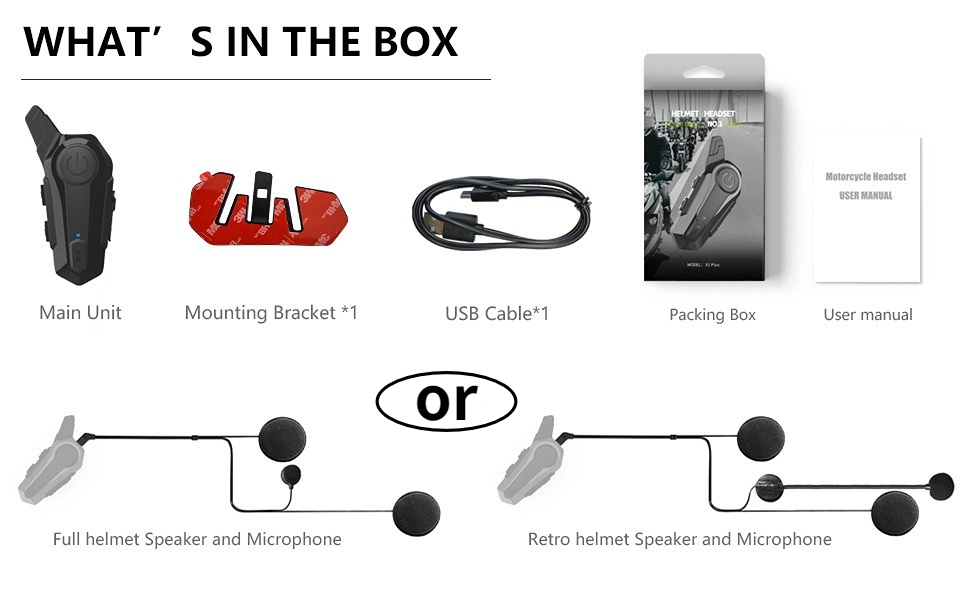
Image: Contents of the eECO-FLYING X1 package.
Características
- Bluetooth 5.0: Ensures fast and stable transmission for seamless connectivity and an immersive riding experience.
- DSP + CVC Noise Reduction: Intelligent noise reduction technology provides clear communication and high-quality music by minimizing bothersome background noise.
- Physical Pressure Button Design: User-friendly buttons are designed for easy operation even when wearing gloves, offering a tactile and responsive experience.
- U Frequency Channel: Guarantees stable transmission and wide bandwidth for clear voice calls, convenient mobile communication, and strong anti-interference capabilities.
- IPX6 Waterproof & 800mAh Battery: The IPX6 waterproof design allows the headset to handle various weather conditions. The 800mAh battery provides long-lasting power for continuous use, with up to 44 hours standby time, 12 hours working time, and 2.5 hours charging time.

Image: Two riders using the intercom with a 1000M range.

Image: Headset demonstrating IPX6 waterproof capability.

Image: Battery life details for the X1 headset.

Image: Noise cancellation technology diagram.
Configuração e instalação
Follow these steps to properly install your eECO-FLYING X1 Bluetooth Intercom Headset on your motorcycle helmet:
- Prepare o capacete: Remove the inner padding of your helmet to access the shell.
- Posicionamento do alto-falante: Attach the speaker pads (velcro) to the inside of the helmet where your ears will be. Ensure they are positioned for optimal sound. The short speaker line should be attached to the left side, and the long speaker line to the right side.
- Posicionamento do microfone: Secure the microphone in front of your mouth area, ensuring it is close enough for clear voice pickup but not obstructing your vision or comfort.
- Cabos de rota: Carefully route all cables under the helmet padding to keep them tidy and prevent interference.
- Conectar a unidade principal: Choose between the clip-on bracket or the adhesive bracket. For the adhesive bracket, peel off the protective film and firmly press the bracket onto the side of your helmet. For the clip-on bracket, slide it onto the edge of the helmet.
- Mount Headset: Slide the main headset unit onto the installed bracket until it clicks securely into place.
- Conecte os alto-falantes/microfone: Plug the speaker and microphone cable into the designated port on the main unit.
Video: Detailed installation guide for the eECO-FLYING X1 helmet Bluetooth headset.
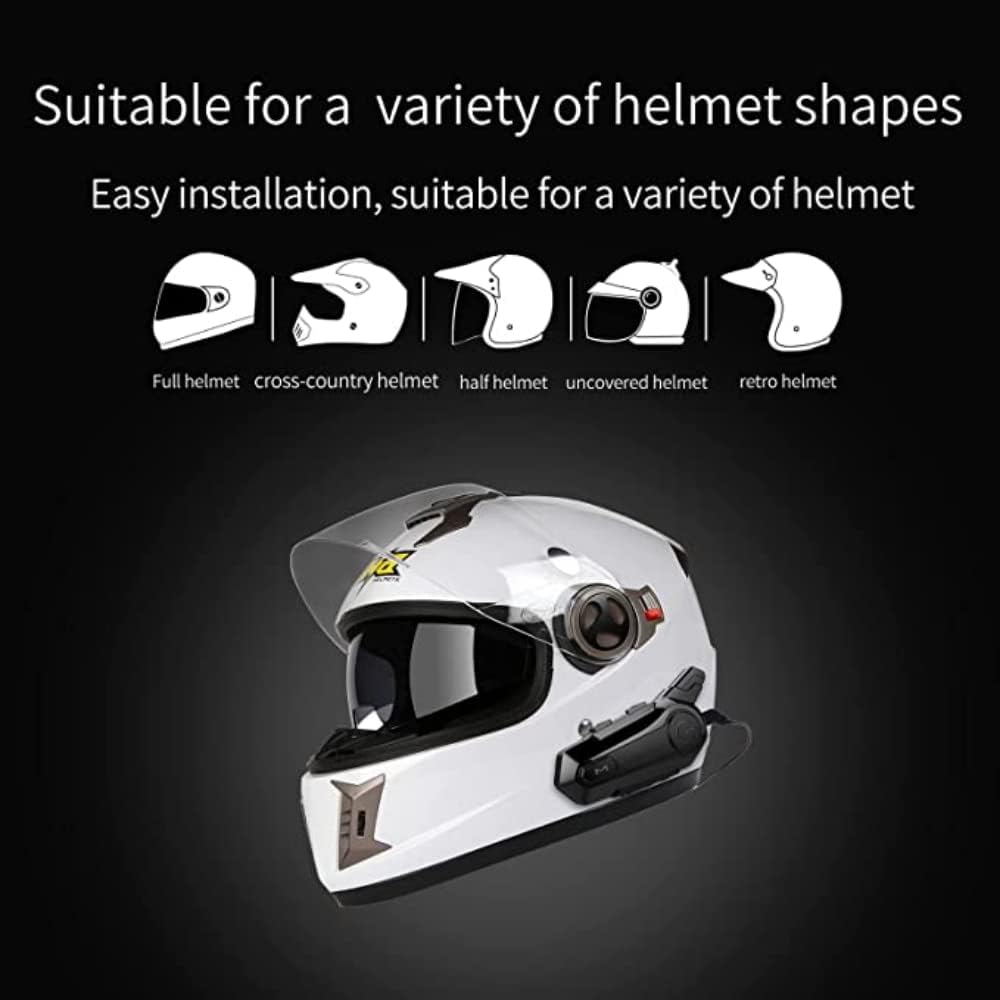
Image: Compatibility with various helmet shapes.

Image: X1 headset mounted on a helmet.
Instruções de operação
Familiarize yourself with the controls and functions of your X1 headset:

Image: Labeled diagram of headset buttons and ports.
- Ligar/desligar: Press and hold the Power button for approximately 3 seconds to turn the unit on or off.
- Emparelhamento Bluetooth: With the unit off, press and hold the Power button until the indicator light flashes red and blue, indicating pairing mode. Procurar "X1" on your device's Bluetooth settings and connect.
- Função de intercomunicação: To initiate intercom communication with another X1 headset, ensure both units are paired. Press the Mode button once to start or end intercom.
- Reprodução de música: After pairing with your phone, open your music player. Use the Volume +/- buttons for track navigation (short press) and volume adjustment (long press).
- Assistente de voz: Short press the "M" key to activate your phone's voice assistant (e.g., Siri, Google Assistant). You can then issue commands like "Please play music" or "Give Mary a call."
- Gerenciamento de chamadas: Press the Power button once to answer an incoming call. Press again to end a call. Long press to reject a call.
- Controle de volume: Long press the Volume + button to increase volume, and long press the Volume - button to decrease volume.
Vídeo: Acimaview of X1 intercom features and usage.

Image: Using the voice assistant feature.
Especificações
| Recurso | Detalhe |
|---|---|
| Nome do modelo | X1 |
| Marca | eECO-FLYING |
| Tecnologia de comunicação sem fio | Bluetooth 5.0 |
| Faixa de intercomunicação | Up to 1000M (for 2 riders) |
| Redução de ruído | DSP + CVC Technology |
| Classificação à prova d'água | IPX6 |
| Capacidade da bateria | 800mAh |
| Tempo de espera | Até 44 horas |
| Tempo de trabalho | Até 12 horas |
| Tempo de carregamento | Aproximadamente 2.5 horas |
| Tipo de controle | Media Control, Touch (Physical Buttons) |
| Dispositivos compatíveis | Motocicletas |
| Usos recomendados | Calling, Music |
| Componentes incluídos | Headset, Headband (speakers/mic) |
Solução de problemas
- Sem energia: Ensure the battery is charged. Connect the headset to a power source using the provided USB cable.
- Não foi possível emparelhar: Make sure the headset is in pairing mode (flashing red and blue light). Turn off and on your phone's Bluetooth, then try searching again. Ensure no other devices are connected to the headset.
- O interfone não está conectando: Verify both headsets are within range and are not connected to other Bluetooth devices. Try re-pairing the intercom units.
- Má qualidade de áudio: Check speaker placement inside the helmet. Ensure the microphone is positioned correctly and not obstructed. Reduce background noise if possible.
- Danos causados pela água: Although IPX6 rated, avoid prolonged submersion or high-pressure water jets. If water ingress is suspected, power off the device immediately and allow it to dry completely before attempting to use it again.
Manutenção
- Limpeza: Limpe a unidade do fone de ouvido com um pano macio e seco.amp pano. Não use produtos químicos agressivos ou produtos de limpeza abrasivos.
- Armazenar: Guarde o fone de ouvido em local fresco e seco, longe da luz solar direta e de temperaturas extremas quando não estiver em uso.
- Cuidados com a bateria: Para otimizar a vida útil da bateria, evite descarregá-la completamente com frequência. Carregue o dispositivo regularmente, mesmo que não o esteja usando constantemente.
Garantia e Suporte
The eECO-FLYING X1 Bluetooth Intercom Headset comes with a standard manufacturer's warranty. Please refer to the warranty card included in your package for specific terms and conditions. For technical support, troubleshooting assistance, or warranty claims, please contact eECO-FLYING customer service through the retailer where you purchased the product or visit the official eECO-FLYING website.