1. Introdução
This manual provides instructions for the proper installation, operation, and maintenance of your new Generic phone case and tempered glass screen protector for the Aligator S6000 Senior smartphone. Please read this manual thoroughly before use to ensure optimal performance and protection for your device.
2. Conteúdo da embalagem
Verifique se todos os itens estão presentes no seu pacote:
- 1x Phone Case for Aligator S6000 Senior (DJL-SY)
- 1x protetor de tela de vidro temperado
- 1x Adhesive Metal Finger Ring Support
- 1x Screen Cleaning Kit (typically includes alcohol wipe, microfiber cloth, dust removal sticker)
3. Configuração
3.1 Installing the Tempered Glass Screen Protector
- Limpe a tela: Use the provided alcohol wipe to thoroughly clean your phone's screen. Follow with the microfiber cloth to dry and remove any streaks. Use the dust removal sticker to lift any remaining dust particles.
- Alinhe o Protetor: Carefully align the tempered glass screen protector with your phone's screen, ensuring the cutouts for the speaker and camera match perfectly.
- Aplique o protetor: Once aligned, gently lower the protector onto the screen. It will begin to adhere automatically. If bubbles appear, gently push them towards the edges with the microfiber cloth.

Image: Features of the tempered glass screen protector, including 9H High Hardness, Perfect Adhesion, Shatterproof design, Case Friendly compatibility, 99.9% Super Transparency, and Anti-fingerprint properties.

Image: Demonstration of the screen protector's scratch-proof capabilities, showing it resisting damage from sharp objects.
3.2 Installing the Phone Case
- Insira o número de telefone: Gently place your Aligator S6000 Senior phone into the soft silicone frame of the case. Ensure all buttons and ports align correctly with the case openings.
- Ajuste seguro: Press firmly around the edges of the phone to ensure it is fully seated within the case. The case features a PC hard back panel and soft silicone frame for a secure, protective fit.

Image: The phone case demonstrating its shockproof design with 2-in-1 hard PC and soft silicone construction, featuring four-corner thickening and integrated shock airbags for enhanced drop protection.
3.3 Attaching the Finger Ring Support
The adhesive metal finger ring support can be attached to the back of the case or used separately. For optimal adhesion, ensure the surface is clean and dry before applying.
- Escolha a localização: Decide on the desired placement for the finger ring on the back of your phone case. Consider comfort for one-hand operation.
- Superfície limpa: Wipe the chosen area on the case with an alcohol wipe and dry thoroughly.
- Apply Ring: Peel off the protective film from the adhesive backing of the finger ring. Press the ring firmly onto the cleaned area of the case for at least 30 seconds. Allow 24 hours for the adhesive to fully cure before heavy use.
4. Instruções de operação
4.1 Using the Finger Ring Support
- Aderência melhorada: Slide your finger through the ring for a more secure grip, reducing the risk of accidental drops.
- Função de apoio: Rotate the ring 360 degrees and adjust it to a comfortable angle to use your phone as a multi-angle stand for hands-free viewindo.
- Operação com uma mão: The ring allows for easier reach across the screen, improving one-hand operation.
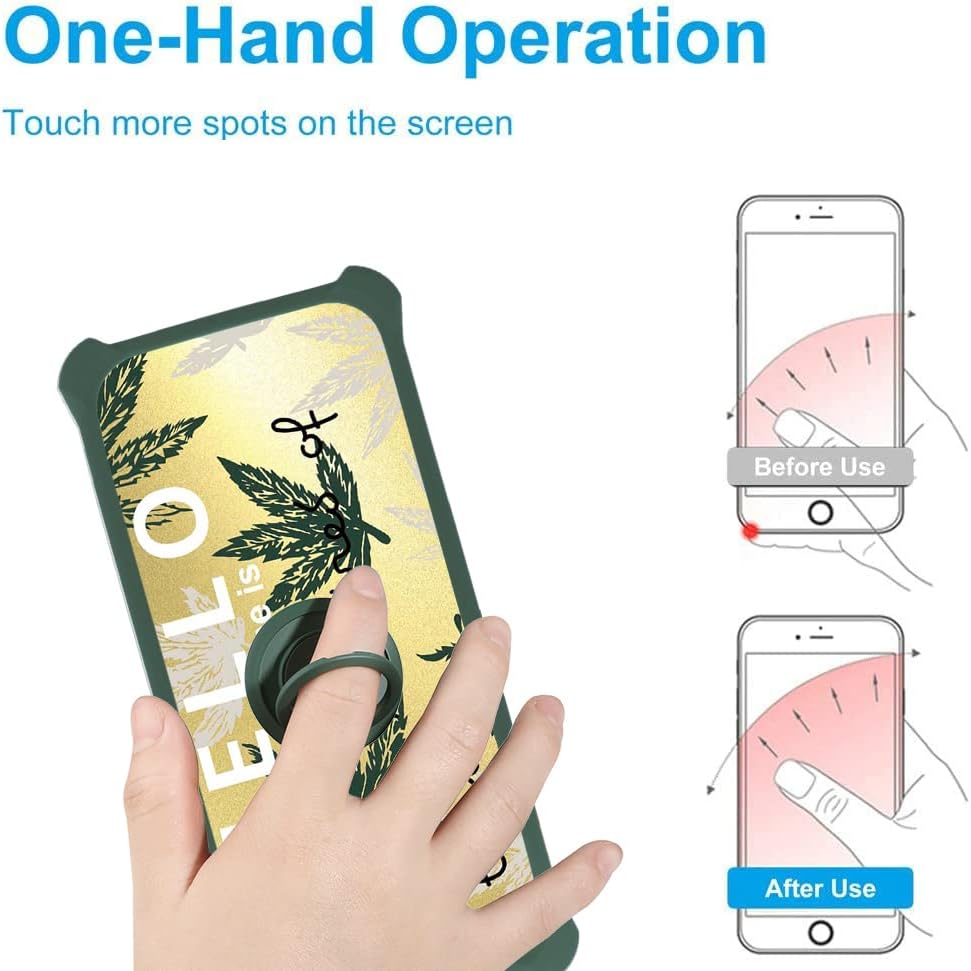
Image: Illustration demonstrating how the finger ring support facilitates comfortable one-hand operation by allowing users to reach more areas of the screen.
4.2 Magnetic Car Mount Compatibility
The metal finger ring support is designed to be compatible with magnetic car mounts. Simply attach your phone (with the case and ring) to a compatible magnetic car mount for secure in-car navigation or hands-free use.
Important Note: This case does not support wireless charging due to the integrated metal components of the ring support. Please remove the case or use a wired charger for charging your device.

Image: Visual representation of the finger ring's 180-degree and 360-degree rotation capabilities, and its compatibility with magnetic car mounts. A note indicates that wireless charging is not supported.
5. Manutenção
- Limpeza do gabinete: Wipe the phone case with a soft, damp cloth to remove dust and smudges. For tougher stains, a mild soap solution can be used, followed by wiping with a clean, damp Secagem com pano e ao ar livre. Evite produtos químicos agressivos ou abrasivos.
- Como limpar a película protetora da tela: Use a microfiber cloth to gently wipe the screen protector. For smudges, a screen cleaner spray designed for electronics can be used.
- Evite condições extremas: Do not expose the case or screen protector to extreme temperatures or direct sunlight for prolonged periods, as this may affect material integrity and color.
6. Solução De Problemas
| Problema | Possível causa | Solução |
|---|---|---|
| Bubbles under screen protector | Dust particles or improper application | Gently lift the nearest edge of the protector and reapply, pushing bubbles towards the edge with a microfiber cloth. Ensure screen is dust-free before reapplication. |
| Finger ring not adhering properly | Surface not clean/dry, insufficient pressure during application, or not enough curing time | Ensure the surface is clean and dry. Apply firm pressure for at least 30 seconds and allow 24 hours for the adhesive to fully cure. |
| O telefone não está carregando sem fio. | Case contains metal components (finger ring) | This case does not support wireless charging. Use a wired charger or remove the case for wireless charging. |
7. Especificações
| Nome do produto | Phone Case for Aligator S6000 Senior with Tempered Glass Screen Protector |
| Modelo | DJL-SY |
| Telefone compatível | Aligator S6000 Senior |
| Material | PC hard back panel, soft silicone frame, metal support finger ring |
| Características | Shockproof (4-corner airbags), 2-in-1 design, integrated finger ring (360° rotation, kickstand, magnetic car mount compatible), tempered glass screen protector (9H hardness, shatterproof, anti-fingerprint) |
| Dimensões (C x L x A) | 0.39 x 0.39 x 0.39 inches (Product dimensions, case specific dimensions may vary slightly) |
| Peso do item | 2.46 onças |
| Carregamento sem fio | Não suportado |
8. Garantia e suporte
This product is manufactured by Generic. For any questions, concerns, or support needs regarding your product, please refer to the retailer's return policy or contact the seller directly through the platform where the purchase was made. Please retain your proof of purchase for any warranty claims.


