
EZFIX DVR: EF-D08E4B2-1L Camera
EZFIX Wired Security Camera System User Manual
Marca: EZFIX
Modelo: DVR: EF-D08E4B2-1L Camera
Introdução
This manual provides comprehensive instructions for the installation, operation, and maintenance of your EZFIX Wired Security Camera System. This system is designed to provide reliable 24/7 surveillance with 1080P HD full-color night vision, advanced motion detection, and remote access capabilities. Please read this manual thoroughly before using the product to ensure proper setup and optimal performance.
O que está na caixa
Upon unpacking, please verify that all components listed below are present and in good condition.
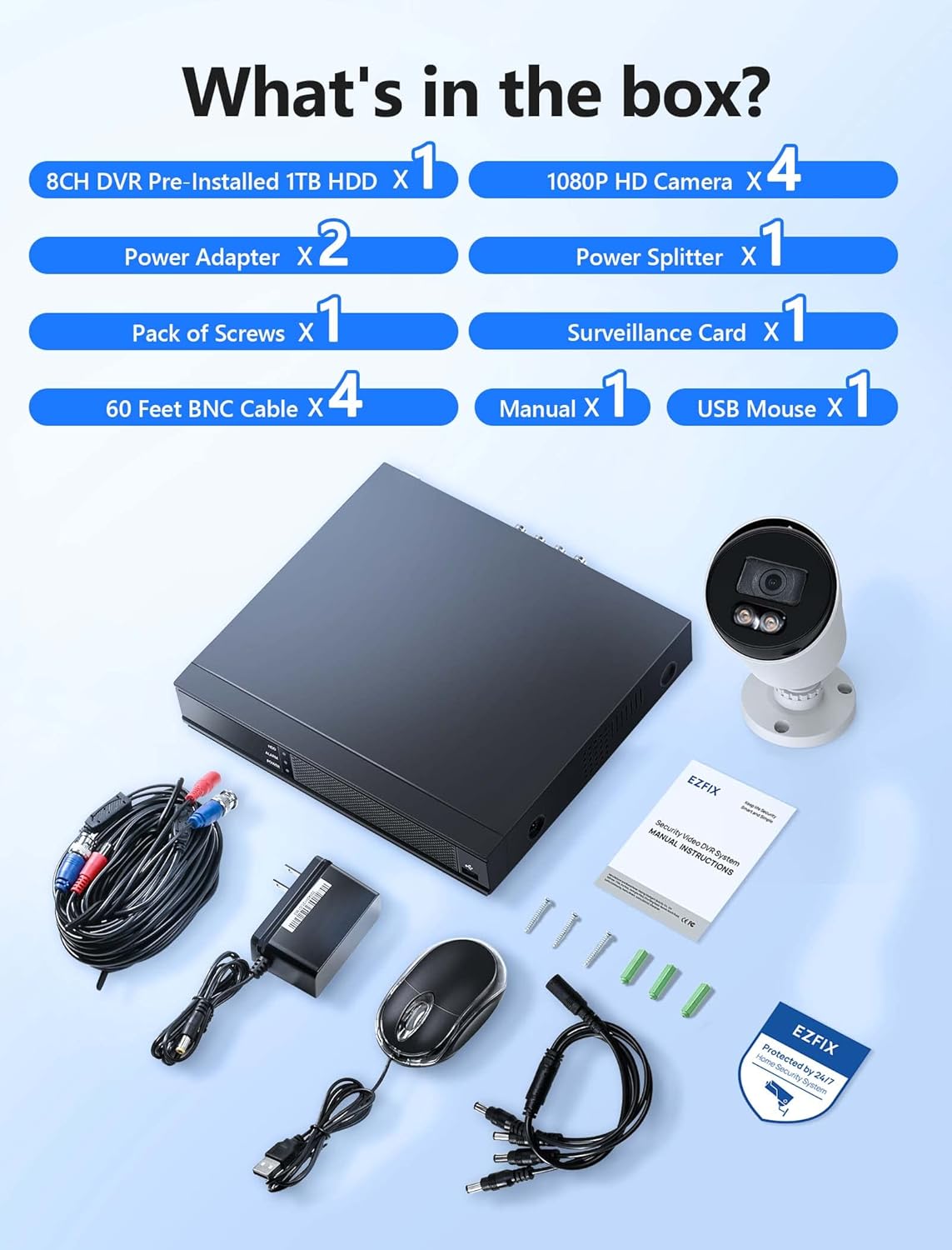
Image: All components included in the EZFIX Security Camera System package.
- 1 x 8CH DVR with Pre-installed 1TB HDD
- 4 x EZFIX 1080P HD Security Cameras
- 2 x adaptadores de energia
- 1 x Divisor de Energia
- Cabos BNC de 4 x 60 pés
- 1 x Pack of Screws
- 1 x Mouse USB
- 1 x Manual do Usuário (este documento)
- 1 x Surveillance Card
Guia de configuração
Follow these steps to set up your EZFIX security camera system.
1. DVR and Camera Placement
- Choose a secure, well-ventilated location for the DVR, away from direct sunlight and moisture.
- Plan the camera locations to cover desired areas, ensuring clear lines of sight and access to power. The cameras are IP66 waterproof, suitable for both indoor and outdoor use.

Image: EZFIX camera demonstrating IP66 waterproof rating for indoor and outdoor use.
2. Conectando o Sistema
- Conecte as câmeras ao DVR: Use the provided BNC cables to connect each camera to the corresponding video input port on the back of the DVR.
- Conecte a alimentação das câmeras: Use the power adapters and power splitter to provide power to all cameras.
- Conecte o DVR ao monitor: Connect the DVR to a monitor or TV using an HDMI or VGA cable (not included) to view a transmissão ao vivo e as configurações de acesso.
- Conectar mouse USB: Plug the included USB mouse into a USB port on the DVR for navigation.
- Conectar à rede (opcional, mas recomendado): For remote access and online features, connect the DVR to your router using an Ethernet cable (not included).
- Ligar: Connect the DVR's power adapter to the DVR and then to a power outlet. The system will boot up.

Image: Connection diagram for the EZFIX DVR and cameras.
3. Configuração Inicial do Sistema
- Follow the on-screen prompts to complete the initial setup, including setting the date/time, creating a password, and configuring network settings if connected.
- Ensure the 1TB HDD is recognized and formatted for recording.
Instruções de operação
Ao vivo View e exibir
Once powered on, the DVR will display the live video feed from all connected cameras on your monitor. You can switch between single-camera view e grade multicâmera view using the DVR interface.

Image: 24/7 Supervision System displaying multiple camera feeds.
1080P HD Full-Color Night Vision
The EZFIX cameras feature 1080P Full HD resolution for clear daytime and nighttime viewing. With built-in infrared LEDs, the cameras provide up to 100ft of night vision in dark conditions, capturing details even in low light.

Image: Day and night vision comparison showcasing 1080P FHD and Full-Color Night Vision.
Advanced Motion Detection & Instant Alerts
Configure motion detection zones and sensitivity through the DVR settings. When motion is detected, the system can send instant alerts via email and push notifications to your authorized mobile application, ensuring you are immediately aware of any activity.

Image: Motion detection and alert features with notification options.
24/7 Continuous Recording & Playback
The DVR, equipped with a 1TB hard drive, supports continuous 24/7 recording. The system utilizes advanced H.265+ video compression technology, which maintains high video quality while maximizing storage space and reducing file size by up to 50% compared to H.264. Older recordings are automatically overwritten as the HDD fills up.

Image: Benefits of H.265+ Video Compression.
Para review foo gravadotage, access the playback function on the DVR. You can search for specific recordings by time, event, or image. The system supports intelligent playback, allowing you to quickly find relevant moments.

Image: Intelligent Playback interface on monitor and mobile device.
Acesso Remoto
Access your security system remotely from your smartphone, tablet, or computer. Download the authorized application (e.g., Rview Pro App) from the App Store or Google Play. After installing, add your DVR device using its unique ID or QR code to view live feeds, playback recordings, and receive alerts from anywhere with an internet connection.
Image: Remote access via mobile app and computer interface.
Manutenção
- Limpeza da câmera: Limpe periodicamente as lentes da câmera com um pano macio e seco.amp Use um pano para garantir uma imagem nítida. Evite produtos de limpeza abrasivos.
- Inspeção de cabos: Regularly check all cables for wear, damage, or loose connections, especially for outdoor cameras.
- Atualizações de software: Check the DVR's system settings for available firmware updates to ensure optimal performance and security.
- Saúde do disco rígido: Monitor the health of the 1TB HDD through the DVR's system information to prevent data loss.
Solução de problemas
| Problema | Possível causa | Solução |
|---|---|---|
| Nenhuma imagem é exibida no monitor. | Conexão de cabo solta, entrada incorreta no monitor, DVR não ligado. | Verifique as conexões dos cabos HDMI/VGA. Certifique-se de que o monitor esteja na entrada correta. Verifique se o DVR está ligado. |
| Nenhum alerta de detecção de movimento. | Motion detection not enabled, sensitivity too low, incorrect detection zone. | Enable motion detection in DVR settings. Adjust sensitivity and detection zones. Ensure network connection for alerts. |
| O acesso remoto não está funcionando. | DVR not connected to internet, incorrect app settings, firewall issues. | Verify DVR's network connection. Check app settings (device ID, password). Ensure router firewall is not blocking access. |
| Recording issues (no recording, incomplete). | HDD full, HDD error, recording schedule not set. | Check HDD status and ensure it's formatted. Verify recording schedule. If HDD is faulty, consider replacement. |
Especificações
| Recurso | Detalhe |
|---|---|
| Marca | EZFIX |
| Tecnologia de Conectividade | Com fio |
| Resolução de captura de vídeo | 1080p |
| Características especiais | 1080P HD Full-Color Night Vision, Compatible System, Easy Installation, Motion Sensor, IP66 Waterproof |
| Número de canais | 8 |
| Capacidade de armazenamento de memória | 1 TB (expandable up to 6TB) |
| Cor | White Wired Home Security Cameras System |
| Fonte de energia | CA/CC |
| Dimensões do item (C x L x A) | 14.76 x 11.61 x 11.82 polegadas |
| Usos recomendados | Surveillance (home, office, warehouse, shopping mall, garden) |
| Dispositivos compatíveis | Smartphones, Personal Computers, TV, Tablets, Cameras, Laptops |
| Tecnologia de pouca luz | Cor da noite |
| Alcance de visão noturna | 82 pés (aproximadamente 25 metros) |
| Taxa de quadros | 30 qps |
| Modo de gravação | Detecção contínua de movimento |
| Total de portas USB | 2 |
| interface de hardware | Ethernet |
| Tipo de lente | Grande Angular |
| Entrada de vídeo | BNC, CVBS |
| Viewângulo de engate | 82.2 graus |
Garantia e Suporte
Your EZFIX Security Camera System comes with a Garantia de 1 ano from the date of purchase. This warranty covers manufacturing defects and ensures replacement availability within 12 months.
EZFIX is committed to providing excellent customer service. We offer:
- Respostas rápidas a consultas em até 24 horas.
- Lifetime service and technical support.
For technical assistance, troubleshooting, or warranty claims, please refer to the contact information provided on the product packaging or the official EZFIX website. Tenha em mãos o número do modelo e os detalhes da compra ao entrar em contato com o suporte.