
Hoppstar Hoppstar Expert Yale
Hoppstar Expert Digital Camera User Manual
Model: Hoppstar Expert Yale | Brand: Hoppstar
1. Introdução
Welcome to the user manual for your Hoppstar Expert Digital Camera. This manual provides essential information on how to set up, operate, and maintain your camera, ensuring a fun and creative experience for young photographers. Please read this manual carefully before using the camera and keep it for future reference.
The Hoppstar Expert is designed specifically for children, offering a user-friendly interface, durable construction with interchangeable silicone covers, and a range of exciting features including a selfie camera, video recording, picture frames, photo filters, and face detection.
2. Informações de segurança
- This product is intended for children aged 3 years and older. Adult supervision is recommended during use.
- Não exponha a câmera à água ou umidade excessiva.
- Avoid dropping the camera or subjecting it to strong impacts, even with the protective silicone cover.
- Keep small parts, such as memory cards, out of reach of very young children to prevent choking hazards.
- Use only the charging cable provided or a compatible USB charger.
- Do not attempt to disassemble or repair the camera yourself. Contact customer support if issues arise.
3. Conteúdo da embalagem
Por favor, marque a caixa para os seguintes itens:
- Hoppstar Expert Digital Camera
- Manual de instruções
- Cabo de carregamento USB
- Cordão/Alça
- Adaptador USB-C para USB-A
- USB-C to Micro-USB Adapter
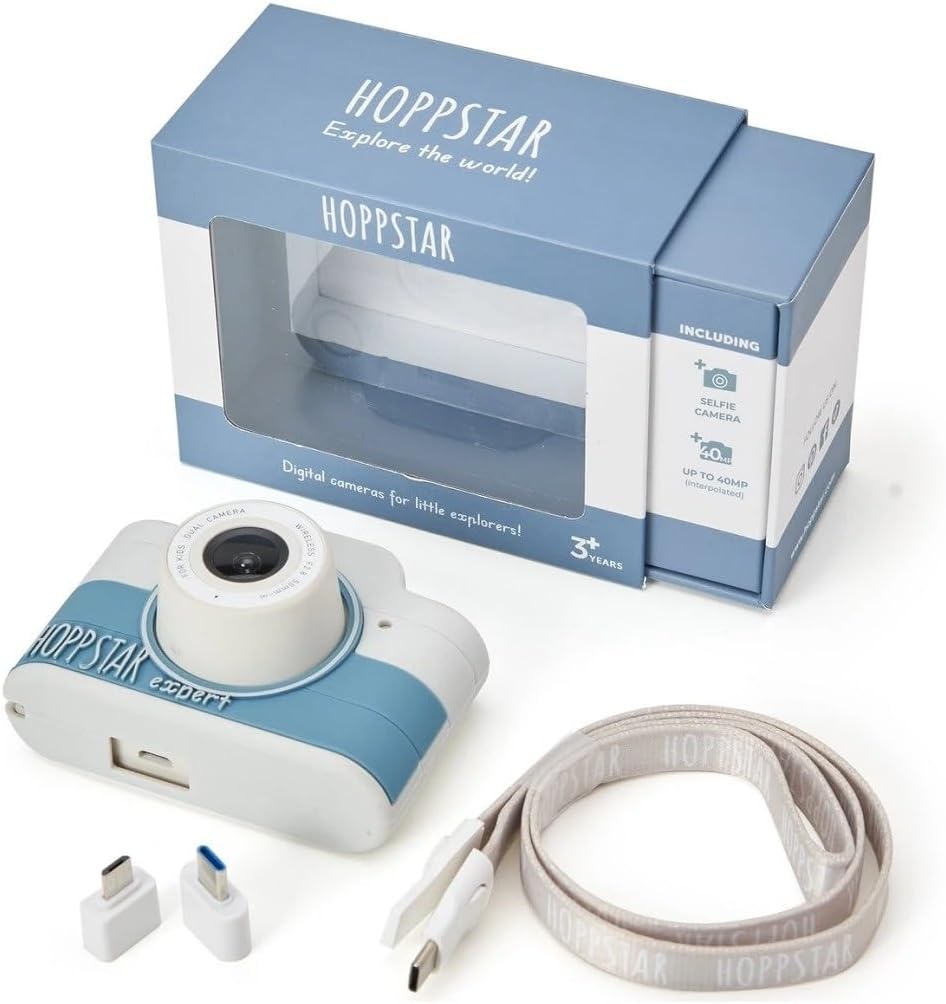
Image: Hoppstar Expert camera shown with its retail packaging, USB charging cable, lanyard, and two USB adapters.
4. Produto acabadoview
Frente View

Image: The front of the Hoppstar Expert camera, featuring the main lens, flash, and the 'Hoppstar Expert' branding on the blue and white body.
- Lente principal: For taking standard photos and videos.
- Flash/Light: Proporciona iluminação em condições de pouca luz.
- Microfone: Captura o áudio durante a gravação de vídeo.
Traseira View

Image: The back of the Hoppstar Expert camera, displaying the LCD screen and the control buttons on either side.
- Tela LCD: Exibe menus, ao vivo viewe reprodução.
- Câmera Selfie: Located above the screen for self-portraits.
- Botões de controle: Navigation, OK, Menu, and other function buttons.
5. Configuração
5.1 Carregando a câmera
Before first use, fully charge the camera's internal battery. Connect the provided USB charging cable to the camera's USB port and to a USB power source (e.g., computer, wall adapter). The charging indicator light will show the charging status and turn off when fully charged.
5.2 Inserindo um cartão de memória
The Hoppstar Expert comes with 16 GB of internal storage. If you wish to expand storage, locate the memory card slot (usually on the side or bottom) and insert a compatible microSD card (not included) until it clicks into place. Ensure the camera is powered off before inserting or removing the card.
5.3 Ligar/Desligar
Press and hold the Power button (usually located on the top or side) for a few seconds to turn the camera on or off.
6. Instruções de operação
6.1 Controles Básicos
- Botão OK: Confirms selections in menus, takes photos, or starts/stops video recording.
- Botões de navegação: Used to move through menu options (Up, Down, Left, Right).
- Botão de menu: Accesses the camera's settings and feature options.
- Botão de modo: Alterna entre os modos de foto, vídeo e reprodução.
6.2 Tirando fotos
In photo mode, frame your shot using the LCD screen. Press the OK button to capture a photo. The camera supports both front and selfie cameras. To switch between cameras, navigate to the camera settings in the menu or use a dedicated button if available.
6.3 Gravação de vídeos
Switch to video mode. Press the OK button once to start recording and press it again to stop. Videos are saved to the internal memory or inserted memory card.
6.4 Utilizando Recursos Criativos
The Hoppstar Expert includes several creative features:
- Picture Frames: Apply fun borders to your photos. Access this feature through the camera's menu.
- Filtros de fotos: Change the look and feel of your photos with various color and effect filters.
- Detecção de rosto: The camera can automatically detect faces in the frame, assisting with focus.
Explore these options within the camera's menu settings to enhance your photos and videos.
7. Manutenção
- Limpeza: Use a soft, dry cloth to clean the camera body and screen. For the lens, use a specialized lens cleaning cloth. Do not use liquid cleaners.
- Capa de silicone: The interchangeable silicone cover can be removed and cleaned with mild soap and water if necessary. Ensure it is completely dry before reattaching.
- Cuidados com a bateria: Para prolongar a vida útil da bateria, evite descarregá-la completamente com frequência. Carregue a câmera regularmente, mesmo que não a utilize por longos períodos.
- Armazenar: Guarde a câmera em um local fresco e seco, longe da luz solar direta e de temperaturas extremas.
8. Solução De Problemas
Câmera não liga
- Verifique se a bateria está carregada. Conecte a câmera a uma fonte de energia e tente novamente.
- Press and hold the Power button for a longer duration (5-10 seconds).
Qualidade de imagem/vídeo ruim
- Certifique-se de que a lente esteja limpa e livre de manchas ou poeira.
- Check lighting conditions. Optimal results are achieved in well-lit environments.
- Ensure the camera is held steady during capture.
Camera Freezes/Unresponsive
- Try resetting the camera by pressing the reset button (if available, often a small pinhole) or by holding the Power button until it turns off and then restarting.
Cannot Save Photos/Videos
- Check if the internal memory or inserted memory card is full. Delete unnecessary fileou insira um novo cartão.
- Ensure the memory card is properly inserted and not corrupted.
If you encounter issues not listed here or if troubleshooting steps do not resolve the problem, please contact Hoppstar customer support.
9. Especificações
| Recurso | Especificação |
|---|---|
| Marca | Hoppstar |
| Nome do modelo | Hoppstar Expert Yale |
| Número do modelo | 76893 |
| Cor | Yale |
| Dimensões da embalagem | 14.3 x 8.7 x 5.1 cm |
| Velocidade de disparo contínuo | 30 qps |
| Componentes integrados | Camera + Instruction Manual |
| Ano do modelo | 2023 |
| Cor do filme | Cor |
| Tipo de controle de exposição | Automático |
| Tipo de obturador | Eletrônico |
10. Garantia e Suporte
The Hoppstar Expert Digital Camera comes with a standard manufacturer's warranty. Please refer to the warranty information provided with your purchase or visit the official Hoppstar webPara obter detalhes sobre os termos e condições da garantia, consulte o site.
For technical support, product inquiries, or warranty claims, please contact Hoppstar customer service through their official website ou as informações de contato fornecidas na documentação da sua compra.
Ask a question about this manual
Ask about setup, troubleshooting, compatibility, parts, safety, or missing instructions. Manuals+ will review the question and use this page’s manual context to help answer it.