
1. Instruções importantes de segurança
Leia atentamente todas as instruções antes de usar este aparelho. Guarde este manual para futuras consultas.
- Este aparelho é destinado somente para uso doméstico.
- Não mergulhe o aparelho em água ou outros líquidos.
- Keep the appliance away from water sources, especially when charging.
- Do not use the appliance if the cord or plug is damaged. Contact customer support for repair.
- Always ensure the appliance is switched off before cleaning or performing maintenance.
- Mantenha fora do alcance de crianças. Este aparelho não é um brinquedo.
- Evite o contato com peças móveis.
- Do not use the trimmer on irritated skin or open wounds.
- Only use the charging adapter supplied with the appliance.
2. Produto acabadoview
The HTC AT-206A is a rechargeable hair trimmer designed for precise grooming tasks such as edging, outlining, dry shaving, and light shaping around areas like the neck, ears, and sideburns.

Image 2.1: HTC AT-206A Trimmer and its retail packaging, showing the device and included accessories.
Componentes:
- Trimmer Unit (HTC AT-206A)
- Cabo de carregamento
- Escova de limpeza
- Frasco de óleo lubrificante
- Acessório de pente
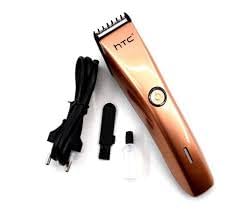
Image 2.2: The HTC AT-206A trimmer displayed with its charging cable, cleaning brush, oil bottle, and comb attachment.
3. Configuração e carregamento
3.1 Carregamento Inicial
- Before first use, fully charge the trimmer for approximately 8-10 hours.
- Certifique-se de que o aparador está desligado.
- Conecte o cabo de carregamento à porta de carregamento do aparador.
- Ligue o adaptador a uma tomada elétrica adequada.
- The charging indicator light (if present) will illuminate to show charging is in progress.
- Once fully charged, disconnect the charger from the outlet and the trimmer.
3.2 Attaching the Comb Attachment
- Certifique-se de que o aparador está desligado.
- Alinhe o pente guia com a lâmina da máquina de cortar cabelo.
- Gently push the comb attachment onto the blade until it clicks into place.
- To remove, gently pull the comb attachment away from the blade.
4. Instruções de operação
4.1 Operação básica
- Certifique-se de que o aparador esteja carregado.
- Pressione o botão liga/desliga para ligar o aparador.
- Press the power button again to turn the trimmer off.
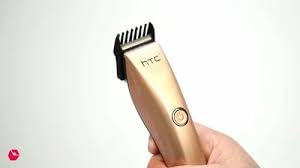
Image 4.1: The HTC AT-206A trimmer held in hand, demonstrating its ergonomic design for ease of use.
4.2 Técnicas de Aparar
- Para melhores resultados, utilize a máquina de cortar cabelo em cabelos limpos e secos.
- Segure o aparador em um ângulo ligeiramente inclinado contra a pele.
- Mova a máquina de cortar cabelo lenta e firmemente na direção oposta ao crescimento do pelo.
- Use the comb attachment for longer hair lengths (0.5mm-13mm).
- For edging and outlining, use the trimmer without the comb attachment for a closer trim.
- Stretch the skin taut with your free hand to ensure a smooth surface for trimming.
5. Manutenção e Limpeza
A limpeza e a manutenção regulares garantirão o desempenho ideal e prolongarão a vida útil do seu aparador.
5.1 Limpeza das lâminas
- Ensure the trimmer is switched off and disconnected from the charger.
- Use the provided cleaning brush to remove any loose hairs from the blades.
- For a more thorough clean, you may carefully detach the blade head (refer to specific instructions if provided with your model for blade removal).
- Do not rinse the entire trimmer under water unless explicitly stated as waterproof.
5.2 Lubrificação das Lâminas
- After cleaning, apply 1-2 drops of the provided lubricating oil onto the blades.
- Ligue o aparador por alguns segundos para permitir que o óleo se distribua uniformemente.
- Limpe o excesso de óleo com um pano macio.
- Oiling the blades regularly (e.g., after every few uses) helps maintain cutting efficiency and prevents rust.
5.3 Armazenamento
Store the trimmer in a cool, dry place, away from direct sunlight and moisture. Ensure it is fully charged before storing for extended periods.
6. Solução De Problemas
If you encounter any issues with your trimmer, refer to the following common problems and solutions:
- O aparador não liga:
Ensure the trimmer is fully charged. Check if the charging cable is properly connected and the power outlet is functional. - Desempenho ruim de corte / arrancamento de pelos:
The blades may be dull or clogged with hair. Clean and oil the blades as described in the Maintenance section. Ensure the trimmer is adequately charged. - Bateria não segura carga:
Ensure the trimmer is charged for the recommended duration. If the issue persists, the battery may need replacement. Contact customer support. - Ruído ou vibração excessivos:
The blades might be misaligned or require oiling. Clean and oil the blades. If the problem continues, discontinue use and contact customer support.
7. Especificações
| Recurso | Especificação |
|---|---|
| Número do modelo | AT-206A (SA-144) |
| Fonte de energia | Bateria recarregável |
| Material da lâmina | Stainless Steel (Metal) |
| Cutting Length Range | 0.5mm - 13mm (with comb attachment) |
| Dimensões (C x L x A) | 18.7 x 4.9 x 11.2 cm |
| Usos recomendados | Dry Shaving, Edging, Light Shaping, Outlining (Neck, Ears, Sideburns, Face) |
| Cor | Preto |
| Fabricante | CHINA |
8. Garantia e Suporte
This product is covered by a standard manufacturer's warranty. Please refer to the product packaging or contact your retailer for specific warranty terms and conditions.
For technical support, troubleshooting assistance, or warranty claims, please contact the retailer or manufacturer directly. Keep your proof of purchase for any warranty-related inquiries.