
Firecore F94T-XG
Firecore F94T-XG 3 X 360 Laser Level and FT1500D Tripod User Manual
Model: F94T-XG Laser Level & FT1500D Tripod
1. Introdução
Thank you for choosing the Firecore F94T-XG 3 X 360 Laser Level and FT1500D Tripod. This comprehensive system provides an all-in-one leveling and alignment solution for various applications. The F94T-XG laser level projects three 360° green laser planes, offering superior visibility and precision for tasks such as aligning, leveling, plumbing, and squaring. Paired with the adjustable FT1500D aluminum alloy tripod, this kit ensures stable and accurate measurements for both interior and exterior projects. Please read this manual thoroughly before operation to ensure safe and effective use of your new tool.
2. Informações de segurança
WARNING: Read and understand all safety warnings and instructions before operating this laser level. Failure to follow the warnings and instructions may result in serious injury.
2.1 Segurança do Laser
This product is a Class II laser product, with a power output of less than 1mW and a wavelength of 505-520nm. Direct eye exposure to the laser beam should be avoided.
- Não olhe diretamente para o feixe de laser.
- Do not intentionally direct the laser beam at other people or reflective surfaces.
- Não utilize o nível a laser em atmosferas explosivas, como na presença de líquidos, gases ou poeira inflamáveis.
- Keep the laser level out of reach of children.
- Utilize apenas as baterias e os métodos de carregamento especificados.
2.2 Segurança Geral
- Always ensure the work area is clear and well-lit.
- Do not modify the laser level or tripod.
- Protect the device from extreme temperatures, water, and impact.
- Clean the laser level with a soft, dry cloth. Do not use solvents.
3. Conteúdo da embalagem
The Firecore F94T-XG Laser Level and FT1500D Tripod kit includes the following items:

- Firecore F94T-XG 3 X 360 Laser Level
- Firecore FT1500D 60-inch Aluminum Alloy Laser Tripod
- 2 x 7.4V / 2600mAh Rechargeable Li-ion Batteries
- Type-C Charging Cable and Power Adapter
- Magnetic Pivoting Base
- Placa alvo verde
- Manual do usuário
- Carrying Case for Laser Level
- Shoulder Strap Bag for Tripod
4. Produto acabadoview
4.1 Firecore F94T-XG Laser Level
The F94T-XG is a robust and precise laser level designed for demanding job sites. It features an over-molded housing and IP65 water/dust resistance for durability.
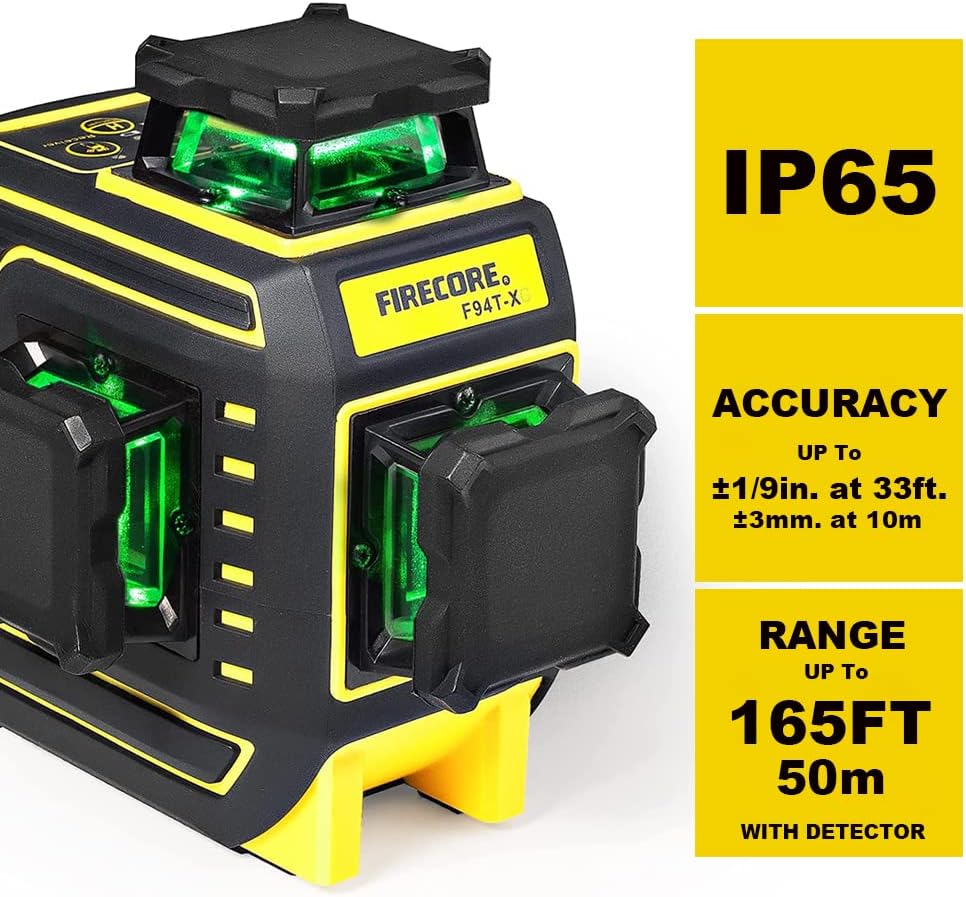
- 3 x 360° Green Laser Lines: One horizontal and two vertical planes for full room coverage.
- Alta visibilidade: Green beams are up to 4X brighter than standard red beams.
- Smart Pendulum System: Self-levels within ±4° in 3 seconds and indicates out-of-level conditions.
- Modo de pulso: Extends working range up to 197 ft (60m) with a Firecore FD30 laser detector.
- Suporte magnético integrado: Features 1/4 in. and 5/8 in. threads for versatile mounting.
- Disturbance Monitor: High-precision electronic motion sensor alerts if the tool position changes, ensuring consistent accuracy.
4.2 Firecore FT1500D Laser Tripod
The FT1500D tripod provides a stable and adjustable platform for your laser level, suitable for various applications.

- Altura ajustável: Expands from 20 inches to 60 inches (50 cm to 150 cm).
- Material: Crafted from quality aluminum for durability and lightweight portability.
- Design da cabeça: Flat head with 1/4-inch x 20 threaded studs, compatible with the F94T-XG.
- Cl de liberação rápidaamps: For easy and secure leg adjustments.
5. Configuração
5.1 Instalação e carregamento da bateria
The F94T-XG uses two 7.4V / 2600mAh rechargeable Li-ion batteries.
- Open the battery compartment cover on the back of the laser level.
- Insert the rechargeable Li-ion battery packs, ensuring correct polarity.
- Feche bem a tampa do compartimento da bateria.
- To charge, connect the Type-C charging cable to the battery pack (if charging separately) or directly to the laser level. Connect the power adapter to a suitable power outlet. The charging indicator will show charging status.
5.2 Attaching Laser Level to Tripod
The FT1500D tripod features both 1/4-inch and 5/8-inch mounting threads for compatibility.

- Extend the tripod legs and central column to your desired height. Use the quick-release clamps para protegê-los.
- Place the F94T-XG laser level onto the tripod head. The laser level's base has a 1/4-inch thread.
- Secure the laser level by rotating the mounting screw on the tripod head until it is firmly attached.
6. Instruções de operação
6.1 Powering On and Self-Leveling Mode
The F94T-XG features a Smart Pendulum System for automatic leveling.

- Unlock the pendulum by sliding the pendulum lock switch to the unlocked position.
- Press the power button to turn on the laser level. The laser lines will activate.
- Place the laser level on a stable surface or tripod. The Smart Pendulum System will automatically self-level within ±4°.
- If the device is out of its self-leveling range, the laser lines will flash rapidly to indicate an out-of-level condition. Adjust the position of the laser level until the lines stop flashing and become steady.
6.2 Manual Mode (Locking Lines)
For applications requiring lines at an angle, you can lock the pendulum.
- With the pendulum lock switch in the locked position, press and hold the power button for a few seconds to activate Manual Mode.
- The laser lines will turn on and remain steady, allowing you to project lines at any desired angle. The out-of-level alarm will be deactivated in this mode.
6.3 Pulse Mode (Detector Use)
Pulse mode extends the working range of the laser level, especially in bright lighting or outdoor conditions, when used with a compatible laser detector (e.g., Firecore FD30).

- In self-leveling mode, press the dedicated Pulse Mode button (if available, or cycle through modes) to activate Pulse Mode. The laser lines may appear dimmer to the naked eye but will be detectable by the receiver.
- Follow the instructions for your specific laser detector to locate the laser line at extended distances.
6.4 Aplicações
The Firecore F94T-XG is versatile for various professional and DIY applications.

- Room layout and partitioning
- Alignment of conduit, lighting, and fixtures
- Flooring and tiling installation
- Drywall and window framing
- Cabinet and shelf installation
7. Manutenção
7.1 Limpeza
- Regularly clean the laser level and tripod with a soft, dry cloth.
- Do not use abrasive cleaners, solvents, or harsh chemicals, as these can damage the housing or optical components.
- Keep the laser apertures clean to ensure clear and accurate laser lines.
7.2 Armazenamento

- Always lock the pendulum before storing or transporting the laser level to prevent damage to the internal mechanism.
- Store the laser level and tripod in their respective carrying cases when not in use.
- Armazenar em local fresco e seco, longe da luz solar direta e de temperaturas extremas.
- If storing for extended periods, remove the batteries from the laser level.
7.3 Cuidados com a bateria
- Carregue as baterias completamente antes da primeira utilização.
- Do not expose batteries to excessive heat or direct flame.
- Descarte as baterias de acordo com os regulamentos locais.
8. Solução De Problemas
If you encounter issues with your Firecore F94T-XG laser level, refer to the table below for common problems and solutions.
| Problema | Possível causa | Solução |
|---|---|---|
| Linhas de laser piscam rapidamente. | Laser level is out of its self-leveling range (±4°). | Place the laser level on a more level surface or adjust the tripod until the lines become steady. |
| As linhas do laser são fracas ou invisíveis ao ar livre. | Bright ambient light; not in Pulse Mode. | Activate Pulse Mode and use a compatible laser detector (e.g., Firecore FD30). Use the green target plate to enhance visibility over short distances. |
| Laser level does not turn on. | Low battery; pendulum locked; power button not pressed correctly. | Charge or replace batteries. Ensure pendulum lock switch is in the unlocked position. Press the power button firmly. |
| Medições imprecisas. | Device not calibrated; pendulum not fully settled; disturbance during operation. | Ensure the device is on a stable surface and has fully self-leveled. Avoid disturbing the device during use. If persistent, contact customer support for calibration. |
| A vida útil da bateria é menor do que o esperado. | Batteries not fully charged; old batteries; operating in extreme temperatures. | Ensure batteries are fully charged. Replace old batteries if capacity has significantly degraded. Operate within recommended temperature ranges. |
9. Especificações
| Recurso | Especificação |
|---|---|
| Aula de Laser | Class II (IEC/EN60825-1/2014) |
| Comprimento de onda do laser | 505-520nm (Green Laser) |
| Precisão de nivelamento | ±1/9 inch at 33 ft (±3mm at 10m) |
| Faixa de autonivelamento | ±4° |
| Tempo de autonivelamento | 3 segundos |
| Alcance visível | Até 82 pés (25m) |
| Working Range with Detector | Up to 197 ft (60m) with Firecore FD30 |
| Classificação IP | IP65 (Water/Dust Resistance) |
| Fonte de energia | 2 x 7.4V / 2600mAh Li-ion Batteries |
| Tempo de operação | Approx. 10 hours per battery (continuous use) |
| Rosca de montagem | 1/4 pol. e 5/8 pol. |
| Material do tripé | Liga de alumínio |
| Faixa de altura do tripé | 20 polegadas a 60 polegadas (50 cm a 150 cm) |
| Temperatura de operação | Not specified, generally 14°F to 122°F (-10°C to 50°C) for laser levels. |
| Temperatura de armazenamento | Not specified, generally -4°F to 158°F (-20°C to 70°C). |
10. Garantia e Suporte
Firecore products are manufactured to high-quality standards. For information regarding warranty coverage, please refer to the warranty card included with your product or visit the official Firecore website. If you have any questions, require technical assistance, or need to report an issue, please contact Firecore customer support through the following channels:
- Oficial Website: www.firecoretools.com (Example, actual link not provided in data)
- Suporte por e-mail: Consulte a embalagem do produto ou o manual oficial. website para contato por e-mail.
- Loja Amazon: Visite o Firecore Store on Amazon Para obter informações sobre o produto e opções de suporte.
Please have your model number (F94T-XG) and purchase date ready when contacting support.