
1. Introdução
The IHSENO Mini WiFi Smart Switch Relay is a compact and intelligent device designed to integrate your traditional lighting and appliances into a smart home system. It operates on 2.4GHz WiFi and is compatible with the Tuya Smart Life App, allowing for remote control, voice commands via Alexa and Google Home, and intelligent scheduling.

Imagem 1.1: Terminadoview of the IHSENO Mini WiFi Smart Switch Relay and its packaging.
Principais características:
- Mini WiFi Smart Switch: Designed for 2.4GHz WiFi, enabling whole-house intelligence through the Tuya APP.
- Tuya Smart Life App Control: Connects with other smart devices for intelligent scene linkage.
- Customize Different Scene Modes: Allows setting scenes like 'Reading' or 'Movie' and controlling various smart devices.
- Alexa & Google Home Enabled: Supports voice control for hands-free operation.
- Design compacto: Fits into most standard electrical boxes, even with existing wiring.
2. Informações de segurança
Leia atentamente todas as instruções de segurança antes da instalação e operação. O não cumprimento dessas instruções pode resultar em choque elétrico, incêndio ou outros riscos.
- Instalação profissional recomendada: Os trabalhos elétricos devem ser realizados por um eletricista qualificado.
- Desligue antes da instalação: Desligue sempre a energia no disjuntor antes de instalar ou realizar manutenção no aparelho.
- Somente para uso interno: Este dispositivo destina-se ao uso interno em locais secos.
- Volumetage e classificações atuais: Não exceda o volume especificadotage (AC 100-240V) and current (3 Amps) ratings.
- Fiação: Ensure all wiring connections are secure and comply with local electrical codes. Input and output connections cannot be reversed.

Image 2.1: Safety and Certification details for the Mini Smart Switch.
3. Configuração e instalação
The IHSENO Mini WiFi Smart Switch Relay is designed for easy integration into your existing electrical system. It supports both 1-way and 2-way control setups.
Diagramas de fiação:
Importante: Always ensure the power is OFF at the circuit breaker before performing any wiring. Input and output connections cannot be reversed.

Image 3.1: Wiring Method 1 - Direct connection to a lamp and mains power.

Image 3.2: Wiring Method 2 - Connection with a 1-way wall switch.

Image 3.3: Wiring Method 3 - Connection with a 2-way wall switch.
Emparelhamento de aplicativos:
- Baixe o Tuya Inteligente or Vida Inteligente aplicativo da loja de aplicativos do seu smartphone.
- Registre-se ou faça login na sua conta.
- Certifique-se de que seu smartphone esteja conectado a uma rede WiFi de 2.4 GHz.
- Power on the smart switch. The indicator light should blink rapidly, indicating it's in pairing mode. If not, refer to the troubleshooting section for resetting the device.
- In the app, tap '+' to add a device. Select 'Electrical' > 'Switch (Wi-Fi)' or allow the app to auto-discover the device.
- Siga as instruções na tela para concluir o processo de emparelhamento.
4. Instruções de operação
Once installed and paired, you can control your IHSENO Mini WiFi Smart Switch Relay through various methods.
4.1. Controle Remoto por Aplicativo
Control your connected devices from anywhere using the Tuya Smart Life App, as long as your smartphone and the switch are connected to the internet.

Image 4.1: WiFi Remote Control functionality.

Image 4.2: App Remote Control in action, showing control of a lamp.
4.2. Controle de voz
Integrate your smart switch with Amazon Alexa or Google Assistant for convenient voice commands.
- Abra o aplicativo Alexa ou Google Home.
- Link your Tuya Smart Life account to the voice assistant.
- Descubra dispositivos.
- Use commands like "Alexa, turn on the lamp" or "Hey Google, turn off the kitchen light."
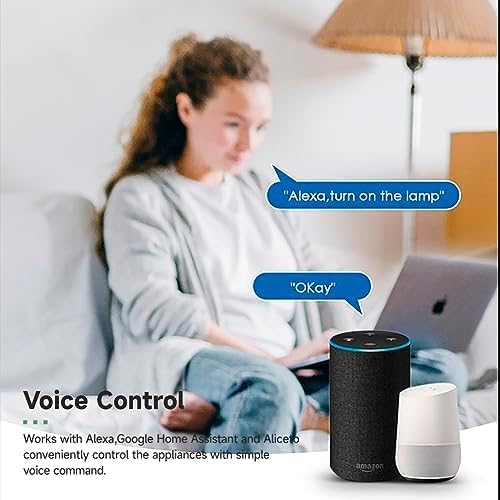
Image 4.3: Voice control with Alexa and Google Home.
4.3. Intelligent Timing and Scene Modes
Set schedules, countdowns, and create custom scene modes within the Tuya Smart Life App.
- Tempo: Schedule devices to turn on/off at specific times (e.g., 23:30 Off).
- Ciclismo: Set recurring schedules (e.g., 08:00 ON Everyday).
- Contagem regressiva: Defina um temporizador para que o dispositivo desligue após um período de tempo especificado.
- Modos de cena: Combine multiple smart devices to activate with a single command or schedule (e.g., 'Movie Night' scene dims lights and turns on entertainment).
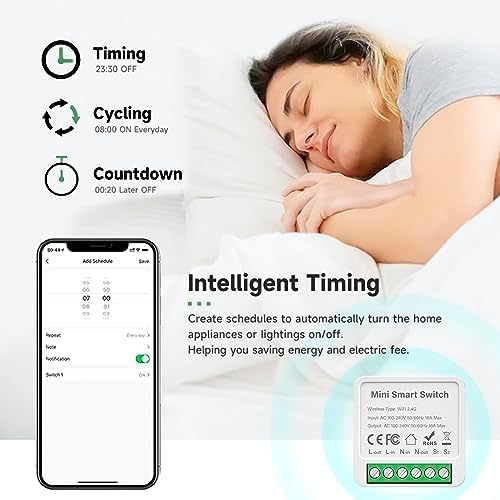
Image 4.4: Intelligent Timing features in the app.
4.4. Sharing Function
Share control of your smart devices with family members through the Tuya Smart Life App.

Image 4.5: Sharing function for family members.
5. Manutenção
To ensure the longevity and optimal performance of your IHSENO Mini WiFi Smart Switch Relay, follow these simple maintenance guidelines:
- Limpeza: Use um pano macio e seco para limpar o dispositivo. Não use produtos de limpeza líquidos ou aerossóis.
- Ambiente: Evite expor o dispositivo à umidade excessiva, temperaturas extremas ou luz solar direta.
- Inspeção: Verifique periodicamente as conexões da fiação para detectar sinais de desgaste ou afrouxamento.
6. Solução De Problemas
If you encounter issues with your IHSENO Mini WiFi Smart Switch Relay, refer to the following common problems and solutions:
- Dispositivo não emparelhado:
- Ensure your WiFi network is 2.4GHz. The device does not support 5GHz WiFi.
- Check that the device is powered on and the indicator light is blinking rapidly. If not, power cycle the device or perform a factory reset (refer to app instructions for reset procedure).
- Move the device closer to your WiFi router during pairing.
- Device offline in app:
- Verify your home WiFi network is active and has internet access.
- Check the power supply to the smart switch.
- Reinicie o seu roteador Wi-Fi.
- O controle de voz não está funcionando:
- Ensure your Tuya Smart Life account is correctly linked to Alexa or Google Home.
- Check the device name in the voice assistant app; ensure it's easy to pronounce and recognize.
- Verifique se o seu dispositivo assistente de voz está conectado à internet.
- Physical switch not responding:
- Ensure all wiring connections are secure and correct according to the diagrams.
- Check if the physical switch itself is functional.
7. Especificações
Technical specifications for the IHSENO Mini WiFi Smart Switch Relay:

Imagem 7.1: Especificações detalhadas do produto.
| Especificação | Detalhe |
|---|---|
| Marca | IHSENO |
| Modelo | B0CF1FYYBN |
| Tipo sem fio | WiFi 2.4G |
| Vol de entradatage | CA 100-240 V 50/60 Hz |
| Volume de saídatage | CA 100-240 V 50/60 Hz |
| Classificação de corrente máxima | 3 Amps (Note: Product image shows 16A Max, but product specifications list 3 Amps. Please verify with product packaging.) |
| Tipo de montagem | Montagem em superfície |
| Material de contato | Cobre |
| Material | PC V0 (Fireproof) |
| Tamanho | 41x20x41mm (approx. 1.6*0.8*1.6 inches) |
| Modo de operação | (ON)-ON-OFF |
| Tipo de interruptor | 1 vias |
| Mudar Estilo | Botão de pressão |
| Compatibilidade de aplicativos | Smart Life (Support iOS & Android) |
8. Garantia e Suporte
IHSENO is committed to providing high-quality products and customer satisfaction.
If you have any questions about this product, please feel free to contact our customer service team. We aim to reply within 24 hours to assist you with any inquiries or issues.
Consulte a documentação de compra para obter os termos e condições específicos da garantia.