
1. Produto acabadoview
The charmast 20000mAh Portable Charger (Model C2065) is a high-capacity power bank designed to charge multiple devices on the go. It features built-in USB-C, Lightning, and Micro-USB cables, along with additional USB-A and USB-C ports, providing versatile charging options for a wide range of electronic devices. A digital display indicates the remaining battery percentage.

Image 1.1: The charmast 20000mAh Portable Charger (Model C2065) in Navy.
2. O que está na caixa
Ao abrir a embalagem, verifique se todos os itens estão presentes:
- 1 x charmast 20000mAh Portable Charger (Model C2065)
- 1 x Manual do Usuário
- 1 x Travel Pouch
3. Especificações
| Recurso | Detalhe |
|---|---|
| Número do modelo | C2065 |
| Capacidade da bateria | 20000 Miliamp Horas (mAh) |
| Dimensões do produto | 6.3 x 2.85 x 0.75 polegadas |
| Peso do item | 12 onças |
| Portas de saída | Built-in USB-C, Lightning, Micro-USB cables; 2x USB-A ports; 1x USB-C port (Input/Output) |
| Carregamento rápido | Carregamento rápido PD de 22.5 W |
| Características especiais | Built-in cables, Digital Display, Fast Charging, High Capacity, Slim design |
4. Configuração
4.1 Carregamento inicial do Power Bank
Before first use, fully charge the power bank. The digital display will show the charging progress from 0% to 100%.
- Utilizando o cabo USB-C integrado: Connect the built-in USB-C cable to a compatible USB wall adapter (not included). Charging time is approximately 6 hours.
- Utilizando o cabo USB-A integrado: Connect the built-in USB-A cable to a compatible USB wall adapter (not included). Charging time is approximately 12 hours.
- Using an External Cable (USB-C Input): Connect a USB-C cable (not included) to the power bank's USB-C input port and a compatible 18W PD/QC wall adapter. Charging time is approximately 6 hours.
- Using an External Cable (Micro-USB Input): Connect a Micro-USB cable (not included) to the power bank's Micro-USB input port and a compatible 18W PD/QC wall adapter. Charging time is approximately 6 hours.

Image 4.1: Methods for recharging the power bank.
5. Instruções de operação
5.1 Dispositivos de carregamento
O carregador portátil oferece diversas maneiras de carregar seus dispositivos:
- Utilizando cabos integrados: The power bank includes built-in Lightning, USB-C, and Micro-USB cables. Simply pull out the appropriate cable and connect it directly to your device.
- Utilizando portas USB-A: Connect your device's USB-A charging cable to one of the two USB-A output ports on the power bank.
- Utilizando a porta USB-C: Connect your device's USB-C charging cable to the USB-C output port on the power bank. This port also supports input for recharging the power bank.

Image 5.1: Built-in cables for various devices.
5.2 Carregamento simultâneo
The power bank can charge up to six devices simultaneously using a combination of its built-in cables and external USB ports.

Image 5.2: Charging multiple devices.
5.3 Carregamento rápido
The power bank supports 22.5W PD fast charging. When connected to a compatible device, it can charge up to 50% in approximately 30 minutes. Ensure your device and cable support fast charging for optimal performance.
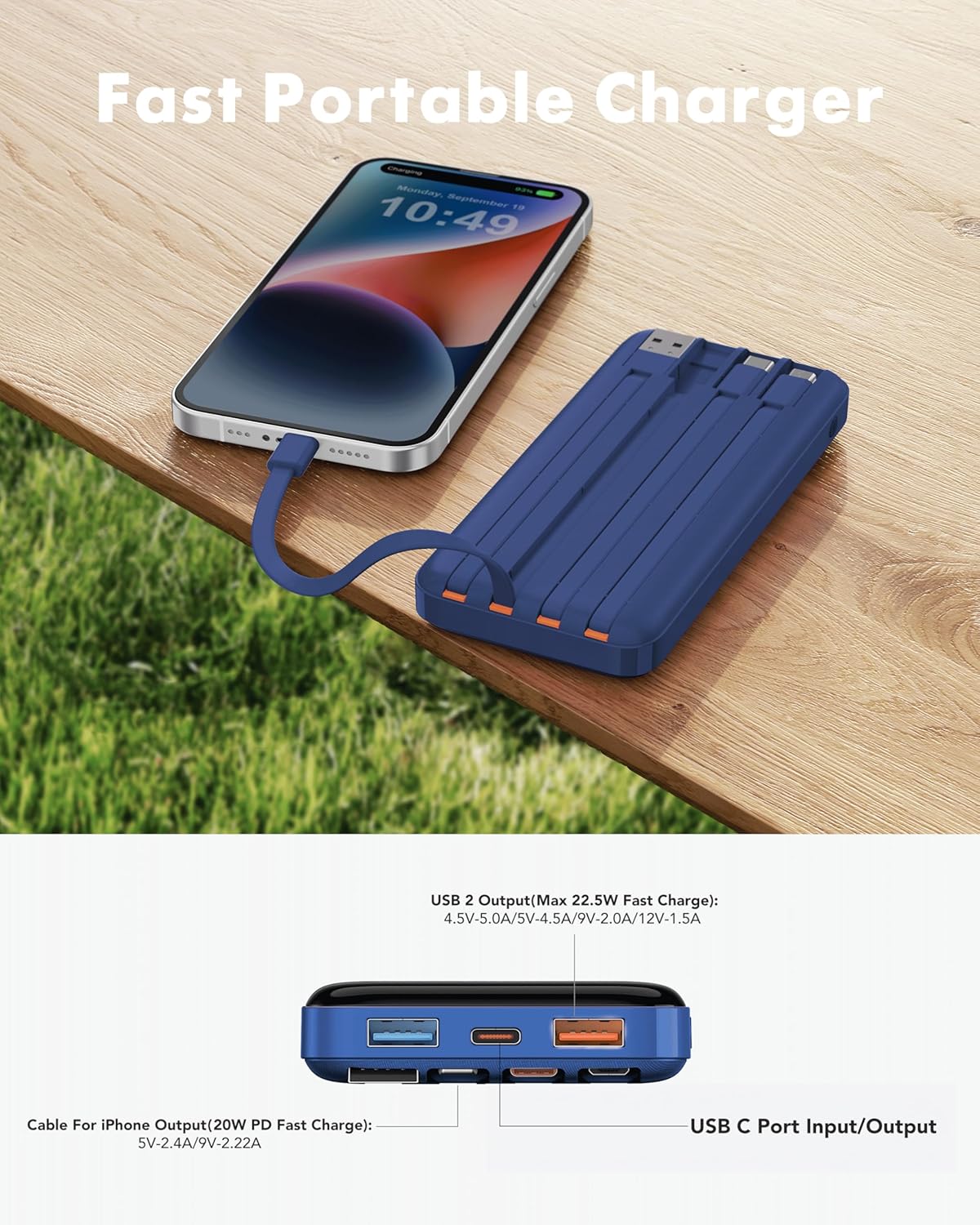
Image 5.3: Fast charging in action.
5.4 display digital
The integrated digital display shows the precise remaining battery percentage (0-100%) of the power bank. This allows for accurate monitoring of the power bank's charge level.

Image 5.4: Digital display showing battery percentage.
5.5 Modo de baixa corrente
For charging low-power devices such as Bluetooth earphones, smartwatches, or fitness trackers, activate the low-current mode. Press and hold the power button for 5 seconds to engage this mode, ensuring safe and efficient charging for smaller electronics.
6. Informações de segurança
- Não exponha o carregador portátil a temperaturas extremas (quentes ou frias), luz solar direta ou fogo.
- Evite deixar o dispositivo cair, desmontá-lo ou modificá-lo.
- Mantenha longe da água e da alta umidade.
- Guarde em local fresco e seco quando não estiver em uso.
- Mantenha fora do alcance de crianças.
- Flight Travel: This power bank meets airline safety standards for carry-on luggage. Always pack it in your carry-on bag; never place it in checked luggage.

Image 6.1: The power bank is flight-friendly.
7. Manutenção
- Limpe o carregador portátil com um pano macio e seco. Não utilize produtos químicos agressivos ou materiais abrasivos.
- If the power bank will not be used for an extended period, charge it to approximately 50-75% every three months to maintain battery health.
- Avoid storing the power bank in extreme temperatures or direct sunlight.
8. Solução De Problemas
8.1 Power Bank não carrega
- Ensure the charging cable is securely connected to both the power bank's input port/built-in cable and the wall adapter.
- Verifique se o adaptador de parede está funcionando corretamente e conectado a uma tomada elétrica em funcionamento.
- Experimente um cabo de carregamento ou adaptador de parede diferente.
8.2 O dispositivo não está carregando a partir do power bank.
- Verifique se a bateria externa tem carga suficiente (consulte o visor digital).
- Ensure the cable connecting the device to the power bank is securely plugged in at both ends.
- Try a different output port or built-in cable on the power bank.
- Verifique se a porta de carregamento do seu dispositivo está limpa e livre de detritos.
- If charging a low-power device, ensure Low-Current Mode is activated (press and hold power button for 5 seconds).
8.3 Carregamento lento
- Certifique-se de que tanto o carregador portátil quanto o seu dispositivo sejam compatíveis com protocolos de carregamento rápido.
- Use um cabo de alta qualidade e compatível com carregamento rápido.
- Evite carregar vários dispositivos simultaneamente se precisar da velocidade máxima em um único dispositivo.
9. Garantia e Suporte
The charmast 20000mAh Portable Charger comes with 24 months of support and lifetime technical support. For assistance, please refer to the contact information provided in your product packaging or visit the official charmast website.