1. Introdução
This manual provides comprehensive instructions for the safe and efficient use of your new artfone C1+ 4G mobile phone. Please read this manual thoroughly before operating the device to ensure proper functionality and to familiarize yourself with all features. Keep this manual for future reference.

Image 1.1: The artfone C1+ 4G mobile phone with its dedicated charging dock.
2. Produto acabadoview
2.1 Principais Características
- Design amigável: Features a large 1.77-inch color display with clear menu icons and larger fonts for easy readability.
- Áudio aprimorado: Amazingly high volume and clear speakers, ideal for individuals with hearing difficulties.
- Características de segurança: Integrated SOS button for up to 5 emergency contacts and a conveniently located flashlight button.
- Bateria de longa duração: Equipped with a robust 1800mAh battery, offering 5-6 hours of continuous talk time and 240-300 hours (10-12 days) of standby time.
- Construção durável: Non-slip back panel and sturdy PC materials provide protection against impacts and drops.
- Versatile Network Compatibility: Unlocked and compatible with major Canadian 4G networks, supporting 2G, 3G, and 4G bands for voice calls and text messaging.
- Funções essenciais: Includes audio, video, Bluetooth, FM radio, calculator, alarm, and calendar.
2.2 Conteúdo da embalagem
Ao abrir a embalagem, verifique se todos os itens estão presentes:
- Celular artfone C1+ 4G
- Bateria recarregável
- Cabo de carregamento USB-C
- Adaptador de carregador de parede
- Doca de carregamento
- Manual do usuário

Image 2.1: The complete package contents, including the phone, battery, charger, dock, and manual.
3. Configuração
3.1 Instalação do cartão SIM e da bateria
- Remova a tampa traseira: Gently slide the back cover of the phone downwards or pry it open from the designated notch.
- Insira o cartão SIM: Locate the SIM card slot(s). Insert your 4G compatible SIM card(s) into the slot(s) with the gold contacts facing down and the cut corner aligned as indicated.
- Insira a bateria: Coloque a bateria no compartimento da bateria, certificando-se de que os contatos dourados da bateria estejam alinhados com os contatos do telefone.
- Substituir a tampa traseira: Securely reattach the back cover until it clicks into place.
3.2 Carregando o telefone
Antes da primeira utilização, carregue totalmente a bateria do telefone.
- Utilizando a base de carregamento: Connect the USB-C charging cable to the wall charger adapter, then plug the adapter into a power outlet. Connect the other end of the USB-C cable to the charging dock. Place the phone into the charging dock, ensuring it sits securely and the charging indicator appears on the screen.
- Carregamento direto: Alternatively, connect the USB-C charging cable directly to the USB-C port on the phone and then to the wall charger adapter plugged into a power outlet.
A full charge typically takes approximately 2-3 hours. The battery icon on the screen will indicate charging status.
4. Operação básica
4.1 Ligar/Desligar
- Ligar: Pressione e segure o Red Call/Power Off button (usually marked with a phone icon) until the screen lights up.
- Desligar: Pressione e segure o Red Call/Power Off button until a power off option appears on the screen. Select 'Power Off' and confirm.
4.2 Fazendo e recebendo chamadas
- Fazer uma chamada: On the standby screen, dial the desired phone number using the keypad. Press the Chamada Verde botão para iniciar a chamada.
- Atender uma chamada: Quando o telefone tocar, pressione o Chamada Verde botão para responder.
- Finalizando uma chamada: Pressione o Red Call/Power Off button to end an active call.
4.3 Contatos
- Access Contacts: From the main menu, navigate to 'Contacts' or press the dedicated 'Contacts' button if available.
- Adicionar novo contato: Select 'Options' or 'Add New' within the Contacts menu. Enter the contact's name and phone number, then save.
- Call from Contacts: Select a contact from the list and press the Chamada Verde botão.
4.4 Mensagens (SMS)
- Access Messages: From the main menu, navigate to 'Messages'.
- Create New Message: Select 'New Message' or 'Write Message'. Enter the recipient's phone number and type your message using the keypad.
- Enviar mensagem: Selecione 'Enviar' para transmitir a mensagem.

Image 4.1: The phone's user-friendly interface with large icons for easy navigation.
5. Características especiais
5.1 Botão de Emergência SOS
The SOS button is located on the back of the phone. It allows you to quickly contact pre-set emergency numbers in critical situations.
- Configurando contatos de emergência: Navigate to the 'SOS Settings' menu. You can add up to 5 emergency contact numbers.
- Ativando o SOS: In an emergency, press and hold the SOS button on the back of the phone for a few seconds. The phone will emit an alarm sound and automatically send an emergency SMS to the pre-set contacts, then sequentially call them until one answers.

Image 5.1: Location of the SOS button and other functional side buttons.
5.2 Lanterna
O telefone inclui uma lanterna integrada para maior comodidade.
- Ligar/Desligar: Locate the dedicated flashlight button on the side of the phone. Slide or press this button to turn the flashlight on or off.

Image 5.2: The phone's strong flashlight feature in use.
Rádio 5.3 FM
Enjoy listening to FM radio stations on your device.
- Access FM Radio: Acesse o aplicativo 'Rádio FM' no menu principal.
- Canais de varredura: Use the options within the FM Radio app to automatically scan for available stations.
- Ajustar volume: Use the side volume buttons to adjust the radio volume.
5.4 Talking Numbers
The talking numbers feature provides audio feedback when dialing, enhancing usability for visually impaired users.
- Habilitar/Desabilitar: This feature can usually be toggled on or off in the phone's 'Settings' menu under 'Sound' or 'Accessibility' options.
6. Manutenção
Proper maintenance ensures the longevity and optimal performance of your artfone C1+ 4G.
- Limpeza: Use um pano macio e seco para limpar a tela e a carcaça do telefone. Evite usar produtos de limpeza líquidos ou materiais abrasivos.
- Cuidados com a bateria: Avoid extreme temperatures. Do not expose the battery to direct sunlight or very cold conditions. Charge the phone regularly, but avoid overcharging for extended periods.
- Armazenar: Se for guardar o telefone por um longo período, certifique-se de que a bateria esteja parcialmente carregada (em torno de 50%) e guarde-o em um local fresco e seco.
- Proteção: The phone features a non-slip design and sturdy PC materials for protection. However, avoid dropping the phone or exposing it to excessive force.
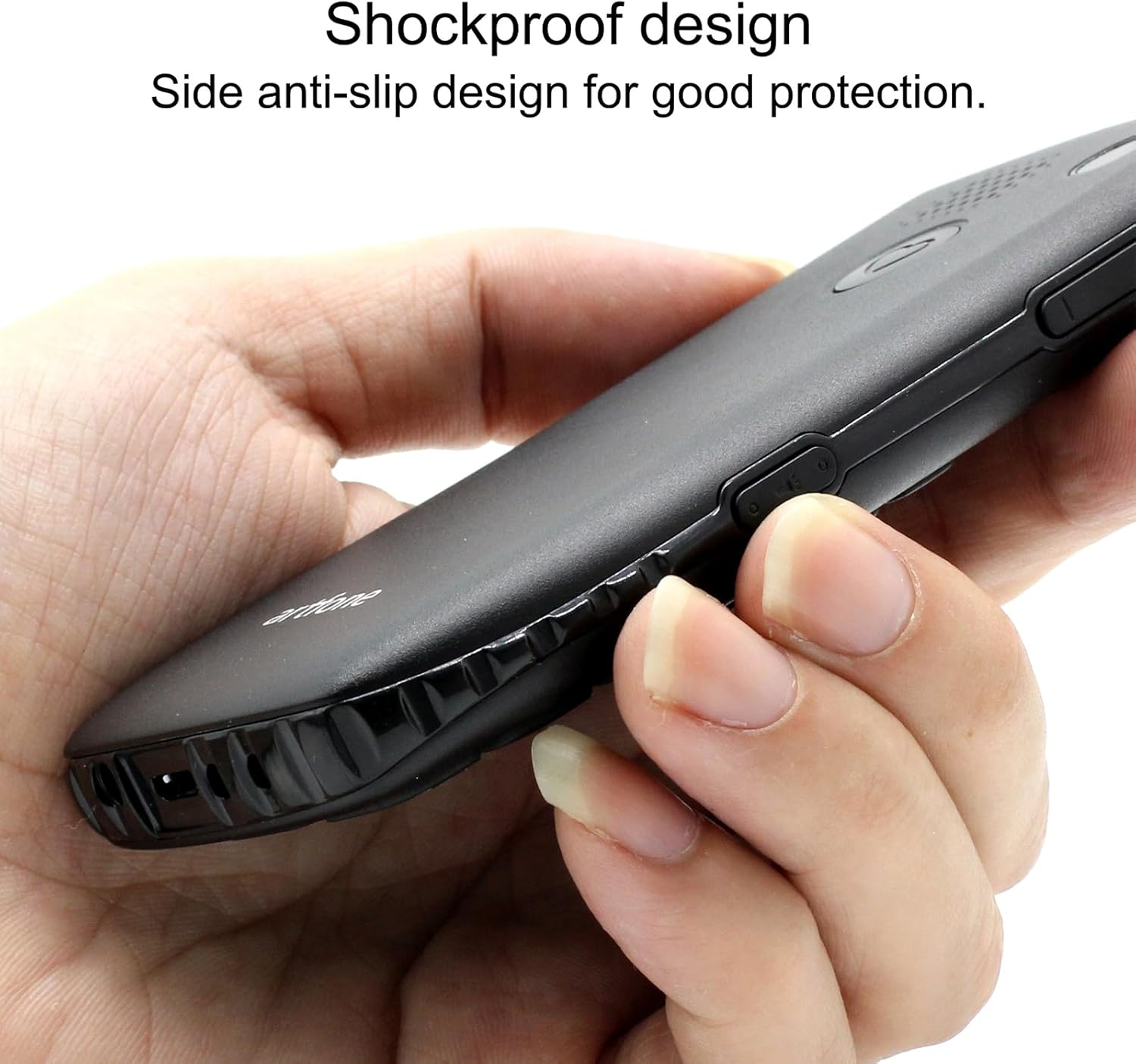
Image 6.1: The phone's shockproof design with side anti-slip features.
7. Solução De Problemas
Se você tiver problemas com seu telefone, consulte os problemas e soluções comuns a seguir:
| Problema | Possível causa | Solução |
|---|---|---|
| O telefone não liga | Bateria fraca; Bateria mal instalada. | Carregue o telefone por pelo menos 30 minutos; reinstale a bateria, certificando-se de que os contatos estejam alinhados. |
| Não consigo fazer/receber chamadas. | No SIM card; SIM card not active; Out of network coverage | Ensure SIM card is inserted and active; Move to an area with better network signal. |
| Poor call quality/low volume | Weak signal; Speaker/microphone obstruction | Move to an area with better signal; Ensure speaker/microphone are not covered. Adjust call volume using side buttons. |
| A bateria descarrega rapidamente | Frequent use; Background features active | Reduce usage; Turn off unnecessary features like flashlight when not in use. |
| O botão SOS não está funcionando. | No emergency contacts set; Feature disabled | Verify emergency contacts are correctly configured in SOS settings; Ensure SOS feature is enabled. |
Se o problema persistir após tentar essas soluções, entre em contato com o suporte ao cliente.
8. Especificações
| Recurso | Especificação |
|---|---|
| Modelo | C1+ 4G |
| Sistema operacional | Artfone OS |
| Processador | Boca-de-leão |
| BATER | 48 MB |
| Memória Flash | 128 MB |
| Capacidade de armazenamento digital | 32 GB (for media/contacts) |
| Tamanho da tela | LCD de 1.8 polegadas |
| Resolução | 240 x 320 |
| Taxa de atualização | 60 Hz |
| Resolução da câmera | 2 MP |
| Resolução de captura de vídeo | 1280 x 720 |
| Tipo de Bateria | Íon de lítio |
| Capacidade da bateria | 1400 mAh |
| Average Battery Life (Talk) | 5.5 horas |
| Tecnologia Celular | 4G, 3G, 2G |
| Tipo de conector | USB-C |
| Entrada de Interface Humana | Botões |
| Fator de forma | Bar |
| Dimensões | 13.1 x 11.8 x 6.1 cm |
| Peso | 240 g |
9. Vídeos oficiais do produto
Vídeo 9.1: Uma análise detalhadaview of the artfone C1+ 4G phone's features and design. This video demonstrates the phone's physical attributes and user interface.
Video 9.2: A demonstration of the phone's ease of use and key functionalities, highlighting its suitability for seniors.
10. Garantia e Suporte
Your artfone C1+ 4G mobile phone comes with a standard manufacturer's warranty. Please refer to the warranty card included in your package for specific terms and conditions, including the warranty period and coverage details.
For technical support, troubleshooting assistance beyond this manual, or warranty claims, please contact artfone customer service through their official website ou as informações de contato fornecidas na embalagem do seu produto.