
1. Introdução
Welcome to the KRUPS Sensation C10 EA910A10 Superautomatic Coffee Machine user manual. This guide provides comprehensive instructions for the safe and efficient operation, maintenance, and troubleshooting of your new coffee machine. Please read this manual thoroughly before first use and keep it for future reference.
2. Instruções importantes de segurança
Para garantir uma operação segura, siga sempre estas precauções básicas de segurança:
- Leia todas as instruções antes de usar o aparelho.
- Não mergulhe o aparelho, o cabo de alimentação ou a ficha em água ou outros líquidos.
- Este aparelho é destinado somente para uso doméstico.
- Garantir o volumetagA tensão indicada no aparelho corresponde à tensão da sua rede elétrica.tage.
- Desligue sempre o aparelho da tomada antes de limpá-lo ou quando não estiver em uso.
- Não opere nenhum aparelho com o cabo ou plugue danificado, ou após o aparelho apresentar mau funcionamento ou ter sido danificado de qualquer forma.
- Mantenha as crianças afastadas do aparelho durante o funcionamento.
- Utilize somente acessórios recomendados pelo fabricante.
- Avoid contact with hot surfaces, such as the coffee spouts or steam nozzle.
3. Componentes do produto
Familiarize yourself with the main components of your KRUPS Sensation C10 EA910A10 coffee machine:
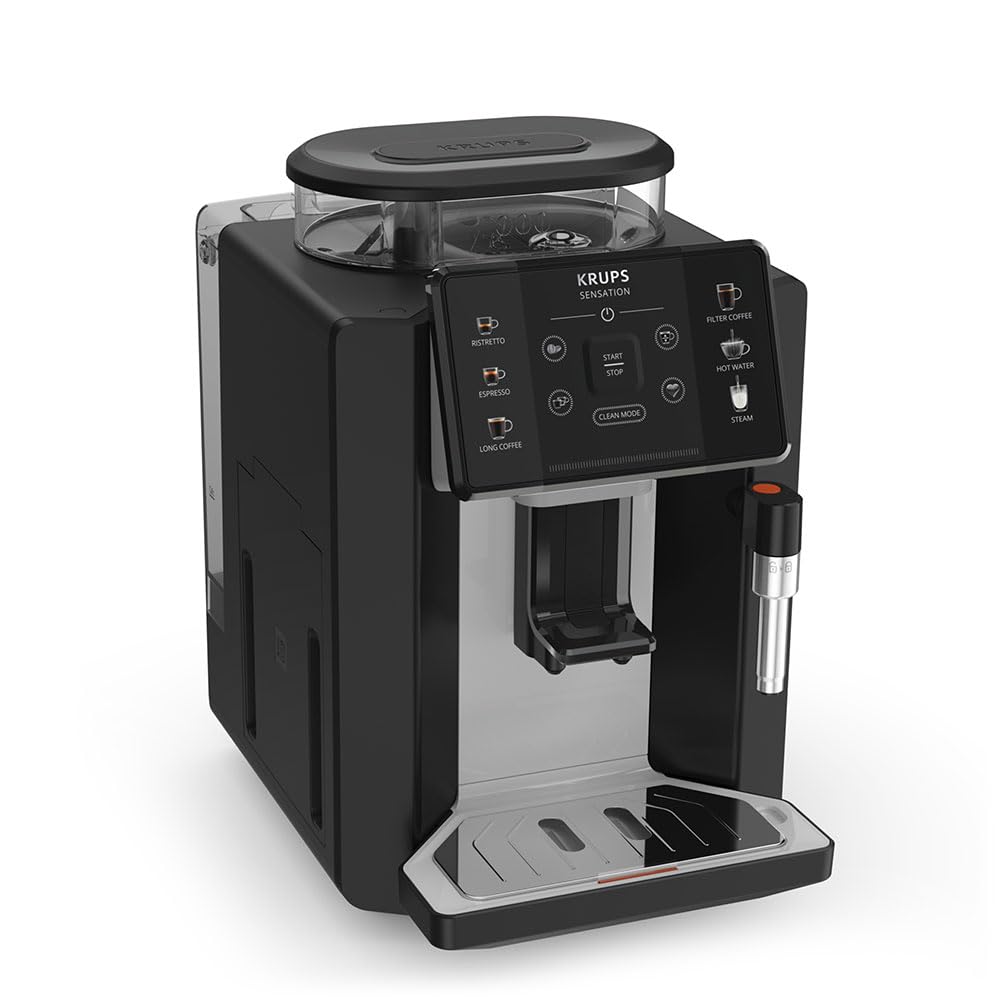
Imagem: Frente direita view of the KRUPS Sensation C10 EA910A10 Superautomatic Coffee Machine, showing the bean hopper, control panel, coffee spouts, and drip tray. Two cups of coffee are being dispensed.
- Recipiente para Feijões com Tampa
- Tanque de água
- Control Panel (Touchscreen)
- Coffee Spouts (Adjustable)
- Bandeja coletora de gotas com grade
- Recipiente de borra de café
- Steam Nozzle / Hot Water Spout
- Conexão do cabo de alimentação
4. Configuração inicial
4.1. Desembalagem
- Retire cuidadosamente a máquina de café da embalagem.
- Remova todos os materiais de embalagem, incluindo películas protetoras e adesivos.
- Coloque a máquina sobre uma superfície estável, plana e resistente ao calor, longe de fontes de água e calor.
4.2. Preparação para o primeiro uso
- Enxágue o reservatório de água: Remove the water tank, rinse it thoroughly with fresh water, and fill it to the MAX level. Reinsert the tank securely.
- Encha o funil de feijão: Open the lid of the bean hopper and fill it with fresh coffee beans. Do not use ground coffee in the bean hopper.
- Conexão de energia: Plug the power cord into the machine and then into a grounded electrical outlet.
- Ciclo de enxágue inicial: The machine will prompt you to perform an initial rinse cycle. Follow the instructions on the touchscreen. This primes the system and cleans internal components.
5. Instruções de operação
5.1. Painel de controle finalizadoview

Image: A hand interacting with the intuitive touchscreen control panel of the KRUPS Sensation C10 EA910A10, highlighting its ease of use.
The KRUPS Sensation C10 EA910A10 features an intuitive touchscreen control panel for easy operation. Key functions include:
- Ristretto: For a very short, concentrated espresso.
- Expresso: For a classic espresso shot.
- Café longo: For a larger volume of coffee.
- Café filtrado: For a milder, filter-style coffee.
- Água quente: Para chá ou outras bebidas quentes.
- Vapor: Para espumar leite.
- Iniciar/Parar: To begin or end a brewing cycle.
- Modo Limpo: Initiates cleaning cycles.
- Coffee Strength/Volume Adjustment: Icons to customize your drink.
5.2. Fazendo café
To brew a coffee beverage:
- Ensure the water tank is filled and the bean hopper contains sufficient beans.
- Place a cup under the coffee spouts. Adjust the spout height if necessary.
- Select your desired coffee type (e.g., Espresso, Long Coffee) from the touchscreen.
- Adjust coffee strength and volume using the on-screen options if desired.
- Press the "Start" button to begin brewing.
- The machine will grind the beans, brew the coffee, and dispense it into your cup.
- The machine will automatically stop when the brewing is complete.

Image: A selection of coffee beverages, including espresso, long coffee, and a milk-based drink, demonstrating the versatility of the KRUPS Sensation C10 EA910A10.
5.3. Função Água Quente
- Coloque uma xícara sob o bico de água quente.
- Select the "Hot Water" option on the touchscreen.
- Press "Start" to dispense hot water. Press "Stop" to cease dispensing.
5.4. Steam Function (for milk frothing)
- Encha uma jarra com leite frio.
- Posicione o bico de vapor no leite.
- Select the "Steam" option on the touchscreen.
- Press "Start" to activate the steam. Move the pitcher up and down to froth the milk.
- Press "Stop" when desired froth is achieved.
- Importante: Clean the steam nozzle immediately after use to prevent milk residue buildup.
6. Manutenção e Limpeza
A limpeza e a manutenção regulares garantem o desempenho ideal e a longevidade da sua máquina de café.
6.1. Limpeza Diária
- Bandeja coletora de gotas e recipiente para borra de café: Esvazie e enxágue a bandeja de gotejamento e o recipiente de borra de café diariamente ou quando a máquina solicitar.
- Bicos de café: Limpe os bicos de café com detergente.amp pano.
- Tanque de água: Enxágue o reservatório de água com água limpa diariamente.
6.2. Descalcificação
The machine will indicate when descaling is required. Follow the on-screen instructions and use a KRUPS-approved descaling solution.

Image: A hand inserting a cleaning tablet into the designated slot of the KRUPS Sensation C10 EA910A10, illustrating the ease of the cleaning process.
6.3. Substituição do filtro de água
If your machine uses a water filter, replace it every 2-3 months or as indicated by the machine to ensure optimal water quality and prevent limescale buildup.
7. Solução De Problemas
Consulte a tabela abaixo para obter informações sobre problemas comuns e suas soluções.
| Problema | Possível causa/solução |
|---|---|
| A máquina não liga. | Check if the power cord is securely plugged into the machine and the electrical outlet. Ensure the outlet is functional. |
| Não é servido café. | Water tank empty: Fill the water tank. Bean hopper empty: Fill with coffee beans. Coffee grounds container full: Empty and clean. Descaling required: Perform descaling cycle. |
| O café está muito fraco. | Adjust coffee strength settings on the control panel. Check if the bean hopper is sufficiently filled. Ensure fresh beans are used. |
| Vazamentos de água da máquina. | Check if the water tank is correctly inserted. Ensure the drip tray is properly positioned. If leakage persists, contact customer support. |
| "Clean Mode" alert persists. | Perform the indicated cleaning cycle (e.g., descaling, rinsing). Ensure all removable parts are clean and correctly reinserted. |
| Steam nozzle not frothing milk effectively. | Clean the steam nozzle thoroughly after each use to prevent blockages. Ensure cold milk is used. |
| Grinder is unusually loud or not grinding. | Check for foreign objects in the bean hopper. Ensure the bean hopper is not empty. Contact customer support if the issue persists. |
8. Especificações técnicas
| Recurso | Especificação |
|---|---|
| Número do modelo | EA910A10 |
| Marca | KRUPS |
| Volumetage | 145 Volts |
| Poder | 1450 Watts |
| Material | Aço |
| Peso do produto | 7.5 kg |
| Interface | Tela sensível ao toque |

Image: The KRUPS Sensation C10 EA910A10 coffee machine with indicated dimensions: 24 cm width, 34.6 cm depth, and 36.4 cm height.
9. Informações de garantia
Your KRUPS Sensation C10 EA910A10 Superautomatic Coffee Machine is covered by a manufacturer's warranty. Please refer to the warranty card included in your product packaging for specific terms, conditions, and duration. Keep your proof of purchase for warranty claims.
10. Suporte ao cliente
For further assistance, technical support, or spare parts, please contact KRUPS customer service. Contact details can typically be found on the KRUPS official website ou na documentação de garantia fornecida com o seu aparelho.