
Introdução
Obrigado pela compra.asing the Funistree Cell Phone Stand with Wireless Bluetooth Speaker. This device combines a versatile phone stand with a high-quality Bluetooth speaker and a white noise machine, designed to enhance your audio and viewing experience. Please read this manual carefully before use to ensure proper operation and to maximize the product's lifespan.
Produto acimaview
The Funistree H77 is a multi-functional device featuring a detachable phone stand and a wireless Bluetooth speaker. Its innovative design allows for independent use of the speaker and the stand, or combined for an integrated entertainment solution.
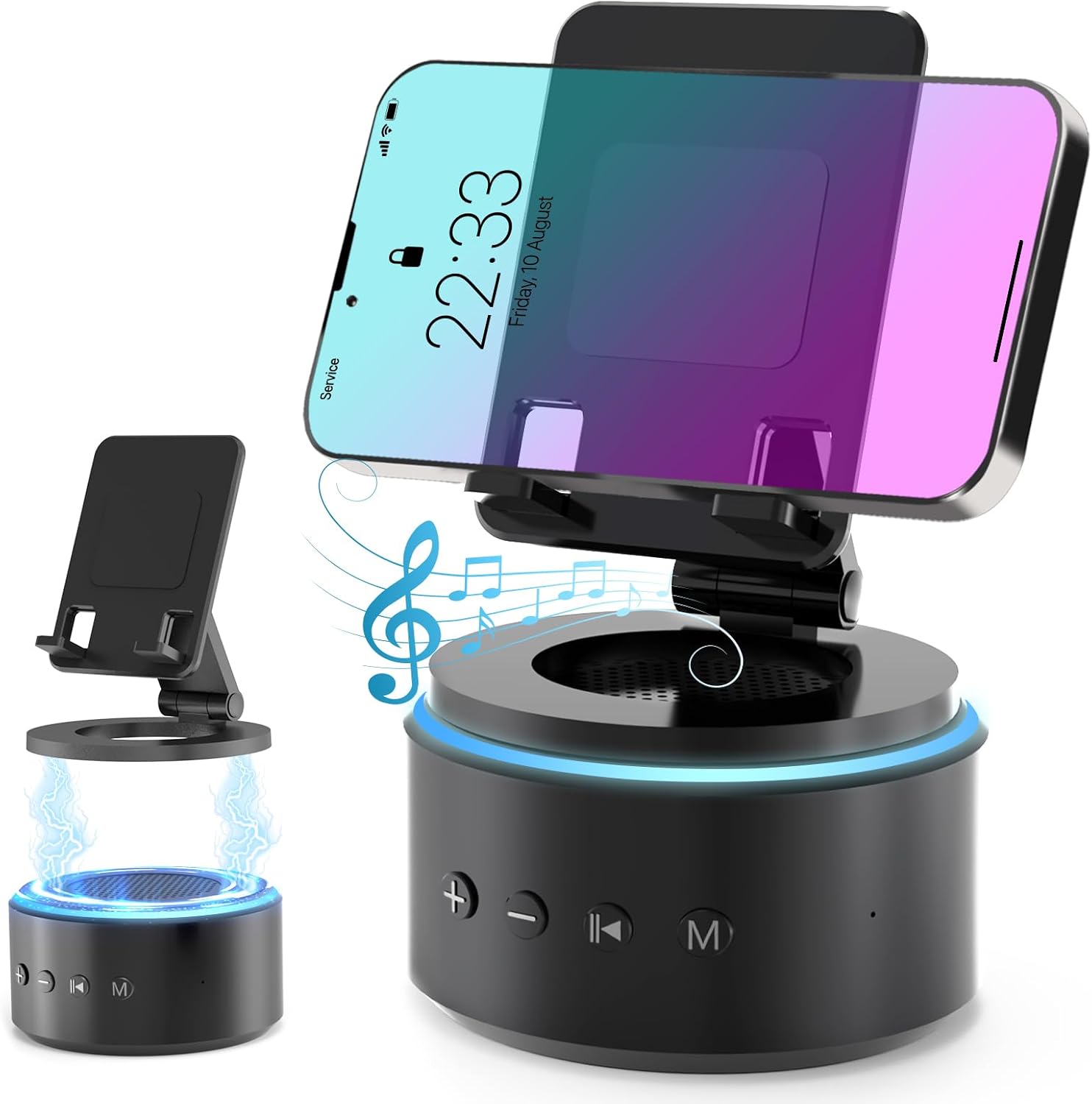
Image: The Funistree H77 device, illustrating its 2-in-1 design with the phone stand attached to the speaker base and also shown detached.
Principais características:
- Design destacável 2 em 1: The phone stand magnetically connects to the Bluetooth speaker, allowing for combined or separate use.
- Adjustable & Portable Stand: Oferece vários viewing angles and includes a hanging design for easy portability.
- HD Stereo Sound: Equipped with a dual stereo system for enhanced bass, clear highs, and balanced midrange.
- Máquina de ruído branco: Features 10 soothing white noise sounds with an auto-off timer (15, 30, or 60 minutes).
- Base estável: Anti-slip silicone pads ensure device stability.
- Bateria de longa duração: Optimized 1800 mAh battery for extended use.
Conteúdo da embalagem
Por favor, verifique se a embalagem contém os seguintes itens:
- Funistree Cell Phone Stand with Wireless Bluetooth Speaker (Model H77)
- Cabo de carregamento USB
- Manual do usuário
Note: Contents may vary slightly. If any items are missing or damaged, please contact customer support.
Configurar
Carregando o dispositivo:
- Locate the charging port on the speaker base.
- Connect the provided USB charging cable to the speaker.
- Conecte a outra extremidade do cabo USB a um adaptador de energia USB compatível (não incluído) ou a uma porta USB do computador.
- A luz indicadora de carregamento acenderá. Quando a carga estiver completa, a luz poderá mudar de cor ou apagar.
Initial charge time is approximately 2-3 hours.
Assembling the Phone Stand and Speaker:
The phone stand and speaker connect magnetically.
- Align the magnetic base of the phone stand with the top surface of the speaker.
- The magnets will snap the two components together securely.
- To detach, simply pull the phone stand upwards from the speaker base.

Imagem: Close-up view demonstrating the magnetic connection between the phone stand and the speaker base.
Instruções de operação
Ligar/desligar:
- To power on, press and hold the Power button (usually marked with a power symbol) on the speaker base for a few seconds until you hear an audible prompt or see an indicator light.
- To power off, press and hold the Power button again for a few seconds.
Emparelhamento Bluetooth:
- Ensure the speaker is powered on and in pairing mode (indicated by a flashing LED light, usually blue). If not, briefly press the Bluetooth button (if available) or power cycle the device.
- On your mobile device (smartphone, tablet, etc.), go to Bluetooth settings.
- Procurar available devices. The speaker will appear as "H77" or "Funistree H77".
- Select the speaker from the list to pair. Once paired, you will hear a confirmation sound, and the LED light will become solid.
- Agora você pode reproduzir áudio do seu dispositivo através do alto-falante.

Image: The Funistree H77 in use, with a smartphone mounted on the stand, playing music, and a laptop nearby, illustrating its versatile functionality.
White Noise Function:
The speaker includes 10 built-in white noise sounds to aid relaxation or concentration.
- Press the 'M' (Mode) button to cycle through the white noise sounds.
- To set a timer for the white noise, press the Timer button (if available) or refer to the specific button layout on your device. The available timer settings are 15, 30, or 60 minutes. The device will automatically turn off after the selected duration.

Image: Visual representation of the 10 white noise options (Ocean, Wind, Rain, Bird, Heartbeat, Campfire, Thunderstorm, Brook, Fan, Piano) and timer settings, with a person sleeping, indicating the relaxation benefits.
Ajustando o volume e a reprodução:
- Aumentar o volume: Pressione o botão '+'.
- Volume baixo: Pressione o botão '-'.
- Reproduzir/Pausar: Press the Play/Pause button (usually marked with a triangle/two vertical bars).
- Próxima faixa: Press the '>>|' button.
- Faixa anterior: Press the '|<<' button.
Usando o suporte de telefone:
The phone stand is adjustable to provide optimal viewângulos de inclinação.
- Place your smartphone or tablet securely on the stand's cradle.
- Adjust the angle of the stand by gently pushing or pulling the articulated arm to your desired viewposição de entrada.
- The stand features anti-slip silicone pads to prevent your device from sliding.

Imagem: Detalhada view highlighting the adjustable angle mechanism and the anti-slip silicone pads on the phone stand and base for secure device placement.
Portabilidade:
The speaker can be carried easily using its integrated hanging design.

Image: A woman outdoors, holding the Funistree speaker by its hanging rope, demonstrating its portability for outdoor activities.
Manutenção
- Limpeza: Use a soft, dry cloth to wipe the surface of the device. Do not use abrasive cleaners, alcohol, or chemical solvents, as these may damage the finish.
- Armazenar: Quando não estiver em uso por longos períodos, guarde o dispositivo em local fresco e seco, longe da luz solar direta e de temperaturas extremas.
- Cuidados com a bateria: Para prolongar a vida útil da bateria, evite descarregá-la completamente com frequência. Carregue o dispositivo regularmente, mesmo quando não estiver em uso.
- Evite água: This device is not waterproof. Keep it away from water, moisture, and excessive humidity.
- Manuseie com cuidado: Evite deixar cair ou submeter o dispositivo a impactos fortes.
Solução de problemas
| Problema | Possível causa | Solução |
|---|---|---|
| O dispositivo não liga. | Bateria fraca. | Carregue o dispositivo totalmente. |
| Não foi possível emparelhar via Bluetooth. | Speaker not in pairing mode; Bluetooth disabled on source device; device too far. | Ensure speaker is in pairing mode. Enable Bluetooth on your device. Move devices closer (within 10 meters). Forget previous pairings and try again. |
| Sem som ou volume muito baixo. | Volume too low on speaker or source device; device not properly paired. | Increase volume on both speaker and source device. Re-pair the device. |
| White noise function not working. | Modo incorreto selecionado. | Press the 'M' (Mode) button to cycle to the white noise function. |
| O suporte para celular é instável. | Device not placed correctly; surface is uneven. | Ensure phone is centered on the cradle. Place the stand on a flat, stable surface. |
If the problem persists, please contact Funistree customer support.
Especificações
| Número do modelo | H77 |
| Dimensões do produto | 4.53 x 4.13 x 4.37 polegadas |
| Peso do item | 15.8 onças |
| Tipo de Bateria | 1 bateria de íon de lítio (incluída) |
| Capacidade da bateria | 1800 mAh |
| Conectividade | Bluetooth |
| Sons de ruído branco | 10 types (Ocean, Wind, Rain, Bird, Heartbeat, Campfire, Thunderstorm, Brook, Fan, Piano) |
| Configurações do temporizador | 15, 30, 60 minutos |
| Dispositivos compatíveis | Smartphones, Tablets (iPhone, Galaxy, LG, iPad, Samsung Tab, Sony, etc.) |
Informações de segurança
- Não desmonte, repare ou modifique o dispositivo. Isso pode causar danos, choque elétrico ou incêndio.
- Keep the device away from heat sources, direct sunlight, and high temperatures.
- Não exponha o dispositivo a água ou outros líquidos.
- Do not use the device in environments with strong electromagnetic interference.
- Mantenha fora do alcance de crianças e animais de estimação.
- Descarte o dispositivo e a bateria de forma responsável, de acordo com as normas locais. Não descarte no lixo doméstico.
Garantia e Suporte
Funistree products are designed and manufactured to the highest quality standards. For warranty information and customer support, please refer to the warranty card included with your purchase or visit the official Funistree website. If you encounter any issues or have questions regarding your product, please contact our customer service team.
Para obter mais assistência, visite: Funistree Official Store on Amazon