
1. Introdução
This manual provides detailed instructions for the proper setup, operation, and maintenance of your Wantek 783F Headset. Please read this manual thoroughly before using the product to ensure optimal performance and longevity. Keep this manual for future reference.
2. Produto acabadoview
The Wantek 783F Headset is a versatile single-ear headphone designed for clear communication and audio. It features a noise-cancelling microphone and multiple connectivity options for broad compatibility.
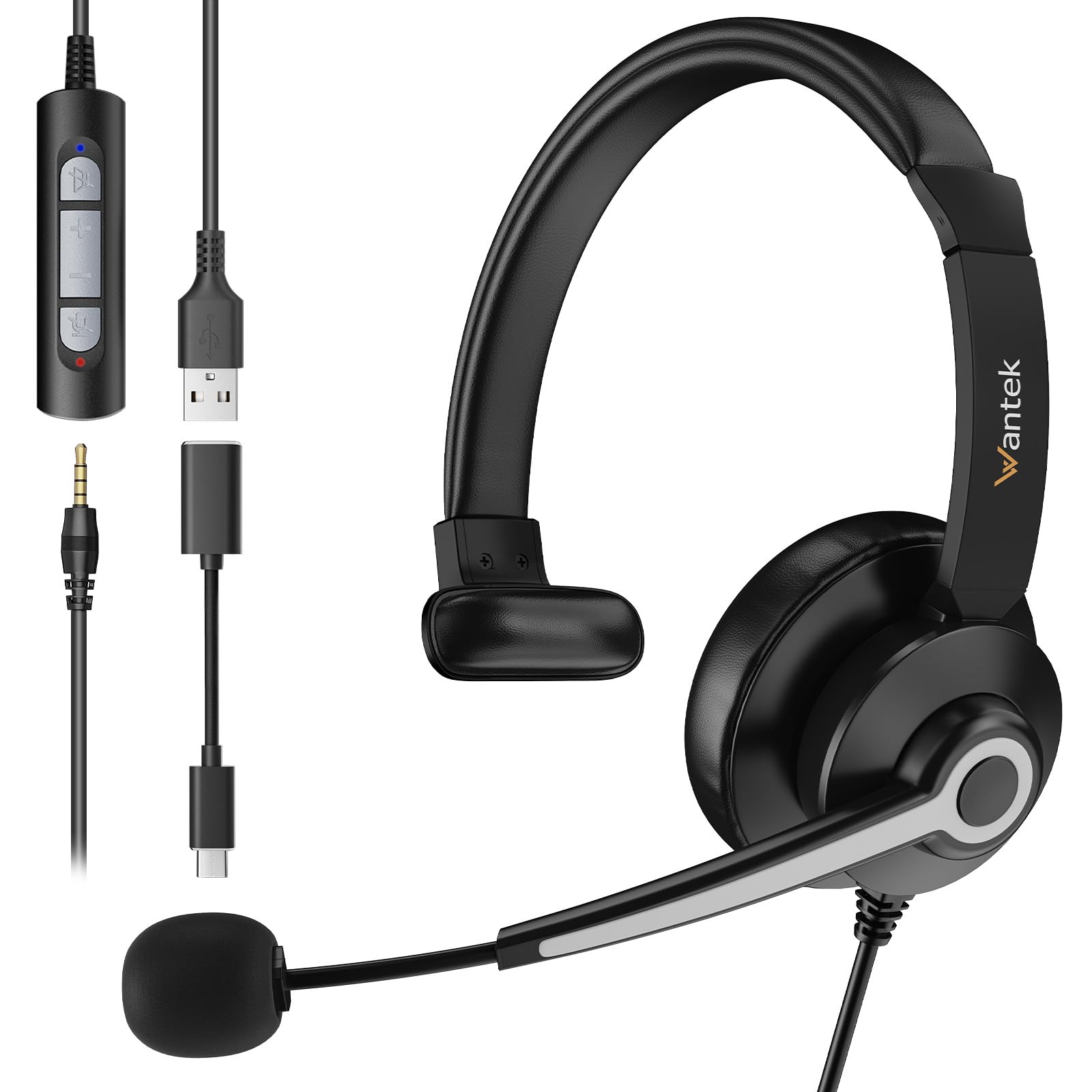
Image 2.1: Wantek 783F Headset with its inline controller and multiple connection options (3.5mm, USB, Type-C).
Os principais recursos incluem:
- Ampla compatibilidade: Connects via USB, 3.5mm, and Type-C.
- Chamadas cristalinas: Noise-cancelling microphone reduces background noise by up to 97%.
- Design confortável: Lightweight with a soft faux leather headband and 270° rotatable microphone boom.
- Easy Inline Control: Physical buttons for speaker mute, volume up/down, and microphone mute.
3. Instruções de configuração
The Wantek 783F Headset offers plug-and-play functionality, requiring no additional drivers for most operating systems.
3.1 Conectando o fone de ouvido
Your headset can be connected to various devices using one of the three provided interfaces:
- Conector de 3.5 mm: Connect the 3.5mm jack directly to devices such as smartphones, tablets, or laptops with a compatible audio port.
- Conector USB-A: Use the USB-A adapter to connect the headset to computers, laptops, or gaming consoles (e.g., PlayStation, Xbox) with a USB-A port.
- USB Type-C Adapter: Attach the Type-C adapter to the USB-A connector, then plug it into devices with a USB Type-C port, such as newer laptops, MacBooks, or Android phones.

Image 3.1: Connection diagram illustrating how to connect the headset using 3.5mm, USB, and Type-C interfaces to different devices.
3.2 Initial Device Recognition
After connecting, your device should automatically recognize the headset. You may need to select the headset as the default audio input and output device in your operating system's sound settings or within your communication application (e.g., Zoom, Skype, Microsoft Teams).
4. Instruções de operação
The Wantek 783F Headset features an inline control unit for convenient audio management.
4.1 Funções de controle em linha

Imagem 4.1: Detalhada view of the inline controller, highlighting its buttons and their functions.
- Botão para silenciar o alto-falante: Press to mute or unmute the headset's speaker audio. An indicator light may show the mute status.
- Aumentar o volume (VOL+): Pressione para aumentar o volume de audição.
- Diminuir o volume (VOL-): Pressione para diminuir o volume de audição.
- Botão de microfone mudo: Press to mute or unmute the microphone. An indicator light may show the mute status.
4.2 Ajuste do Microfone
The microphone boom can be rotated 270 degrees. Position the microphone approximately 1-2 inches from your mouth for optimal voice pickup. The flexible design allows for precise positioning.
4.3 Cenários de Uso
The headset is suitable for various applications, including:
- Online meetings (Zoom, Skype, Webex, Google Meet)
- Call center operations
- Online learning and tutoring
- Voice chat and gaming
- General audio listening

Imagem 4.2: Examples of the headset in use across different environments, demonstrating its versatility.
5. Manutenção
Os devidos cuidados e manutenção prolongarão a vida útil do seu fone de ouvido.
5.1 Limpeza
- Use a soft, dry cloth to wipe the headset and inline controller.
- Para sujeira persistente, levementeampUmedeça o pano com água. Evite usar produtos químicos agressivos ou abrasivos.
- Do not immerse the headset or any of its components in water.
5.2 Armazenamento
- Guarde o fone de ouvido em local fresco e seco, longe da luz solar direta e de temperaturas extremas.
- Avoid tangling the cable. Use the small clip on the wire to manage the cable and prevent damage.
6. Solução De Problemas
Se você tiver problemas com seu fone de ouvido, consulte as seguintes soluções comuns:
- Sem som:
- Certifique-se de que o fone de ouvido esteja conectado firmemente ao seu dispositivo.
- Check the inline volume control and increase the volume.
- Verify that the speaker mute button on the inline controller is not active.
- Confirm the headset is selected as the default playback device in your computer's sound settings.
- Microfone não funciona:
- Ensure the microphone mute button on the inline controller is not active.
- Check that the microphone boom is properly positioned.
- Confirm the headset is selected as the default recording device in your computer's sound settings or communication application.
- Teste o microfone com outro aplicativo ou dispositivo.
- Áudio distorcido:
- Abaixe o volume tanto nos fones de ouvido quanto no seu dispositivo.
- Ensure the connection is stable and free from interference.
- Faça o teste com outra fonte ou dispositivo de áudio.
7. Especificações
Below are the technical specifications for the Wantek 783F Headset:
| Recurso | Especificação |
|---|---|
| Marca | Querer |
| Número do modelo do item | XUC783 |
| Dimensões do produto | 12 x 12 x 5 cm |
| Peso do item | 182 gramas |
| Cor | Preto |
| Tecnologia de Conectividade | Com fio |
| Entrada para fones de ouvido | 3.5 mm Jack |
| Controle de Ruído | Cancelamento de ruído passivo |
| Tipo de controle | Voice Control (via inline controller) |
| Recurso de cabo | Detachable (adapters) |
| Material | Polycarbonate (PC), Aluminum, Faux Leather |
| Dispositivos compatíveis | Cellphones, Desktops, Laptops, Music Production Equipment, Tablets |
| Usos recomendados | Calling, Gaming, Motorcycling, Running |
8. Garantia e Suporte
Wantek products are manufactured to high-quality standards. For information regarding warranty coverage, terms, and conditions, please refer to the warranty card included with your purchase or visit the official Wantek website.
For technical support, troubleshooting assistance beyond this manual, or to inquire about replacement parts, please contact Wantek customer service through their official support channels.