
1. Introdução
The CAPTOK 1500W Pure Sine Wave Inverter converts 12V DC battery power to 120V AC household power, providing a clean and stable energy source for various applications. This manual provides essential information for safe and efficient operation, setup, and maintenance of your inverter.
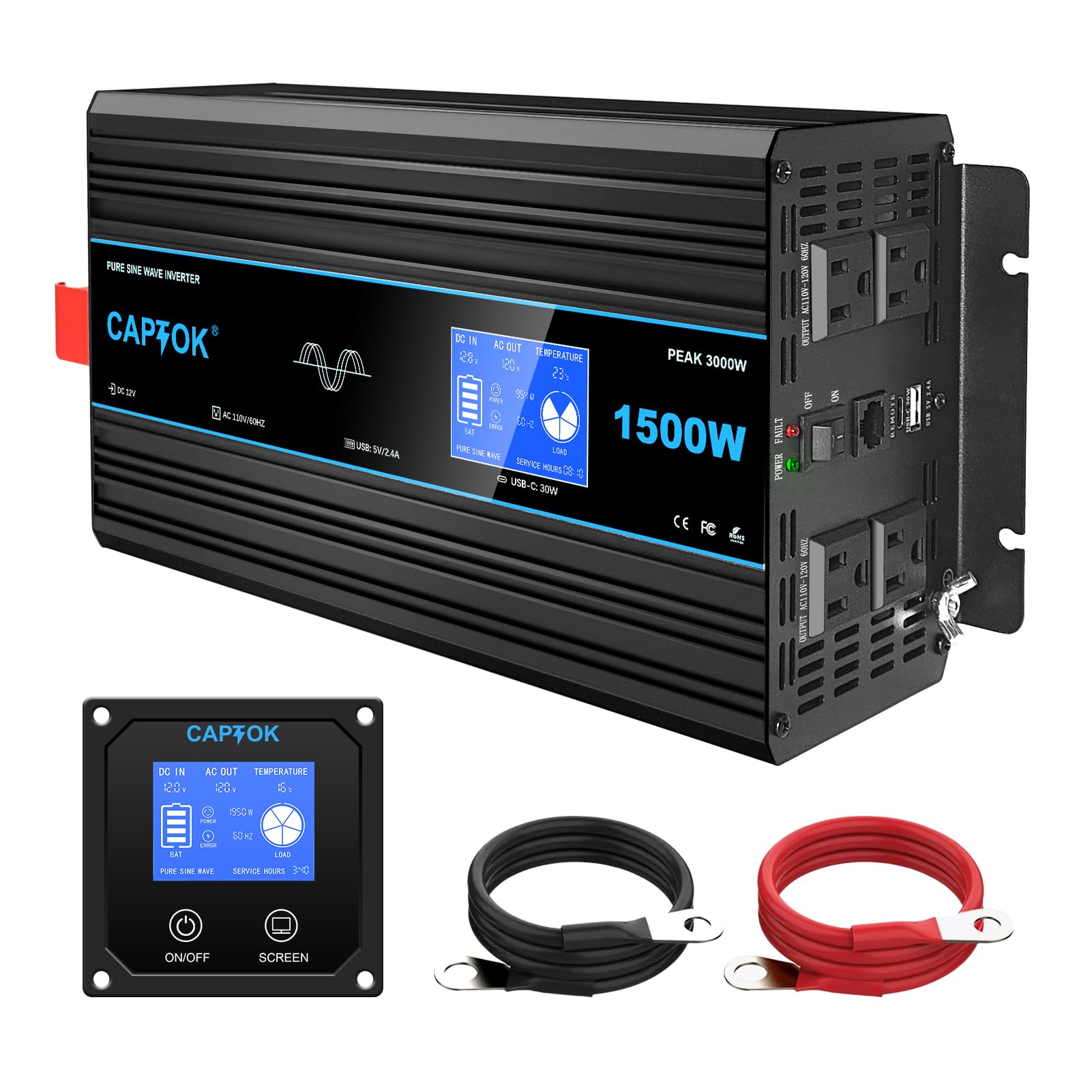
Image: The CAPTOK 1500W Pure Sine Wave Inverter, a compact black unit with orange accents, featuring an integrated LCD display and multiple output ports.
2. Recursos do Produto
- Advanced LCD Monitor: A large built-in LCD display allows for clear viewing and monitoring of the inverter's operating information, including input voltage, volume de saídatage, and load power. The remote control display is synchronized in real-time for convenient monitoring.
- Múltiplas portas de saída: Equipped with 4 AC outlets, 1 USB 5V 2.4A port, and 1 Type-C 30W port, ensuring fast power supply for multiple devices simultaneously.
- Proteções de segurança abrangentes: Features isolated input/output design and provides under-voltage proteção, over-voltage protection, overload protection, over-heat protection, and short-circuit protection to ensure safe operation.
- Temperature Controlled Silent Fan: The built-in powerful cooling fan activates when the temperature reaches 45°C (113°F), ensuring stable and quiet operation.
- Saída de onda senoidal pura: Ensures clean power and low interference, suitable for sensitive electronics.

Image: Close-up of the CAPTOK inverter's advanced LCD display, showing real-time data such as DC input voltage, saída CA voltage, temperature, power, frequency, and load.

Image: The CAPTOK inverter connected to a power strip, illustrating its multiple AC outlets, USB, and Type-C ports for various devices.

Image: Diagram highlighting the CAPTOK inverter's safety protections, including low/over voltage, overheating, overload, short circuit, reverse connection, isolated input/output, and real-time monitoring.

Image: The CAPTOK inverter with an illustration of its silent, temperature-controlled cooling fan, designed for fast heat dissipation under high loads.
Image: The CAPTOK inverter connected to a kettle and a coffee maker, demonstrating its pure sine wave output for household appliances.
3. Conteúdo da embalagem
- CAPTOK 1500W Pure Sine Wave Inverter
- LCD Display (integrated)
- Controle remoto
- Battery Connection Cables (red and black)
- Manual do usuário
4. Informações de segurança
AVISOS DE SEGURANÇA IMPORTANTES:
- Always use the battery connection cables provided in the package to ensure proper and safe operation.
- A minimum battery capacity of 12V 200Ah is recommended. Using a battery with insufficient capacity may result in inadequate output voltage or damage to the inverter/battery.
- Garanta ventilação adequada ao redor do inversor para evitar superaquecimento.
- Não exponha o inversor à água, chuva ou umidade excessiva.
- Avoid operating the inverter in direct sunlight or near heat sources.
- Always connect the inverter to a battery before connecting any AC loads.
- Disconnect the inverter from the battery when not in use or before performing any maintenance.
- Ensure the inverter is properly grounded. A grounding screw is provided for this purpose.

Image: Close-up of the grounding screw on the side of the CAPTOK inverter, indicating the connection point for a ground wire.
5. Configuração e instalação
- Prepare a bateria: Ensure your 12V battery (minimum 200AH recommended) is fully charged and in good condition.
- Connect Battery Cables:
- Connect the red (positive) battery cable to the positive (+) terminal of the inverter.
- Connect the black (negative) battery cable to the negative (-) terminal of the inverter.
- Connect the other end of the red cable to the positive (+) terminal of your battery.
- Connect the other end of the black cable to the negative (-) terminal of your battery.
- Certifique-se de que todas as conexões estejam firmes e seguras para evitar arcos elétricos ou superaquecimento.
- Aterramento: Connect a ground wire (not included, but recommended for safety) from the grounding screw on the inverter to a proper earth ground.
- Conexão de controle remoto: If using the remote control, plug its cable into the designated "REMOTE" port on the inverter.
- Colocação: Place the inverter in a dry, well-ventilated area, away from flammable materials and direct sunlight.

Image: The CAPTOK inverter connected to a battery, with its remote control mounted on a wall, showing the cable connection between them.
For a visual guide on how the inverter works with a solar system or directly with a battery, refer to the diagram below:

Image: A diagram illustrating two connection methods for the CAPTOK inverter: one with solar panels, a charge controller, and a battery, and another directly with a battery.
6. Instruções de operação
- Ligar: Flip the ON/OFF switch on the inverter to the "ON" position, or use the ON button on the remote control. The LCD display will illuminate, showing current operating parameters.
- Conectar dispositivos: Plug your AC devices into the 120V AC outlets, or your USB/Type-C devices into the respective ports. Ensure the total wattage of your devices does not exceed the inverter's continuous power rating (1500W).
- Desempenho do monitor: Verifique regularmente o visor LCD para o volume de entrada.tage, volume de saídatage, and load power to ensure optimal operation and prevent overloading.
- Desligar: When finished, disconnect all devices, then flip the ON/OFF switch on the inverter to the "OFF" position, or use the OFF button on the remote control.
Entendendo a tela LCD
The integrated LCD display provides real-time feedback on the inverter's status:
- DC IN: Exibe o volume de entradatage from your 12V battery.
- SAÍDA CA: Mostra a tensão CA de saídatage (120 V).
- TEMPERATURA: Indicates the internal temperature of the inverter.
- PODER: Displays the current power draw in watts.
- BASTÃO: Mostra o nível de carga da bateria.
- ERRO: Illuminates if an error condition is detected.
- CARGA: Visual representation of the current load on the inverter.

Image: A detailed graphic of the CAPTOK inverter's digital LCD display, showing various parameters like input voltage, volume de saídatage, temperature, battery level, load power, and error indicators.
7. Manutenção
- Mantenha o inversor limpo e livre de poeira e detritos.
- Ensure the cooling fan vents are unobstructed for proper airflow.
- Periodically check battery connections for tightness and corrosion.
- Guarde o inversor em local fresco e seco quando não estiver em uso.
8. Solução De Problemas
| Problema | Possível causa | Solução |
|---|---|---|
| O inversor não liga. | Conexões de bateria soltas, baixa tensão da bateriatage, faulty switch. | Check battery cable connections. Recharge or replace battery. Ensure switch is fully "ON". |
| Sem saída AC. | Overload, low battery, inverter fault. | Reduza a carga conectada. Verifique a voltagem da bateria.tage. Power cycle the inverter. |
| Inverter beeps or shows error. | Overload, over-temperature, low/over voltage, curto-circuito. | Refer to LCD display for specific error code. Address the cause (e.g., reduce load, allow cooling, check battery). |
| O ventilador funciona constantemente ou faz muito barulho. | High internal temperature, obstructed vents. | Ensure proper ventilation. Reduce load if operating in high temperatures. |
9. Especificações
| Recurso | Detalhe |
|---|---|
| Número do modelo | CAPTOK 1500W |
| O quetage (Contínuo) | 1500 W |
| Entrada DC Voltage | 12V |
| Saída AC Voltage | 120V |
| Forma de onda de saída | Pure Sine Wave |
| Tomadas AC | 4 |
| Porta USB | 1 (5V 2.4A) |
| Porta Tipo C | 1 (30 W) |
| Recommended Min. Battery Capacity | 12V 200Ah |
| Dimensões do produto | 5.28 x 2.56 x 1.54 polegadas |
| Peso do item | 8.14 libras |
10. Garantia e suporte
The CAPTOK 1500W Pure Sine Wave Inverter comes with a Garantia de 24 meses sem preocupações. For technical support, troubleshooting assistance, or warranty claims, please contact CAPTOK customer service through your retailer or the official CAPTOK website.
We are committed to providing high-quality, user-friendly products and continuously improving the user experience.

Image: A customer service representative wearing a headset, symbolizing support for CAPTOK products.
11. Vídeo oficial do produto
Watch this official product video for a quick overview of the CAPTOK 1500W Pure Sine Wave Inverter:
Video Description: A short video showcasing the CAPTOK 1500W Pure Sine Wave Power Inverter, highlighting its features and applications.