1. Introdução
Thank you for choosing the STORCUBE Portable Power Station 600W. This device is a versatile and reliable power solution designed for various applications, including outdoor camping, emergency home backup, and mobile work. Featuring a durable LiFePO4 battery, pure sine wave AC output, and multiple charging options, it provides stable and efficient power for your electronic devices and small appliances.
This manual provides essential information for the safe and efficient operation of your power station. Please read it thoroughly before use and retain it for future reference.
2. Instruções de segurança
To ensure safe operation and prolong the lifespan of your power station, please adhere to the following safety guidelines:
- Não desmonte, repare ou modifique a unidade. A remontagem incorreta pode causar incêndio ou choque elétrico.
- Não coloque o aparelho perto do fogo nem o exponha à luz solar direta.
- Não carregue, utilize ou guarde o aparelho em um banheiro ou em uma área exposta à água ou umidade.
- Utilize apenas os acessórios fornecidos ou aprovados.
- Ensure proper ventilation during use and charging. Do not block the ventilation openings.
- Mantenha a unidade longe de crianças e animais de estimação.
- If the unit emits an odor, generates heat, or behaves abnormally, discontinue use immediately and contact customer support.
- Evite quedas, impactos fortes ou vibrações intensas.
- Dispose of the unit and its accessories according to local regulations.
3. Conteúdo da embalagem
Verifique se todos os itens estão incluídos em seu pacote:
- 1x STORCUBE 600W Portable Power Station
- Adaptador de alimentação CA 1x
- 1x Cabo de alimentação CA
- 1x cabo de carregamento de carro
- 1x Manual do Usuário (Este documento)
4. Produto acabadoview
Familiarize yourself with the components and features of your STORCUBE Portable Power Station.

Frente view of the STORCUBE Portable Power Station 600W, showcasing its compact design and main display.

Detailed diagram illustrating the 12 versatile output ports and 2 input ports on the power station, including USB-C PD100W, USB-A, DC5521, AC outlets, Anderson input, and car outlet.
4.1. Portas e Controles
- Tomadas CA (x3): 110V Pure Sine Wave output for household appliances up to 600W.
- Portas DC (x4): 12V output for DC-powered devices.
- USB-C PD100W Port (x1): For fast charging compatible USB-C devices and recharging the power station.
- USB-A QC3.0 Port (x1): 18W Quick Charge 3.0 for rapid charging of smartphones and tablets.
- Portas USB-A (x2): Standard 5V/2.4A USB-A outputs.
- 12V Car Outlet (x1): For car-powered devices.
- Entrada DC5521: For charging via AC adapter or car charging cable.
- PV (Solar) Input: Dedicated input for solar panel charging (18-24V, max 120W).
- Lanterna LED: Luz integrada com múltiplos modos.
4.2. Clear LCD Display

Illustration of the clear LCD display, showing remaining output time, battery percentage, input/output power, and active port indicators.
The large and clear LCD display provides real-time information:
- Remaining Output Time: Estimates how long the power station can power connected devices.
- Frequência de saída: Displays the AC output frequency (e.g., 60Hz).
- Bateria Percentage Exibição: Mostra o nível atual de carga da bateria.
- Output Status Indicator: Indicates which output groups (AC, DC, USB) are active.
- Potência de entrada: Displays the current charging power in Watts.
- Potência de saída: Displays the total power consumption of connected devices in Watts.
- Notificação de bateria fraca: Alertas quando a bateria está fraca.
- Thermometer Icon: Indicates high temperature warning.
5. Configuração
Before first use, ensure the power station is fully charged.
5.1. Cobrança Inicial
- Connect the AC power adapter to the DC5521 input port on the power station.
- Plug the AC power cable into a wall outlet.
- The LCD display will show the input power, and the battery icon will animate, indicating charging.
- Charge until the battery percentage reaches 100% and the input power drops to near zero.
For faster charging, simultaneously use the AC adapter and a 100W PD USB-C charger (not included) connected to the USB-C PD100W port. This can charge the unit to 80% in approximately 2.5 hours.
6. Instruções de operação
The STORCUBE Portable Power Station offers multiple output options to power your devices.
6.1. Ligar/Desligar
- Ligar: Press and hold the main power button for 2-3 seconds. The LCD display will light up.
- Desligar: Press and hold the main power button for 2-3 seconds until the display turns off.
6.2. Utilizando tomadas CA
- Press the AC ON/OFF button to activate the AC outlets. The AC icon will appear on the display.
- Plug your AC-powered devices into the outlets. Ensure the total power consumption does not exceed 600W (1000W peak).
- When finished, press the AC ON/OFF button again to turn off the AC output and conserve battery.
6.3. Using DC Outlets (12V Car Port & DC5521)
- Press the DC ON/OFF button to activate the DC outlets. The DC icon will appear on the display.
- Connect your 12V DC devices to the appropriate ports.
- When finished, press the DC ON/OFF button again to turn off the DC output.
6.4. Using USB Ports (USB-A & USB-C)
- The USB ports are typically active when the main power is on.
- Connect your USB-powered devices (smartphones, tablets, laptops via USB-C PD) to the respective ports.
- The display will show the output power for USB devices.

Image demonstrating USB-C fast charging capability, showing a laptop and lantern powered by the unit.
6.5. Operação da lanterna LED
- Press the LIGHT ON/OFF button to turn on the flashlight.
- Press again to cycle through different lighting modes: Common brightness, High brightness, Slow blinking, Fast blinking.
- Pressione e segure para desligar a lanterna.

Image showing the power station's LED light illuminating a room, highlighting its four lighting modes.
6.6. Power-saving Mode
The power station features an automatic power-saving mode. If the output is less than 5W or no device is being charged for 1 hour, the unit will automatically turn off to conserve battery life.

Image illustrating the power-saving mode, showing users working on laptops outdoors with the power station.
6.7. Carregamento Pass-Through
The STORCUBE Power Station supports pass-through charging, meaning it can charge connected devices while simultaneously being recharged itself. This provides greater flexibility and convenience.

Image depicting pass-through charging, with the power station charging a laptop while being recharged from a wall outlet.
6.8. Cenários de Uso Típicos

Infographic showing estimated charges/hours for various devices: Phone (45 charges), Laptop (9 charges), CPAP (11 hours), Wi-Fi Router (45 hours), Light (45 hours), Tablet (15 charges), Projector (4.5 hours), TV (5.5 hours), Radio (90 hours).


The power station is ideal for various outdoor activities like camping and picnics, providing reliable power for all your needs.

The power station is suitable for outdoor adventures and serves as a crucial backup during power outage.
Official video demonstrating the STORCUBE Portable Power Station 600W in various outdoor and indoor scenarios, showcasing its versatility for powering devices like coffee makers, laptops, and for solar charging.
7. Carregando a Estação de Energia
Your STORCUBE Portable Power Station can be recharged using multiple methods:
7.1. Carregamento CA de parede
- Connect the provided AC power adapter and cable to the DC5521 input port and a wall outlet.
- Tempo de carregamento: Aproximadamente 6 horas para uma carga completa.
7.2. Carregamento de carro
- Use the provided car charging cable to connect the power station's DC5521 input to your vehicle's 12V/24V car outlet.
- Tempo de carregamento: Aproximadamente 11 horas para uma carga completa.
7.3. Carregamento do painel solar
- Connect a compatible solar panel (18-24V, max 120W, not included) to the PV input port on the power station.
- Posicione o painel solar sob luz solar direta para um carregamento ideal.
- Charging time: Approximately 6.6 hours with a 100W solar panel in ideal conditions.

Visual guide for various charging methods: AC adapter + USB-C (3.2 hours), AC adapter only (6 hours), 12V/24V car charging (11 hours), and 100W solar panel charging (6.6 hours).

Image showing the power station being charged by a solar panel in an outdoor setting, emphasizing its green energy capability.
Video demonstrating the portability and charging capabilities of a STORCUBE power station, including solar panel setup and charging various devices like drones and laptops outdoors.
8. Manutenção
A manutenção adequada garante a longevidade e o desempenho ideal da sua central elétrica.
- Armazenar: Guarde o aparelho em local fresco e seco, longe da luz solar direta e de temperaturas extremas.
- Frequência de recarga: For optimal battery health, recharge the unit every 3-6 months, even if not in use.
- Limpeza: Use a dry, soft cloth to clean the exterior. Do not use abrasive cleaners or solvents.
- Ventilação: Mantenha as aberturas de ventilação livres de poeira e detritos.
9. Solução De Problemas
Se você encontrar problemas com sua usina elétrica, consulte os problemas comuns e suas soluções a seguir:
| Problema | Possível causa | Solução |
|---|---|---|
| Unidade não liga | A bateria está completamente descarregada; o botão liga/desliga não foi pressionado por tempo suficiente. | Charge the unit using the AC adapter; Press and hold the power button for 2-3 seconds. |
| Saída AC não funciona | AC output not activated; Device power exceeds 600W; Overload protection triggered. | Press the AC ON/OFF button; Reduce the load; Disconnect devices, restart the unit. |
| Unidade não carrega | Charging cable/adapter faulty; Input port loose; Extreme temperature. | Check connections; Try a different charging method/cable; Move to a suitable temperature environment. |
| Display shows error code/icon | Overload, over-temperature, or other internal fault. | Refer to the specific icon on the display for details (e.g., thermometer for over-temperature). Disconnect devices, allow to cool, then restart. If persistent, contact support. |
If the problem persists after trying these solutions, please contact STORCUBE customer support.
10. Especificações
Detailed technical specifications for the STORCUBE Portable Power Station 600W:

Infographic highlighting the power station's capacity (529.9Wh, 600W) and estimated charges for various devices like phones, laptops, and drones.
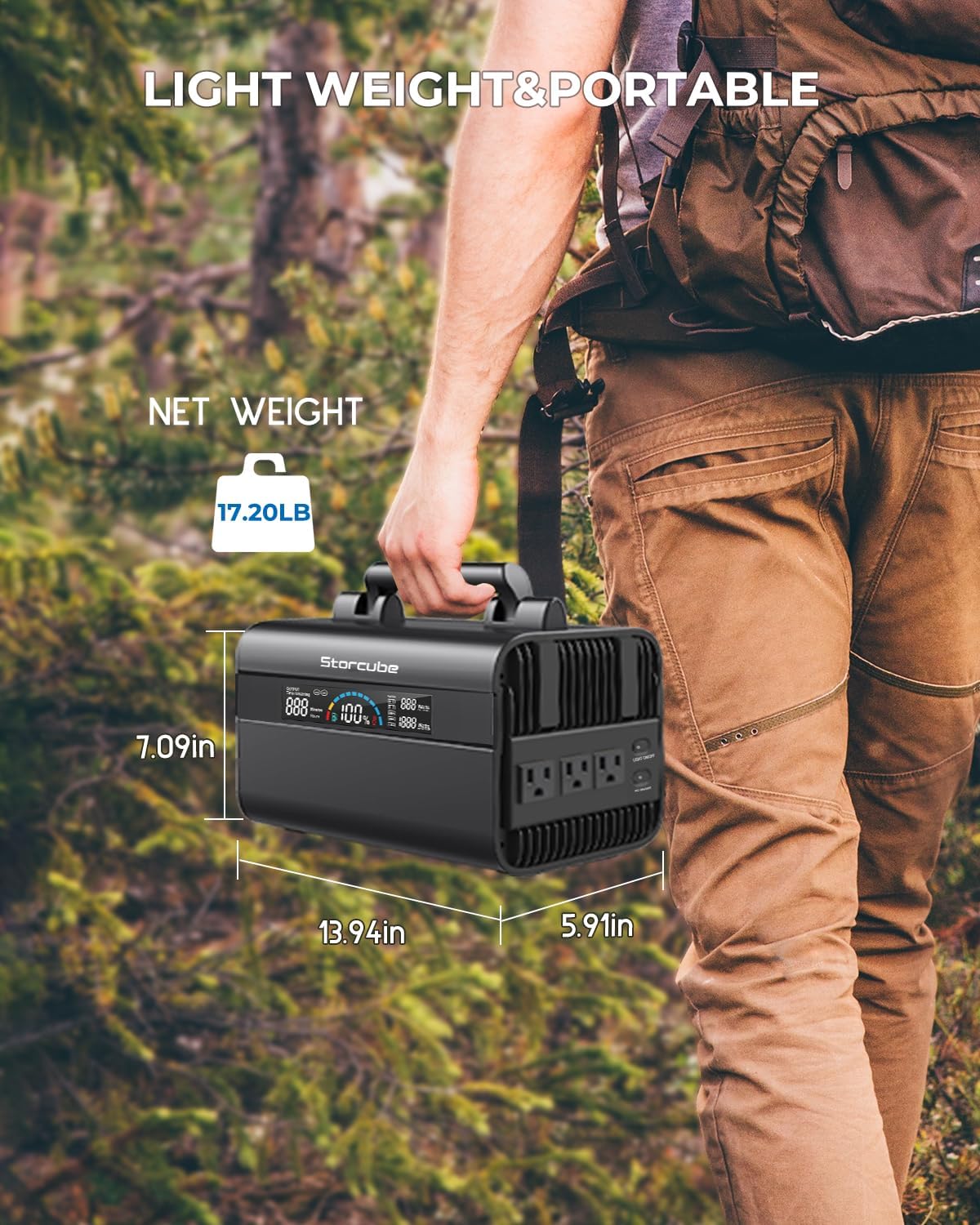
Image showing the dimensions (13.94"L x 5.91"W x 7.09"H) and net weight (17.20 lbs) of the portable power station, emphasizing its lightweight and portable design.
| Recurso | Detalhe |
|---|---|
| Modelo | STC 03/600M |
| Tipo de Bateria | LiFePO4 (Fosfato de Ferro Lítio) |
| Capacidade | 529.9 Wh |
| Saída CA | 600W (Rated), 1000W (Peak), 110V Pure Sine Wave, 60Hz |
| Saída/Entrada USB-C | PD100W |
| Saída USB-A | 1x QC3.0 (18W), 2x 5V/2.4A |
| Saída DC | 4x DC5521, 1x 12V Car Outlet |
| Entrada DC | DC5521 (for AC adapter/car charging) |
| Entrada Solar | 18-24V (Max 120W) |
| Dimensões (C x L x A) | 13.94" x 5.91" x 7.09" |
| Peso | 17.2 libras |
| Material | Alumínio |
| Temperatura de operação | Recommended: 14°F to 104°F (-10°C to 40°C) |
| Temperatura de carregamento | Recommended: 32°F to 104°F (0°C to 40°C) |
10.1. Saída de onda senoidal pura

Image illustrating the pure sine wave output, which provides stable power suitable for sensitive electronics.
The STORCUBE portable power station utilizes pure sine wave technology for its AC output. This ensures stable and clean power delivery, making it safe for sensitive electronics and precision electrical products, similar to the power supplied by a standard household wall outlet.
11. Garantia e Suporte
STORCUBE provides a comprehensive warranty and dedicated customer support for your peace of mind.
- Garantia: The STORCUBE Portable Power Station 600W comes with an extended 5-YEAR warranty.
- Atendimento ao Cliente: For any questions, technical assistance, or warranty claims, please contact STORCUBE customer service.
- Informações de contato: Refer to the contact details provided on the product packaging or the official STORCUBE website.