
1. Introdução
Thank you for choosing TTQ Open Ear Headphones, Model CT26. These true wireless sports earbuds are designed to provide a comfortable listening experience while allowing you to remain aware of your surroundings. Featuring Bluetooth 5.3 connectivity, IPX7 waterproofing, and crystal-clear call quality, they are ideal for various activities including running, cycling, workouts, and driving. This manual will guide you through the setup, operation, and maintenance of your new headphones.
2. Conteúdo da embalagem
Por favor, verifique se todos os itens estão presentes em sua embalagem:
- TTQ Open Ear Headphones (Left and Right Earbuds)
- Estojo de carregamento
- Cabo de carregamento USB-C
- Manual do usuário

Imagem: The TTQ Open Ear Headphones, Model CT26, displayed within their open charging case. The case features an LED digital power display indicating the battery level of both the case and the individual earbuds.
3. Produto acabadoview
The TTQ CT26 headphones feature an innovative open-ear design with flexible earhooks, ensuring comfort and stability during extended use. This design allows ambient sounds to be heard, enhancing safety in outdoor environments.

Imagem: A person wearing the TTQ Open Ear Earbuds, demonstrating how the open-ear design sits comfortably outside the ear canal, allowing for situational awareness.

Imagem: Two individuals cycling outdoors, both wearing TTQ Open Ear Headphones. This illustrates the product's suitability for sports and activities where awareness of surroundings is crucial for safety.
4. Configuração
4.1 Carregando os fones de ouvido e o estojo
Before first use, fully charge the headphones and the charging case. Connect the provided USB-C charging cable to the charging port on the case and a power source. The LED display on the charging case will show the battery percentage, and individual earbud charge indicators will light up during charging.
- A full charge provides up to 8 hours of music playtime or 9 hours of call time for the earbuds.
- The charging case extends total playtime to up to 36 hours.

Imagem: The TTQ charging case with its lid open, showcasing the digital LED display that indicates the battery percentage of the case and the charging status of the earbuds. A USB-C charging port is visible at the front.
4.2 Emparelhamento com o seu dispositivo
- Certifique-se de que os fones de ouvido estejam carregados.
- Open the charging case. The earbuds will automatically enter pairing mode, indicated by a flashing light (if applicable, refer to product specific light indicators).
- No seu dispositivo (smartphone, tablet, computador), acesse as configurações de Bluetooth e ative o Bluetooth.
- Procurar available devices and select "CT26" from the list.
- Após a conexão, os fones de ouvido indicarão o emparelhamento bem-sucedido (por exemplo, um aviso de voz ou uma luz acesa).
Os fones de ouvido se reconectarão automaticamente ao último dispositivo emparelhado ao serem retirados do estojo, caso o Bluetooth esteja ativado no dispositivo.

Imagem: A visual representation of Bluetooth 5.3 technology, showing a smartphone's Bluetooth settings screen with 'CT26' listed as a connected device, illustrating the stable and fast connection capability.
5. Instruções de operação
The TTQ CT26 headphones feature a physical button for easy control of various functions.
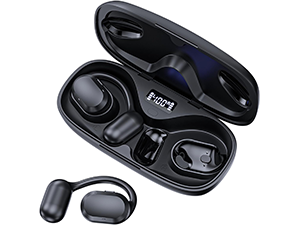
Imagem: A diagram illustrating the single button controls on the earbud, detailing actions for pause/play, answer/hang up, rejection, volume adjustment, switching songs, and activating Siri.
5.1 Reprodução de música
- Reproduzir/Pausar: Press the button once (x1).
- Próxima música: Press the button twice (x2).
- Música anterior: Press the button three times (x3).
- Aumentar/diminuir volume: Press and hold the button for 2 seconds (Hold 2s).
5.2 Gerenciamento de Chamadas
- Atender/encerrar chamada: Press the button once (x1).
- Rejeitar chamada: Press and hold the button for 2 seconds (Hold 2s).
The headphones feature dual-mic noise-cancelling technology for clearer calls by reducing environmental noise.

Imagem: A man wearing TTQ Open Ear Headphones while holding a smartphone, illustrating the intelligent noise cancellation feature that boosts human voice and reduces environmental noise for clearer calls.
5.3 Assistente de Voz
- Ativar assistente de voz (Siri, Google Assistente, etc.): Press the button three times (x3).
6. Manutenção
To ensure the longevity and optimal performance of your TTQ Open Ear Headphones, follow these maintenance guidelines:
- Limpeza: Limpe regularmente os fones de ouvido e o estojo de carregamento com um pano macio, seco e sem fiapos. Evite usar materiais abrasivos ou produtos químicos agressivos.
- Resistência à água: The headphones are IPX7 waterproof, meaning they can withstand submersion in up to 1 meter of water for 30 minutes. They are resistant to sweat and rain, making them suitable for workouts. However, they are not designed for swimming or prolonged submersion. Ensure the charging port is dry before charging.
- Armazenar: Quando não estiverem em uso, guarde os fones de ouvido no estojo de carregamento para protegê-los contra poeira e danos. Armazene-os em local fresco e seco, longe de temperaturas extremas.

Imagem: TTQ Open Ear Headphones and their charging case on a wet surface with water splashes, demonstrating their IPX7 waterproof rating, indicating resistance to rain and sweat.
7. Solução De Problemas
If you encounter issues with your TTQ Open Ear Headphones, please refer to the following common solutions:
- Sem som/Volume baixo:
- Certifique-se de que os fones de ouvido estejam devidamente emparelhados e conectados ao seu dispositivo.
- Verifique o nível de volume dos fones de ouvido e do dispositivo conectado.
- Certifique-se de que os fones de ouvido estejam carregados.
- Problemas de emparelhamento:
- Certifique-se de que o Bluetooth esteja ativado no seu dispositivo.
- Ensure the headphones are in pairing mode (flashing indicator).
- Desative o Bluetooth em outros dispositivos próximos que possam estar tentando se conectar.
- Forget/remove "CT26" from your device's Bluetooth list and try pairing again.
- Restart both your device and the headphones (by placing them back in the case and taking them out).
- Problemas de carregamento:
- Certifique-se de que o cabo de carregamento esteja conectado firmemente ao estojo e à fonte de alimentação.
- Experimente um cabo USB-C e um adaptador de energia diferentes.
- Certifique-se de que os contatos de carregamento nos fones de ouvido e no estojo estejam limpos e livres de detritos.
- Conexão intermitente:
- Ensure your device is within the Bluetooth range (up to 10 meters/33 feet).
- Avoid physical obstructions between the headphones and your device.
- Minimize a interferência de outros dispositivos sem fio.
Se o problema persistir após seguir esses passos, entre em contato com o suporte ao cliente.
8. Especificações
| Recurso | Especificação |
|---|---|
| Nome do modelo | CT26 |
| Tecnologia de Conectividade | Wireless (Bluetooth) |
| Tecnologia de comunicação sem fio | Bluetooth 5.3 |
| Alcance Bluetooth | 10 Metros (33 Pés) |
| Nível de resistência à água | IPX7 à prova d'água |
| Colocação da orelha | Ouvido aberto |
| Fator de forma | Verdadeiramente sem fio |
| Duração da bateria (fones de ouvido) | 8 Hours (Music) / 9 Hours (Calls) |
| Tempo total de jogo com o estojo de carregamento | Até 36 horas |
| Tipo de driver de áudio | Driver Dinâmico |
| Tamanho do driver de áudio | 16.2 milímetros |
| Faixa de frequência | 20 Hz - 20,000 Hz |
| Controle de Ruído | Cancelamento ativo de ruído (para chamadas) |
| Método de controle | Botão Físico |
| Porta de carregamento | USB-C |
| Peso do item | 7.8 onças (0.22 quilogramas) |
| Material | Plástico |
| UPC | 717977781312 |
9. Suporte ao cliente
For any questions, concerns, or if you receive a defective product, please do not hesitate to contact TTQ customer support. We are committed to providing solutions within 24 hours.
Please visit the official TTQ store on Amazon for more information and support resources: TTQ Store