
Introdução
This manual provides essential information for the safe and efficient operation, maintenance, and troubleshooting of your CONENTOOL 12V Cordless Drill Driver Kit. Please read this manual thoroughly before first use and keep it for future reference.
The CONENTOOL 12V Cordless Drill Driver is designed for drilling into wood, plastic, metal, and other materials, as well as for driving and removing screws. It features a powerful 35 N.m max torque, 25+1 torque settings, and two variable speeds for versatile applications.

Image: The CONENTOOL 12V Cordless Drill Driver Kit, including the drill, two batteries, charger, and a case filled with various drill bits and screwdriver bits.
Instruções importantes de segurança
Siga sempre as precauções básicas de segurança ao usar ferramentas elétricas para reduzir o risco de incêndio, choque elétrico e ferimentos pessoais.
- Utilize equipamentos de proteção individual (EPI) adequados, como óculos de segurança, luvas e protetores auriculares.
- Mantenha sua área de trabalho limpa e bem iluminada. Áreas desordenadas ou escuras convidam a acidentes.
- Não opere ferramentas elétricas em atmosferas explosivas, como na presença de líquidos inflamáveis, gases ou poeira.
- Ensure the tool is switched off before making any adjustments, changing accessories, or storing the tool.
- Use a ferramenta correta para sua aplicação. Não force a ferramenta.
- Armazene ferramentas ociosas fora do alcance de crianças e outras pessoas não treinadas.
Componentes e recursos do produto
Familiarize yourself with the various parts and features of your CONENTOOL Cordless Drill Driver.

Image: A detailed diagram of the CONENTOOL drill driver highlighting its key components: 3/8" keyless chuck, 25+1 adjustable clutch, LED light, variable speed switch, forward and reverse button, 2 variable speeds, and 2000 mAh lithium battery.
- Mandril sem chave de 3/8": For quick and easy bit changes. Features an all-metal automatic spindle lock.
- 25+1 Adjustable Clutch: Allows precise torque settings for various applications, preventing overtightening or stripping screws.
- Luz LED: Ilumina a área de trabalho, melhorando a visibilidade em ambientes escuros.
- Interruptor de velocidade variável: Proporciona controle preciso sobre a velocidade de perfuração e aparafusamento.
- Forward and Reverse Button: Easily switch between drilling/driving and unscrewing.
- 2 velocidades variáveis: Low speed (0-450 RPM) for screwing, high speed (0-1650 RPM) for drilling.
- 2000 mAh Lithium Battery: Offers long-lasting power and reliable performance.
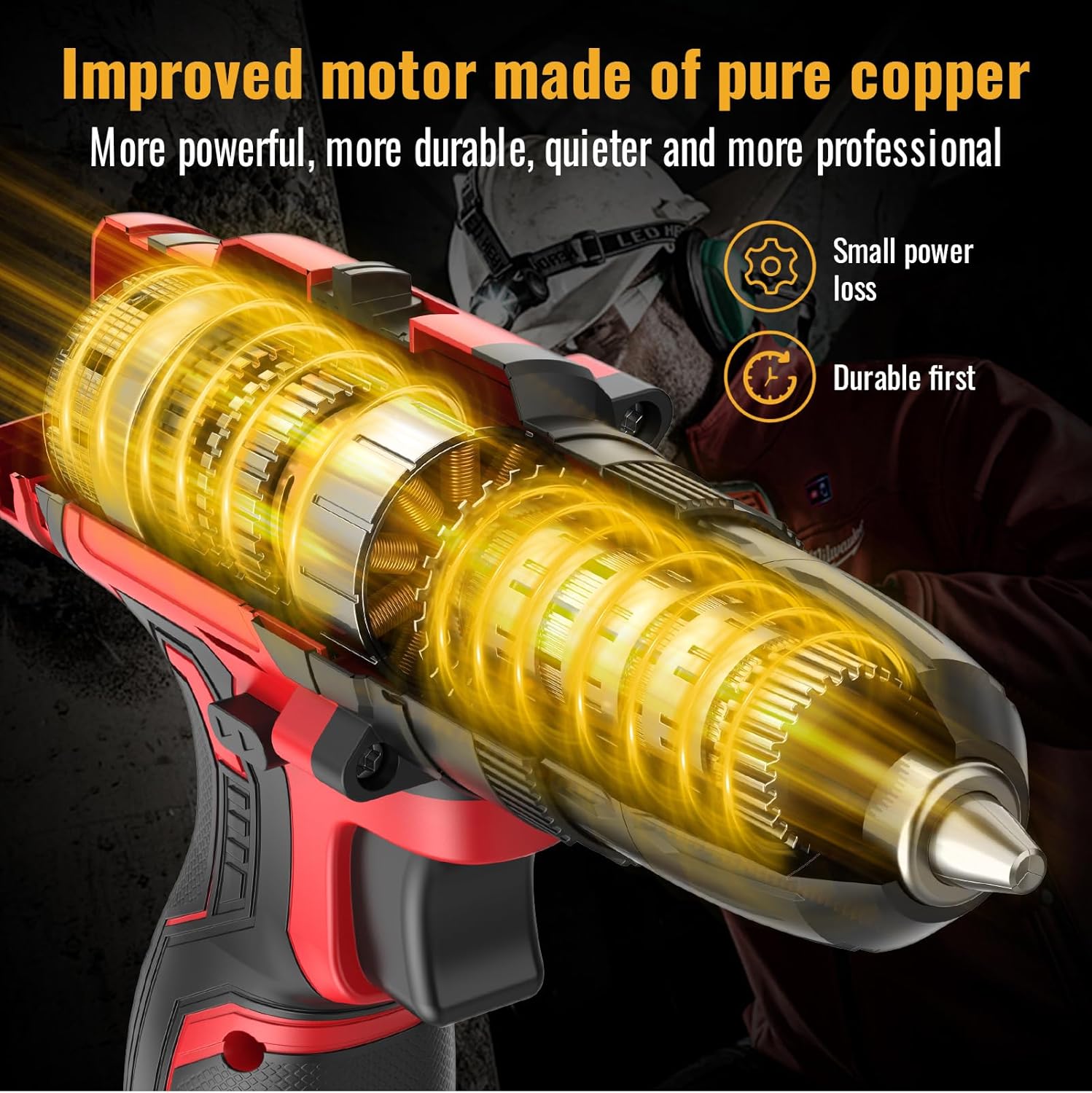
Imagem: Uma imagem interna view of the drill, highlighting the improved motor made of pure copper, designed for more power, durability, and quieter operation with small power loss.

Image: A graph illustrating the extended working hours provided by the 2x 2.0AH large capacity batteries compared to other batteries, showing a slower discharge rate over time.
Configurar
Carregando a bateria
- Conecte o carregador a uma tomada elétrica padrão.
- Deslize a bateria sobre o carregador até ouvir um clique.
- Allow the battery to charge fully before first use. The indicator light on the charger will change when charging is complete.
- Always disconnect the charger from the power supply and remove the battery once fully charged.
Instalando/Removendo a Bateria
- Para instalar: Alinhe a bateria com a base do cabo da furadeira e deslize-a até que se encaixe com segurança.
- To remove: Press the battery release button (usually located on the side of the battery pack) and slide the battery out.
Installing/Removing Drill Bits or Screwdriver Bits
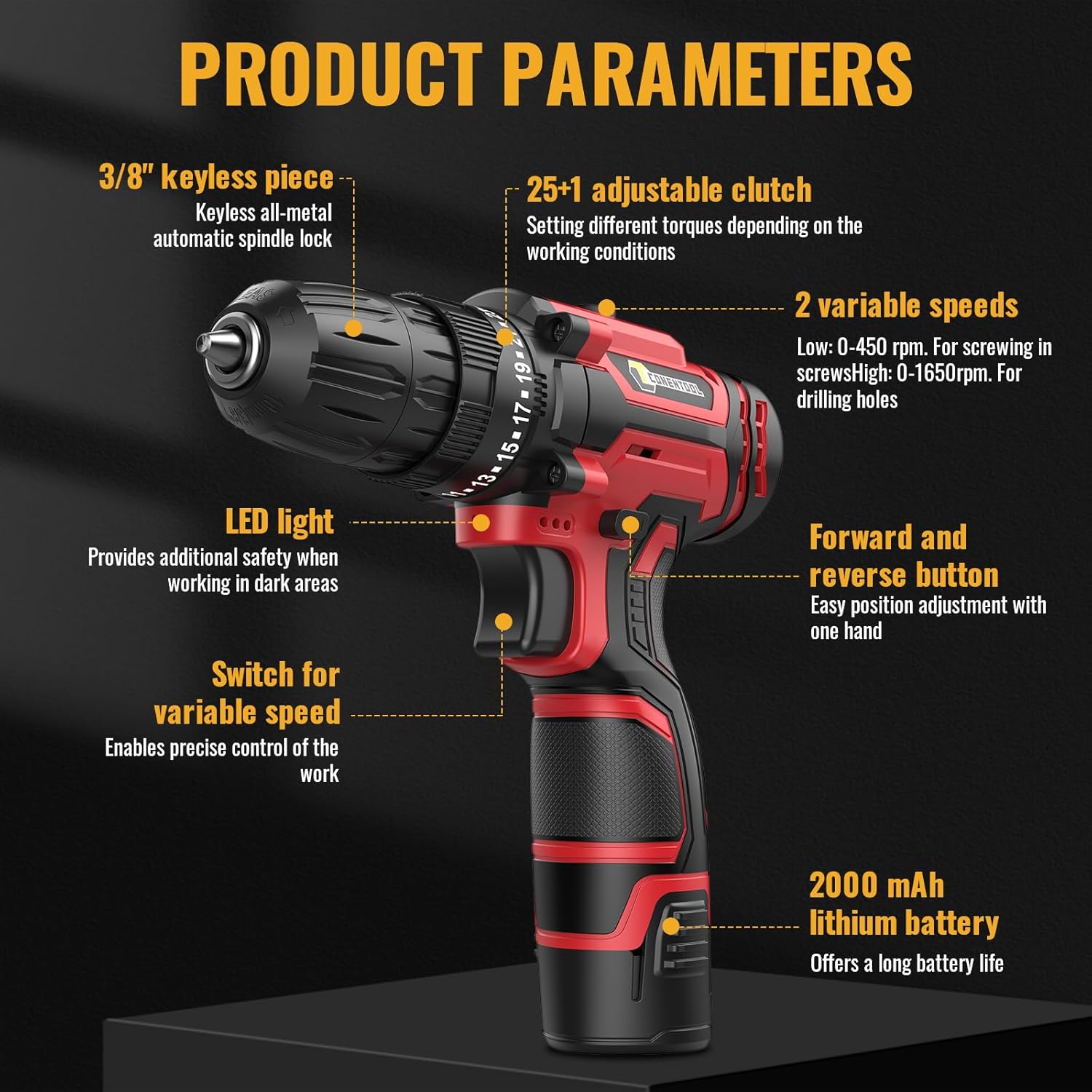
Image: A close-up showing the operation of the 3/8" (10mm) self-locking drill chuck, demonstrating how to open and close it to insert or remove bits.
- Ensure the drill is switched off and the forward/reverse switch is in the center (locked) position.
- Gire o mandril no sentido anti-horário para abrir as garras.
- Insira a broca ou a ponta de chave de fenda desejada completamente no mandril.
- Gire o mandril no sentido horário para apertar firmemente as garras em torno da broca. Certifique-se de que a broca esteja centrada e firmemente presa.
- Para remover: Gire o mandril no sentido anti-horário para soltar as garras e puxe a broca para fora.
Instruções de operação
Selecionando Velocidade
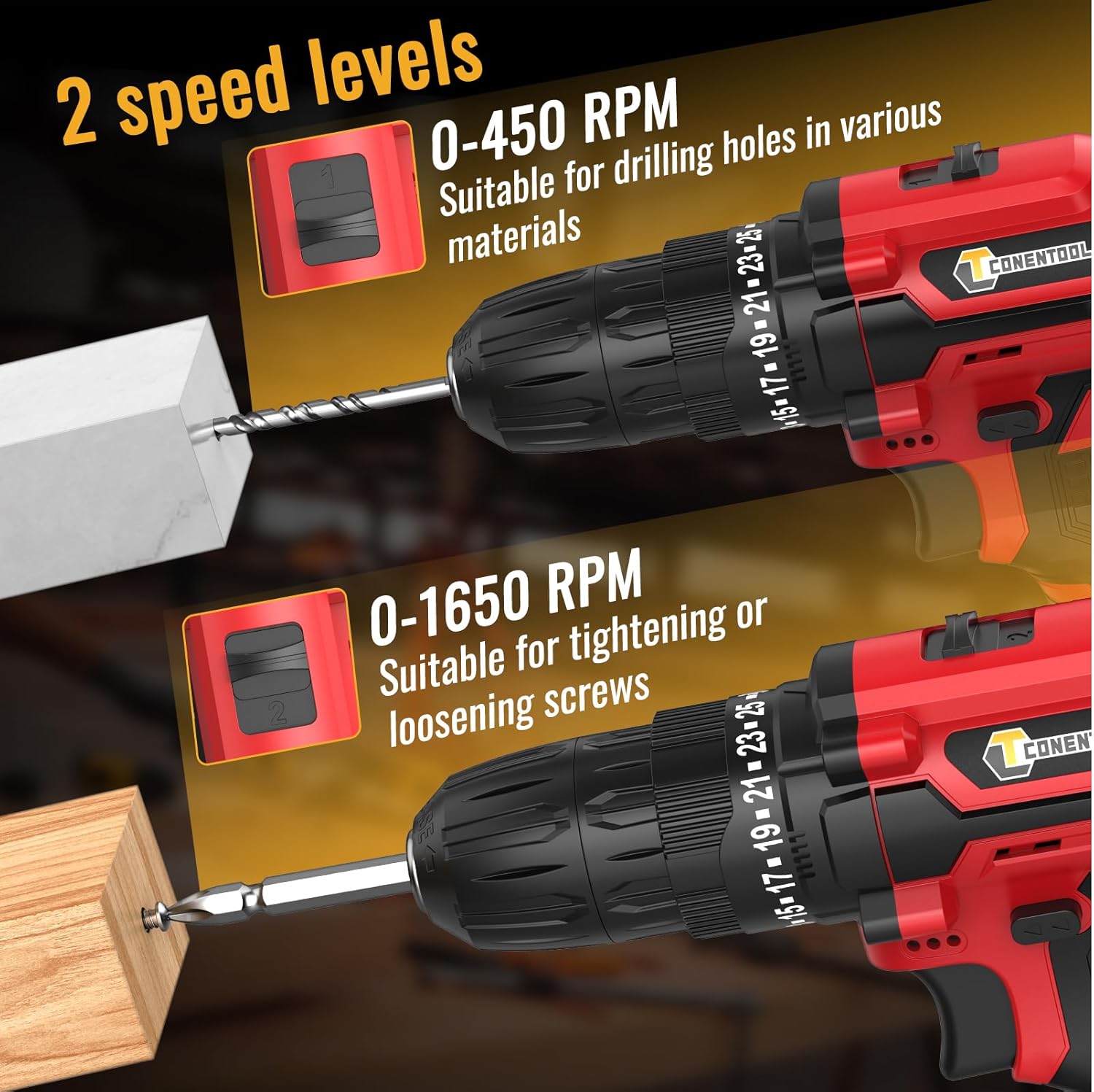
Image: A visual representation of the two-speed levels: 0-450 RPM for drilling holes in various materials (Speed 1) and 0-1650 RPM for tightening or loosening screws (Speed 2).
- Speed 1 (Low, 0-450 RPM): Ideal para apertar parafusos, furar diâmetros maiores ou para aplicações que exigem maior torque.
- Speed 2 (High, 0-1650 RPM): Suitable for smaller diameter drilling and applications requiring faster speed.
- Adjust the speed by sliding the gear selector switch located on top of the drill.
Adjusting Torque (Clutch Setting)

Image: A chart illustrating the drill's multifunctional capabilities, showing increasing torque/power levels suitable for screws, wood, ceramics, brick, concrete, and steel, with distinct settings for drilling and screwdriving.
- The torque adjustment ring is located behind the chuck. Rotate it to select the desired torque setting from 1 to 25.
- The higher the number, the greater the torque. Start with a lower setting and increase as needed to prevent overtightening or damaging the workpiece.
- Use the drill symbol setting for drilling applications, which provides maximum torque without clutch engagement.
Operação para frente/para trás
- Push the forward/reverse selector switch (located above the trigger) to the left for forward rotation (drilling/driving screws).
- Empurre o interruptor para a direita para inverter a rotação (removendo os parafusos).
- For safety, place the switch in the center position to lock the trigger and prevent accidental starting.
Operando a furadeira
- Ensure the correct bit is installed and the battery is charged.
- Select the appropriate speed and torque setting for your task.
- Position the drill bit on the workpiece.
- Press the trigger to start the drill. The LED light will illuminate the work area.
- Aplique pressão constante e uniforme. Não force a furadeira.
- Solte o gatilho para parar a broca.
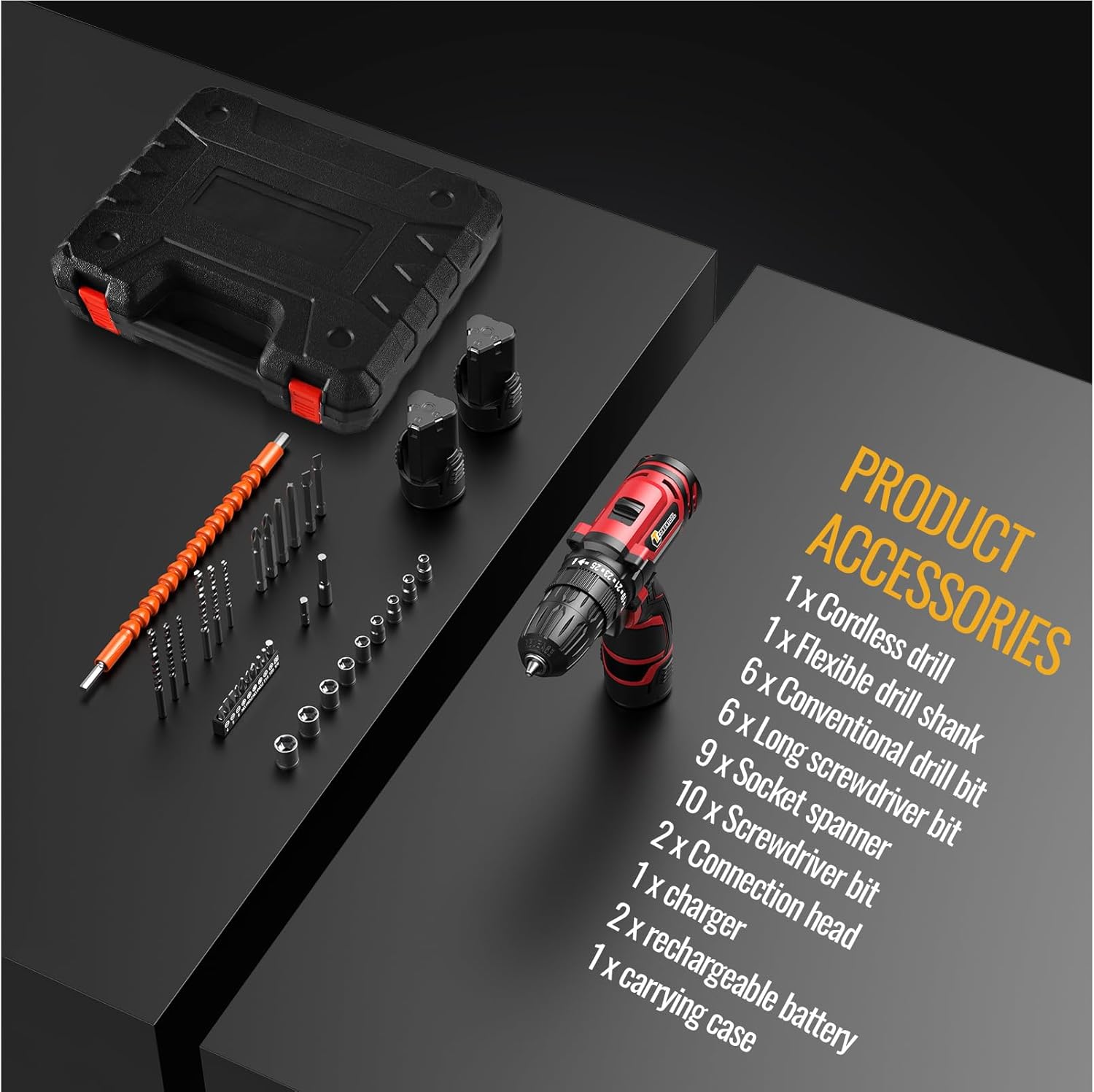
Image: A user demonstrating the versatility of the CONENTOOL drill, shown both drilling into wood and driving a screw into a wall, illustrating its practical application.
Manutenção
Limpeza Geral
- Sempre desconecte a bateria antes de limpar.
- Limpe a ferramenta com um pano limpo e seco.amp pano. Não use produtos químicos agressivos ou produtos de limpeza abrasivos.
- Mantenha as aberturas de ventilação livres de poeira e detritos para evitar superaquecimento. Use ar comprimido, se necessário.
Cuidados com a bateria
- Guarde as baterias em local fresco e seco, longe da luz solar direta e de temperaturas extremas.
- Não guarde as baterias descarregadas por longos períodos. Recarregue-as periodicamente quando não estiverem em uso.
- Não provoque curto-circuito nos terminais da bateria.
Cuidados com acessórios
- Clean drill bits and screwdriver bits after use.
- Store accessories in the provided carrying case to prevent damage and loss.
Solução de problemas
| Problema | Possível causa | Solução |
|---|---|---|
| A furadeira não inicia | Bateria não carregada ou mal instalada. Interruptor de avanço/ré na posição central (travado). | Charge battery fully. Reinstall battery securely. Move forward/reverse switch to desired direction. |
| Perda de energia durante a operação | Bateria fraca. Proteção contra sobrecarga ativada. | Recharge battery. Reduce pressure or use a higher torque setting. |
| A peça oscila ou cai. | Chuck not tightened properly. Bit shank is damaged. | Retighten chuck firmly. Replace damaged bit. |
| Superaquecimento | Uso intenso e contínuo. Ventilação bloqueada. | Deixe a ferramenta esfriar. Desobstrua as aberturas de ventilação. |
Especificações
| Recurso | Detalhe |
|---|---|
| Número do modelo | CR-314 |
| Volumetage | 12 Volts |
| Max Torque | 35 Nm |
| Velocidade sem carga (baixa) | 0-450 RPM |
| Velocidade sem carga (alta) | 0-1650 RPM |
| Configurações da embreagem | 25+1 |
| Tamanho do mandril | 3/8" (10 mm) Sem chave |
| Tipo de Bateria | Íon de lítio |
| Capacidade da bateria | 2000 mAh (2x included) |
| Peso | 2.13 kg (com bateria) |
| Dimensões (C x L x A) | 31 x 25 x 9 cm |
Acessórios incluídos

Image: A display of all accessories included in the kit, such as the cordless drill, flexible drill shank, various drill bits, screwdriver bits, socket spanner, connection head, charger, rechargeable batteries, and carrying case.
- 1 x Furadeira sem fio
- 1 x Flexible Drill Shank
- 6 x Conventional Drill Bits
- 6 x pontas de chave de fenda longas
- 9 x Socket Spanners
- 10 x chave de fenda Bits
- 2 x Connection Heads
- 1 x Carregador
- 2 x Rechargeable Batteries (2000 mAh each)
- 1 x Estojo de transporte
Garantia e Suporte
CONENTOOL is committed to providing high-quality products. For any questions regarding your product, please refer to the seller's contact information or Amazon's customer service.
While specific warranty details are not provided in this manual, most products come with a standard manufacturer's warranty against defects in materials and workmanship. Please retain your proof of purchase for any warranty claims.
For further assistance or technical support, please contact the seller Zhen Hui Xiang EU through the Amazon platform.