
1. Introdução
This manual provides essential information for setting up, operating, and maintaining your Samsung Galaxy S22 SM-S901 5G smartphone. The Galaxy S22 features a vibrant 120Hz Dynamic AMOLED display, advanced camera capabilities, and a powerful 4nm processor for a smooth user experience. This device is a renewed product, ensuring full functionality with generic or original accessories.
2. O que está na caixa
Verifique se seu pacote contém os seguintes itens:
- Samsung Galaxy S22 SM-S901 5G Device
- Standard Battery (STD Battery)
- Cabo de dados
- Cling (Protective film)
Note: Specific accessories may vary based on the renewed product supplier.
3. Configuração
3.1 dispositivo acabadoview

Figura 3.1: Frente view of the Samsung Galaxy S22 SM-S901 5G.
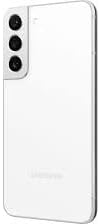
Figura 3.2: Voltar view of the Samsung Galaxy S22 SM-S901 5G, highlighting the camera system.
3.2 Inicialização Inicial
- Press and hold the Power/Side key located on the right side of the device until the Samsung logo appears.
- Siga as instruções na tela para selecionar seu idioma, conectar-se a uma rede Wi-Fi e configurar sua conta do Google.
3.3 Instalação do cartão SIM
- Localize a bandeja do cartão SIM na borda inferior do dispositivo.
- Insert the SIM ejection tool (not included with renewed products, use a paperclip) into the small hole next to the tray to eject it.
- Insira o cartão Nano-SIM na bandeja com os contatos dourados voltados para baixo.
- Empurre a bandeja cuidadosamente de volta para o compartimento até ouvir um clique.
4. Operando seu dispositivo
4.1 Navegação básica
- Toque e segure: Press and hold an item to move it or access additional options.
- Deslize: Move your finger across the screen to navigate between pages or scroll through content.
- Pitada: Use dois dedos para ampliar ou reduzir as fotos e web páginas.
4.2 Fazendo chamadas e enviando mensagens
- To make a call, tap the Telefone icon, enter the number, and tap the call button.
- To send a message, tap the Mensagens icon, tap the new message icon, enter the recipient and your message.
4.3 Recursos da câmera
The Galaxy S22 features advanced camera technology designed for various lighting conditions.
- Noturnografia: This feature enhances low-light photography by pulling in more light and reducing lens flare through the Super Clear Glass, supported by fast-acting AI processing.
- Linear Camera System: The rear camera housing integrates a linear camera system for a sleek design and optimized performance.
4.4 Recursos de exibição
Experience clear and vibrant visuals with the Galaxy S22's display.
- 120Hz Dynamic AMOLED Display: Provides smooth scrolling and responsive touch interactions.
- Vision Booster Technology: Enhances outdoor visibility by optimizing brightness and color contrast, making the screen clear even in bright sunlight.
4.5 Bateria e carregamento
The device is equipped with a battery that intelligently adapts to your usage patterns to optimize battery life, often lasting more than 24 hours under normal use. Use the provided data cable and a compatible charging adapter (sold separately or included with renewed product) for optimal charging.
4.6 Conectividade
- Wi-fi: Conecte-se a redes sem fio para acessar a internet.
- Bluetooth: Emparelhe com fones de ouvido sem fio, alto-falantes e outros dispositivos habilitados para Bluetooth.
- Inteligente View: Stream your phone's screen to a compatible TV. Access this feature from the Quick Panel by swiping down from the top of the screen.
5. Manutenção
5.1 Limpando seu dispositivo
Para limpar seu dispositivo, limpe-o delicadamente com um pano macio e sem fiapos. Evite usar produtos químicos agressivos ou materiais abrasivos.
5.2 Atualizações de Software
Verifique e instale regularmente as atualizações de software para garantir o melhor desempenho, segurança e acesso a novos recursos. Acesse Configurações > Atualização de software > Baixar e instalar.
6. Solução De Problemas
Se você encontrar problemas com seu dispositivo, tente as seguintes etapas comuns de solução de problemas:
- Dispositivo não responde: Pressione e mantenha pressionadas simultaneamente as teclas Liga/Desliga/Lateral e Diminuir Volume por mais de 7 segundos para reiniciar o dispositivo.
- Bateria descarregando rapidamente: Verifique o uso de aplicativos em segundo plano em Configurações > Bateria e cuidados com o dispositivo > Bateria. Reduce screen brightness or disable unnecessary features like GPS or Wi-Fi when not in use.
- Problemas de conectividade: Restart your device. For Wi-Fi, try forgetting the network and reconnecting. For cellular data, ensure your SIM card is properly inserted and your mobile data is enabled.
- O aplicativo está travando: Limpe o cache e os dados do aplicativo em Configurações > Aplicativos > [Nome do aplicativo] > ArmazenamentoSe o problema persistir, desinstale e reinstale o aplicativo.
For more complex issues, refer to Samsung's official support resources or contact your renewed product seller.
7. Especificações
| Recurso | Especificação |
|---|---|
| Nome do modelo | Galaxy S22 |
| Número do modelo do item | SM-S901 |
| Marca | Samsung |
| Sistema operacional | Androide 12.0 |
| Tamanho da tela | 6.1 polegadas |
| Resolução | 1080 x 2340 |
| Taxa de atualização | 120 Hz |
| Velocidade da CPU | 2.3 GHz |
| Tamanho da memória RAM instalada | 8 GB |
| Capacidade de armazenamento de memória | 128 GB (Internal, specific to this renewed model) |
| Peso do item | 5.9 onças (167 gramas) |
| Tecnologias de comunicação sem fio | Bluetooth, rede celular, Wi-Fi |
| Operadora de telefonia móvel | Desbloqueado para todas as operadoras |
| Tempo de conversação telefônica | 24 Hours (approximate) |
| Cor | Phantom White (specific to this renewed model) |
8. Renewed Product Condition Guidelines
As a renewed product, your Samsung Galaxy S22 SM-S901 5G is fully functional and comes with generic or original accessories and packaging. The condition of renewed products is categorized to provide transparency:

Figure 8.1: Amazon Renewed product condition guidelines.
Please refer to the specific condition description provided at the time of purchase for details regarding your device.
9. Garantia e Suporte
9.1 Política de Devolução
This renewed product typically includes a 90-day return policy for refund or replacement. Please consult your seller's specific return policy for detailed terms and conditions.
9.2 Suporte Técnico
For technical assistance, software issues, or hardware malfunctions, please contact the seller from whom you purchased this renewed device. You may also find general support resources on the official Samsung website.