1. Introdução
Obrigado pela compra.asing the Wanbo X2 Pro Projector. This manual provides essential information for the safe and efficient operation of your device. Please read it thoroughly before use and retain it for future reference.
The Wanbo X2 Pro is a high-definition projector designed for home entertainment, offering 450 ANSI lumens brightness and 1280 x 720 pixel resolution, with integrated Wi-Fi connectivity for versatile media playback.
2. Informações de segurança
- Não olhe diretamente para a lente do projetor quando a lente estiver ligada.amp está ligado.
- Assegure-se de que haja ventilação adequada ao redor do projetor para evitar superaquecimento. Não obstrua as aberturas de ventilação.
- Utilize apenas o adaptador de energia fornecido com o projetor.
- Mantenha o projetor longe de água, umidade e materiais inflamáveis.
- Evite colocar o projetor em superfícies instáveis.
- Não tente desmontar ou reparar o projetor por conta própria. Contate pessoal de serviço qualificado para obter assistência.
- Unplug the projector during lightning storms or when unused for extended periods.
3. Conteúdo da embalagem
Por favor, verifique se todos os itens estão presentes na embalagem:
- Wanbo X2 Pro Projector
- Adaptador de energia
- Controle remoto
- Manual do usuário (este documento)
4. Produto acabadoview
4.1 frente View

Figura 1: Frente view of the Wanbo X2 Pro Projector. The large circular lens is prominently featured on the left, with the 'wanbo' brand logo and an indicator light on the right side of the front panel.
The front of the projector features the main projection lens and the Wanbo brand logo. An infrared receiver for the remote control may also be located here.
4.2 Lado View (Ventilação)
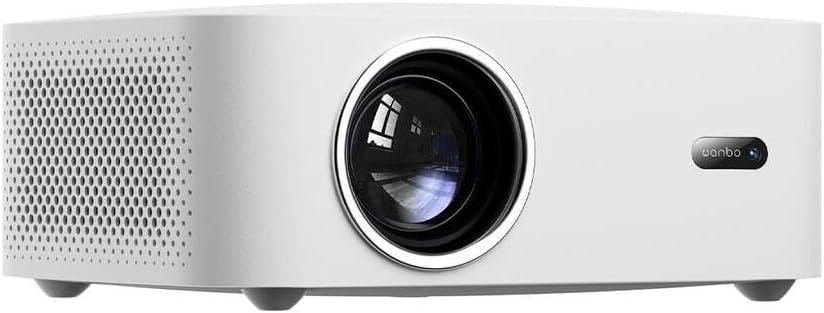
Figura 2: Lado view of the Wanbo X2 Pro Projector. This image shows the left side of the projector, featuring a large area of ventilation grilles designed to dissipate heat, ensuring stable operation.
The sides of the projector are equipped with ventilation grilles to ensure adequate airflow and prevent overheating during operation. Do not obstruct these vents.
4.3 Traseira View (Portos)

Figura 3: Traseira view of the Wanbo X2 Pro Projector. This panel includes multiple connectivity options: USB ports, HDMI ports, an AV input, a 3.5mm audio output, and the power input socket. An infrared receiver for the remote control is also visible.
The rear panel provides various connectivity options:
- Portas USB: For connecting USB storage devices (e.g., flash drives) to play media files.
- Portas HDMI: For connecting external devices such as laptops, gaming consoles, or Blu-ray players.
- Entrada AV: For connecting older devices using a composite video and stereo audio cable.
- Saída de áudio (3.5 mm): Para conectar alto-falantes externos ou fones de ouvido.
- Entrada de energia: Para conectar o adaptador de energia.
- Receptor IR: Para receber sinais do controle remoto.
5. Configuração
5.1 Posicionamento
Place the projector on a stable, flat surface. Ensure there is sufficient space around the projector for proper ventilation (at least 30 cm from walls or other objects). The ideal projection distance depends on the desired screen size.
5.2 Conexão de Energia
- Connect the power adapter to the Power Input port on the rear of the projector.
- Conecte a outra extremidade do adaptador de energia a uma tomada elétrica adequada.
- A luz indicadora de energia do projetor acenderá.
5.3 Conectando dispositivos externos
- HDMI: Connect an HDMI cable from your source device (e.g., laptop, game console) to one of the HDMI ports on the projector.
- USB: Insert a USB flash drive into a USB port to access media files diretamente.
- AV: Use um cabo AV para conectar dispositivos mais antigos.
- Saída de áudio: Connect external speakers or headphones to the 3.5mm audio output jack if desired.
5.4 Initial Power-On and Focus Adjustment
- Pressione o botão liga/desliga no projetor ou no controle remoto para ligar o dispositivo.
- Once the projector starts, a startup screen will appear.
- Adjust the focus ring around the lens (if manual) or use the remote control (if auto-focus) until the projected image is clear and sharp.
5.5 Correção Keystone
If the projected image appears trapezoidal (wider at the top or bottom), use the keystone correction function. This can usually be found in the projector's settings menu or via a dedicated button on the remote control. Adjust until the image is rectangular.
6. Operação
6.1 Controle Remoto
The remote control allows you to navigate the projector's interface, select input sources, adjust volume, and access settings. Ensure batteries are correctly inserted.
6.2 Seleção da fonte de entrada
Press the "Source" or "Input" button on the remote control to cycle through available input sources (e.g., HDMI 1, HDMI 2, AV, USB, Wi-Fi/Smart features). Select the desired source.
6.3 Configurações de imagem e áudio
Access the projector's main menu to adjust picture settings (brightness, contrast, color, aspect ratio) and audio settings (volume, sound mode).
6.4 Conexão Wi-Fi
- Acesse o menu "Configurações".
- Selecione "Rede" ou "Configurações de Wi-Fi".
- Ative o Wi-Fi e selecione a rede desejada na lista.
- Digite a senha do Wi-Fi, se solicitado.
- Uma vez conectado, você poderá acessar conteúdo online ou recursos de espelhamento de tela.
6.5 Screen Mirroring / Casting
The Wanbo X2 Pro supports screen mirroring from compatible smartphones or tablets. Refer to the projector's on-screen instructions or your device's casting features (e.g., Miracast, AirPlay) for detailed steps.
7. Manutenção
7.1 Limpeza da Lente
Use a soft, lint-free cloth specifically designed for optical lenses. Gently wipe the lens surface. Do not use abrasive cleaners or excessive force, as this can scratch the lens.
7.2 Limpeza do corpo do projetor
Limpe a parte externa do projetor com um pano macio e seco. Para manchas persistentes, use um pano levemente umedecido.amp Pode-se usar um pano úmido, seguido de um pano seco. Evite usar produtos químicos agressivos.
7.3 Ventilação
Regularly check and clean the ventilation grilles to ensure they are free from dust and debris. Blocked vents can lead to overheating and reduced projector lifespan.
7.4 Armazenamento
When not in use for extended periods, store the projector in a cool, dry, dust-free environment. Consider using a protective cover to prevent dust accumulation.
8. Solução De Problemas
| Problema | Possível causa | Solução |
|---|---|---|
| Nenhuma imagem projetada |
|
|
| A imagem está borrada |
|
|
| A imagem é trapezoidal. |
|
|
| Sem som |
|
|
9. Especificações
| Recurso | Detalhe |
|---|---|
| Marca | Wanbo |
| Nome do modelo | X2 Pro |
| Número do modelo | WANBOX2PRO |
| Brilho | 450 ANSI Lumens |
| Resolução | 1280 x 720 pixels (HD) |
| Conectividade | Wi-Fi, HDMI, USB, AV, 3.5mm Audio Out |
| Consumo de energia | 5 Watts (Light Source Power) |
| Cor | Branco |
10. Garantia e Suporte
The Wanbo X2 Pro Projector comes with a standard manufacturer's warranty. Please refer to the warranty card included in your package for specific terms and conditions, including the warranty period and coverage details.
For technical support, troubleshooting assistance beyond this manual, or warranty claims, please contact Wanbo customer service. Contact information can typically be found on the official Wanbo website ou na embalagem do seu produto.
Please have your model number (WANBOX2PRO) and purchase information ready when contacting support.