
1. Introdução
This manual provides essential information for the safe and efficient operation of your Sharp GX-BT190 Portable Bluetooth Speaker. Please read it thoroughly before using the device and retain it for future reference.
2. Informações de segurança
- Não exponha o alto-falante a temperaturas extremas, luz solar direta ou alta umidade.
- Não desmonte, repare ou modifique a caixa de som. Isso pode anular a garantia e representar riscos à segurança.
- Certifique-se de que a tampa da porta de carregamento esteja bem fechada ao usar a caixa de som perto da água para manter sua classificação IP67.
- Utilize apenas o cabo de carregamento fornecido ou um equivalente certificado.
- Mantenha o alto-falante longe de crianças e animais de estimação.
- Evite ouvir em níveis de volume altos por longos períodos para evitar danos auditivos.
3. Conteúdo da embalagem
- Sharp GX-BT190 Portable Bluetooth Speaker
- Cabo de carregamento USB
- Cordão
- Manual de instruções
4. Produto acabadoview

Frente view of the Sharp GX-BT190 speaker, showing the central speaker grille with the Sharp logo and the LED light ring.

Lado view of the Sharp GX-BT190 speaker, highlighting the textured speaker grille and the integrated lanyard.
Traseira view of the Sharp GX-BT190 speaker, showing the control buttons and the sealed charging port cover.
Controles e Indicadores:
- Botão de energia: Pressione e segure para ligar/desligar.
- Botão Aumentar Volume / Próxima Faixa (+): Pressione rapidamente para aumentar o volume e pressione longamente para a próxima faixa.
- Botão Diminuir Volume / Faixa Anterior (-): Pressione rapidamente para diminuir o volume, pressione e segure para voltar à faixa anterior.
- Botão Reproduzir/Pausar/Atender Chamada (►||): Short press to play/pause, answer/end calls. Long press to reject calls.
- Mode / Light Button (M): Short press to cycle through LED light modes. Long press to turn off LED lights.
- Porta de carregamento USB-C: For charging the speaker. Ensure the rubber cover is sealed when not charging.
- Indicador LED: Exibe o status de carregamento e o status de emparelhamento Bluetooth.
5. Configuração
5.1 Carregando o alto-falante
- Open the rubber cover on the back of the speaker to access the USB-C charging port.
- Connect the provided USB charging cable to the speaker's USB-C port.
- Conecte a outra extremidade do cabo USB a um adaptador de alimentação USB (não incluído) ou à porta USB de um computador.
- O indicador LED acenderá durante o carregamento e apagará quando a carga estiver completa.
- Close the rubber cover securely after charging to maintain the speaker's waterproof rating.
5.2 Ligar/Desligar
- Para ligar: Pressione e mantenha pressionado o botão Liga/Desliga por aproximadamente 3 segundos. Você ouvirá um aviso sonoro e o indicador LED piscará.
- Para desligar: Pressione e mantenha pressionado o botão Liga/Desliga por aproximadamente 3 segundos. Você ouvirá um aviso sonoro e o indicador LED se apagará.
5.3 Emparelhamento Bluetooth
- Ensure the speaker is powered on and the LED indicator is flashing, indicating it is in pairing mode.
- No seu dispositivo móvel, ative o Bluetooth e pesquise os dispositivos disponíveis.
- Select "GX-BT190" from the list of devices.
- Após o emparelhamento, o indicador LED deixará de piscar e permanecerá aceso, e você ouvirá um sinal sonoro de confirmação.
- O alto-falante se reconectará automaticamente ao último dispositivo emparelhado ao ser ligado, se o dispositivo estiver dentro do alcance e o Bluetooth estiver ativado.
Emparelhamento estéreo sem fio verdadeiro (TWS) 5.4.
TWS allows you to pair two GX-BT190 speakers together for a stereo audio experience.

Two Sharp GX-BT190 speakers, one red and one blue, positioned together, illustrating the True Wireless Stereo (TWS) pairing feature.
- Ensure both GX-BT190 speakers are powered on and not connected to any Bluetooth device.
- On one of the speakers (this will be the primary speaker), double-press the Power button. The speaker will enter TWS pairing mode.
- Os dois alto-falantes se procurarão e se conectarão automaticamente. Você ouvirá um tom de confirmação assim que o emparelhamento TWS for bem-sucedido.
- Once TWS paired, connect your mobile device to the primary speaker via Bluetooth as described in section 5.3.
- To disconnect TWS, double-press the Power button on either speaker.
6. Operação
6.1 Reproduzindo Áudio
- Reproduzir/Pausar: Pressione rapidamente o botão Reproduzir/Pausar.
- Aumentar o volume: Pressione rapidamente o botão '+'.
- Volume baixo: Pressione rapidamente o botão '-'.
- Próxima faixa: Pressione e segure o botão '+'.
- Faixa anterior: Pressione e segure o botão '-'.
6.2 Chamadas em modo mãos-livres
- Atender chamada: Pressione rapidamente o botão Reproduzir/Pausar quando receber uma chamada.
- Encerrar chamada: Pressione rapidamente o botão Reproduzir/Pausar durante uma chamada.
- Rejeitar chamada: Ao receber uma chamada, mantenha pressionado o botão Reproduzir/Pausar.
6.3 LED Mood Lights
- Short press the 'M' (Mode/Light) button to cycle through the 6 available LED mood light modes.
- Long press the 'M' button to turn off the LED lights.
6.4 Uso à prova d'água e poeira (IP67)

The Sharp GX-BT190 speaker partially submerged in water, demonstrating its IP67 waterproof and dustproof capabilities.
The GX-BT190 speaker is rated IP67, meaning it is protected from dust ingress and can withstand immersion in water up to 1 meter for 30 minutes. To ensure this protection:
- Always ensure the rubber cover for the charging port is fully and securely sealed before exposing the speaker to water or dust.
- Não submerja intencionalmente o alto-falante por períodos prolongados ou além da profundidade especificada.
- After exposure to water, wipe the speaker dry with a soft cloth before charging.
7. Manutenção
7.1 Limpeza
- Limpe o alto-falante com um suave, damp pano.
- Não utilize produtos de limpeza abrasivos, álcool ou solventes químicos.
- Ensure the speaker is dry before charging or storing.
7.2 Armazenamento
- Guarde a caixa de som em local fresco e seco, longe da luz solar direta e de temperaturas extremas.
- Se for armazenar a bateria por um longo período, carregue-a periodicamente (por exemplo, a cada 3 meses) para manter sua saúde.
8. Solução De Problemas
| Problema | Solução |
|---|---|
| A caixa de som não liga. | Certifique-se de que a bateria esteja carregada. Conecte a caixa de som a uma fonte de energia usando o cabo USB. |
| Não foi possível emparelhar via Bluetooth. | Ensure the speaker is in pairing mode (LED flashing). Turn off and on Bluetooth on your device. Move the speaker closer to your device. Clear previous Bluetooth connections on your device. |
| Sem som ou volume muito baixo. | Aumente o volume tanto na caixa de som quanto no dispositivo conectado. Certifique-se de que a caixa de som esteja devidamente emparelhada. |
| Má qualidade de som. | Move the speaker closer to your device. Ensure there are no obstructions between the speaker and your device. Try playing a different audio source. |
| O emparelhamento TWS falha. | Ensure both speakers are GX-BT190 models and are not connected to any other Bluetooth device. Try powering both speakers off and on, then re-attempt TWS pairing. |
9. Especificações

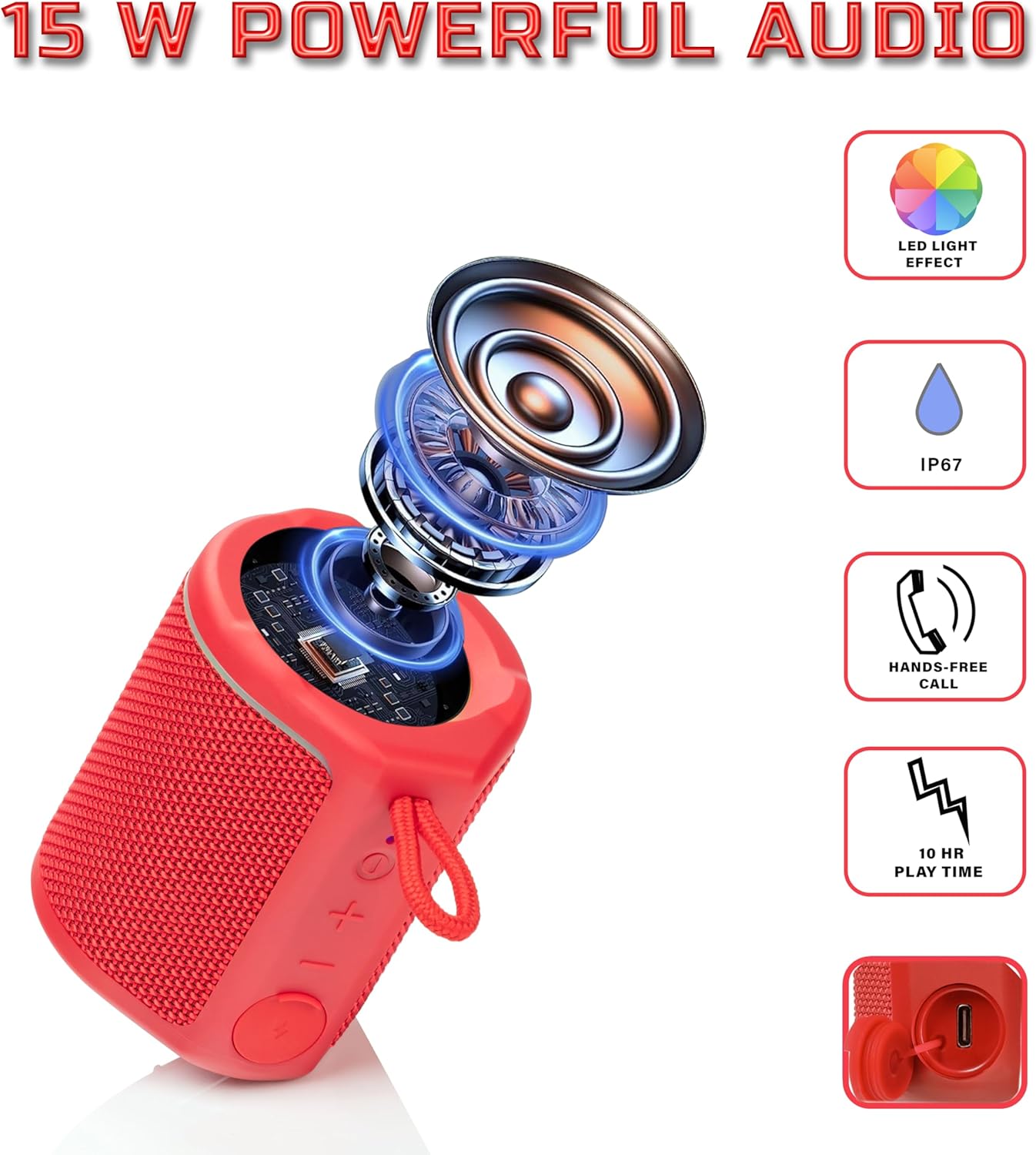
Diagram illustrating the internal components of the Sharp GX-BT190 speaker, including the speaker driver, and highlighting features like LED light effect, IP67 rating, hands-free call function, and battery life.
| Recurso | Detalhe |
|---|---|
| Número do modelo | GX-BT190 |
| Tecnologia de Conectividade | Bluetooth |
| Potência máxima de saída do alto-falante | 10 Watts |
| Classificação à prova d'água | IP67 |
| Duração da bateria | Até 15 horas |
| Tipo de Bateria | 1 íon de lítio (incluído) |
| Capacidade da bateria | 1200 mAh |
| Dimensões do produto (P x L x A) | 7.5 x 7.5 x 7.5 cm (aprox.) |
| Peso do item | 226.8 g (8 onças) |
| Distância wireless | Até 33 pés |
| Características adicionais | LED Light, True Wireless Stereo (TWS), Hands-Free Calling |
10. Garantia
The Sharp GX-BT190 Portable Bluetooth Speaker comes with a 1-Year Limited Warranty from the date of purchase. This warranty covers manufacturing defects under normal use. It does not cover damage caused by misuse, accidents, unauthorized modifications, or normal wear and tear. Please retain your proof of purchase for warranty claims.
11. Suporte
For technical assistance, warranty inquiries, or further information regarding your Sharp GX-BT190 speaker, please contact Sharp Inc. customer support:
- Contato do fabricante: Sharp Inc
- Telefone: 1-800-BE-SHARP