
1. Introdução
This manual provides detailed instructions for the installation, operation, and maintenance of the Tomzn TOVPD1-80-EC Adjustable Over/Under Voltage and Over Current Protection Device. This device is designed to protect electrical appliances and circuits from damage caused by voltage fluctuations and excessive current. Please read this manual thoroughly before use to ensure safe and correct operation.
2. Informações de segurança
- A instalação deve ser realizada por um eletricista qualificado.
- Certifique-se de que a fonte de alimentação esteja desconectada antes da instalação ou manutenção.
- Do not operate the device in wet conditions or with wet hands.
- Verify that the device's specifications match your electrical system requirements.
- Mantenha as crianças afastadas das instalações elétricas.
3. Produto acabadoview
3.1. Principais funções
- Volume excessivotage proteção
- Sub-voltage proteção
- Proteção contra sobrecorrente
- Recuperação automática
- Vol em tempo realtage exibição
- Real-time current display
- Volume ajustáveltage calibration (±10%)
- Função de reset de fábrica
- Error inquiry function
3.2. Componentes do dispositivo
The device features a digital display for voltage and current, indicator lights for protection status, and control buttons for settings adjustment.
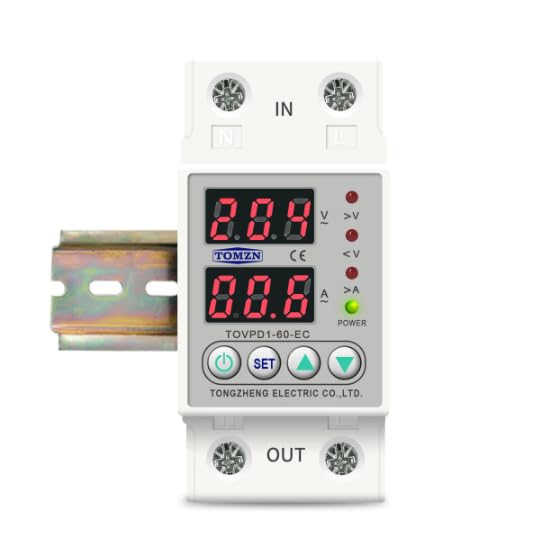
Figura 1: Frente view of the Tomzn TOVPD1-80-EC protection device. Note: The image displays model TOVPD1-60-EC, but the instructions apply to the TOVPD1-80-EC model with an 80 Ampere avaliação.
The device includes input terminals (IN) and output terminals (OUT) for electrical connections, along with a power indicator and status LEDs for over-voltage (>V), under-voltage (<V), and over-current (>A).
4. Instalação
The TOVPD1-80-EC device is designed for DIN rail mounting (35mm). Follow these steps for proper installation:
- Desconexão de energia: Before starting, ensure the main power supply to the circuit is completely disconnected to prevent electrical shock.
- Montagem: Snap the device onto a standard 35mm DIN rail in your electrical panel.
- Fiação:
- Connect the incoming live (L) and neutral (N) wires from the power source to the "IN" terminals of the device.
- Connect the outgoing live (L) and neutral (N) wires to the load (appliances/circuit) from the "OUT" terminals of the device.
- Certifique-se de que todas as conexões estejam firmes e seguras.
- Verificação: Verifique novamente todas as conexões de fiação para garantir que estejam corretas e seguras.
- Restauração de energia: Restore power to the circuit. The device will power on and display the current voltage e leituras atuais.
5. Operating Instructions and Settings
O dispositivo exibe o volume em tempo real.tage and current. Use the control buttons to adjust protection parameters.
5.1. Funções dos botões
- Botão de energia: Turns the device ON/OFF (if applicable, or for display cycling).
- Botão de configuração: Enters/exits setting mode and cycles through parameters.
- Botão de seta para cima (▲): Increases parameter values.
- Botão de seta para baixo (▼): Decreases parameter values.
5.2. Ajuste de Parâmetros
To adjust a parameter:
- Pressione o DEFINIR button to enter the setting mode. The first parameter will flash.
- Imprensa DEFINIR repeatedly to cycle through the available parameters (e.g., Over-voltage protection threshold, Under-voltage protection threshold, Over-current protection threshold, recovery delays, etc.).
- When the desired parameter is flashing, use the ▲ (Para cima e ▼ (Down) buttons to adjust its value.
- After setting the value, wait a few seconds for the device to automatically save the setting and exit the setting mode, or press DEFINIR again to move to the next parameter.
5.3. Parameter Ranges and Default Values (for 220V/80A model)
| Parâmetro | Faixa de Valores | Valor Padrão |
|---|---|---|
| Volume excessivotage Proteção (UVP) | 230V ~ 300V (OFF) | 270V |
| Volume excessivotage Recovery (UVR) | 225V ~ 295V | 250V |
| UVP Action Time | 0.1s ~ 30s | 0.5s |
| UVP Recovery Delay | 1s ~ 500s | 30s |
| Sub-voltage Proteção (LVP) | 140V ~ 210V (OFF) | 170V |
| Sub-voltage Recovery (LVR) | 145V ~ 215V | 190V |
| LVP Action Time | 0.1s ~ 30s | 0.5s |
| LVP Recovery Delay | 1s ~ 500s | 30s |
| Over-current Protection (OCP) | 1A ~ 80A (adjustable) | 40A (Note: Default may vary based on specific model variant.) |
| OCP Action Time | 0.1s ~ 30s | 0.5s |
| OCP Recovery Delay | 1s ~ 500s | 30s |
| Power-on Delay Time | 1s ~ 500s | 10s |
Note: The over-current adjustment range is inferred to be up to 80A for the TOVPD1-80-EC model, although the provided description mentions 40A and 63A variants. Always refer to the specific markings on your device.
5.4. Redefinição de fábrica
To restore the device to its factory default settings, press and hold the ▼ (Down) button for more than 12 seconds. The display will indicate a reset.
5.5. Error Inquiry
To inquire about past error events, press and hold the ▲ (Up) button for more than 12 seconds. The device will display error codes or logs if available.
6. Manutenção
- Regularly inspect the device for any signs of physical damage or loose connections.
- Mantenha o dispositivo limpo e livre de poeira. Use um pano seco e macio para a limpeza.
- Não utilize produtos de limpeza abrasivos ou solventes.
- Garanta ventilação adequada ao redor do dispositivo para evitar superaquecimento.
7. Solução De Problemas
| Problema | Possível causa | Solução |
|---|---|---|
| Dispositivo não liga | Sem alimentação elétrica; fiação incorreta; defeito interno. | Verifique a fonte de alimentação principal. Verifique as conexões da fiação. Se o problema persistir, entre em contato com o suporte. |
| Device trips frequently | Protection thresholds set too low; actual voltage/current exceeds limits. | Adjust protection parameters (UVP, LVP, OCP) to appropriate levels. Check load for faults. |
| O visor mostra o código de erro | Internal error or specific fault detected. | Refer to the error inquiry function (Section 5.5) for details. If unknown, contact support. |
| Device does not recover automatically | Automatic recovery feature disabled or recovery delay too long. | Ensure automatic recovery is enabled in settings. Check recovery delay times. |
8. Especificações
| Recurso | Valor |
|---|---|
| Número do modelo | TOVPD1-80-EC |
| Corrente nominal | 80 Ampantes |
| Fonte de energia | 220V AC 50/60Hz (Nominal) |
| Volume excessivotage Faixa de Proteção | 230V ~ 300V (OFF) |
| Sub-voltage Faixa de Proteção | 140V ~ 210V (OFF) |
| Over-current Adjustment Range | 1A ~ 80A |
| Consumo de energia | <2 W |
| Vida elétrica | 100,000 vezes |
| Tipo de instalação | DIN Rail Mount (35mm) |
| Dimensões (C x L x A) | 9.3 x 7.8 x 4.5 cm |
| Peso | 200 gramas |