
Simyke U2SE
Manual do Usuário do Monitor de Vídeo Inteligente para Bebês Simyke
Model: U2SE
Introdução
Thank you for choosing the Simyke Smart Video Baby Monitor. This device is designed to provide peace of mind by allowing you to monitor your baby from anywhere using the Simyke app on your smartphone or tablet. Featuring 1080P HD video, AI detection, two-way audio, and night vision, this monitor ensures you stay connected with your little one.
O que está na caixa
- 1 x Simyke Baby Camera
- 1 x adaptador de energia
- 1 x Manual do Usuário
Principais características

Figura 1: Overview of Simyke Baby Monitor Key Features
- Vídeo HD 1080p: Crystal-clear live streaming and recording.
- Conectividade Wi-Fi de 2.4 GHz: Connects to your home Wi-Fi for remote monitoring (does not support 5G Wi-Fi).
- Cry Detection & Real-time Alerts: Receive instant notifications on your phone when your baby cries.
- Áudio bidirecional: Speak to your baby or communicate with anyone in the room.
- Canções de ninar: Canções de ninar integradas para acalmar o seu bebê.
- Visão noturna HD: Clear visibility in low-light conditions up to 3 meters.
- Detecção de IA: Includes features like Face Detection, Sound Detection, Human Detection, Safe Zone, and Danger Zone monitoring.
- Conectividade multidispositivo: Compatible with Simyke 2.8" LCD display, iPad, and smartphones.
- Storage & Playback: Supports up to 128GB SD card storage and cloud storage for video replay.
- Relatório do sono: Tracks and reports your baby's sleep patterns.
Produto acimaview

Figure 2: Simyke Smart Video Baby Monitor and its ecosystem.
The Simyke U2SE Baby Monitor features a compact design with a flexible base for optimal positioning. It includes a high-definition camera lens, a microphone for two-way audio, and an indicator light. The base allows for tabletop placement or wall mounting.
On the back of the camera, you will find the power input, a 'Pair' button for Wi-Fi connection, and a Wi-Fi On/Off switch. The camera's adjustable stand allows you to manually angle the view to cover the desired area of your baby's room.
Instruções de configuração
- Ligando: Connect the provided power adapter to the camera's power input port and plug it into a wall outlet. The indicator light will illuminate.
- Download the Simyke App: Procurar "Simyke" in your smartphone's app store (iOS or Android) and download the official application.
- Criar uma conta: Open the Simyke app and follow the on-screen instructions to create a new user account or log in if you already have one.
- Adicionar dispositivo: In the app, select the option to add a new device. Choose the Simyke U2SE Baby Monitor from the list.
- Conectar ao Wi-Fi: Ensure your smartphone is connected to a 2.4 GHz Wi-Fi network. The app will guide you through connecting the monitor to your Wi-Fi. You may need to press the 'Pair' button on the back of the camera as instructed by the app.
- Posicionando o monitor: Place the monitor on a stable surface like a shelf or dresser, or mount it on the wall above the crib using appropriate hardware (not included). Adjust the camera's angle manually to get the best view do seu bebê.
Instruções de operação
Ao vivo View e Monitoramento
Once connected, open the Simyke app to access the live video feed from your baby monitor. You can view your baby in 1080P HD resolution.
Áudio bidirecional e canções de ninar

Figure 3: Two-way communication and lullaby feature.
Use the microphone icon in the app to speak to your baby. The monitor also features 8 built-in lullabies. You can activate these from the app to help soothe your baby to sleep.
Cry Detection and Alerts

Figure 4: Cry detection alerts on your smartphone.
Enable cry detection in the app settings to receive real-time alerts on your phone when your baby cries. The video playback function allows you to review the exact circumstances of the crying.
Visão noturna HD

Figure 5: Day and Night Vision capabilities.
The monitor automatically switches to HD night vision in low-light conditions, providing clear black and white video of your baby without disturbing their sleep.
AI Detection Features
The Simyke app offers advanced AI detection capabilities:
- Detecção de rosto: Identifies and tracks faces within the camera's view.

Figure 6: Face Detection in action.
- Zona Segura: Define specific areas in the room to monitor for activity. Alerts are triggered if movement is detected outside this zone.

Figure 7: Safe Zone monitoring.
- Relatório do sono: Access detailed reports on your baby's sleep duration and patterns.

Figure 8: Sleep Report interface.
- Zona de perigo: Set up alerts for specific areas that should be avoided.

Figure 9: Danger Zone alerts.
- Detecção de som: Beyond cry detection, this feature alerts you to other significant sounds.

Figure 10: Sound Detection notification.
- Detecção Humana: Alerts you when a human is detected in the camera's view.
Multi-Device Connectivity & Family Sharing
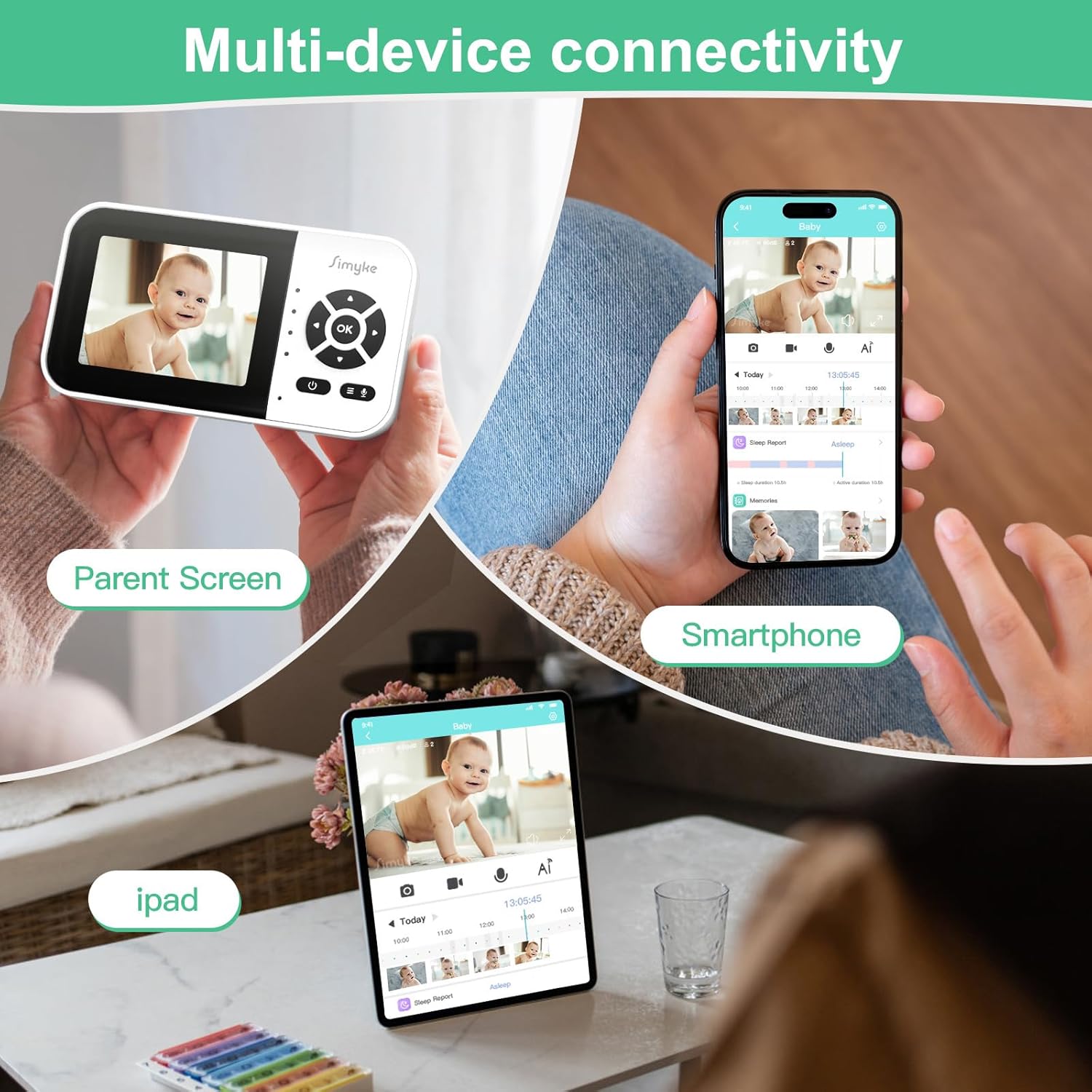
Figura 11: Opções de conectividade para múltiplos dispositivos.
The Simyke monitor supports connectivity across various devices, including the Simyke 2.8" LCD display, iPads, and smartphones. You can also share access to the monitor's feed with family members through the app, allowing multiple users to monitor the baby simultaneously.

Figure 12: Family sharing feature.
Armazenamento e reprodução
The monitor supports local storage via a 128GB SD card (not included) and cloud storage options. You can review foo gravadotage directly from the Simyke app.
Manutenção
- Limpeza: Limpe delicadamente a lente e o corpo da câmera com um pano macio e seco. Não use produtos de limpeza líquidos ou aerossóis.
- Colocação: Ensure the monitor is placed in a well-ventilated area, away from direct sunlight, heat sources, and moisture.
- Gerenciamento de cabos: Keep the power cable out of reach of children to prevent strangulation hazards.
Solução de problemas
| Problema | Possível causa | Solução |
|---|---|---|
| Monitor não conecta ao Wi-Fi | Incorrect Wi-Fi band (5G not supported), weak signal, incorrect password. | Ensure you are on a 2.4 GHz Wi-Fi network. Check Wi-Fi signal strength. Re-enter Wi-Fi password carefully. Try re-pairing the device via the app. |
| Sem vídeo / Tela preta | Power issue, app glitch, poor internet connection. | Check if the monitor is powered on. Restart the Simyke app. Verify your internet connection. Restart the monitor by unplugging and re-plugging it. |
| Áudio bidirecional não funciona | Microphone/speaker muted in app, app permissions. | Check audio settings in the Simyke app. Ensure app has microphone permissions on your device. |
| AI detection alerts are too frequent/infrequent | Sensitivity settings, zone configuration. | Adjust sensitivity levels for cry, sound, and human detection in the app settings. Reconfigure Safe Zone/Danger Zone areas as needed. |
Especificações
| Recurso | Detalhe |
|---|---|
| Nome do modelo | U2SE Baby Camera |
| Resolução de captura de vídeo | 1080p |
| Tecnologia de Conectividade | Sem fio (Wi-Fi) |
| Frequência Wi-Fi | 2.4 GHz apenas |
| Fonte de energia | Elétrico com fio |
| Dispositivos compatíveis | Tablet, Smartphone, Simyke Parent Unit |
| Tipo de montagem | Suporte de mesa |
| Alcance de visão noturna | 3 metros |
| Material | Policarbonato (PC), Acrilonitrila Butadieno Estireno (ABS) |
| Dimensões do item (C x L x A) | 2.48 x 2.48 x 4.47 polegadas |
| Peso do item | 6.7 onças |
| Armazenamento máximo do cartão SD | 128 GB |
Garantia e Suporte
For warranty information and technical support, please refer to the official Simyke website or contact Simyke customer service directly. Keep your purchase receipt for warranty claims.
Documentos relacionados - U2SE
 |
Manual do Usuário do Monitor de Bebê Inteligente Simyke 2SE - Configuração, Recursos e Segurança Obtenha instruções completas de configuração, diretrizes de segurança, especificações do produto e dicas de solução de problemas para o Simyke SMART BABY MONITOR 2SE. Aprenda como instalar, conectar e usar seu monitor de bebê inteligente. |
 |
Manual do Usuário do Monitor de Bebê WiFi ieGeek Baby 4 1080P Manual do usuário completo para o monitor de bebê ieGeek Baby 4 1080P WiFi, detalhando a configuração, recursos como detecção de movimento e choro, e solução de problemas. Aprenda como conectar, monitorar e garantir a segurança do seu bebê com este monitor de bebê avançado. |
 |
Manual do Produto do Monitor de Bebê Boifun Este manual do produto fornece informações completas sobre o monitor de bebê Boifun, abordando seus recursos, configuração, conexão com telas e aplicativos, configurações gerais, instruções de uso, funções e perguntas frequentes. Ele detalha os componentes da câmera e da tela, a instalação, as opções de conectividade e dicas para solução de problemas. |
 |
Guia de Início Rápido do Monitor de Bebê Bonoch 1080P - Configuração, Recursos e Solução de Problemas Guia conciso para configurar e usar o monitor de bebê Bonoch 1080P. Saiba mais sobre recursos, perguntas frequentes e informações sobre o produto.viewOperações rápidas e avisos importantes. |
 |
Manual do Usuário do Monitor de Vídeo Inteligente 2K ieGeek - Baby IT Manual do usuário completo para o monitor de vídeo inteligente ieGeek 2K (modelo Baby IT), abrangendo configuração, conexão, recursos e solução de problemas para atender às necessidades de segurança e monitoramento do seu bebê. |
 |
VTech RM5752 Wi-Fi 1080p Video Monitor Quick Start Guide Quick start guide for the VTech RM5752 Wi-Fi 1080p Video Monitor, covering Wi-Fi setup, camera pairing, basic operations, and remote monitoring via the MyVTech Baby 1080p app. |
Ask a question about this manual
Ask about setup, troubleshooting, compatibility, parts, safety, or missing instructions. Manuals+ will review the question and use this page’s manual context to help answer it.