1. Introdução
This manual provides detailed instructions for the setup, operation, and maintenance of your Cheerlux C50 Projector. Please read this manual thoroughly before using the product to ensure proper function and to prevent damage.
The Cheerlux C50 is a high-performance projector featuring Android 9.0, Wi-Fi 5.0G, Bluetooth 5.1, autofocus, and 4P keystone correction. It offers a brightness of 4000 Lumens and a contrast ratio of 2500:1, delivering a full HD 1920x1080 resolution display.
2. Informações de segurança
- Do not block the ventilation openings of the projector. Ensure adequate space around the device for proper airflow.
- Evite olhar diretamente para a lente do projetor quando o lamp está acesa, pois a luz forte pode causar danos aos olhos.
- Não coloque o projetor sobre superfícies instáveis.
- Mantenha o projetor longe de água, umidade e temperaturas extremas.
- Utilize apenas o adaptador de energia fornecido com o projetor.
- Não tente desmontar ou reparar o projetor por conta própria. Contate pessoal de serviço qualificado para obter assistência.
- Mantenha fora do alcance de crianças.
3. Conteúdo da embalagem
Verifique se todos os itens estão presentes na embalagem:
- Projetor Cheerlux C50
- Controle remoto
- Tomada
- Cabo de sinal AV
- Manual do usuário (este documento)
- Support Base (1x)
- Pano de limpeza de lentes
- Cabo VGA
- Kit de limpeza
4. Produto acabadoview
Familiarize-se com os componentes e portas do projetor.
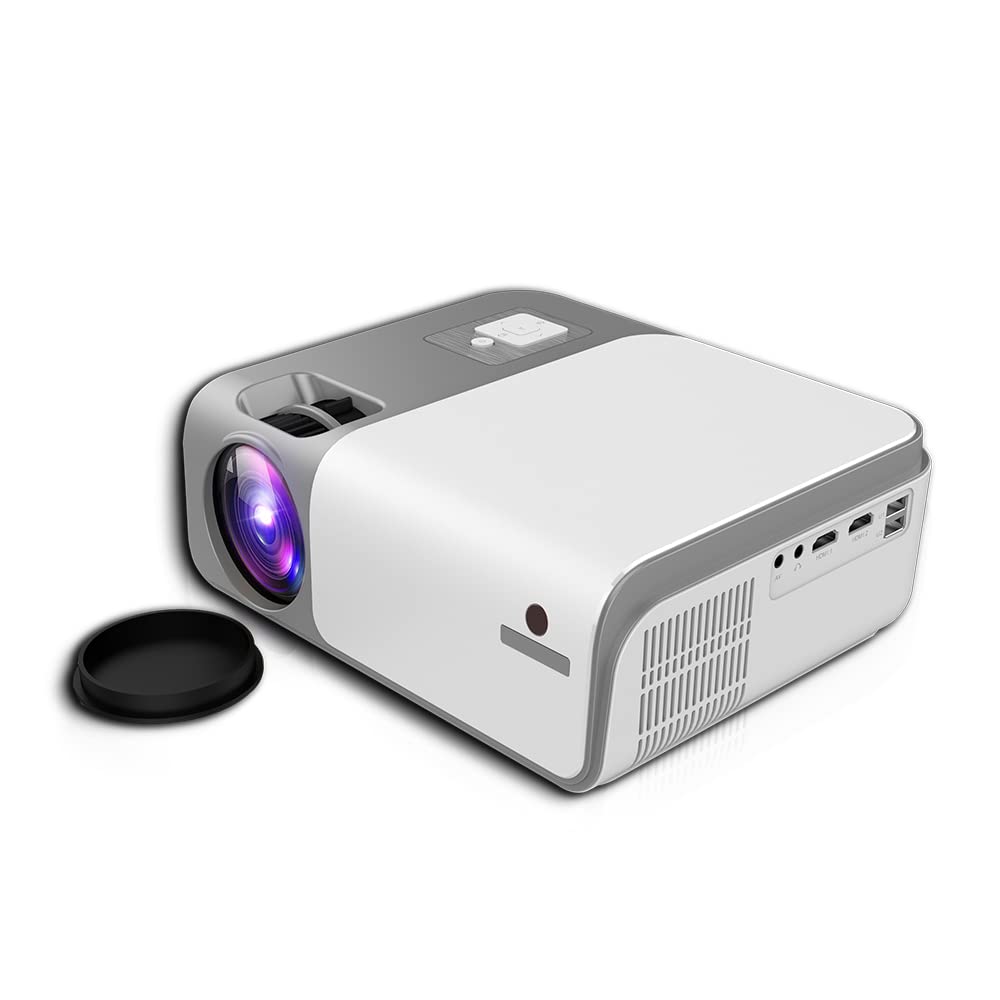
Figura 4.1: Frente e lateral view of the Cheerlux C50 Projector. This image shows the projector's lens, ventilation grilles, and various input ports on the side, including USB and HDMI.

Figura 4.2: The Cheerlux C50 Projector demonstrating screen mirroring with a smartphone. A wireless signal icon indicates the mirroring function, allowing content from a mobile device to be displayed on the projector.
Portas de entrada / saída:
- 2x USB Sockets: Para conectar unidades USB ou outros dispositivos USB.
- 2x HDMI Sockets: For connecting HDMI-enabled devices like laptops, gaming consoles, or media players.
- 1x Composite AV Socket: For connecting older devices using AV cables.
- Soquete de fone de ouvido: Para conectar dispositivos de áudio externos ou fones de ouvido.
5. Configuração
5.1 Posicionamento
Position the projector on a stable, flat surface or mount it securely. Ensure the projector lens is perpendicular to the projection surface for optimal image quality.
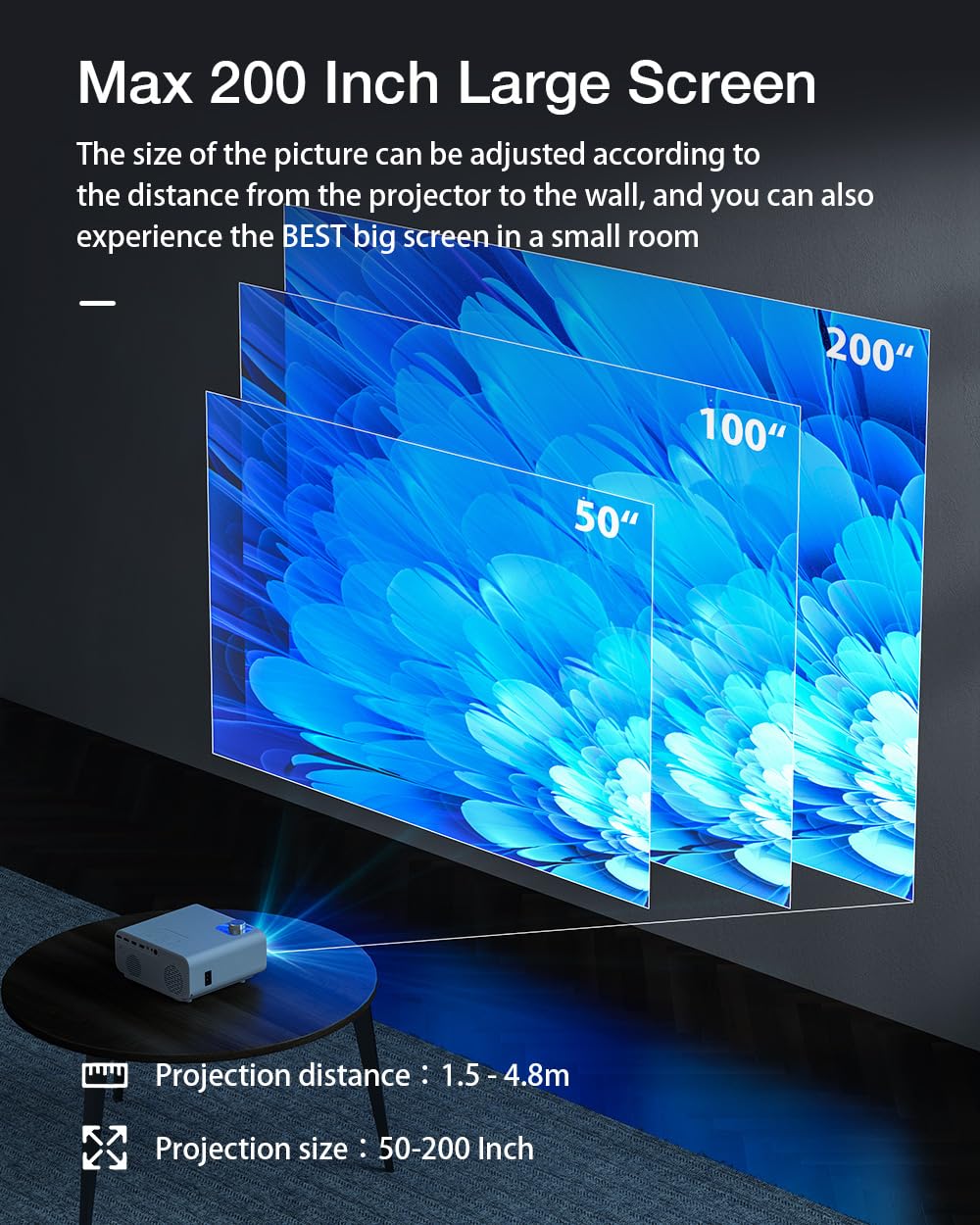
Figura 5.1: Projection distance and screen size guide. The projector can achieve a screen size of 50 to 200 inches with a projection distance ranging from 1 to 8 meters (approximately 3.3 to 26.2 feet).
- Distância de projeção: 1 - 8 meters (3.3 - 26.2 feet)
- Tamanho da imagem projetada: 50 - 200 polegadas
- Proporção da tela: 16:9
5.2 Conexão de Energia
- Conecte o cabo de alimentação à porta de entrada de energia do projetor.
- Ligue a outra extremidade do cabo de alimentação a uma tomada elétrica adequada.
- A luz indicadora de energia do projetor deve acender.
5.3 Foco e correção trapezoidal
- Auto-foco: The Cheerlux C50 features an autofocus function. The projector will automatically adjust the image clarity upon startup or movement.
- 4P Keystone Correction: If the projected image appears distorted (trapezoidal), use the 4P keystone correction feature to adjust each corner of the image independently until it forms a perfect rectangle. This is particularly useful when the projector is not perfectly aligned with the screen. Refer to the on-screen menu for keystone adjustment options.
6. Instruções de operação
6.1 Ligar/Desligar
- Ligar: Press the power button on the projector or the remote control. The projector will start up and display the Android 9.0 home screen.
- Desligar: Press the power button again. A shutdown confirmation prompt may appear. Select "Power Off" to safely shut down the projector.
6.2 Sistema Operacional Android 9.0
The Cheerlux C50 Projector runs on Android 9.0, providing access to a smart interface and various applications.

Figura 6.1: The Android 9.0 operating system interface on the Cheerlux C50 Projector. The screen shows various streaming and social media application icons, indicating smart functionality.
- Navegação: Use the remote control to navigate through the Android interface.
- Aplicações: Access pre-installed applications or download new ones from the app store (if available) to watch videos, browse the internet, and more.
- Configurações: Adjust system settings, network connections, display options, and other preferences through the settings menu.
6.3 Espelhamento de tela
The projector supports screen mirroring from compatible smartphones and tablets.
- Certifique-se de que tanto seu dispositivo móvel quanto o projetor estejam conectados à mesma rede Wi-Fi.
- On the projector's Android interface, select the "Mirroring" or "Screen Share" application.
- On your mobile device, activate its screen mirroring feature (e.g., "Smart View" on Samsung, "Screen Cast" on Android, "AirPlay" on iOS).
- Select the projector's name from the list of available devices on your mobile device.
- The mobile device's screen content will now be displayed on the projector.
7. Conectividade
7.1 Conexão Wi-Fi
Connect the projector to a wireless network to access online content and enable screen mirroring.
- Go to the projector's "Settings" menu.
- Selecione "Rede e Internet" ou "Wi-Fi".
- Ligue o Wi-Fi e selecione a rede desejada na lista.
- Digite a senha do Wi-Fi, se solicitado, e conecte-se.
7.2 Conexão Bluetooth
Connect Bluetooth speakers, headphones, or other compatible devices for audio output.
- Go to the projector's "Settings" menu.
- Select "Connected Devices" or "Bluetooth".
- Ligue o Bluetooth e coloque seu dispositivo Bluetooth no modo de emparelhamento.
- Selecione seu dispositivo na lista de dispositivos disponíveis no projetor e emparelhe-o.
7.3 Wired Connections (HDMI, USB, AV)
- HDMI: Connect an HDMI cable from your source device (e.g., laptop, gaming console) to one of the projector's HDMI ports. Select the corresponding HDMI input source from the projector's input menu.
- USB: Insert a USB flash drive or external hard drive into a USB port. The projector's media player will typically detect the device, allowing you to browse and play media files.
- AV: Connect an AV cable from your source device to the projector's AV input. Select the AV input source from the projector's input menu.
8. Manutenção
- Limpeza de lentes: Use the provided lens cleaning cloth or a soft, lint-free cloth to gently wipe the projector lens. Do not use abrasive cleaners or solvents.
- Remoção de poeira: Limpe regularmente as aberturas de ventilação do projetor com uma escova macia ou ar comprimido para evitar o acúmulo de poeira, que pode afetar o desempenho e a vida útil do aparelho.
- Armazenar: Quando não estiver em uso por longos períodos, guarde o projetor em local fresco e seco, protegido da poeira e da luz solar direta.
9. Solução De Problemas
- Sem energia:
- Ensure the power cable is securely connected to both the projector and a working power outlet. Check if the power indicator light is on.
- Sem imagem:
- Verify that the correct input source (HDMI, AV, USB) is selected. Check cable connections. Ensure the lens cap is removed.
- Imagem desfocada:
- Allow the autofocus to adjust. If still blurry, manually adjust focus if an option is available, or ensure the projector is within the recommended projection distance.
- Distorted Image (Trapezoid):
- Use the 4P keystone correction feature in the projector's settings menu to adjust the image corners.
- Sem som:
- Check the volume settings on both the projector and the source device. Ensure external speakers or headphones are properly connected if used. Verify that the correct audio output is selected in settings.
- Problemas com o espelhamento de tela:
- Ensure both devices are on the same Wi-Fi network. Restart both the projector and the mobile device. Check for compatibility issues with your mobile device's mirroring protocol.
10. Especificações
| Marca | Genérico |
| Nome do modelo | Cheerlux C50 |
| Sistema operacional | Androide 9.0 |
| Brilho | 4000 Lúmens |
| Taxa de contraste | 2500:1 |
| Resolução Nativa | 1920 x 1080 pixels (Full HD) |
| Tipo de exibição | LIDERADO |
| Proporção da tela | 16:9 |
| Distância de projeção | 1 a 8 metros |
| Projected Image Size | 50 - 200 polegadas |
| Tecnologia de Conectividade | Wi-Fi 5.0G, Bluetooth 5.1 |
| interface de hardware | 2x HDMI, 2x USB, 1x Composite AV, Headphone Socket |
| Características especiais | Autofocus, 4P Keystone Correction, Screen Mirroring, Built-In Wi-Fi |
| Dispositivos compatíveis | Gaming Console, Smartphone, Laptop, TV, Speakers |
| Dimensões do produto | 260 x 210 x 102 mm (21 x 26 x 10 cm) |
| Peso do item | 1 kg |
| O quetage | 150 Watts |
| Taxa de atualização | 480 MHz |
11. Garantia e Suporte
Para informações sobre garantia e suporte técnico, consulte a documentação fornecida no momento da compra ou entre em contato com o revendedor. Guarde o comprovante de compra para eventuais solicitações de garantia.


