
1. Introdução
Thank you for choosing the HOWENS 15.6 Inch Portable Touchscreen Monitor. This device is designed to enhance your productivity and entertainment with its Full HD 1920x1080 IPS display, 10-point multi-touch functionality, and versatile connectivity options. Its compact and lightweight design makes it ideal for various applications, from extending your laptop's display to serving as an industrial control interface.

Imagem 1.1: Frente view of the HOWENS 15.6 Inch Portable Touchscreen Monitor.
2. Informações de segurança
Leia atentamente todas as instruções de segurança antes de usar este produto. O não cumprimento dessas instruções pode resultar em choque elétrico, incêndio ou danos ao aparelho.
- Não exponha o monitor à chuva, umidade ou temperaturas extremas.
- Evite colocar o monitor perto de fontes de calor ou sob luz solar direta.
- Use apenas o adaptador de energia fornecido com o dispositivo.
- Do not attempt to disassemble or repair the monitor yourself. Contact qualified service personnel for assistance.
- Mantenha o monitor longe de campos magnéticos fortes.
- Garanta ventilação adequada ao redor do monitor para evitar superaquecimento.
3. O que está na caixa
O pacote inclui os seguintes itens:
- Portable Touchscreen Monitor 15.6 inch
- Cabo HDMI
- USB cable (for touch functionality)
- Adaptador DC
- Controle remoto
- Manual de operação
4. Produto acabadoview
4.1 Principais Características
- FHD 1080P Display: Features a 1920x1080 resolution with a 60Hz refresh rate and IPS panel for 178° wide viewing angles. Brightness of 300 cd/m² and 72% NTSC color gamut ensure vibrant and accurate colors.
- 10-Point Touch Screen: Advanced multi-touch functionality for intuitive interaction. Connect via a Type-A to Type-B USB cable for touch support.
- Ampla compatibilidade: Supports Laptops, PCs, Mini PCs, Raspberry Pi, PS5/4, Xbox, and various industrial devices via HDMI, DVI, and VGA connections.
- Multi-Function Display Modes: Supports expansion, mirror, second-screen-only, horizontal, and vertical display modes.
- Standard VESA Mount: Equipped with a 75x75mm VESA hole for wall or desktop mounting (stand not included).
- Alto-falantes duplos integrados: Enjoy stereo audio directly from the monitor.
4.2 Port Parameters
The monitor features a variety of ports for diverse connectivity:
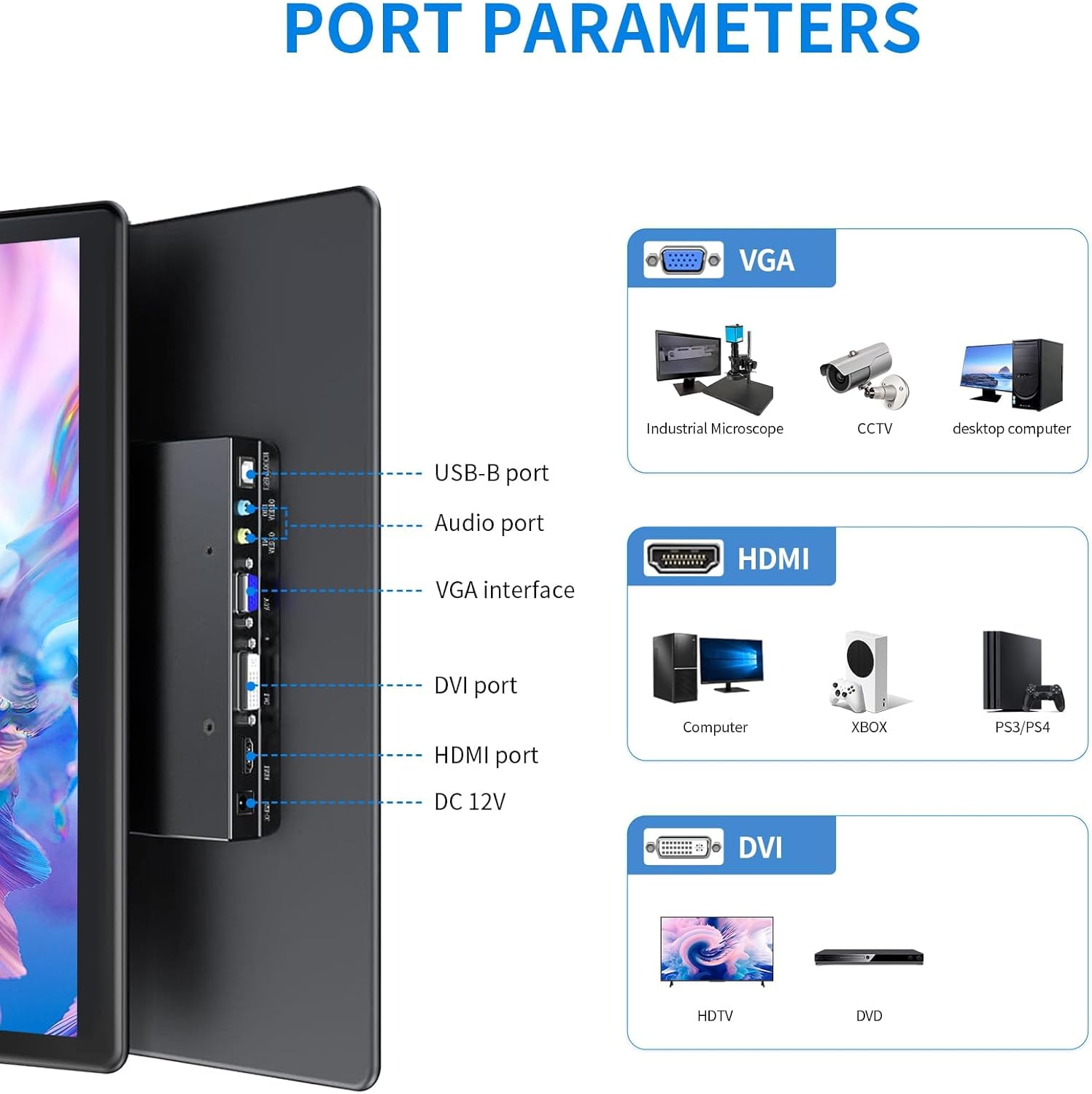
Imagem 4.1: Detalhada view das portas de entrada/saída do monitor.
- Porta USB-B: For touch functionality connection to a host device.
- Porta de áudio: Para entrada/saída de áudio.
- Interface VGA: For video input from devices like industrial microscopes, CCTV, and desktop computers.
- Porta DVI: For video input from devices such as HDTVs and DVD players.
- Porta HDMI: For high-definition video and audio input from computers, Xbox, PS5/4, and other compatible devices.
- CC 12V: Porta de entrada de energia.
4.3 Características de exibição

Image 4.2: Visual representation of key display features.
The monitor's IPS panel provides a 178° wide viewing angle, ensuring consistent image quality from various perspectives. The 1920x1080 resolution delivers sharp and clear visuals, while the 72% NTSC color gamut offers rich and accurate color reproduction.
4.4 Dimensions and VESA Mount

Image 4.3: Product dimensions and VESA mounting details.
The monitor features a standard 75x75mm VESA mounting pattern, allowing for flexible installation on compatible wall mounts or desktop stands (sold separately).
5. Configuração e conexão
Follow these steps to connect your HOWENS portable touchscreen monitor to your device:
- Connect Video Signal: Use the provided HDMI cable to connect the monitor's HDMI port to your laptop, PC, or gaming console's HDMI output. Alternatively, use a DVI or VGA cable if your device supports those interfaces.
- Connect Touch Functionality (Optional): For touchscreen features, connect the provided USB-A to USB-B cable from your host device's USB-A port to the monitor's USB-B port.
Note: Touch input is not enabled on devices with strict security protocols, such as Nintendo Switch, iPhones, or iPads.
- Conecte a energia: Plug the DC power adapter into the monitor's DC 12V port and then into a power outlet.
- Ligar: Press the power button on the monitor or use the remote control to turn on the device.
Video 5.1: Demonstration of connecting the monitor to a laptop, including HDMI, USB for touch, and power connections, and showcasing touch functionality and remote control use.
5.1 Montagem VESA
The monitor is compatible with 75x75mm VESA mounts. To mount the monitor, attach a compatible VESA arm or bracket to the four screw holes on the back of the monitor. Ensure the mount can support the weight of the monitor.
6. Operando o monitor
6.1 Funcionalidade de tela sensível ao toque
Once the USB-A to USB-B cable is connected to a compatible device, the 10-point multi-touch feature will be active. You can use gestures such as tapping, swiping, pinching, and zooming directly on the monitor screen for intuitive control.
6.2 Controle Remoto
The included remote control allows you to navigate the monitor's On-Screen Display (OSD) menu to adjust settings such as brightness, contrast, color temperature, and input source. Point the remote control towards the infrared receiver on the monitor.
6.3 Modos de exibição
O monitor suporta vários modos de exibição para atender às suas necessidades:

Imagem 6.1: Exemplo visualamples of multiple display modes.
- Modo estendido: Expande sua área de trabalho para ambas as telas, proporcionando mais espaço de trabalho.
- Modo Espelho: Duplicates your primary display onto the portable monitor.
- Modo somente para segunda tela: Displays content only on the portable monitor, turning off the primary display.
- Horizontal/Vertical Mode: Adjust the display orientation to landscape or portrait as required. This can usually be configured in your operating system's display settings.
6.4 Áudio

Image 6.2: Location of built-in dual speakers.
The monitor includes built-in dual speakers for stereo audio output. You can adjust the volume using the remote control or through your connected device's audio settings.
7. Manutenção
- Limpando a tela: Limpe suavemente a tela com um pano macio e sem fiapos. Para manchas persistentes, dampUmedeça levemente o pano com água ou uma solução de limpeza de telas. Evite usar produtos químicos agressivos ou materiais abrasivos.
- Limpando o Casing: Use um pano macio e seco para limpar a tela do monitor.asing.
- Armazenar: Quando não estiver em uso por longos períodos, guarde o monitor em local fresco e seco, de preferência em sua embalagem original ou em uma capa protetora.
8. Solução De Problemas
Se você encontrar problemas com seu monitor, consulte as seguintes soluções comuns:
- Sem energia:
- Ensure the DC power adapter is securely connected to the monitor and a working power outlet.
- Verifique se a tomada está funcionando conectando outro aparelho.
- Sem sinal/exibição:
- Check that the HDMI, DVI, or VGA cable is securely connected to both the monitor and the source device.
- Ensure the correct input source is selected on the monitor using the remote control or OSD menu.
- Try connecting the monitor to a different source device to rule out issues with the original source.
- A tela sensível ao toque não responde:
- Confirm the USB-A to USB-B cable is properly connected between the monitor and the host device.
- Restart both the monitor and the host device.
- Ensure your operating system supports touchscreen functionality and that drivers are up to date.
- Remember that some devices (e.g., Switch, iPhones, iPads) do not support touch input with this monitor due to security protocols.
- Má qualidade de imagem:
- Ajuste as configurações de brilho, contraste e cor através do menu OSD.
- Ensure the display resolution on your source device is set to 1920x1080 for optimal clarity.
9. Especificações
| Recurso | Especificação |
|---|---|
| Marca | HOWENS |
| Número do modelo | CXTP-BB |
| Tamanho da tela | 15.6 polegadas |
| Resolução | FHD 1920 x 1080p |
| Proporção da tela | 16:9 |
| Tipo de exibição | LCD |
| Tecnologia de exibição | IPS |
| Taxa de atualização | 60 Hz |
| Brilho | 300 vela |
| Taxa de contraste | 1000:1 |
| Viewângulo de engate | 178 graus |
| Gama de cores | 72% NTSC |
| Tecnologia de Conectividade | DVI, HDMI, VGA |
| Características adicionais | Built-In Speakers, Energy Efficient, Eye Care, Portable, Touchscreen |
| Peso do item | 2.33 libras |
| Tipo de montagem | Wall Mount (75x75mm VESA) |
10. Garantia e Suporte
This HOWENS monitor comes with a Garantia do fabricante de 1 ano against defects. For any product issues or technical support, please contact HOWENS customer service. We are committed to resolving any concerns promptly.
For further assistance, please refer to the contact information provided on the HOWENS official website ou sua documentação de compra.


